【小家Spring】资源访问利器---Spring提供的Resource接口以及它的常用子类源码分析
每篇一句
长大的标志是憋得住尿,成熟的标志是憋得住话。两年学说话一辈子学闭嘴。绝大多数人失败是没有学会闭嘴
相关阅读
【小家Spring】资源访问利器—Spring提供的Resource接口以及它的常用子类源码分析
【小家Spring】资源访问利器—Spring使用ResourceLoader接口便捷的取资源资(ResourcePatternResolver、ResourceLoaderAware)
前言
资源是一个抽象的概念,什么是资源?我们已知Spring中有很多xml配置文件,同时还可能自建各种properties资源文件,还有可能进行网络交互,收发各种文件、二进制流等。
资源粗略的可以分为(这里以Spring的分类为例):
- URL资源
- File资源
- ClassPath相关资源
- 服务器相关资源(JBoss AS 5.x上的VFS资源)
JDK操纵底层资源基本就是java.net.URL 、java.io.File 、java.util.Properties这些:取资源基本是根据绝对路径或当前类的相对路径来取。从类路径或Web容器上下文中获取资源的时候也不方便。若直接使用这些方法,需要编写比较多的额外代码,例如前期文件存在判断、相对路径变绝对路径等。
而Spring提供的Resource接口提供了更强大的访问底层资源的能力。
JDK提供的资源访问简单案例
Class类提供的获取资源的方法
它有两个获取资源的方法:
public java.net.URL getResource(String name) {name = resolveName(name);ClassLoader cl = getClassLoader0();if (cl==null) {// A system class.return ClassLoader.getSystemResource(name);}return cl.getResource(name);}public InputStream getResourceAsStream(String name) {name = resolveName(name);ClassLoader cl = getClassLoader0();if (cl==null) {// A system class.return ClassLoader.getSystemResourceAsStream(name);}return cl.getResourceAsStream(name);}private String resolveName(String name) {if (name == null) {return name;}if (!name.startsWith("/")) {Class<?> c = this;while (c.isArray()) {c = c.getComponentType();}String baseName = c.getName();int index = baseName.lastIndexOf('.');if (index != -1) {name = baseName.substring(0, index).replace('.', '/')+"/"+name;}} else {name = name.substring(1);}return name;}
我们发现它采用的是当前的ClassLoader,并且是当前类的路径相关的,也是支持以/开头的绝对路径的。
说明,下面的例子基于:
spring.properties在类路径下(也就是maven工程的resources目录下)demo.properties位于maven工程的java目录下,包名为:com/fsx/maintest/demo.properties
Demo
public static void main(String[] args) {// 此处用相对路径,那就是相对Main所在的路径。因此此处需要demo.properties和Main.class文件在同一个包里面 否则请用对应的../../等// 这里Main所在包为:com.fsx.maintest 因此最终找的文件地址为:com/fsx/maintest/demo.properties 会去这里找文件URL resource = Main.class.getResource("demo.properties");System.out.println(resource); //file:/E:/work/remotegitcheckoutproject/myprojects/java/demo-war/target/classes/com/fsx/maintest/demo.properties// 若采用绝对路径 /就代表当前项目名~~~~ 所以此处的效果同上~~~resource = Main.class.getResource("/com/fsx/maintest/demo.properties");System.out.println(resource); // 同上// 关于getResourceAsStream的使用,路径处理上和上面一致,此处就不做过多解释了InputStream resourceAsStream = Main.class.getResourceAsStream("demo.properties");System.out.println(resourceAsStream); //java.io.BufferedInputStream@33e5ccce// ==================最后如果你想直接加载Classpath类路径下的配置文件(此处以类路径下的spring.properties为例)===================// 这个/ 不能省略,否则classpathResource为nullURL classpathResource = Main.class.getResource("/spring.properties");System.out.println(classpathResource); //file:/E:/work/remotegitcheckoutproject/myprojects/java/demo-war/target/classes/spring.propertiesSystem.out.println(Main.class.getResource("")); //.../demo-war/target/classes/com/fsx/maintest/ 它定位到的是Main这个类所在的路径System.out.println(Main.class.getResource("/")); //.../demo-war/target/classes/ 它定位到的是类路径}
ClassLoader提供的获取资源
getSystemResource和getSystemResourceAsStream
这种方式也是我们平时非常常用的
public static void main(String[] args) {// 这个大体上和class.getResource()类似。但是它没有class对路径的一个提前处理。所以它这里需要把路径写全了:com/fsx/maintest/demo.properties// 需要注意的是,因为它没有对路径处理的,所以不支持 `/`打头的这种绝对路径URL systemResource = ClassLoader.getSystemResource("com/fsx/maintest/demo.properties");System.out.println(systemResource); ///demo-war/target/classes/com/fsx/maintest/demo.properties//后面已经有一个/了,说明就是直接从classpath/目录下查找~~~~ 所以我们自己不需要再写/ 了systemResource = ClassLoader.getSystemResource("");System.out.println(systemResource); // .../demo-war/target/classes/ 获取类路径的地址InputStream systemResourceAsStream = ClassLoader.getSystemResourceAsStream("com/fsx/maintest/demo.properties");System.out.println(systemResourceAsStream); //java.io.BufferedInputStream@46f5f779// 若要加载类路径下的文件,显然这个就更加的方便些~~~ 不需要 "/"了System.out.println(ClassLoader.getSystemResourceAsStream("spring.properties")); //java.io.BufferedInputStream@5a42bbf4}
备注像getSystemResources或者getResources相当于不仅在本类加载器中找,还会去父加载器中去找~~~~(一般目前而言,我们使用不着)
需要注意的是:把java项目打包成jar包,如果jar包中存在资源文件需要访问,必须采取stream的形式访问。可以调用getResourceAsStream()方法,而不能采用路径的方式访问(文件已经被打到jar里面了,不符合路径的)。
另外大多数情况下classLoader.getResources和ClassLoader.getSystemResources方法是等价的。比如下面两种方式是等价的:
// 实例方法
classLoader.getResources(META-INF/spring.factories)
// 静态方法
ClassLoader.getSystemResources(META-INF/spring.factories)
他俩的输出结果一样
File方式读取
public static void main(String[] args) throws FileNotFoundException {// 显然通过这种间接的方式去构建一个File对象也是可行的 只是比较绕String filePath = ClassLoader.getSystemResource("spring.properties").getFile();System.out.println(new File(filePath).exists()); //true}
new File()路径名的两种方式
全路径名(带盘符的):
public static void main(String[] args) {// 使用带盘符的绝对路径 显然这个把项目名以及target都暴露出来了File file = new File("E:\\work\\remotegitcheckoutproject\\myprojects\\java\\demo-war\\target\\classes\\com\\fsx\\maintest\\demo.properties");System.out.println(file.exists()); //true 这里是返回true,表示找到了这个文件// 另外一种方式,也可以这么写file = new File(System.getProperty("user.dir") + "\\target\\classes\\com\\fsx\\maintest\\demo.properties");System.out.println(file.exists()); // true}
相对路径名:
File的相对路径,请务必注意。它是相对于项目名的。也就是说和项目名平级的才能直接获取。
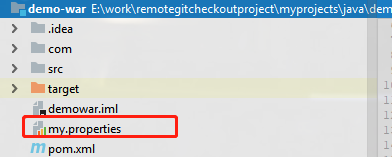
这个my.properties显然是是项目外层,和项目平级的,我们就可以这样直接获取:
public static void main(String[] args) {// 采用相对路径 很显然,这里相对的是工程~~~File file = new File("my.properties");System.out.println(file.exists()); //true}
那么如果我们想要采用相对路径去获取工程内部的资源呢?
public static void main(String[] args) {// 采用相对路径 很显然,这里相对的是工程~~~(这里也得把/demo-war/target/classes这些写出来,非常不优雅)File file = new File("../demo-war/target/classes/com/fsx/maintest/demo.properties");System.out.println(file.exists()); //true}
个人建议:一般都不太建议直接使用File,或者不建议直接new File()
JDK加载资源注意
不管是类对象的getResource()还是类加载器的getSystemResouce(),都是走的类加载器的getResource(),类加载器会搜索自己的加载路径来匹配寻找项。而最常用的类加载器就是AppClassLoader,又因为APPClassLoader的加载路径是classpath,所以网上文章一般都会说getClass().getResouce()是返回classpath,这是不够准确的。
整体来说,JDK提供的一些获取资源的方式,还是比较难用的。如果你处在Spring环境中,强烈建议使用它提供的资源访问接口,下面着重介绍
Spring提供的资源访问 Resource接口
它位于的包为org.springframework.core.io,属于Spring Framework的核心内容
可能很多用了Spring多年的程序员对Resource都了解有限,毕竟访问资源一般是搭建web工程框架的时候的事情。不过了解它也是非常有好处的。特别是你自己想基于Spring构建自己的框架的时候,就显得特别的有必要了~
public interface Resource extends InputStreamSource {//返回Resource所指向的底层资源是否存在 boolean exists();//返回当前Resource代表的底层资源是否可读 default boolean isReadable() {return true;}//返回Resource资源文件是否已经打开,**如果返回true,则只能被读取一次然后关闭以避免内存泄漏;**常见的Resource实现一般返回false default boolean isOpen() {return false;}//@since 5.0  参见:getFile()default boolean isFile() {return false;}//如果当前Resource代表的底层资源能由java.util.URL代表,则返回该URL,否则抛出IO异常 URL getURL() throws IOException;//如果当前Resource代表的底层资源能由java.util.URI代表,则返回该URI,否则抛出IO异常 URI getURI() throws IOException;//如果当前Resource代表的底层资源能由java.io.File代表,则返回该File,否则抛出IO异常 File getFile() throws IOException;//@since 5.0  用到了nio得Channel相关的default ReadableByteChannel readableChannel() throws IOException {return Channels.newChannel(getInputStream());}// 返回当前Resource代表的底层文件资源的长度,一般是值代表的文件资源的长度long contentLength() throws IOException;//返回当前Resource代表的底层资源的最后修改时间long lastModified() throws IOException;// 用于创建相对于当前Resource代表的底层资源的资源// 比如当前Resource代表文件资源“d:/test/”则createRelative(“test.txt”)将返回表文件资源“d:/test/test.txt”Resource资源。 Resource createRelative(String relativePath) throws IOException;//返回当前Resource代表的底层文件资源的文件路径,比如File资源“file://d:/test.txt”将返回“d:/test.txt”,而URL资源http://www.javass.cn将返回“”,因为只返回文件路径。 @NullableString getFilename();//返回当前Resource代表的底层资源的描述符,通常就是资源的全路径(实际文件名或实际URL地址)String getDescription();
}
Resouce接口并不是一个根接口,它继承了一个简单的父接口 InputStreamSource,它只提供一个方法用以返回一个输入流:
InputStream getInputStream() throws IOException;
它还有如下几大分支:

文末会解释一下EncodedResource,至于Web中的
MultipartFile,在Spring MVC相关篇章中会着重解释
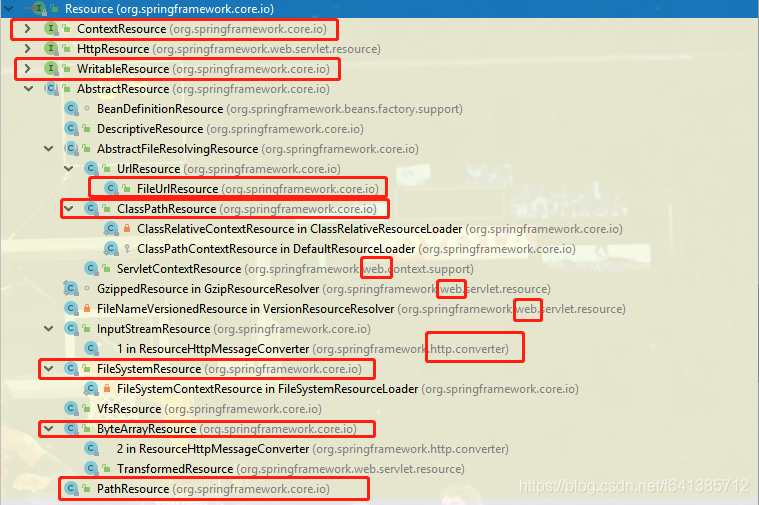
子接口ContextResource和WritableResource
这两个接口继承于Resource,拥有Resource的全部方法。其中,ContextResource接口增加了一个方法:
String getPathWithinContext(); // 返回上下文内的路径
这个方法使得它的实现类有了返回当前上下文路径的能力。
WritableResource接口增加了2个方法:
boolean isWritable(); // 是否可写OutputStream getOutputStream() throws IOException; //返回资源的写入流
这个方法使得它的实现类拥有了写资源的能力。
可以看到Spring为我们提供了非常多的实现类。
- ByteArrayResource
- InputStreamResource
- FileSystemResource
- UrlResource
- ClassPathResource
- ServletContextResource
- VfsResource(这个和Jboss有关,本文不讨论)
- …
抽象类AbstractResource
对于任何的接口而言,这个直接抽象类是重中之重,里面浓缩了接口的大部分公共实现,所以这里直接拿源码开刀:
public abstract class AbstractResource implements Resource {// File或者流 都从此处判断// 这里属于通用实现,子类大都会重写这个方法的~~~~~~@Overridepublic boolean exists() {// Try file existence: can we find the file in the file system?try {return getFile().exists();} catch (IOException ex) {// Fall back to stream existence: can we open the stream?try {InputStream is = getInputStream();is.close();return true;} catch (Throwable isEx) {return false;}}}// 默认都是可读得。大多数子类都会复写@Overridepublic boolean isReadable() {return true;}// 默认不是打开的。 比如InputStreamResource就会让他return true@Overridepublic boolean isOpen() {return false;}// 默认不是一个File@Overridepublic boolean isFile() {return false;}// 可议看到getURI方法一般都是依赖于getURL的@Overridepublic URL getURL() throws IOException {throw new FileNotFoundException(getDescription() + " cannot be resolved to URL");}@Overridepublic URI getURI() throws IOException {URL url = getURL();try {return ResourceUtils.toURI(url);} catch (URISyntaxException ex) {throw new NestedIOException("Invalid URI [" + url + "]", ex);}}@Overridepublic File getFile() throws IOException {throw new FileNotFoundException(getDescription() + " cannot be resolved to absolute file path");}@Overridepublic ReadableByteChannel readableChannel() throws IOException {return Channels.newChannel(getInputStream());}// 调用此方法,也相当于吧流的read了一遍,请务必注意@Overridepublic long contentLength() throws IOException {InputStream is = getInputStream();try {long size = 0;byte[] buf = new byte[255];int read;while ((read = is.read(buf)) != -1) {size += read;}return size;} finally {try {is.close();} catch (IOException ex) {}}}@Overridepublic long lastModified() throws IOException {long lastModified = getFileForLastModifiedCheck().lastModified();if (lastModified == 0L) {throw new FileNotFoundException(getDescription() +" cannot be resolved in the file system for resolving its last-modified timestamp");}return lastModified;}// 只有一个子类:`AbstractFileResolvingResource`覆盖了此方法protected File getFileForLastModifiedCheck() throws IOException {return getFile();}@Overridepublic Resource createRelative(String relativePath) throws IOException {throw new FileNotFoundException("Cannot create a relative resource for " + getDescription());}@Override@Nullablepublic String getFilename() {return null;}// 这些基础方法,很多子类也都有重写~~~~ 但是一般来说关系不大@Overridepublic String toString() {return getDescription();}// 比较的就是getDescription()@Overridepublic boolean equals(Object obj) {return (obj == this ||(obj instanceof Resource && ((Resource) obj).getDescription().equals(getDescription())));}// getDescription()的hashCode@Overridepublic int hashCode() {return getDescription().hashCode();}}
那么接下来就以AbstractResource为主要分支,分析它的实现类们:
PathResource
它是基于@since 4.0,也是基于JDK7提供的java.nio.file.Path的。实现原理也非常的简单,更像是对java.nio.file.Path进行了包装(java.nio.file.Files)
另外它还实现了WritableResource,证明它拥有对资源写的能力~~~
ByteArrayResource:获取字节数组封装的资源
ByteArrayResource代表byte[]数组资源,对于“getInputStream”操作将返回一个ByteArrayInputStream。
// @since 1.2.3
public class ByteArrayResource extends AbstractResource {private final byte[] byteArray;private final String description;...	@Overridepublic InputStream getInputStream() throws IOException {return new ByteArrayInputStream(this.byteArray);}
}
它可多次读取数组资源,即isOpen()永远返回false
ByteArrayResource因为入参可以是byte[]类型,所以用途比较广泛,可以把从网络或者本地资源都转换为byte[]类型,然后用ByteArrayResource转化为资源
Demo:
public static void main(String[] args) {Resource resource = new ByteArrayResource("Hello!Spring!你好!".getBytes());if (resource.exists()) {dumpStream(resource); //Hello!Spring!你好!}}// 这个其实可以把这个resource写到本地文件,本处就不麻烦了,直接sout输出看一看即可~~~~private static void dumpStream(Resource resource) {InputStream is = null;try {//1.获取文件资源is = resource.getInputStream();//2.读取资源byte[] descBytes = new byte[is.available()];is.read(descBytes);System.out.println(new String(descBytes));} catch (IOException e) {e.printStackTrace();} finally {try {//3.关闭资源is.close();} catch (IOException e) {}}}
TransformedResource是继承此类的一个扩展。在web中使用较多,实现非常简单,就是多了两个参数:filename和lastModified
FileSystemResource:通过文件系统获取资源
代表java.io.File资源,对于getInputStream操作将返回底层文件的字节流,isOpen将永远返回false,从而表示可多次读取底层文件的字节流。
这个实现类就大名鼎鼎了。此类在Spring5以后,就使用NIO.2的API比如ReadableByteChannel等来操作读写了。提高了效率。这点就和PathResource特别的像了
public class FileSystemResource extends AbstractResource implements WritableResource {private final File file;private final String path;...// 使用了Files 基于JDK1.7了@Overridepublic InputStream getInputStream() throws IOException {try {return Files.newInputStream(this.file.toPath());}catch (NoSuchFileException ex) {throw new FileNotFoundException(ex.getMessage());}}@Overridepublic boolean isReadable() {return (this.file.canRead() && !this.file.isDirectory());}// 读写@Overridepublic ReadableByteChannel readableChannel() throws IOException {try {return FileChannel.open(this.file.toPath(), StandardOpenOption.READ);}catch (NoSuchFileException ex) {throw new FileNotFoundException(ex.getMessage());}}@Overridepublic WritableByteChannel writableChannel() throws IOException {return FileChannel.open(this.file.toPath(), StandardOpenOption.WRITE);}
}
它的工作主要是构建一个File对象出来,此处我就省略了~~~
InputStreamResource:获取输入流封装的资源
InputStreamResource代表java.io.InputStream字节流,对于“getInputStream ”操作将直接返回该字节流,因此只能读取一次该字节流,即“isOpen”永远返回true。
public class InputStreamResource extends AbstractResource {private final InputStream inputStream;private final String description;private boolean read = false;@Overridepublic InputStream getInputStream() throws IOException, IllegalStateException {if (this.read) {throw new IllegalStateException("InputStream has already been read - " +"do not use InputStreamResource if a stream needs to be read multiple times");}this.read = true;return this.inputStream;}
}
Demo:
// dumpStream方法请参照上文public static void main(String[] args) {ByteArrayInputStream bis = new ByteArrayInputStream("Hello World!".getBytes());Resource resource = new InputStreamResource(bis);if (resource.exists()) {dumpStream(resource); //Hello World!}}
DescriptiveResource
这个类更简单,仅仅一个不可变的描述字符串的包装
// @since 1.2.6
public class DescriptiveResource extends AbstractResource {@Overridepublic InputStream getInputStream() throws IOException {throw new FileNotFoundException(getDescription() + " cannot be opened because it does not point to a readable resource");}
}
这个类实际只是对资源描述的定义,既不是可读,实际文件也是不存在的,其他Resource接口中的方法也并未实现。当一个方法需要你传递一个资源对象,但又不会在方法中真正读取该对象的时候,
如果没有合适的资源对象作为参数,就创建一个 DescriptiveResource 资源做参数。比如ConfigurationClass就有使用~~~
另外
BeanDefinitionResource和DescriptiveResource有点像。但它持有的是一个BeanDefinition,也不能对它进行读、写。一般也是占位用的
AbstractFileResolvingResource
它复写了AbstractResource大多数方法,是一个比较重要的分支。有不少非常好用的实现类
// @since 3.0
public abstract class AbstractFileResolvingResource extends AbstractResource {
}
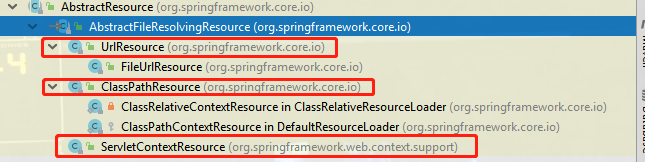
UrlResource:通过URL地址获取资源
可以从网络里获取资源
public static void main(String[] args) throws IOException {UrlResource resource = new UrlResource("http://www.springframework.org/schema/beans/spring-beans.xsd");if (resource.exists()) {File file = resource.getFile();System.out.println(file); //报错 java.io.FileNotFoundException: URL [xxx] cannot be resolved to absolute file path because itdumpStream(resource); //输出这个.xsd文件的所有的内容...}}
FileUrlResource
//@since 5.0.2 显然它出现得很晚。 并且还实现了WritableResource接口
public class FileUrlResource extends UrlResource implements WritableResource {@Nullableprivate volatile File file;public FileUrlResource(URL url) {super(url);}// 注意:若使用此构造函数,此处使用的是file协议  而UrlResource采用的是http协议,此处需注意// 若想http,请用上面构造。自己构造一个URL对象吧public FileUrlResource(String location) throws MalformedURLException {super(ResourceUtils.URL_PROTOCOL_FILE, location);}@Overridepublic File getFile() throws IOException {File file = this.file;if (file != null) {return file;}file = super.getFile();this.file = file;return file;}@Overridepublic boolean isWritable() {try {URL url = getURL();if (ResourceUtils.isFileURL(url)) {// Proceed with file system resolutionFile file = getFile();return (file.canWrite() && !file.isDirectory());}else {return true;}}catch (IOException ex) {return false;}}@Overridepublic OutputStream getOutputStream() throws IOException {return Files.newOutputStream(getFile().toPath());}@Overridepublic WritableByteChannel writableChannel() throws IOException {return FileChannel.open(getFile().toPath(), StandardOpenOption.WRITE);}
}
它提供了我们访问网络资源能像访问本地文件一样的能力~~~
public static void main(String[] args) throws IOException {//FileUrlResource resource = new FileUrlResource("http://www.springframework.org/schema/beans/spring-beans.xsd");FileUrlResource resource = new FileUrlResource(new URL("http://www.springframework.org/schema/beans/spring-beans.xsd"));if (resource.exists()) {dumpStream(resource); //输出这个.xsd文件的所有的内容...}}
ClassPathResource:通过类路径获取资源文件
听这名字就知道,它是直接去读取类路径下的资源文件的。
其实它的底层都是依赖于我们上面说得
clazz.getResourceAsStream或者classLoader.getResourceAsStream。掌握了上面之后,这个其实就非常简单了
public class ClassPathResource extends AbstractFileResolvingResource {private final String path;'@Nullableprivate ClassLoader classLoader;@Nullableprivate Class<?> clazz; // 它还可以自己指定clazz@Nullablepublic final ClassLoader getClassLoader() {return (this.clazz != null ? this.clazz.getClassLoader() : this.classLoader);}@Overridepublic boolean exists() {return (resolveURL() != null);}// 这是它最重要的一个方法,依赖于JDK的实现嘛@Overridepublic InputStream getInputStream() throws IOException {InputStream is;if (this.clazz != null) {is = this.clazz.getResourceAsStream(this.path);}else if (this.classLoader != null) {is = this.classLoader.getResourceAsStream(this.path);}else {is = ClassLoader.getSystemResourceAsStream(this.path);}if (is == null) {throw new FileNotFoundException(getDescription() + " cannot be opened because it does not exist");}return is;}@Overridepublic URL getURL() throws IOException {URL url = resolveURL();if (url == null) {throw new FileNotFoundException(getDescription() + " cannot be resolved to URL because it does not exist");}return url;}// 非常简单 直接解析path即可@Override@Nullablepublic String getFilename() {return StringUtils.getFilename(this.path);}
}
Demo:
public static void main(String[] args) {//ClassPathResource resource = new ClassPathResource("spring.properties");// 如果是要获取指定类所在包下的文件,建议指定classClassPathResource resource = new ClassPathResource("demo.properties",Main.class);if (resource.exists()) {dumpStream(resource); //name=fangshixiang 或者 demo=value}}
ServletContextResource:获取ServletContext环境下的资源
这个在web包里面。org.springframework.web.context.support
为访问Web容器上下文中的资源而设计的类,负责以相对于Web应用程序根目录的路径加载资源,它支持以流和URL的方式访问,在WAR解包的情况下,也可以通过File的方式访问,还可以直接从JAR包中访问资源
public class ServletContextResource extends AbstractFileResolvingResource implements ContextResource {// 持有servletContext的引用private final ServletContext servletContext;private final String path;// 只提供这一个构造函数,来构造一个资源public ServletContextResource(ServletContext servletContext, String path) {// check ServletContextAssert.notNull(servletContext, "Cannot resolve ServletContextResource without ServletContext");this.servletContext = servletContext;// check pathAssert.notNull(path, "Path is required");String pathToUse = StringUtils.cleanPath(path);if (!pathToUse.startsWith("/")) {pathToUse = "/" + pathToUse;}this.path = pathToUse;}// 我们发现,它底层都是依赖于servletContext.getResource getResourceAsStream这些方法去找到资源的@Overridepublic boolean isFile() {try {URL url = this.servletContext.getResource(this.path);if (url != null && ResourceUtils.isFileURL(url)) {return true;}else {return (this.servletContext.getRealPath(this.path) != null);}}catch (MalformedURLException ex) {return false;}}@Overridepublic InputStream getInputStream() throws IOException {InputStream is = this.servletContext.getResourceAsStream(this.path);if (is == null) {throw new FileNotFoundException("Could not open " + getDescription());}return is;}// 这个有点意思。如果URL就是File类型。就ok// 如果不是file类型,就根据绝对路径 new一个出来@Overridepublic File getFile() throws IOException {URL url = this.servletContext.getResource(this.path);if (url != null && ResourceUtils.isFileURL(url)) {// Proceed with file system resolution...return super.getFile();}else {String realPath = WebUtils.getRealPath(this.servletContext, this.path);return new File(realPath);}}}
总结
Spring内部,针对于资源文件有一个统一的接口Resource表示。
因为我们现在绝大部分应用都构建在Spring的基础上,因此它提供的这些便捷的获取资源的工具,我们也是可以使用的。而不用去使用源生JDK的获取了~~~
关注A哥
| Author | A哥(YourBatman) |
|---|---|
| 个人站点 | www.yourbatman.cn |
| yourbatman@qq.com | |
| 微 信 | fsx641385712 |
活跃平台 |         |
| 公众号 | BAT的乌托邦(ID:BAT-utopia) |
| 知识星球 | BAT的乌托邦 |
| 每日文章推荐 | 每日文章推荐 |

本文来自互联网用户投稿,文章观点仅代表作者本人,不代表本站立场,不承担相关法律责任。如若转载,请注明出处。 如若内容造成侵权/违法违规/事实不符,请点击【内容举报】进行投诉反馈!