c#实验四 组合框和列表框的使用
前言:
👏作者简介:我是笑霸final,一名热爱技术的在校学生。
📝个人主页:个人主页1 || 笑霸final的主页2
📕系列专栏:《作业专栏》
📧如果文章知识点有错误的地方,请指正!和大家一起学习,一起进步👀
🔥如果感觉博主的文章还不错的话,👍点赞👍 + 👀关注👀 + 🤏收藏🤏

这里写目录标题
- 一、实验目的
- 二、实验任务
- 1. 练习组合框的三种模式。
- 2.创建Windows窗体应用程序,实现城市邮编的添加、删除及显示功能,
- 3. 设计一个个人基本情况调查程序
一、实验目的
1.掌握常用控件在程序设计中的使用。
2.掌握组合框及复选列表框控件的使用。
3.灵活应用列表框控件与组合框控件中的集合属性。
二、实验任务
1. 练习组合框的三种模式。
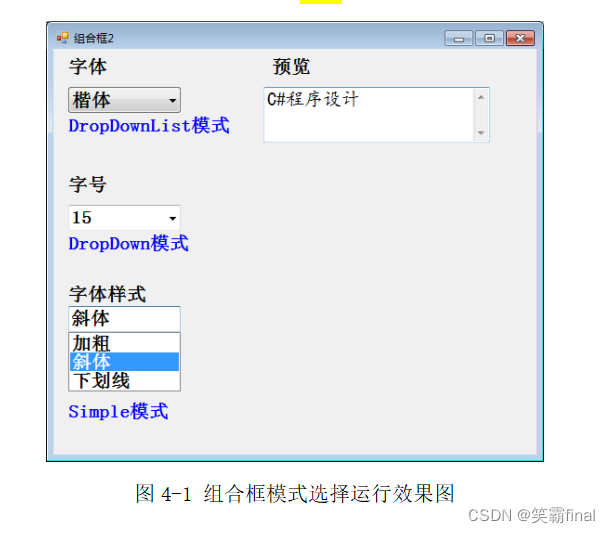
如图4-1所示。
添加三个组合框(ComboBox1、ComboBox2、ComboBox3)
要求:
(1)选定ComboBox1中的一项,可以设置文本框的字体;
(2)选定ComboBox2中的一项,可以设置文本框的字号;
(3)选定ComboBox3中的一项,可以设置文本框的字体样式;
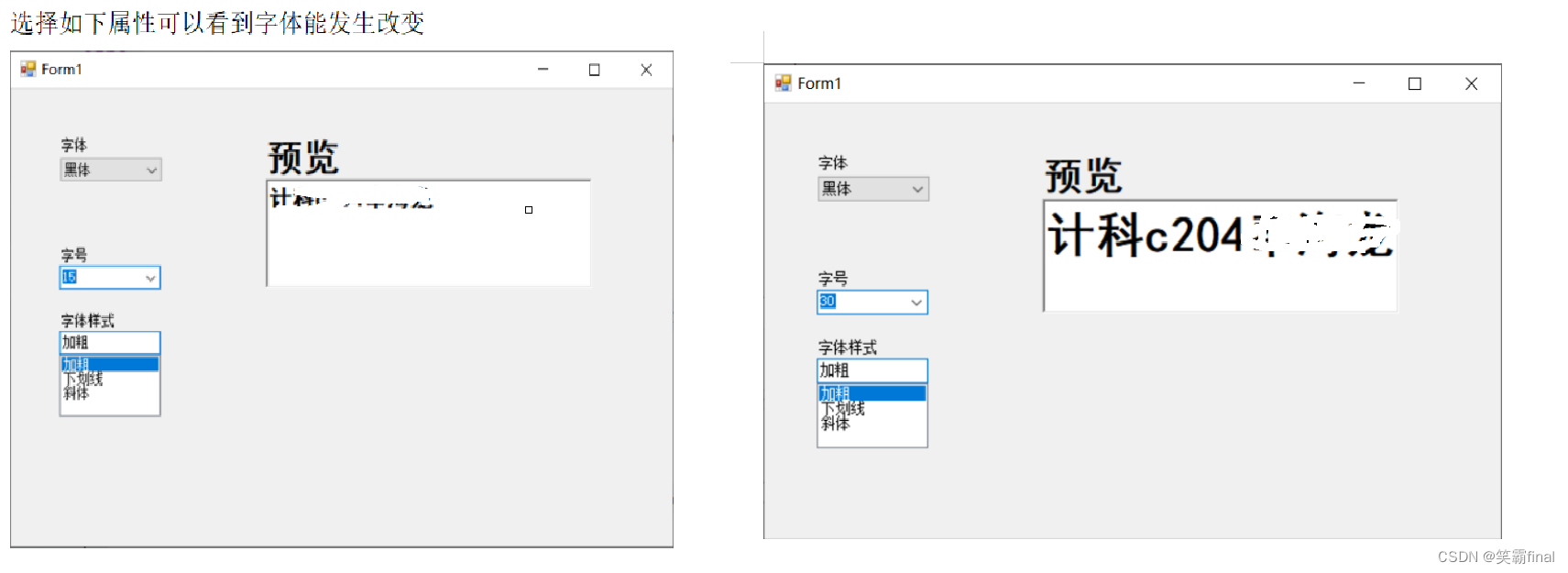
(4)对于ComboBox2,当输入“30”后按下回车键,可以调整文本框的字号。
源代码:
using System;
using System.Drawing;
using System.Windows.Forms;namespace 第一题
{public partial class Form1 : Form{public Form1(){InitializeComponent();}private void comboBox1_SelectedIndexChanged(object sender, EventArgs e){//字体选择String str = comboBox1.Text;//richTextBox1.Font =new Font(字体, 大小, 风格);richTextBox1.Font = new Font(str, richTextBox1.Font.Size, richTextBox1.Font.Style);}private void comboBox2_SelectedIndexChanged(object sender, EventArgs e){//字体大小int str = int.Parse(comboBox2.Text);richTextBox1.Font = new Font(richTextBox1.Font.FontFamily, str, richTextBox1.Font.Style);}private void comboBox3_SelectedIndexChanged(object sender, EventArgs e){//字体风格String str = comboBox3.Text;if(str == "加粗"){//加粗richTextBox1.Font = new Font(richTextBox1.Font.FontFamily, richTextBox1.Font.Size, FontStyle.Bold);}else if (str == "下划线"){//下划线richTextBox1.Font= new Font(richTextBox1.Font.FontFamily, richTextBox1.Font.Size, FontStyle.Underline);}else if (str == "斜体"){//下划线richTextBox1.Font= new Font(richTextBox1.Font.FontFamily, richTextBox1.Font.Size, FontStyle.Italic);}else{//复原richTextBox1.Font= new Font(richTextBox1.Font.FontFamily, richTextBox1.Font.Size, FontStyle.Regular);}}private void comboBox2_KeyDown(object sender, KeyEventArgs e){if(e.KeyCode == Keys.Enter)//按回车在判断{if (comboBox2.Text == "30")//判断是否为30{richTextBox1.Font = new Font(richTextBox1.Font.FontFamily, 30, richTextBox1.Font.Style);}}}}
}
运行结果
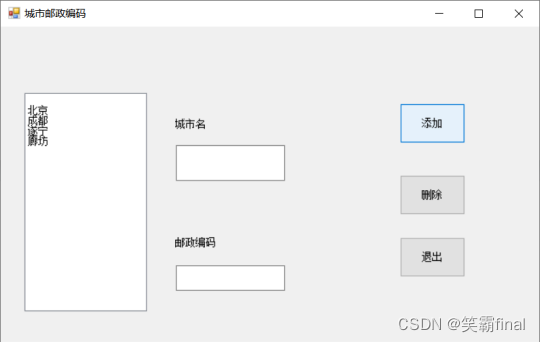
2.创建Windows窗体应用程序,实现城市邮编的添加、删除及显示功能,
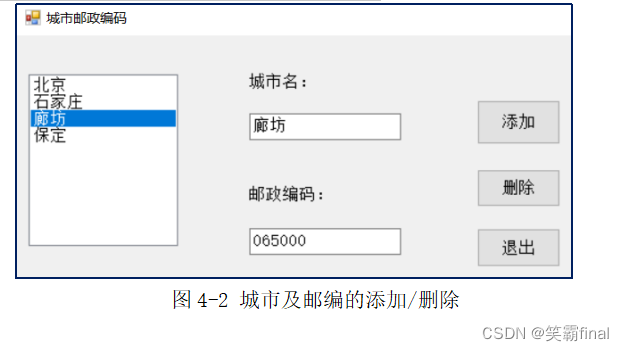
如图4-2所示。要实现的工作包括:
- (1)城市名及其邮编的添加: 在2个文本框中分别输入城市名及其邮编后,点击“添加”,记录这2个信息并在列表框中显示城市名。
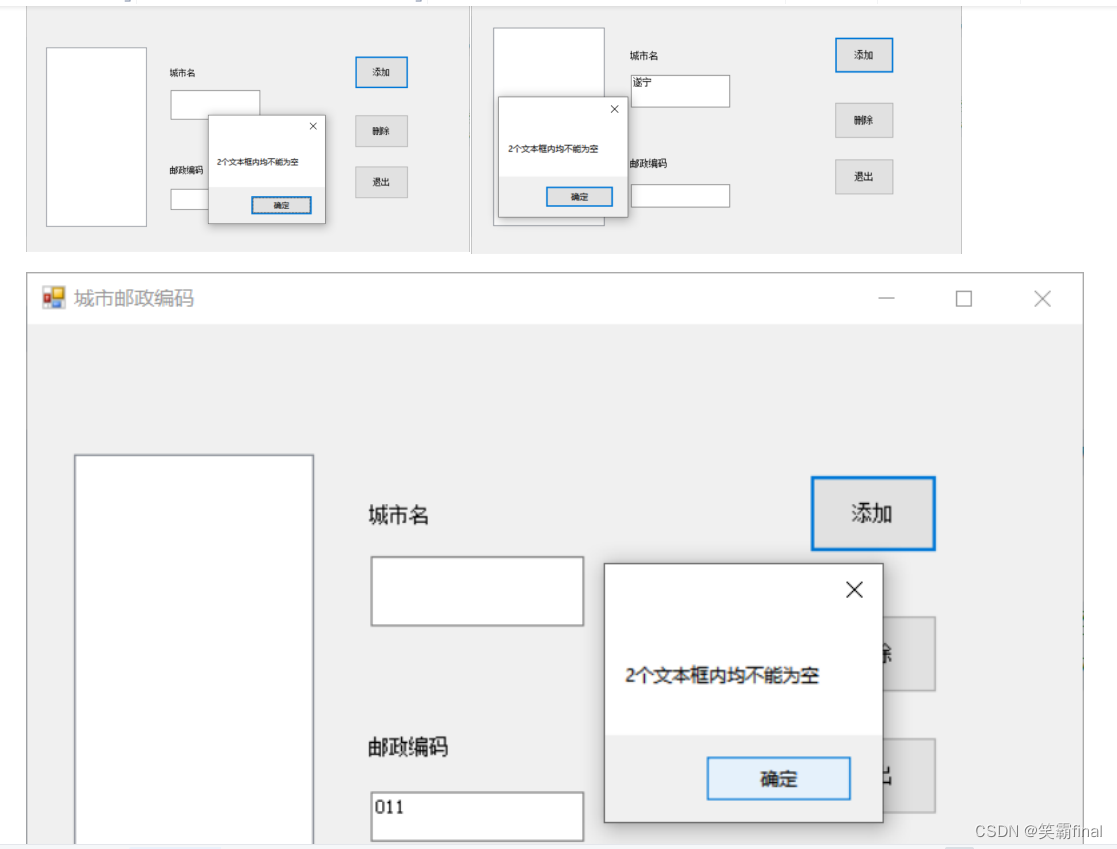
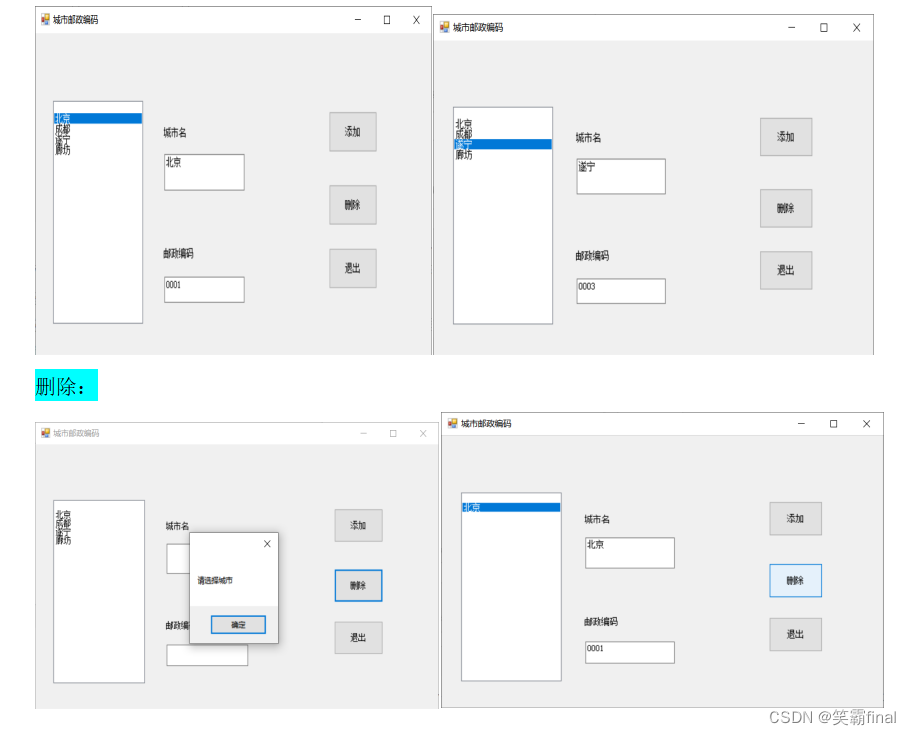
要求:2个文本框内均不能为空,要添加的城市名应在列表框中未出现过。- (2)反显功能:当在列表框中点击了城市名,在2个文本框中显示其相关信息;
- (3)删除功能:列表框中选取了城市后点击“删除”,在列表框内删除该城市信息,(同时需要删除数组对应的信息);若未选择城市而直接点击“删除”,则应在消息框中提示“请先选择城市”。
提示:城市名和邮编信息可用ArrayList数组保存。
源代码:
using System;
using System.Collections;
using System.Collections.Generic;
using System.ComponentModel;
using System.Data;
using System.Drawing;
using System.Linq;
using System.Text;
using System.Threading.Tasks;
using System.Windows.Forms;namespace 第二题
{public partial class Form1 : Form{//城市名称private ArrayList CiteNmae = new ArrayList();//城市编号private ArrayList Cite = new ArrayList();public Form1(){InitializeComponent();}private void button3_Click(object sender, EventArgs e){Application.Exit();}private void button1_Click(object sender, EventArgs e){ //添加按钮if (textBox1.Text=="" || textBox2.Text == ""){//当两个输入框都没有填的情况MessageBox.Show("2个文本框内均不能为空");return;}//循环遍历城市名字数组foreach(string name in CiteNmae){//判断城市是否存在if(name== textBox1.Text){MessageBox.Show("城市已存在!");return;}}//执行到这说明满足要求 就装入ArrayListCiteNmae.Add(textBox1.Text);Cite.Add(textBox2.Text);//listBox 显示添加的名字listBox1.Items.Add(textBox1.Text);//复原textBox1.Text = "";textBox2.Text = "";}private void button2_Click(object sender, EventArgs e){//删除//没有选择城市if (listBox1.SelectedItem==null){MessageBox.Show("请选择城市");return;//退出当前点击}//下面就说明选着了选着了城市String name = (String)listBox1.SelectedItem;//获取名字int index = CiteNmae.IndexOf(name);//获取数组中的下标//删除两个数组CiteNmae.RemoveRange(index, 1);Cite.RemoveRange(index, 1);//删除lisbox中的值listBox1.Items.Remove(name);//复原textBox1.Text = "";textBox2.Text = "";}private void listBox1_SelectedIndexChanged(object sender, EventArgs e){//lixtBoxif (listBox1.SelectedItem != null){//如果不为空,说明选择了一个城市String name = (String)listBox1.SelectedItem;//获取名字int index = CiteNmae.IndexOf(name);//获取数组中的下标String id = (String)Cite[index];//两个框反显信息textBox1.Text = name;textBox2.Text = id;}}}
}
实验结果:
- 为空的情况
- 正常添加值
3. 设计一个个人基本情况调查程序
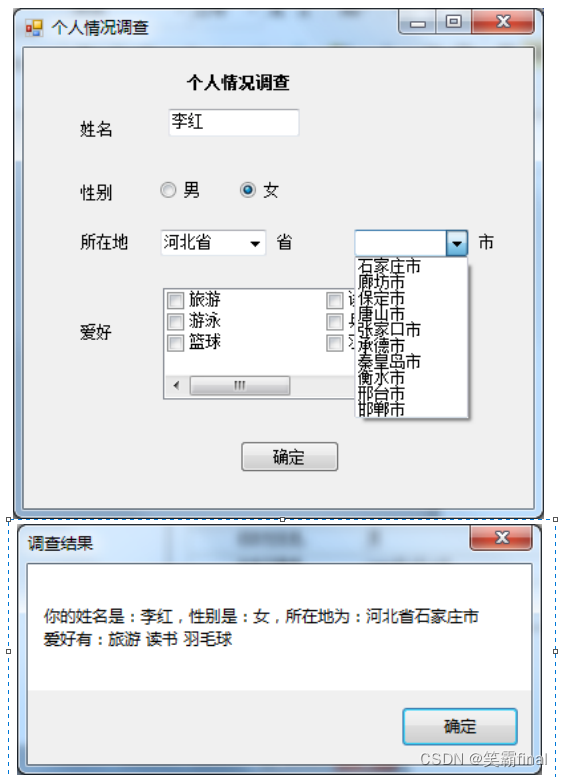
(包括:姓名、性别、所在地、爱好),利用文本框、单选按钮、复选列表框、组合框和按钮等控件实现,点击“确定”按钮后,在消息框中显示上述基本信息,运行效果如图4-3所示。
要求:用来选择市的组合框能与省组合框实现联动,(当选择“省”时,“市”组合框显示对应省的城市。)
说明:实现时省组合框添加2-3个省即可。
源代码:
using System;
using System.Collections.Generic;
using System.ComponentModel;
using System.Data;
using System.Drawing;
using System.Linq;
using System.Text;
using System.Threading.Tasks;
using System.Windows.Forms;namespace 第三题
{public partial class Form1 : Form{public Form1(){InitializeComponent();}private void Form1_Load(object sender, EventArgs e){//列表加载时 添加省份comboBox1.Items.Add("四川省");comboBox1.Items.Add("重庆市");comboBox1.Items.Add("河北省");}private void comboBox1_SelectedIndexChanged(object sender, EventArgs e){//当前选项改变时comboBox2.Items.Clear();//先清删除前itemcomboBox2.Text = "";//设置为空字符串if(comboBox1.SelectedIndex == 0)//选择的是四川{comboBox2.Items.Add("成都市");comboBox2.Items.Add("遂宁市");comboBox2.Items.Add("绵阳市");}else if(comboBox1.SelectedIndex == 1)//选择的是重庆{comboBox2.Items.Add("长寿区");comboBox2.Items.Add("潼南区");comboBox2.Items.Add("北碚区");}else if(comboBox1.SelectedIndex == 2)//选择的是河北{comboBox2.Items.Add("石家庄市");comboBox2.Items.Add("廊坊市");comboBox2.Items.Add("唐山市");}return;}private void button1_Click(object sender, EventArgs e){//先创建form2的对象String name = "你的姓名是:"+ textBox1.Text;//添加姓名//判断选中的那一个性别String sex = "你的性别是:"+(radioButton1.Checked? radioButton1.Text: radioButton2.Text);String cite = "所在地为:"+ comboBox1.SelectedItem+ comboBox2.SelectedItem;String like = "爱好有:";//获取选中的值foreach (String item in checkedListBox1.CheckedItems){like += item+" ";}String info = name +"\n" + sex + "\n" + cite + "\n" + like;MessageBox.Show(info, "调查结果", MessageBoxButtons.OK);}}
}
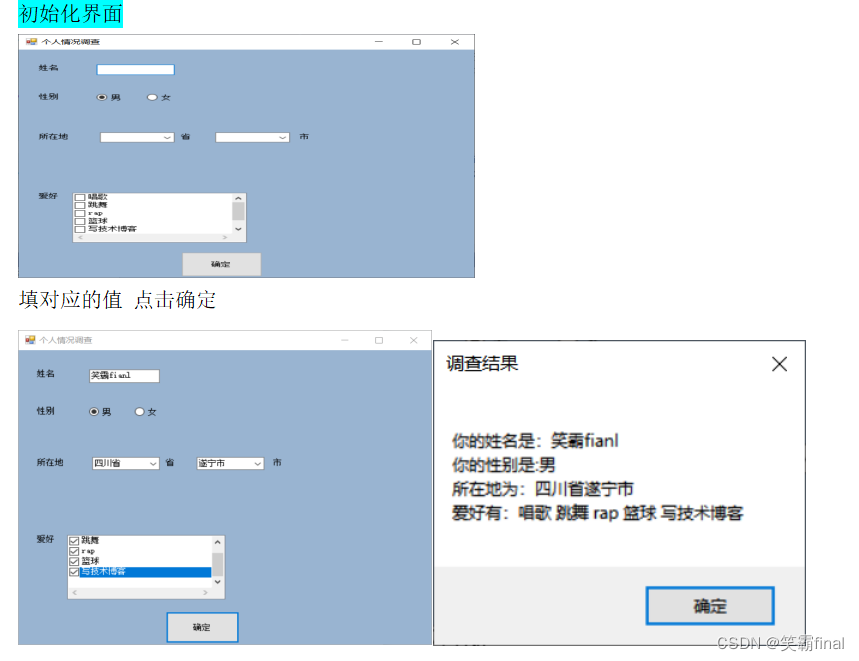
实验结果:
本文来自互联网用户投稿,文章观点仅代表作者本人,不代表本站立场,不承担相关法律责任。如若转载,请注明出处。 如若内容造成侵权/违法违规/事实不符,请点击【内容举报】进行投诉反馈!