vue2封装简单的Tree组件
使用Vue2封装Tree组件
一、介绍
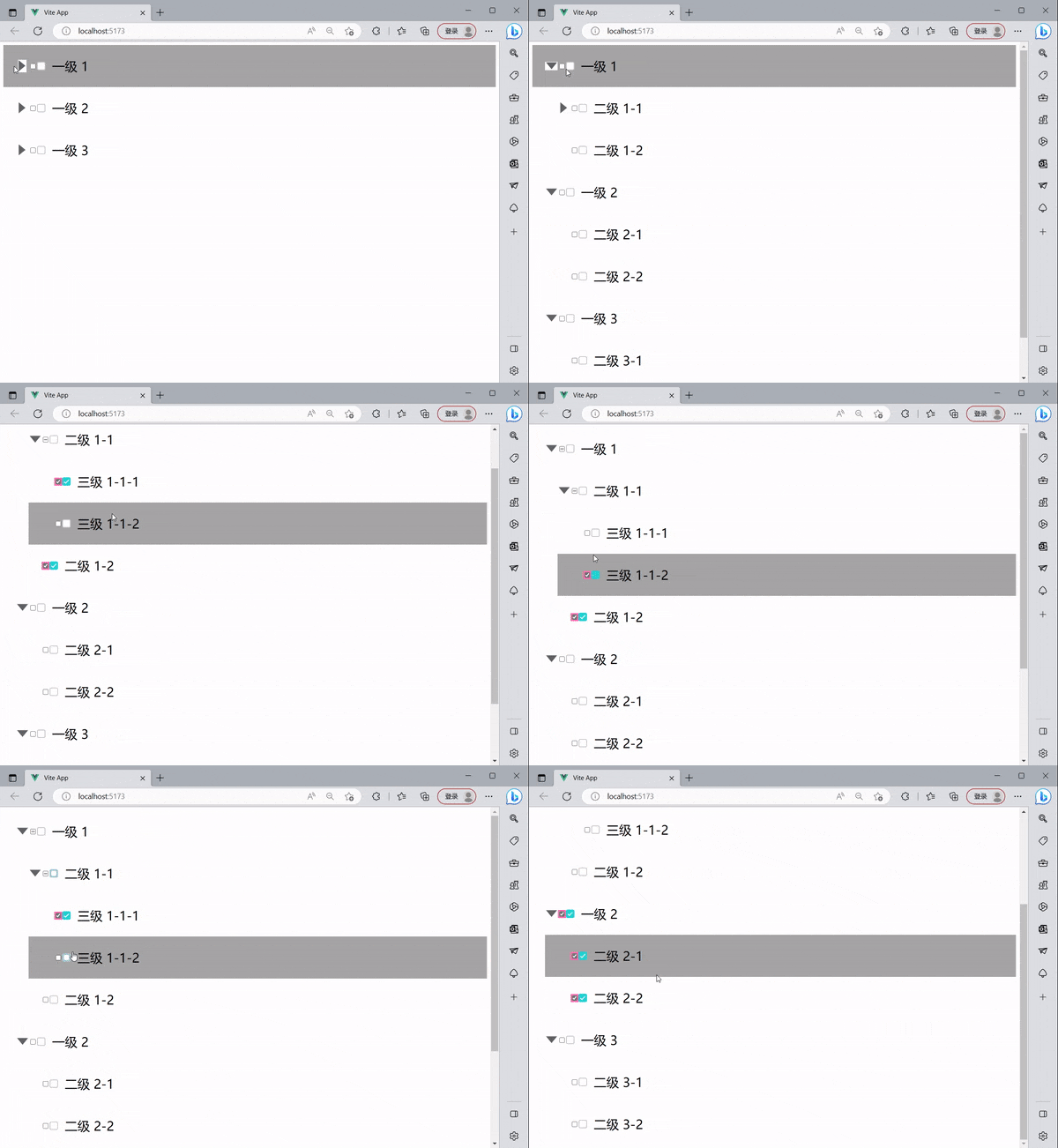
Tree组件实现,原理就是递归,数据是递归的,所以组件也是递归,将数据一层一层的渲染,简易结构如下
-
组件接收一个父组件的data,将自己作为子组件传入 item.children
-
当点击input (checkbox)时,要获取当前input 使得点击他时他所有的子节点都要被选中所有要给子组件Tree添加ref=“child”,或者被取消,父节点要根据子节点的被选中数量来判断是否为选中,还是半选中状态给 input添加ref=“parent”。
-
由于渲染是一层一层渲染 ,第一次渲染时会获取父组件input时最外层的所有input,所以需要给子组件添加自定义属性:data-index=“index”利用父组件的索引,找到自己真正的父节点
例如:如果最外层有两个数据 那么就会递归渲染出2次 input 和一个2个Tree子组件
二、组件代码
1.改变input复选框的样式,Tree/reset.css
input[type="checkbox"]:checked {box-shadow: 0 0 0 3px hotpink;border:hotpink ;
}
:root {--dark: #24d3d3;
}
/* input[type="checkbox"]{display: none;
} */
label {display: flex;align-items: center;grid-gap: 16px;cursor: pointer;
}
label .checkbox {width: 20px;height: 20px;background: #ccc;border-radius: 4px;position: relative;transition: .2s ease;transition-delay: .2s;
}
label .checkbox::before {content: '';position: absolute;top: 2px;left: 2px;right: 2px;bottom: 2px;background: #fff;border-radius: 2.5px;transition: .2s ease;transition-delay: .2s;
}
input:checked + label .checkbox::before {top: 10px;left: 10px;right: 10px;bottom: 10px;border-radius: 50%;transition-delay: 0s;
}
input:checked + label .checkbox {background:#24d3d3;transition-delay: 0s;
}
label .checkbox .check {display: block;width: 12px;height: 6px;position: absolute;top: 6px;left: 50%;transform: translateX(-50%) rotateZ(-45deg);
}
label .checkbox .check::before {content: '';position: absolute;top: 0;left: 0;width: 2px;height: 0;background: #fff;transition: .2s ease;transition-delay: .2s;
}
label .checkbox .check::after {content: '';position: absolute;bottom: 0;left: 0;width: 0;height: 2px;background: #fff;transition: .2s ease;transition-delay: 0s;
}
input:checked + label .checkbox .check::before {height: 100%;transition-delay: .2s;
}
input:checked + label .checkbox .check::after {width: 100%;transition-delay: .4s;
}
2.组件Vue文件,Tree/index.vue
注意:背景图找一个向右的一个箭头
3.使用
- 将树形结构测试数据data写入data.js
export const data =  [{id: 1,label: '一级 1',children: [{id: 4,label: '二级 1-1',children: [{id: 10,label: '三级 1-1-1'}, {id: 11,label: '三级 1-1-2'}]},{id: 5,label: '二级 1-2',}
]
}, {id: 2,label: '一级 2',children: [{id: 6,label: '二级 2-1'}, {id: 7,label: '二级 2-2'}]
}, {id: 3,label: '一级 3',children: [{id: 8,label: '二级 3-1'}, {id: 9,label: '二级 3-2'}]
}]
- 在想要使用Tree组件的index.vue中
4.git地址:https://github.com/gittwl/twl_-.git
本文来自互联网用户投稿,文章观点仅代表作者本人,不代表本站立场,不承担相关法律责任。如若转载,请注明出处。 如若内容造成侵权/违法违规/事实不符,请点击【内容举报】进行投诉反馈!