【黑马程序员】7、小兔鲜_2023新版前端Web开发HTML5+CSS3+移动Web视频教程_笔记
小兔鲜网站
1、项目目录
- xtx-pc
- images文件夹:放固定使用的图片,比如logo
- uploads文件夹:放非固定使用的图片,比如商品图,宣传需要的上传的图片。
- iconfont文件夹:字体图标素材
- css文件夹:存放css文件(用link引入)
- base.css:基础公共样式,例如清除默认样式,设置网页基本样式
- common.css: 各个网页相同模块的重复样式,例如:头部,底部。
- index.css:首页css样式。
- index.html 首页html文件
2、SEO搜索引擎优化 三大标签
SEO:搜索引擎优化,提升网站百度搜索排名
提升SEO的常见方法:
1、竞价排名
2、将网页制作成html后缀
3、标签语义化(在合适的地方使用合适的标签)
4、......
步骤3:网页头部SEO标签
- title: 网页标题标签
</li><li>description: 网页描述 <meta:desc></li><li>keywords: 网页关键词 <meta:kw></li></ul> <pre><code class="language-html"> <meta charset="UTF-8"><meta name="viewport" content="width=device-width, initial-scale=1.0"><meta name="description" content="小兔鲜儿官网,致力于打造全球最大的食品、生鲜电商购物平台。"><meta name="keywords" content="小兔鲜儿,食品,生鲜,服装,家电,电商,购物"><title>小兔鲜儿-新鲜、惠民、快捷! 3、Favicon图标
Favicon图标:网页图标,出现在浏览器标题栏,增加网页辨识度。例如下面csdn网站的图案C。
图标:Favicon,一般放在网站的根目录里面。
使用方法:
加link标签。link:favicon
4、版心
wrapper 版心宽度:1240px
/* 版心 */
.wrapper {width: 1240px;margin: 0 auto;
}
5、快捷导航 shortcut
结构:通栏> 版心 > 导航 ul
内容在版心区域右对齐--> flex-end
CSS
/* 快捷导航 */
.shortcut {height: 52px;background-color: #333;
}
.shortcut .wrapper {display: flex;justify-content: flex-end;height: 52px;/* background-color: pink; */
}
.shortcut ul {display: flex;line-height: 52px;
}
.shortcut li a {padding: 0 15px;border-right: 1px solid #999;font-size: 14px;color: #fff;
}
.shortcut li:last-child a { /* 是li的最后一个 a*/border-right: none;
}
.shortcut li iconfont {margin-right: 4px;vertical-align: middle;}
.shortcut li .login {color: #5eb69c;
}
HTML
6、头部 header
结构: .header > logo + 导航 nav + 搜索search + 购物车cart
注意点
1: logo标签是a
2:导航栏直接给a加一个padding-bottom,hover的时候出现border-bottom且变色
3:浏览器优先生效input标签的默认宽度,导致flex为1不生效,解决办法:重置input的默认宽度 width:0
代码实现
CSS
/* 头部区域 */
.header {display: flex;height: 88px;/* background-color: pink; */margin-top: 22px;margin-bottom: 22px;
}/* logo */
.header .logo {width: 200px;height: 88px;margin-right: 41px;background-color: skyblue;}
/* .header .logo a{display: block;width: 200px;height: 88px;background-image: url(../images/logo.png);} */
/* nav */
.nav {margin-top: 33px;margin-right: 28px;
}
.nav ul {display: flex;}
.nav ul li {margin-right: 47px;
}
.nav li a {padding-bottom: 10px;
}
.nav li a:hover {border-bottom: 2px solid #5eb69c;color: #5eb69c;
}
/* 搜索 */
.search {display: flex;width: 170px;height: 34px;/* background-color: skyblue; */border-bottom: 2px solid #F4F4F4;margin-top: 33px;margin-right: 45px;
}
.search .iconfont {font-size: 18px;color: #ccc;margin-right: 8px;
}
.search input {/* 浏览器优先生效input标签的默认宽度导致flex为1不生效,解决办法:重置input的默认宽度  width:0 */flex: 1;width: 0;
}
.search input::placeholder {font-size: 16px;color: #ccc;
}
/* 购物车 */
.cart {position: relative;margin-top: 32px;
}
.cart .iconfont {font-size: 24px;
}
.cart i {position: absolute;top: 1px;/* right的话,定位是右对齐:如果文字多了,会向左撑开,会盖住文字的内容 *//* left定位左对齐,文字多了,向右撑开 */left: 15px;padding: 0 6px;height: 15px;background-color: #e26237;border-radius: 8px;/* transform: translate(); */font-size: 14px;color: #fefefe;line-height: 15px;}
HTML
 2
27、底部 footer
分服务、帮助中心和版权三部分
1、版权部分的链接,因为这里不需要SEO,所以不需要使用ul嵌套li的形式。
代码实现
CSS
/* 底部 */
.footer {height: 580px;background-color: #f5f5f5;
}
/* 服务 */
.service {height: 178px;border-bottom: 1px solid #e8e8e8;padding: 60px 0;
}
.service ul {display: flex;justify-content: space-evenly;
}
.service li {display: flex;width: 190px;height: 58px;/* background-color: pink; */
}
.service h5 {width: 58px;height: 58px;background-image: url(../images/sprite.png);/* background-position: 0 0; */margin-right: 20px;
}
.service p {font-size: 28px;line-height: 58px;
}
.service li:nth-child(2) h5 {background-position: 0 -58px;
}
.service li:nth-child(3) h5 {background-position: 0 -116px;
}
.service li:nth-child(4) h5 {background-position: 0 -174px;
}/* 帮助中心 */
.help {display: flex;justify-content: space-between;height: 300px;padding-top: 60px;/* background-color: pink; */}
.help .left {display: flex;
}
.help .left dl{margin-right: 84px;
}
.help .left dl:last-child {margin-right: 0;
}
.help .left dt {margin-bottom: 30px;font-size: 18px;
}
.help .left dd {margin-bottom: 10px;/* font-size: 16px; */
}
.help .left dd a {color: #969696;/* font-size: 16px; */
}
.help .left .iconfont {color:#5eb69c;
}
/* 二维码 */
.help .right ul{display: flex;
}
.help .right li:first-child {margin-right: 55px;
}
.help .right .pic {width: 120px;height: 120px;margin-bottom: 10px;
}
.help .right p {text-align: center;color: #969696;
}
/* 版权 */
.copyright {text-align: center;
}
.copyright p {margin-bottom: 10px;color: #a1a1a1;
}
.copyright p a {color: #a1a1a1;margin: 0 10px;
}
HTML
价格亲民
物流快捷
品质新鲜
售后无忧

微信公众号

APP下载二维码
关于我们|帮助中心|售后服务|配送与验收|商务合作|搜索推荐|友情链接
Copy Right © 小兔鲜儿
8、banner
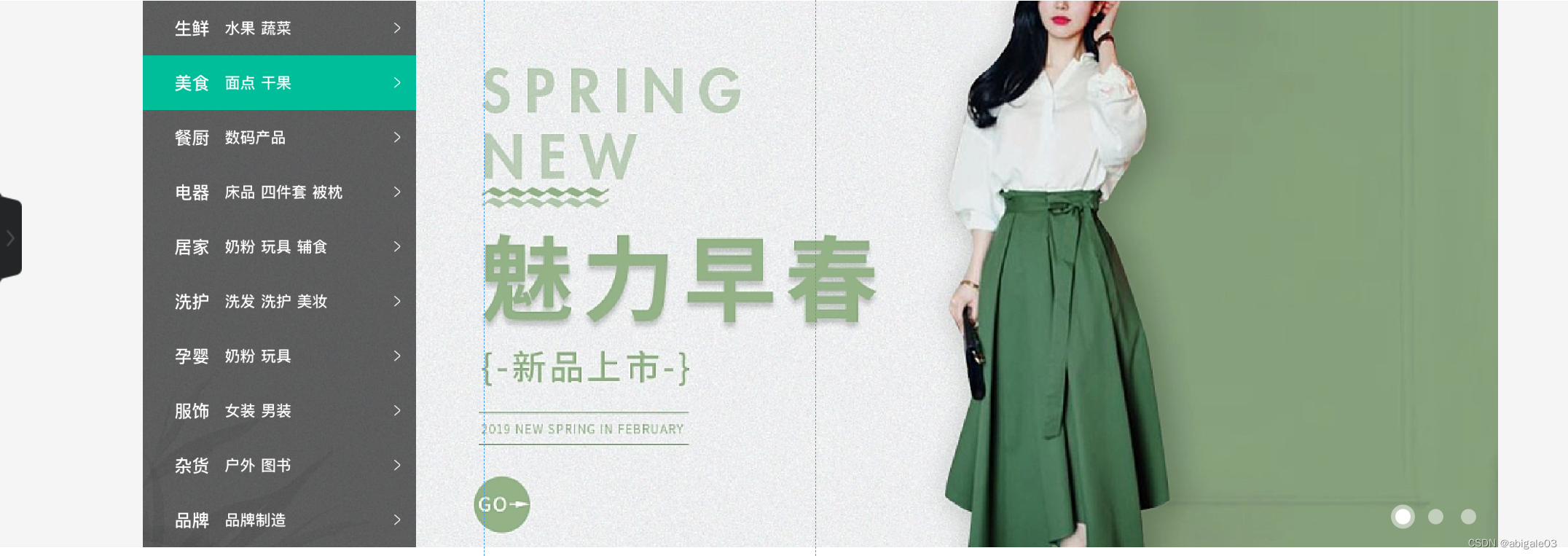
这里开始,css往index.css中写
结构:通栏 > 版心 > 轮播图(ul.pic) + 侧导航(subnav>ul) + 圆点指示器(ol)
代码实现
CSS
/* banner */
.banner {height: 500px;/* background-color: pink; */
}
.banner .wrapper {position: relative;overflow: hidden;height: 500px;/* background-color: pink; */
}
/* 图片 */
.banner .pic {display: flex;/* flex布局,父级宽度不够,子级被挤小,不想挤小,增大父级尺寸 */width: 3720px;
}
/* 侧导航 */
.subnav {position: absolute;left: 0;top: 0;width: 250px;height: 500px;background-color: rgba(0,0,0,0.42);
}
.subnav li {display: flex;justify-content: space-between;height: 50px;/* background-color: pink; */padding-left: 30px;padding-right: 12px;color: #fff;line-height: 50px;
}
/* a所有都是小字,分类是大字 */
.subnav li a {font-size: 14px;margin-right: 5px;color: #fff;
}
.subnav li .classify {margin-right: 14px;font-size: 16px;}
.subnav li .iconfont {font-size: 14px;
}
.subnav li:hover{background-color: #5eb69c;cursor: pointer;
}
/* 圆点指示器 */
.banner ol {display: flex;position: absolute;bottom: 17px;right: 16px;
}
.banner ol li {width: 22px;height: 22px;/* background-color: pink; */border-radius: 50%;margin-left: 8px;cursor: pointer;
}
.banner ol i {display: block;/* i是行内块,没有宽高,所以要转块级 */margin: 4px;border-radius: 50%;width: 14px;height: 14px;background-color: rgba(255,255,255,0.5);
}
.banner ol .active {background-color: rgba(255,255,255,0.5);}
.banner ol .active i {background-color: #fff;
}
HTML
9、新鲜好物区域
结构:标题title+内容bd
多区域样式共用
代码实现
CSS
/* 新鲜好物 */
/* 标题 公共样式 */
.title {display: flex;justify-content: space-between;margin-top: 40px;margin-bottom: 30px;height: 42px;/* background-color: pink; */
}
.title .left {display: flex;
}
.title .left h3 {font-size: 30px;margin-right: 35px;
}
.title .left p {align-self: flex-end;color: #a1a1a1;
}
.title .right .more {line-height: 42px;color: #a1a1a1;
}
.title .right .more .iconfont {margin-left: 10px;
}
/* 好物内容 公共样式*/
.bd ul {display: flex;justify-content: space-between;
}.bd li {width: 304px;height: 404px;background-color: #eef9f4;
}
.bd li .pic {width: 304px;height: 304px;
}.bd li .txt {text-align: center;
}
.bd li .txt h4 {margin-top: 18px;margin-bottom: 8px;font-size: 20px;
}
.goods .bd p {font-size: 18px;color: #aa2113;
}
.goods .bd p span {font-size: 22px;margin-left: 3px;
}
HTML
新鲜好物
新鲜出炉 品质靠谱
查看全部10、人气推荐
与9类似
代码实现
CSS
/* 人气推荐 */
.recommend .bd li {background-color: #fff;
}
.recommend .bd .txt p {/* font-size: 12px; */color: #a1a1a1;}
HTML
人气推荐
人气爆款 不容错过
11、热门品牌区域 brand
与9和10差别不大,多了个< >
代码实现
CSS
/* 热门品牌 */
.brand {height: 468px;background-color: #f5f5f5;
}
.brand .wrapper {overflow: hidden;height: 468px;/* background-color: pink; */margin-top: 50px;
}
.brand .title {position: relative;margin-bottom: 40px;
}
.brand .button {display: flex;position: absolute;right: 0;bottom: -25px;
}
.brand .button a {/* display: block; */text-align: center;line-height: 20px;width: 20px;height: 20px;color: #fff;
}
.brand .button .prev {background-color: #ddd;margin-right: 12px;
}
.brand .button .next {background-color: #00be9a;
}
.brand .bd li {width: 244px;height: 306px;
}
HTML
热门品牌
人气爆款 不容错过
12、生鲜区域 fresh
想学TypeScript了,不想看这个了。等复习的时候自己做,照着视频不动脑子没什么效果。
下次是从视频P126开始。
13、最新专题
本文来自互联网用户投稿,文章观点仅代表作者本人,不代表本站立场,不承担相关法律责任。如若转载,请注明出处。 如若内容造成侵权/违法违规/事实不符,请点击【内容举报】进行投诉反馈!


