win10安装pybullet并测试
安装
pip install pybullet
可能出现的问题:
1、microsoft visual c++ 14.0 or greater is required.
解决:访问 http://go.microsoft.com/fwlink/?LinkId=691126,安装下载的文件。
测试
import pybullet as p
from time import sleepphysicsClient = p.connect(p.GUI)p.setGravity(0, 0, -10)
# planeId = p.loadURDF("plane.urdf")
cubeStartPos = [0, 0, 1]
cubeStartOrientation = p.getQuaternionFromEuler([0, 0, 0])
boxId = p.loadURDF("path_to_urdf", cubeStartPos, cubeStartOrientation)
cubePos, cubeOrn = p.getBasePositionAndOrientation(boxId)useRealTimeSimulation = 0if (useRealTimeSimulation):p.setRealTimeSimulation(1)while 1:if (useRealTimeSimulation):p.setGravity(0, 0, -10)sleep(0.01)  # Time in seconds.else:p.stepSimulation()
可能出现的问题:
1、pybullet.error: cannot load urdf file.
解决:path_to_urdf 要写绝对路径。
2、b3Printf: path_to_urdf.urdf:15: cannot find ‘path_to_urdf.obj’ in any directory in urdf path
解决:urdf所在的文件夹内需要包含模型文件,将path_to_urdf.obj放到path_to_urdf.urdf的同目录下即可。
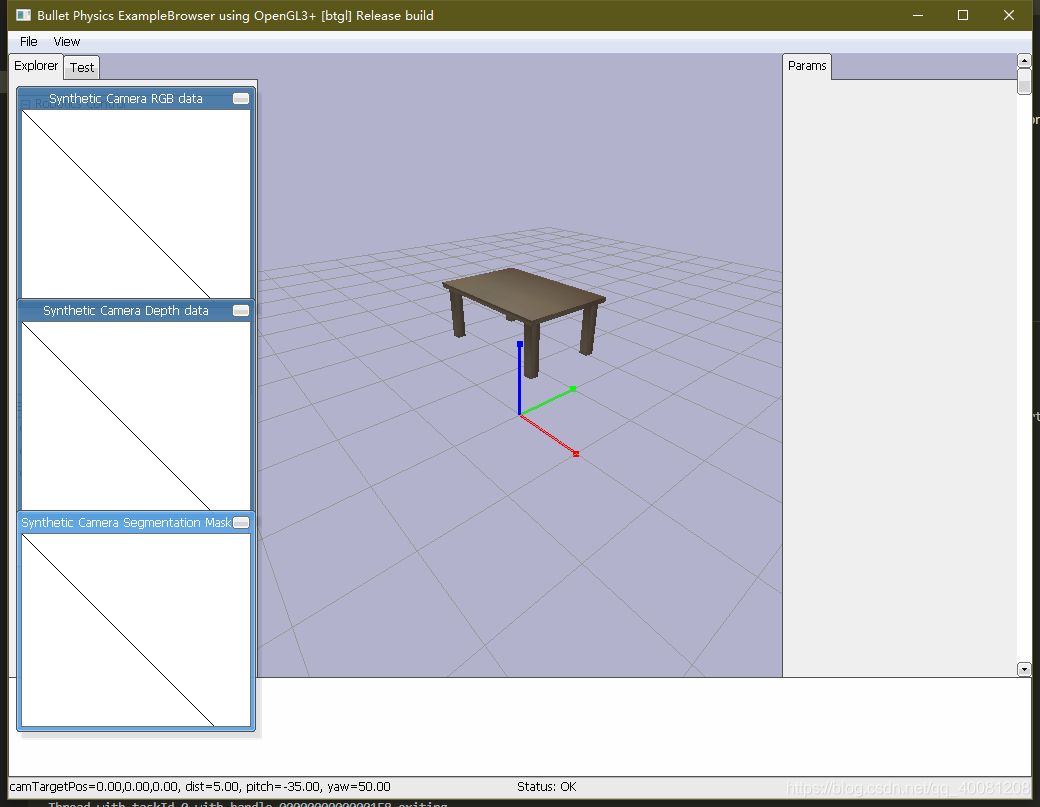
最终的结果:
参考:https://blog.csdn.net/weixin_41045354/article/details/104534581
本文来自互联网用户投稿,文章观点仅代表作者本人,不代表本站立场,不承担相关法律责任。如若转载,请注明出处。 如若内容造成侵权/违法违规/事实不符,请点击【内容举报】进行投诉反馈!