菱声音响文字转语音开发ls20
菱声音响文字转语音开发
1.登录ip智能网络广播管理平台
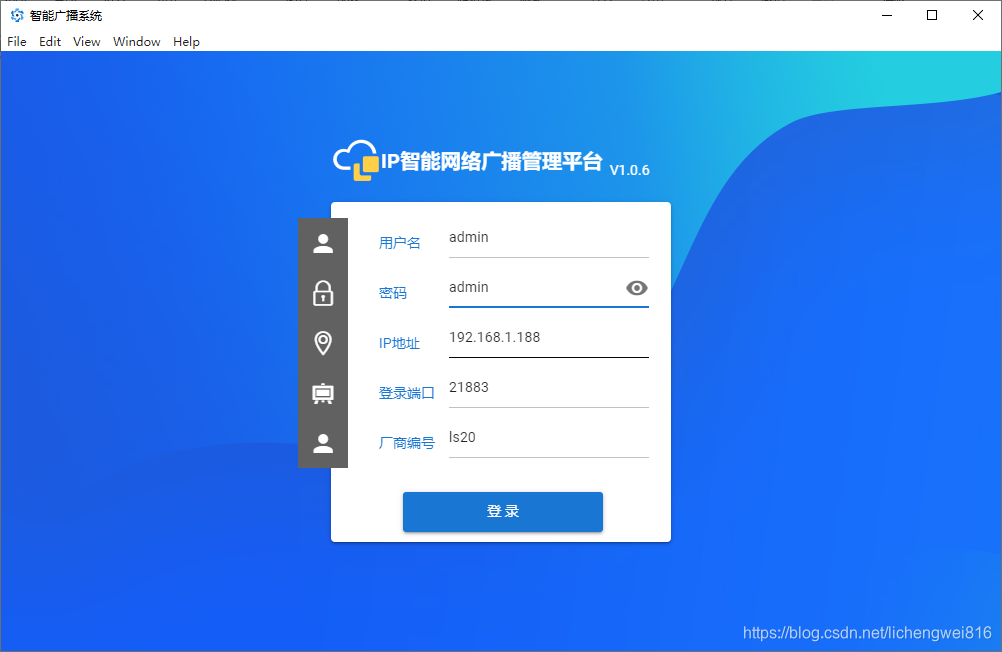
ip配置:
服务器ip地址是指音响服务所安装的位置
服务器端口号是在服务所安装的电脑上使用的端口,一般默认21883
注意:设备的ip相关的设置。目前搜索软件不支持跨网段。
登录音响服务:
因为这是个服务器的管理端,所以进去后需要设定服务器所在的ip()(这是文字转语音的服务端口,必须保持一致。)
(文件端口号默认10008 推流端口号默认8554)
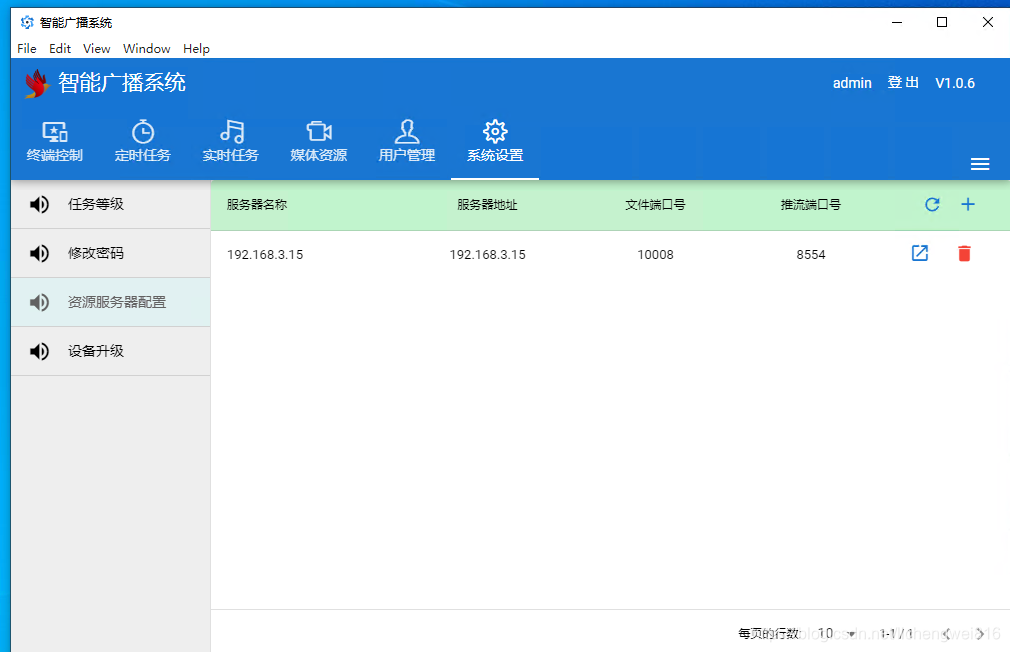
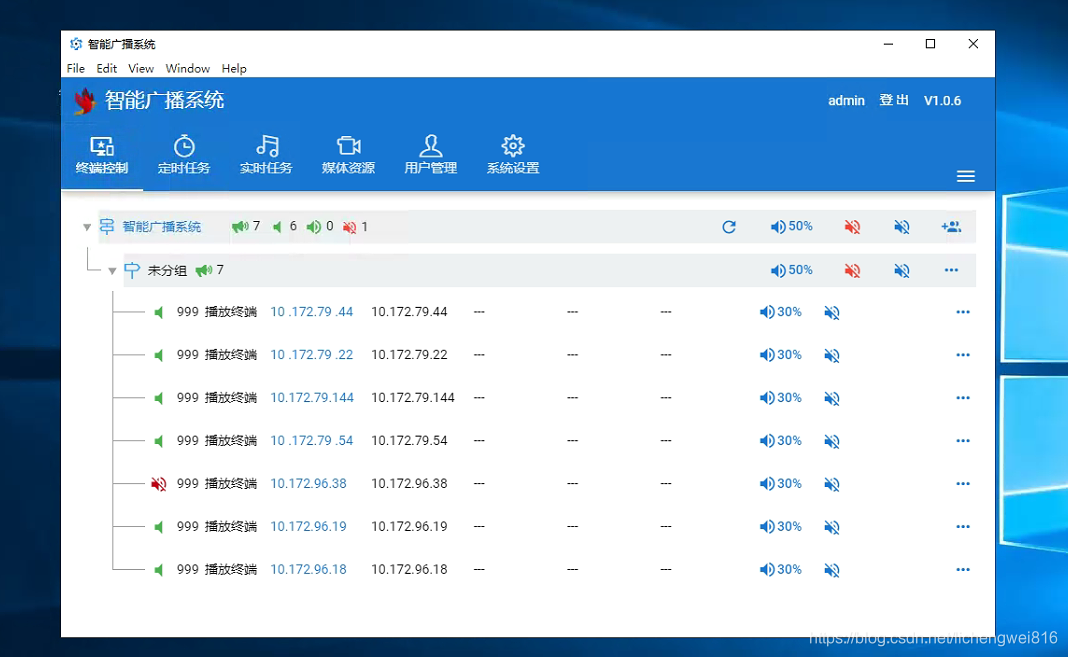
如果服务器ip 在设备中设定过,绑定的设备就会出现在列表中
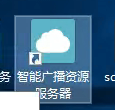
桌面这个图标点击右键 ,在根目录添加2021_enable_tts文件 不要后缀。
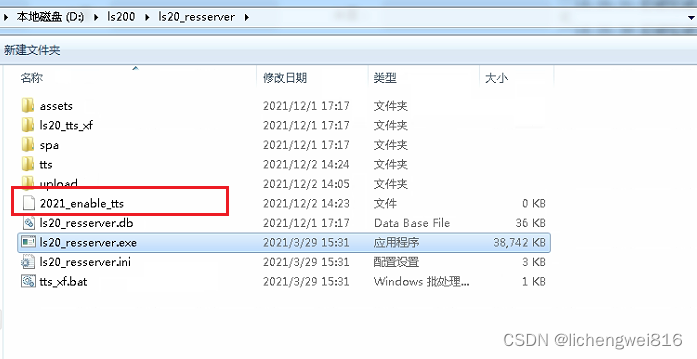
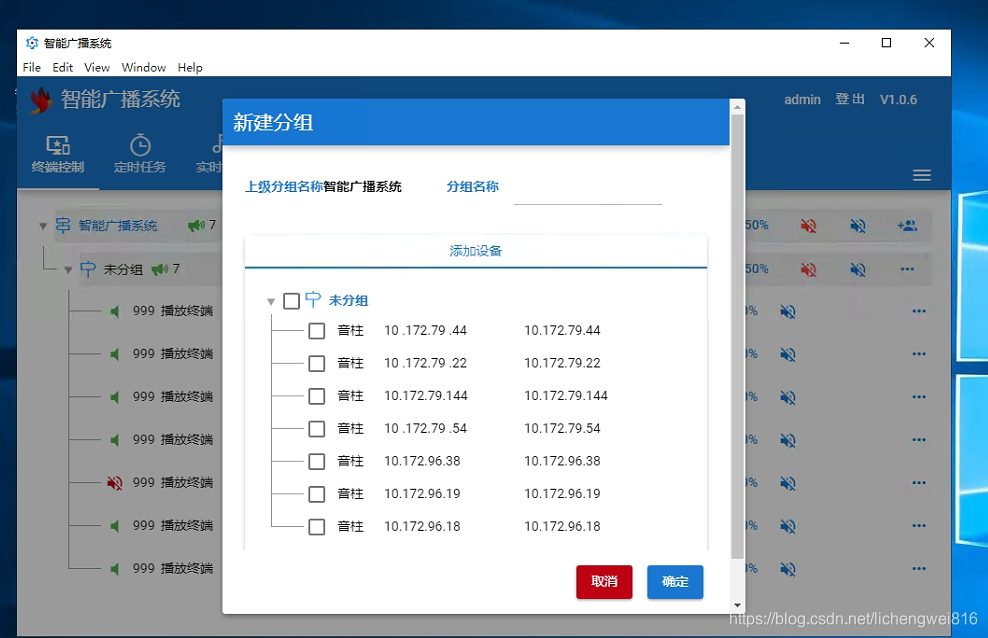
这时,音响服务器算是配置完成了。
这时候就可以使用接口对接了:
基本流程:1调用文字转语音服务得到mp3格式的文件2.带着文件请求音响服务并传参(指定播放的音响ip,或者音响组的名称)
using System;
using System.Collections.Generic;
using System.Linq;
using System.Text;
using System.Threading.Tasks;namespace ZK.HardWareBLL
{/// /// 菱声音响文字转语音/// public class LS20BLL{string type = "req";string app = "ls20";string uid = "";string wjyyPort = "10008";Models.TerminalM yx;Models.TerminalM yxfw;string[] sns;Common.IConfig.Myconfig myconfig = Common.IConfig.GetSetMyconfig;public LS20BLL(Models.TerminalM yxfw, Models.TerminalM yx){this.yx = yx;this.yxfw = yxfw;InterfaceServer.LSwzzyybfServer.yxfwIp = yxfw.ip;Login();getAllDevices();}public Models.ReceiveDataBase<object> Login(string account = "admin", string passWord = "admin"){Models.LSwzzyybfM.loginReq loginReq = new Models.LSwzzyybfM.loginReq();loginReq.type = type;loginReq.app = app;loginReq.op = "login";loginReq.params1.name = account;loginReq.params1.password = passWord;loginReq.params1.vender = app;Models.LSwzzyybfM.loginRes loginRes = ZK.InterfaceServer.LSwzzyybfServer.login(loginReq);if (loginRes.params1.result != "0"){return Models.ReceiveDataBase<object>.SetFailRes("登录失败");}uid = loginRes.params1.uid;return Models.ReceiveDataBase<object>.SetSuccessRes("登录成功");}public Models.ReceiveDataBase<object> getAllDevices(){Models.LSwzzyybfM.getAllDevicesReq mm = new Models.LSwzzyybfM.getAllDevicesReq();mm.type = type;mm.app = app;mm.op = "getAllDevices";mm.params1.uid = uid;Models.LSwzzyybfM.getAllDevicesRes loginRes = ZK.InterfaceServer.LSwzzyybfServer.getAllDevices(mm);if (loginRes.params1.result != "0"){return Models.ReceiveDataBase<object>.SetFailRes("获取设备列表失败");}sns = loginRes.params1.devices.Where(p=>p.ip == this.yx.ip).Select(p => p.sn).ToArray();return Models.ReceiveDataBase<object>.SetSuccessRes();}public void DevPlayStop(){Models.LSwzzyybfM.devPlayStopReq devPlayStopReq = new Models.LSwzzyybfM.devPlayStopReq();devPlayStopReq.type = "req";devPlayStopReq.app = "ls20";devPlayStopReq.op = "devPlayStop";devPlayStopReq.params1.devices = sns;devPlayStopReq.params1.uid = uid;InterfaceServer.LSwzzyybfServer.devPlayStop(devPlayStopReq);}/// /// 发送信息给音响/// /// /// /// /// /// /// /// /// public Models.ReceiveDataBase<object> SendMessage(string msg){try{if (sns != null && sns.Count() < 1){return Models.ReceiveDataBase<object>.SetFailRes("设备不能为空");}Models.LSwzzyybfM.tts_xf mm = new Models.LSwzzyybfM.tts_xf();mm.text = msg;mm.origin = "http://" + this.yxfw.ip + ":" + wjyyPort;mm.speed = myconfig.YXSPEED;mm.voice_name = "xiaoyan";//xiaoyan 女 xiaofeng 男mm.volume = "100";Models.LSwzzyybfM.tts_xfRes res = ZK.InterfaceServer.LSwzzyybfServer.tts_xf(mm);if (res.result != "0"){return Models.ReceiveDataBase<object>.SetFailRes("语音转化失败");}//先暂停,在播放DevPlayStop();//播放Models.LSwzzyybfM.fileUrl fileUrl1 = new Models.LSwzzyybfM.fileUrl();fileUrl1.name = "name1";fileUrl1.uri = res.url;List<Models.LSwzzyybfM.fileUrl> fileUrls = new List<Models.LSwzzyybfM.fileUrl>();fileUrls.Add(fileUrl1);Models.LSwzzyybfM.playMusicReq playMusic = new Models.LSwzzyybfM.playMusicReq();playMusic.type = type;playMusic.app = app;playMusic.op = "playMusic";playMusic.params1.uid = uid;playMusic.params1.name = "task1";playMusic.params1.type = 5;playMusic.params1.devices = sns;playMusic.params1.level = 1000;playMusic.params1.leng = "0";playMusic.params1.count = Convert.ToInt32(myconfig.YXCOUNT);playMusic.params1.vol = Convert.ToInt32(myconfig.YXVOL);playMusic.params1.urls = fileUrls;Models.LSwzzyybfM.playMusicRes playMusic1 = ZK.InterfaceServer.LSwzzyybfServer.playMusic(playMusic);if (playMusic1.params1.result != "0"){return Models.ReceiveDataBase<object>.SetFailRes("播放失败");}return Models.ReceiveDataBase<object>.SetSuccessRes("语音发送并播放成功");}catch (Exception ex){Common.Log4.LogManage.WriteErr("播放音响文件时发生了异常:" + ex);return Models.ReceiveDataBase<object>.SetFailRes("播放音响文件时发生了异常");}}}
}
菱声模型
using Newtonsoft.Json;
using System;
using System.Collections.Generic;
using System.Linq;
using System.Text;
using System.Threading.Tasks;namespace ZK.Models
{/// /// 菱声转语音的模型/// public class LSwzzyybfM{public class devPlayStopReqC{//用户idpublic string uid{get; set;}//设备的snpublic string[] devices{get; set;}}public class devPlayStopReq : baseParams{public devPlayStopReq(){params1 = new devPlayStopReqC();}[JsonProperty("params")]public devPlayStopReqC params1{get; set;}}public class playMusicReq : baseParams{public class devPlayStopReq : baseParams{public devPlayStopReq(){params1 = new devPlayStopReqC();}[JsonProperty("params")]public devPlayStopReqC params1{get; set;}}public playMusicReq(){params1 = new playMusicReqC();}[JsonProperty("params")]public playMusicReqC params1{get; set;}}public class playMusicRes{public string app{get; set;}public string callid{get; set;}public string type{get; set;}[JsonProperty("params")]public playMusicResC params1{get; set;}}public class playMusicResC{public string result{get; set;}}public class playMusicReqC{//用户idpublic string uid{get; set;}//任务名称public string name{get; set;}public int type{get; set;}//设备的snpublic string[] devices{get; set;}//级别,不知道啥意思public int level{get; set;}//播放时长public string leng{get; set;}//播放次数public int count{get; set;}//声音public int vol{get; set;}public List<fileUrl> urls{get; set;}}public class fileUrl{public string name{get; set;}public string uri{get; set;}}public class tts_xfRes{public string result{get; set;}public string url{get; set;}public string text{get; set;}}public class tts_xf{public string text{get; set;}public string voice_name{get; set;}public string speed{get; set;}public string volume{get; set;}public string origin{get; set;}}/// /// 设备信息/// public class device{public string ip{get; set;}public string level{get; set;}public string mute{get; set;}public string name{get; set;}public string num{get; set;}public string sid{get; set;}public string size{get; set;}public string sn{get; set;}public string status{get; set;}public string type{get; set;}public string version{get; set;}public string vol{get; set;}}public class loginParams{public string name{get; set;}public string password{get; set;}public string vender{get; set;}}public class baseParams{public string type{get; set;}public string app{get; set;}public string op{get; set;}}public class loginReq : baseParams{public loginReq(){params1 = new loginParams();}[JsonProperty("params")]public loginParams params1{get; set;}}public class getAllDevicesReqC{public string uid{get; set;}}public class getAllDevicesRes : baseParams{public getAllDevicesRes(){params1 = new getAllDevicesResC();}[JsonProperty("params")]public getAllDevicesResC params1{get; set;}}public class getAllDevicesResC{public List<device> devices{get; set;}public string result{get; set;}}public class getAllDevicesReq : baseParams{public getAllDevicesReq(){params1 = new getAllDevicesReqC();}[JsonProperty("params")]public getAllDevicesReqC params1{get; set;}}public class loginRes : baseParams{[JsonProperty("params")]public loginParamsRes params1{get; set;}}public class loginParamsRes{public string result{get; set;}public string type{get; set;}public string uid{get; set;}}}
}
using System;
using System.Collections.Generic;
using System.Linq;
using System.Text;
using System.Threading.Tasks;
using ZK.Common;
using ZK.Models;namespace ZK.InterfaceServer
{public class LSwzzyybfServer{public static string yxfwIp = "192.168.1.188";public static string yxfwPort = "17808";public static string wjyyPort = "10008";//public static string url = "http://"+ yxfwIp + ":"+ yxfwPort + "/call";public static Models.LSwzzyybfM.loginRes login(Models.LSwzzyybfM.loginReq m){string ret;try{ret = HttpClientUtil.doPostMethodToString("http://" + yxfwIp + ":" + yxfwPort + "/call", Newtonsoft.Json.JsonConvert.SerializeObject(m));}catch (Exception ex){Common.Log4.LogManage.WriteErr("login " + ex.ToString());return null;}return Newtonsoft.Json.JsonConvert.DeserializeObject<LSwzzyybfM.loginRes>(ret);}public static Models.LSwzzyybfM.playMusicRes devPlayStop(Models.LSwzzyybfM.devPlayStopReq m){string ret;try{ret = HttpClientUtil.doPostMethodToString("http://" + yxfwIp + ":" + yxfwPort + "/call", Newtonsoft.Json.JsonConvert.SerializeObject(m));}catch (Exception ex){Common.Log4.LogManage.WriteErr("devPlayStop " + ex.ToString());return null;}return Newtonsoft.Json.JsonConvert.DeserializeObject<LSwzzyybfM.playMusicRes>(ret);}public static Models.LSwzzyybfM.getAllDevicesRes getAllDevices(Models.LSwzzyybfM.getAllDevicesReq m){string ret;try{ret = HttpClientUtil.doPostMethodToString("http://" + yxfwIp + ":" + yxfwPort + "/call", Newtonsoft.Json.JsonConvert.SerializeObject(m));}catch (Exception ex){Common.Log4.LogManage.WriteErr("getAllDevices " + ex.ToString());return null;}return Newtonsoft.Json.JsonConvert.DeserializeObject<LSwzzyybfM.getAllDevicesRes>(ret);}public static Models.LSwzzyybfM.playMusicRes playMusic(Models.LSwzzyybfM.playMusicReq m){string ret;try{ret = HttpClientUtil.doPostMethodToString("http://" + yxfwIp + ":" + yxfwPort + "/call", Newtonsoft.Json.JsonConvert.SerializeObject(m));}catch (Exception ex){Common.Log4.LogManage.WriteErr("playMusic " + ex.ToString());return null;}return Newtonsoft.Json.JsonConvert.DeserializeObject<LSwzzyybfM.playMusicRes>(ret);}public static Models.LSwzzyybfM.tts_xfRes tts_xf(Models.LSwzzyybfM.tts_xf m){string ret;Dictionary<string, string> keyValuePairs = new Dictionary<string, string>();keyValuePairs.Add("origin", m.origin);keyValuePairs.Add("text", m.text);keyValuePairs.Add("voice_name", m.voice_name);keyValuePairs.Add("volume", m.volume);keyValuePairs.Add("speed", m.speed);string myUrl = InterfaceExecute.GetUrlNoBaseUrl("http://"+yxfwIp+":"+wjyyPort+"/tts_xf.multi", keyValuePairs);try{ret = HttpClientUtil.doGetMethodToString(myUrl);}catch (Exception ex){Common.Log4.LogManage.WriteErr("tts_xf " + ex.ToString());return null;}return Newtonsoft.Json.JsonConvert.DeserializeObject<LSwzzyybfM.tts_xfRes>(ret);}}
}
使用方式:
LS20BLL lS20BLL;PageShow("音响服务初始化");lS20BLL = new LS20BLL(terminalMs.Where(p => p.code == Convert.ToInt32(myconfig.YXFW)).FirstOrDefault(), terminalMs.Where(p => p.code == Convert.ToInt32(myconfig.YX)).FirstOrDefault());lS20BLL.SendMessage("称重成功,请下磅");
设备模型:
public class TerminalM{public int id;/// /// 名称/// public String name;/// /// 工作状态 1启用 0禁用/// public int? workState;/// /// 安装堆位/// public string local;/// /// 安装位置/// public string localDetail;/// /// 设备类型/// public string type;/// /// 1ip 2 串口/// public int? ipCom;/// /// 备注长度最大100/// public string remark;/// /// 端口/// public int? port;/// /// 登录设备的账号/// public string userName;/// /// 登录设备的密码/// public string password;/// /// Led宽度/// public int? width;/// /// Led高度/// public int? height;/// /// ip地址/// public string ip;/// /// com口/// public string com;/// /// 工控机位置位置/// public string position;/// /// code不能重复/// public int? code;public int? dataBits1;public int? baudRate1;}
如果在对接中音响只是嘟一声,证明电脑缺环境了,请安装vcruntime2015,我资源有。
更新记录:
1.2021-03-01 在播放前先停止正在播放的音频(不管有没有播放任务)
本文来自互联网用户投稿,文章观点仅代表作者本人,不代表本站立场,不承担相关法律责任。如若转载,请注明出处。 如若内容造成侵权/违法违规/事实不符,请点击【内容举报】进行投诉反馈!
