让你的网站变成一个Android应用
TWA (Trusted Web Activity 可信任的网络应用)即: 基于Chrome Custom Tabs,利用谷歌浏览器提供的api,实现强大功能的桌面应用技术。我们可以通过这个把你的网站变成应用。
但是在这之前,你需要准备一些东西,包括
- 一个支持PWA的网站
- Android Studio
本文参照 TWA踩坑记-从零到一让你的博客变成app并上架商店 编写,由于版本更迭的原因,原教程的方法已经不再完全可用。感谢 Harbor Zeng 老师的思路。
创建项目
- 打开 Android Studio
- 创建项目
- 选择 No Activity,稍后引入的库会包含一个activity。

- 填写信息,并注意API需要大于19
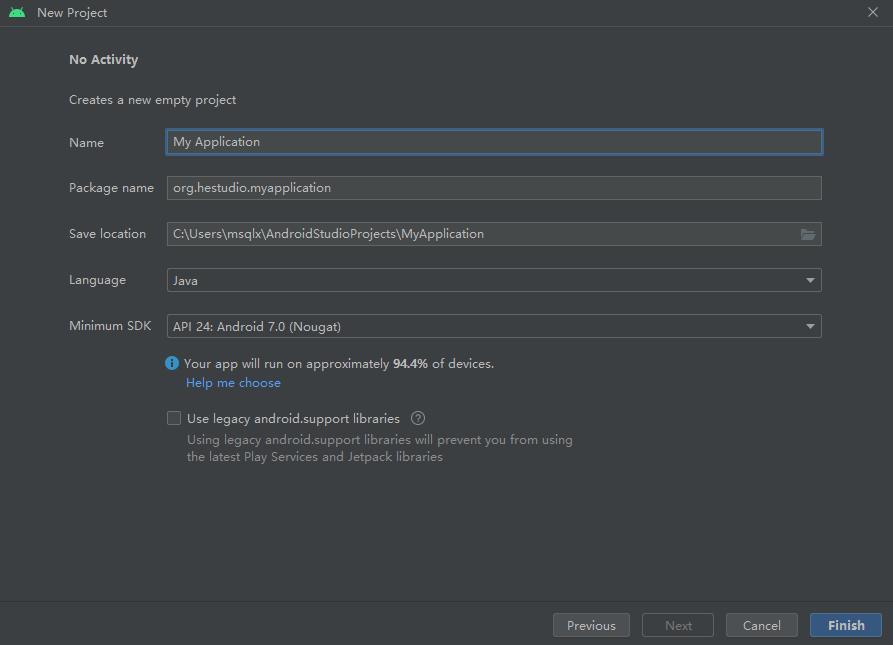
设置仓库
首先我们需要设置仓库。打开project目录的settings.gradle,然后参考这样设置。
pluginManagement {repositories {google()mavenCentral()gradlePluginPortal()}
}
dependencyResolutionManagement {repositoriesMode.set(RepositoriesMode.FAIL_ON_PROJECT_REPOS)repositories {google()jcenter()mavenCentral()maven { url "https://jitpack.io" }}
}
rootProject.name = "heStudio Blog" // 自己的软件名称
include ':app'然后打开app目录的build.gradle,设置Java8,这个库依赖Java8
compileOptions {sourceCompatibility JavaVersion.VERSION_1_8targetCompatibility JavaVersion.VERSION_1_8
}
并添加这个库
dependencies {implementation 'com.github.GoogleChrome.custom-tabs-client:customtabs:d08e93fce3'
}
在保存文件后Android Studio会提醒你是否Sync,这时开始同步。
添加activity
<manifest xmlns:android="http://schemas.android.com/apk/res/android"xmlns:tools="http://schemas.android.com/tools"><applicationandroid:allowBackup="true"android:dataExtractionRules="@xml/data_extraction_rules"android:fullBackupContent="@xml/backup_rules"android:icon="@mipmap/ic_launcher"android:label="@string/app_name"android:supportsRtl="true"android:theme="@style/Theme.HeStudioBlog"tools:targetApi="31" ><meta-dataandroid:name="asset_statements"android:resource="@string/asset_statements" /><activity android:name="android.support.customtabs.trusted.LauncherActivity"android:exported="true"><meta-dataandroid:name="android.support.customtabs.trusted.DEFAULT_URL"android:value="https://www.hestudio.net" /><intent-filter><action android:name="android.intent.action.MAIN" /><category android:name="android.intent.category.LAUNCHER" />intent-filter><intent-filter android:autoVerify="true"><action android:name="android.intent.action.VIEW" /><category android:name="android.intent.category.DEFAULT" /><category android:name="android.intent.category.BROWSABLE" /><dataandroid:host="hestudio.net"android:scheme="https" />intent-filter>activity>application>manifest>
把上面的网站地址和域名都换成你自己的。
链接到网站
我们需要将应用链接到网站以进一步取消地址栏。我们就需要分别设置网站验证APP和APP验证网站。
APP到网页的认证
打开/app/src/main/res/values/strings.xml,插入以下代码
<resources><string name="app_name">heStudio Blogstring><string name="asset_statements">[{\"relation\": [\"delegate_permission/common.handle_all_urls\"],\"target\": {\"namespace\": \"web\",\"site\": \"https://www.hestudio.net\"}}]string>
resources>
将site的网址改成自己的,然后再返回到AndfoidManifest.xml,在activity前面插入meta-data
<manifest xmlns:android="http://schemas.android.com/apk/res/android"xmlns:tools="http://schemas.android.com/tools"><applicationandroid:allowBackup="true"android:dataExtractionRules="@xml/data_extraction_rules"android:fullBackupContent="@xml/backup_rules"android:icon="@mipmap/ic_launcher"android:label="@string/app_name"android:supportsRtl="true"android:theme="@style/Theme.HeStudioBlog"tools:targetApi="31" ><meta-dataandroid:name="asset_statements"android:resource="@string/asset_statements" /><activity android:name="android.support.customtabs.trusted.LauncherActivity"android:exported="true"><meta-dataandroid:name="android.support.customtabs.trusted.DEFAULT_URL"android:value="https://www.hestudio.net" /><intent-filter><action android:name="android.intent.action.MAIN" /><category android:name="android.intent.category.LAUNCHER" />intent-filter><intent-filter android:autoVerify="true"><action android:name="android.intent.action.VIEW" /><category android:name="android.intent.category.DEFAULT" /><category android:name="android.intent.category.BROWSABLE" /><dataandroid:host="hestudio.net"android:scheme="https" />intent-filter>activity>application>manifest>
网页到APP的认证
你可以使用assetlinks.json验证程序是否合法。那么你需要准备一些东西,包括签名证书。
- 访问 https://developers.google.cn/digital-asset-links/tools/generator (大陆可以访问)并填写你的信息,并点击生成。
- 在网站的根目录新建
.well-known文件夹,并在里面新建assetlinks.json - 将生成的内容复制到这个文件里面。
最后,我们修改我们自己需要自定义的部分,经过测试后,打包后就可以发布使用。
后记
欢迎参观我的博客 https://www.hestudio.net
本文来自互联网用户投稿,文章观点仅代表作者本人,不代表本站立场,不承担相关法律责任。如若转载,请注明出处。 如若内容造成侵权/违法违规/事实不符,请点击【内容举报】进行投诉反馈!