一起谈.NET技术,WPF 员工卡条形码
大家都知道条形码(Barcode)是一种可以由机器识别的特殊编码,在生产、生活中也常常会见到并使用它。条形码的类型和种类很多感兴趣的朋友可以详细了解一下。其中Code 39 可以说是一种最为常见并广泛使用的字符与数字结合的编码类型,本篇也将利用它制作一个带有条形码的员工卡应用程序。
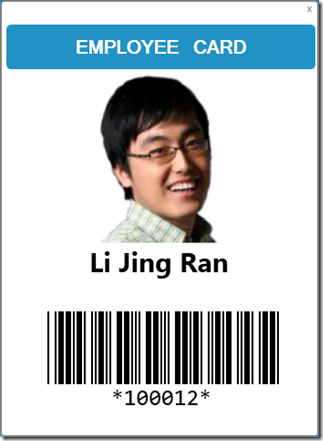
在公司内部员工卡是员工身份唯一的识别工具,同时也是考勤及门禁系统的主要信息来源。首先在WPF 中设计一个简单的员工卡样式,具备员工卡标识、员工相片、员工姓名等。
<Border CornerRadius="3" BorderBrush="Gray" BorderThickness="2" Background="White"MouseLeftButtonDown="Border_MouseLeftButtonDown"><Canvas x:Name="mainCanvas"><Grid x:Name="closeBtn" Canvas.Left="330" Canvas.Top="0" MouseLeftButtonDown="Close_MouseLeftButtonDown"><Ellipse Height="15" Width="15" HorizontalAlignment="Center"><Ellipse.Fill><SolidColorBrush x:Name="ellipseColor"/>Ellipse.Fill>Ellipse><TextBlock Text="x" Margin="2,-2,2,2" HorizontalAlignment="Center"><TextBlock.Foreground><SolidColorBrush x:Name="textColor" Color="Gray"/>TextBlock.Foreground>TextBlock>Grid><Border BorderBrush="#FF54545C" Canvas.Top="25" CornerRadius="5"Height="49" Width="339" Background="#FF2192C4" Canvas.Left="5"><TextBlock Text="EMPLOYEE   CARD" Foreground="White" FontSize="20"VerticalAlignment="Center" HorizontalAlignment="Center"FontWeight="Black" FontFamily="Microsoft Sans Serif"/>Border><Grid Canvas.Left="96" Canvas.Top="78"><Grid.RowDefinitions><RowDefinition /><RowDefinition />Grid.RowDefinitions><Image Source="Images/cardpic.png" Grid.Row="0"/><TextBlock Text="Li Jing Ran" FontSize="30" FontWeight="Black" Grid.Row="1" HorizontalAlignment="Center"/>Grid>Canvas>
Border>

代码内容比较简单,其中需要提一下的是x:Name 为closeBtn 的


该效果代码如下,通过Window.Resources 设置一个ColorAnimation Storyboard,再通过MouseEnter、MouseLeave 来触发Storyboard 动画效果。
<Window.Resources><Storyboard x:Key="flashClose"><ColorAnimation Storyboard.TargetName="ellipseColor" Storyboard.TargetProperty="Color"From="White" To="Gray" Duration="0:0:0.1"/><ColorAnimation Storyboard.TargetName="textColor" Storyboard.TargetProperty="Color"From="Gray" To="White" Duration="0:0:0.1"/>Storyboard>
Window.Resources>
<Window.Triggers><EventTrigger SourceName="closeBtn" RoutedEvent="Grid.MouseEnter"><BeginStoryboard x:Name="showClosBtn" Storyboard="{StaticResource flashClose}"/>EventTrigger><EventTrigger SourceName="closeBtn" RoutedEvent="Grid.MouseLeave"><StopStoryboard BeginStoryboardName="showClosBtn"/>EventTrigger>
Window.Triggers>
完成上面的界面设计,最后只需在员工卡下放的空白处添加员工编号条形码即可。首先在项目中加入Barcode 和Code39 类,我们要通过这两个类完成条形码的绘制工作。打开C#程序,编写如下代码。
定义编码
通过Barcodes 类创建一个新的条形码,定义BarcodeType 为"Code39",编码Data 为“10001”,如果需要校验则将CheckDigit 设为"Yes"。其中thinWidth、thickWidth 用于定义黑白条码的宽窄度。
Barcodes bb = new Barcodes();
bb.BarcodeType = Barcodes.BarcodeEnum.Code39;
bb.Data = "10001";
bb.CheckDigit = Barcodes.YesNoEnum.Yes;
bb.encode();
int thinWidth;
int thickWidth;
thinWidth = 2;
thickWidth = 3 * thinWidth;
string outputString = bb.EncodedData;
string humanText = bb.HumanText;
绘制条形码
根据编码(EncodedData)的长度利用Rectangle 类逐一绘制黑、白条码,t 表示窄码,w 表示宽码。
int len = outputString.Length;
int currentPos = 50;
int currentTop = 340;
int currentColor = 0;
for (int i = 0; i < len; i++)
{Rectangle rect = new Rectangle();rect.Height = 80;if (currentColor == 0){currentColor =  1;rect.Fill = new SolidColorBrush(Colors.Black);}else{currentColor = 0;rect.Fill = new SolidColorBrush(Colors.White);}Canvas.SetLeft(rect, currentPos);Canvas.SetTop(rect, currentTop);if (outputString[i] == 't'){rect.Width = thinWidth;currentPos += thinWidth;}else if (outputString[i] == 'w'){rect.Width = thickWidth;currentPos += thickWidth;}             mainCanvas.Children.Add(rect);
}
添加可读码
最后在条形码下方添加一行可读码,方便员工认读条形码内容,也就是将“10001”员工编号显示出来。
TextBlock tb = new TextBlock();
tb.Text = humanText;
tb.FontSize = 25;
tb.FontFamily = new FontFamily("Consolas");
Rect rx = new Rect(0, 0, 0, 0);
tb.Arrange(rx);
Canvas.SetLeft(tb, 120);
Canvas.SetTop(tb, currentTop + 80);
mainCanvas.Children.Add(tb);
效果图
最后运行下程序看看效果如何,当然条形码内容可按各自需求添加任何字符或数字。
源代码下载
WPFBarcode.zip
转载于:https://www.cnblogs.com/waw/archive/2011/08/29/2158689.html
本文来自互联网用户投稿,文章观点仅代表作者本人,不代表本站立场,不承担相关法律责任。如若转载,请注明出处。 如若内容造成侵权/违法违规/事实不符,请点击【内容举报】进行投诉反馈!