vue实现日历样式
最近,项目组要求仿照企业微信的打卡功能,实现报工的日历展示功能,看了很多资料,现在此自己总结一下思路,以做记录。
首先看界面效果:
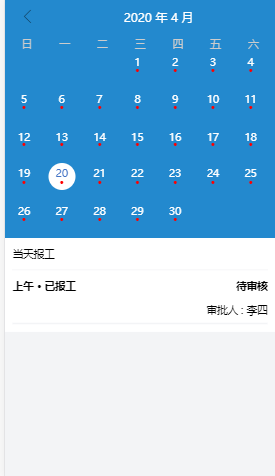
我先描述一下思路:首先判断当前月份一共有几天total,然后找到当月的1号是周几,找到在日历中显示的位置,然后依次往数组里添加对象,有几天就添加几条数据。
一、页面样式布局
<template><div class="date-page"><div class="calenders"><div class="date-header"><div class="pre-month" @click="preMonthClick()"><i class="iconfont icon-zuobianjiantou font20"></i></div><div class="show-date">{{year}} 年 {{month}} 月</div><div class="pre-month" @click="nextMonthClick()" v-if="show"><i class="iconfont icon-youbianjiantou font20"></i></div></div><div class="date-content"><div class="week-header"><div v-for="item in ['日','一','二','三','四','五','六']" :key="item">{{ item }}</div></div><div class="week-day"><divclass="every-day":class="{actived:index == isActive}"v-for="(showDay,index) in showData":key="index"@click="detailClick(showDay,index)"><div :class="['day',isWeekDay?'circle-color-blue':'']">{{showDay}}</div><div v-if="showDay!==''" class="cicle" :class="colorClass(1)">•</div></div></div></div></div><div class="detail"><div><div class="detail-title">当天报工</div><div class="line"></div></div><!-- <div><div class="detail-bottom" v-for="(item,index) in showDayDeatile.datePeriods" :key="index"><div class="left" style="display:inline-block">{{item.jobTime}}</div><div class="right" style="float:right;display:inline-block">{{item.state}}</div></div><div class="line"></div><div class="detail-bottom"><divclass="right"style="float:right;font-size:14px;font-weight:bold;right:0.2rem">审批人:{{showDayDeatile.appRover}}</div></div></div>--><div style="height:60px"><div class="detail-bottom"><div class="left" style="display:inline-block">上午 • 已报工</div><div class="right" style="float:right;display:inline-block">待审核</div></div><div class="right" style="float:right;font-size:14px;right:0.2rem">审批人 : 李四</div></div><div class="line"></div></div></div>
</template>
<script>
export default {data() {return {year: "",month: "",today: "",calendarDateList: [],showData: [],isActive: -1,show: false,showDayDeatile: {},circleColor: 0, //圆点的颜色,0-白色,1-红色,2-橙色isWeekDay: false};},
二、获的当前的日期,初始化数据
getToday() {let date = new Date();this.year = date.getFullYear();this.month = date.getMonth() + 1;this.today = date.getDate();//获取这是周几//初始化数据this.getMonthDays(this.year, this.month - 1);//得到当月今天的位置indexlet targetDay = new Date(this.year, this.month - 1, 1).getDay();let index = this.today + targetDay - 1;this.isActive = index;},
getMonthDays(year, month) {// 定义每个月的天数,如果是闰年第二月改为29天let daysInMonth = [31, 28, 31, 30, 31, 30, 31, 31, 30, 31, 30, 31];if ((year % 4 === 0 && year % 100 !== 0) || year % 400 === 0) {daysInMonth[1] = 29;}// 当月第一天为周几let targetDay = new Date(year, month, 1).getDay();// console.log("targetDay:" + targetDay);let calendarDateList = [];let preNum = targetDay;let nextNum = 0;if (targetDay > 0) {// 当前月份1号前的自然周剩余日期,置空for (let i = 0; i < preNum; i++) {calendarDateList.push("");}}for (let i = 0; i < daysInMonth[month]; i++) {// 正常显示的日期calendarDateList.push(i + 1);}// 当前月份最后一天的自然周剩余日期,置空nextNum = 6 - new Date(year, month + 1, 0).getDay(); for (let i = 0; i < nextNum; i++) {calendarDateList.push("");}this.showData = calendarDateList;// console.log("showDate:" + JSON.stringify(this.showData));return calendarDateList;}
这样,就可以显示出来基本的日历样式。
三、点击前一个月按钮
preMonthClick() {this.isActive = -1;this.show = true;if (this.month === 1) {this.month = 12;this.year = this.year - 1;} else {this.month = this.month - 1;}this.getMonthDays(this.year, this.month - 1);},
四、点击下一个月按钮
nextMonthClick() {this.isActive = -1;let date = new Date();let year = date.getFullYear();let month = date.getMonth() + 1;if (this.year == year) {this.month = this.month + 1;if (this.month < month) {this.show = true;} else {this.show = false;this.getMonthDays(this.year, this.month - 1);let targetDay = new Date(this.year, this.month - 1, 1).getDay();let index = this.today + targetDay - 1;this.isActive = index;}} else if (this.year < year) {this.show = true;if (this.month === 12) {this.month = 1;this.year = this.year + 1;} else {this.month = this.month + 1;}}this.getMonthDays(this.year, this.month - 1);}
因为主要是思路,所以没有上传样式代码。
如有需要,可自行下载。
本文来自互联网用户投稿,文章观点仅代表作者本人,不代表本站立场,不承担相关法律责任。如若转载,请注明出处。 如若内容造成侵权/违法违规/事实不符,请点击【内容举报】进行投诉反馈!