移动端触摸事件 事件防误触 以及 1物理像素问题
移动端触摸事件 事件防误触 以及 1物理像素问题
移动端的主要三个事件
touchstart touchmove touchend 分别对用 PC 端事件的 mousedowm mousemove mouseup
移动端中有很多的默认事件
比如长按某个文本时,能够选中复制。这样对于很多业务是不符合逻辑的,因此我们先来阻止默认事件。
<script>// 阻止移动端默认事件window.onload = function () {document.addEventListener('touchstart', function (ev) {ev = ev || eventev.preventDefault()// console.log(ev.cancelable) 是否可阻止默认事件,输出 true, false})}</script>
但是阻止默认行为之后,有两个很大的缺陷就是,所有的滚动条都会失效 和 会出现事件点透现象。
事件点透现象该怎么解决呢?
事件点透,两个重合的元素,明明事件要执行的是第一个元素的方法,但是却还执行了另一个元素的方法。 举个例子,比如说一个 a 标签 和一个 div 盒子定位到了一起,监听div盒子的事件点击,点击出后让他出现一个背景色,但是也执行了跳转事件。
- PC 端的事件,是可以在移动端使用的,比如 click 点击事件,好处是不会出现点透现象,但是却有 300ms 延迟,但是移动端的事件是不会有延迟的
最好的移动端跳转方案,且有防误触
<html lang="en">
<head><meta charset="UTF-8"><meta name="viewport" content="width=device-width, initial-scale=1.0, user-scalable=no"><title>Documenttitle>
head>
<body><a href="https://www.baidu.com">百度a><script>// 阻止默认事件document.addEventListener('touchstart', function(ev) {ev = ev || eventev.preventDefault()})// 阻止默认事件之后,会发生 a标签点击不起作用,也就是说a标签的跳转事件被阻止了// 下面就是移动端的点击事件解决方案,且拥有防误触功能let aNode = document.querySelector('a')aNode.addEventListener('touchstart', function() {this.isMoved = false})aNode.addEventListener('touchmove', function() {this.isMoved = true})aNode.addEventListener('touchend', function() {if(!this.isMoved) {location.href = this.href}})script>
body>
html>
event => changedTouches
移动端的 event 中一个重要属性就是 changedTouches, 利用它可以获取到触摸的位置
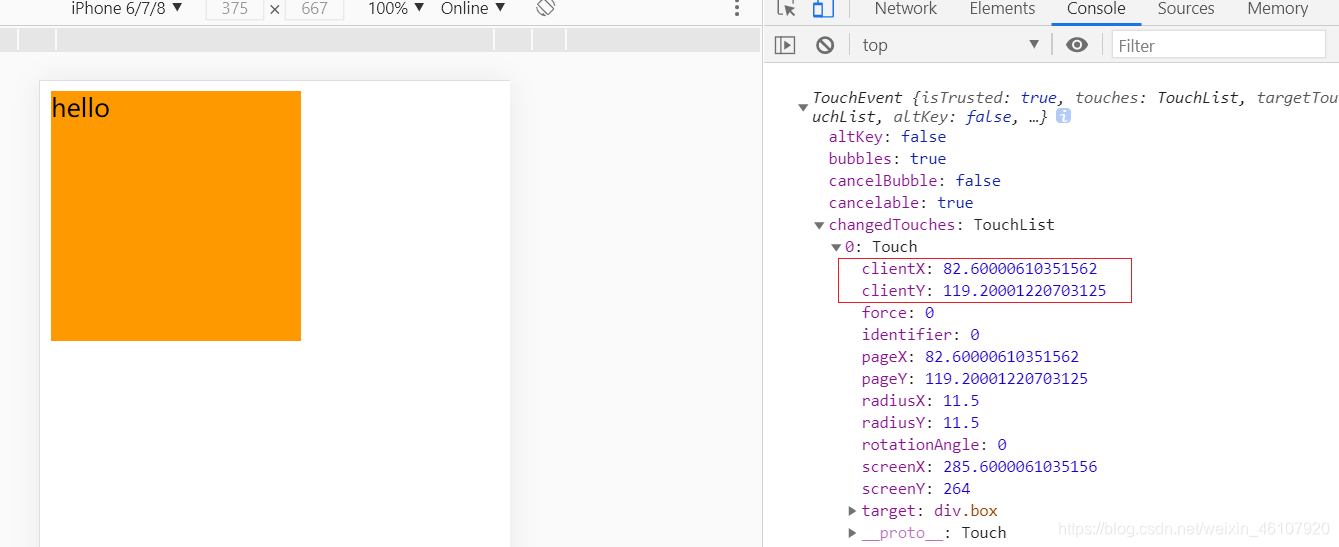
移动端常见问题
禁止电话和邮箱
<meta name="format-detection" content="telephone=no, email=no"><p>122p> // 无效<a href="122">122a> // 有效<a href="9090877876@qq.com">9090877876@qq.coma> // 有效
解决 a 链接点击高亮问题
 <style>a {text-decoration: none;-webkit-tap-highlight-color: none;}style><body><a href="javascript:;">1671671671a>
body>
解决按钮圆角渲染
<style>input {-webkit-appearance: none;}style><body><input type="button" value="按钮">
body>
解决 Foot Boostring 字体放大
<style>p {font-size: 30px;max-height: 9999999px;}style><body><p>cujewfscjsdhcujkhbjcsdhcjp>
body>
1 物理像素的问题
淘宝方案
<html lang="en">
<head><meta charset="UTF-8"><meta name="viewport" content="width=device-width, initial-scale=1.0, user-scalable=no"><title>Documenttitle><style>* {margin: 0;padding: 0;}.line {width: 16rem;height: 1px;margin-top: 1rem;background-color: #000;}style>
head>
<body><div class="line">div><script>// 淘宝方案(function() {let dpr = window.devicePixelRatio || 1let styleNode = document.createElement('style')let w = document.documentElement.clientWidth*dpr/16styleNode.innerHTML = "html {font-size: "+ w +"px!important}"document.head.appendChild(styleNode)let scale = 1/dprlet meta = document.querySelector("meta[name='viewport']")meta.content="width=device-width, initial-scale="+scale+", user-scalable=no"})()script>
body>
html>
一般方案
<html lang="en">
<head><meta charset="UTF-8"><meta name="viewport" content="width=device-width, initial-scale=1.0, user-scalable=no"><title>Documenttitle><style>* {margin: 0;padding: 0;}.line {width: 100%;height: 1px;margin-top: 30px;background-color: #000;}@media only screen and (-webkit-device-pixel-ratio:2) {.line {transform: scaleY(.5);}}@media only screen and (-webkit-device-pixel-ratio:3) {.line {transform: scaleY(.333333333);}}style>
head>
<body><div class="line">div>
body>
html>
本文来自互联网用户投稿,文章观点仅代表作者本人,不代表本站立场,不承担相关法律责任。如若转载,请注明出处。 如若内容造成侵权/违法违规/事实不符,请点击【内容举报】进行投诉反馈!