ros中rqt_plot画出速度曲线

ros中rqt_plot画出速度曲线

  • 前言
  • 一、rqt_plot是什么?
  • 二、使用步骤
    • 1. 代码
    • 2.操作实现:
  • 三、速度参数更改;
    • 1. 代码
    • 2.操作实现:
  • 总结

文章目录

  • 前言
  • 一、rqt_plot是什么?
  • 二、使用步骤
    • 1. 代码
    • 2.操作实现:
  • 三、速度参数更改;
    • 1. 代码
    • 2.操作实现:
  • 总结


前言

提示:这里可以添加本文要记录的大概内容:
例如:随着人工智能的不断发展,机器学习这门技术也越来越重要,很多人都开启了学习机器学习,本文就介绍了机器学习的基础内容。


提示:以下是本篇文章正文内容,下面案例可供参考

一、rqt_plot是什么?

一种工具,该工具是为了解决数据分析任务而创建的。

二、使用步骤

1. 代码

publish_node.cpp:

#include "ros/ros.h"
#include "std_msgs/String.h" //use data struct of std_msgs/String  
#include "mbot_linux_serial.h"
#include "topic_example/speed.h"
#include 
#include 
#include using namespace std;
//test send value
double testSend1 = 0.2;
double testSend2 = 0.4;
double testSend3 = 0.3;
double testSend4 = 0.3;
unsigned char testSend5 = 0x07;//test receive value
double testRece1=0.0;                  
double testRece2=0.0;
double testRece3=0.0;
double testRece4=0.0;
unsigned char testRece5=0x00;int main(int agrc,char **argv)
{ros::init(agrc,argv,"public_node");ros::NodeHandle nh;ros::Publisher my_pub = nh.advertise<topic_example::speed>("myspeed",1);topic_example::speed msg;ros::Rate loop_rate(50);//串口初始化serialInit();double t=0;while(ros::ok()){ros::spinOnce();//向STM32端发送数据,前两个为double类型,最后一个为unsigned char类型writeSpeed(testSend1,testSend2,testSend3,testSend4,testSend5);//打印数据ROS_INFO("send to stm32:%f,%f,%f,%f,%d\n",testSend1,testSend2,testSend3,testSend4,testSend5);//从STM32接收数据,输入参数依次转化为小车的线速度、角速度、航向角(角度)、预留控制位readSpeed(testRece1,testRece2,testRece3,testRece4,testRece5);msg.a=testRece1;msg.b=testRece2;msg.c=testRece3;msg.d=testRece4;my_pub.publish(msg);//打印数据ROS_INFO("recevie form STM32:%f,%f,%f,%f,%d\n",testRece1,testRece2,testRece3,testRece4,testRece5);loop_rate.sleep();t+=1.0/50.0;}return 0;
}

2.操作实现:

代码如下(示例):

$ roscore 
$ rosrun topic_example publish_node
$ rqt_plot /myspeed
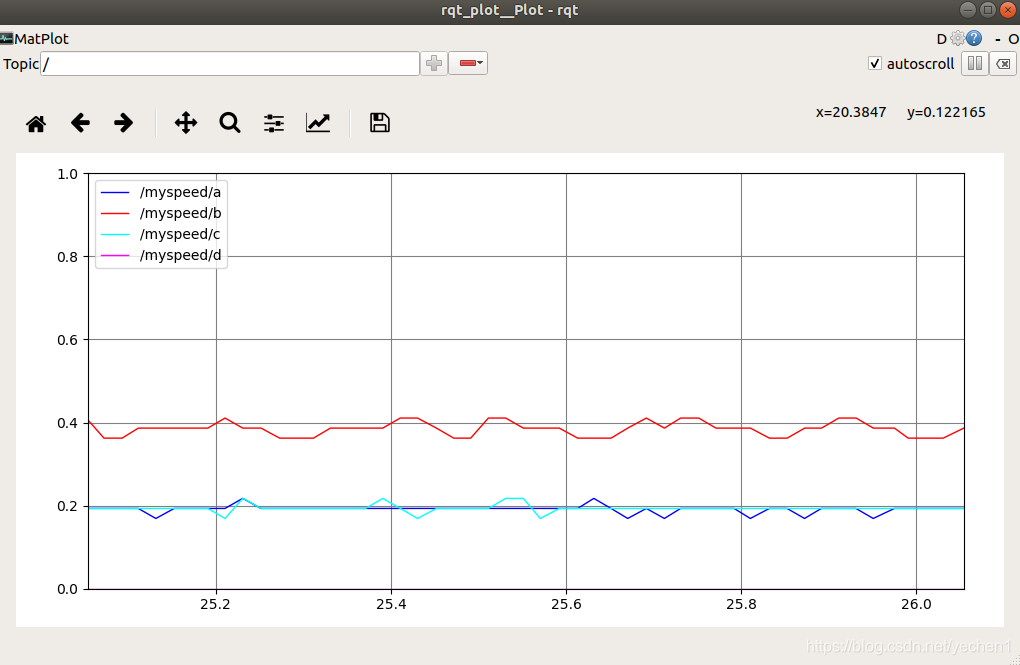
在这里插入图片描述


三、速度参数更改;

不完善:

1. 代码

在这里插入图片描述
增加节点:
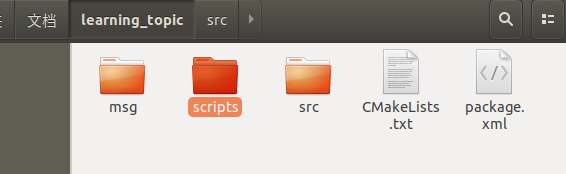
speed_publisher.py:

#!/usr/bin/env python
# -*- coding: utf-8 -*-
# 该例程将发布/speed_info话题,自定义消息类型topic_example::Personimport rospy
from topic_example.msg import speeddef velocity_publisher():# ROS节点初始化rospy.init_node('speed_publisher', anonymous=True)# 创建一个Publisher,发布名为/person_info的topic,消息类型为learning_topic::Person,队列长度10speed_info_pub = rospy.Publisher('/speed_info', speed, queue_size=10)#设置循环的频率rate = rospy.Rate(10) while not rospy.is_shutdown():# 初始化learning_topic::Person类型的消息speed_msg = speed()speed_msg.a = 0.3;speed_msg.b = 0.2;speed_msg.c = 0.4;# 发布消息speed_info_pub.publish(speed_msg)rospy.loginfo("Publsh speed message[%f, %f, %f]", speed_msg.a, speed_msg.b, speed_msg.c)# 按照循环频率延时rate.sleep()if __name__ == '__main__':try:velocity_publisher()except rospy.ROSInterruptException:pass

更改:
publish_node.cpp:

#include "ros/ros.h"
#include "std_msgs/String.h" //use data struct of std_msgs/String  
#include "mbot_linux_serial.h"
#include "topic_example/speed.h"
#include 
#include 
#include using namespace std;
//test send value
//double testSend1 = 0.2;
//double testSend2 = 0.4;
//double testSend3 = 0.3;
//double testSend4 = 0.3;
//unsigned char testSend5 = 0x07;//test receive value
double testRece1=0.0;                                               
double testRece2=0.0;
double testRece3=0.0;
double testRece4=0.0;
unsigned char testRece5=0x00;// 接收到订阅的消息后,会进入消息回调函数
void speedInfoCallback(const topic_example::speed::ConstPtr& msg)
{// 将接收到的消息打印出来ROS_INFO("Subcribe speed Info: a:%f  b:%f  c:%f", msg->a, msg->b, msg->c);//test send value
double testSend1 =msg->a;
double testSend2 =msg->b;
double testSend3 = msg->c;
double testSend4 = 0;
unsigned char testSend5 = 0x07;//向STM32端发送数据,前两个为double类型,最后一个为unsigned char类型writeSpeed(testSend1,testSend2,testSend3,testSend4,testSend5);//打印数据ROS_INFO("send to stm32:%f,%f,%f,%f,%d\n",testSend1,testSend2,testSend3,testSend4,testSend5);}int main(int agrc,char **argv)
{ros::init(agrc,argv,"public_node");ros::NodeHandle nh;ros::Publisher my_pub = nh.advertise<topic_example::speed>("myspeed",1);// 创建一个Subscriber,订阅名为/person_info的topic,注册回调函数personInfoCallbackros::Subscriber person_info_sub = nh.subscribe("/speed_info", 10, speedInfoCallback);topic_example::speed msg;ros::Rate loop_rate(50);//串口初始化serialInit();double t=0;while(ros::ok()){ros::spinOnce();//从STM32接收数据,输入参数依次转化为小车的线速度、角速度、航向角(角度)、预留控制位readSpeed(testRece1,testRece2,testRece3,testRece4,testRece5);msg.a=testRece1;msg.b=testRece2;msg.c=testRece3;msg.d=testRece4;my_pub.publish(msg);//打印数据ROS_INFO("recevie form STM32:%f,%f,%f,%f,%d\n",testRece1,testRece2,testRece3,testRece4,testRece5);loop_rate.sleep();t+=1.0/50.0;}return 0;
}

2.操作实现:

代码如下(示例):

$ roscore 
$ rosrun topic_example publish_node
$ rqt_plot /myspeed

总结

以上就是今天要讲的内容,本文仅仅简单介绍了 rqt_plot 的使用,而 rqt_plot 提供了大量能使我们快速便捷地处理数据的函数和方法。


本文来自互联网用户投稿,文章观点仅代表作者本人,不代表本站立场,不承担相关法律责任。如若转载,请注明出处。 如若内容造成侵权/违法违规/事实不符,请点击【内容举报】进行投诉反馈!

相关文章

立即
投稿

微信公众账号

微信扫一扫加关注

返回
顶部