android 布局分析,Android编程布局(Layout)之AbsoluteLayout用法实例分析
本文实例讲述了Android编程布局(Layout)之AbsoluteLayout用法。分享给大家供大家参考,具体如下:
AbsoluteLayout,顾名思义,就是绝对位置的布局;也可以叫做坐标布局,也就是指定元素的绝对位置(或者叫绝对坐标值)。这种布局简单直接,直观性强,但是由于手机屏幕尺寸差别比较大,使用绝对定位的适应性会比较差。
android:layout_width="fill_parent"
android:layout_height="wrap_content"
android:padding="10dip">
android:layout_width="fill_parent"
android:layout_height="wrap_content"
android:text="请输入用户名:"/>
android:layout_width="fill_parent"
android:layout_height="wrap_content"
android:layout_x="100dip"
android:layout_y="20dip"/>
android:layout_width="wrap_content"
android:layout_height="wrap_content"
android:layout_x="10dip"
android:layout_y="50dip"
android:text="取消"/>
android:layout_width="wrap_content"
android:layout_height="wrap_content"
android:layout_x="60dip"
android:layout_y="50dip"
android:text="确定"/>
效果如下:
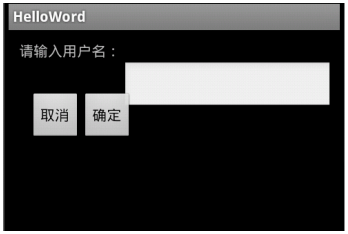
如果不指定Layout_x 和Layout_y 那么默认都为0.回显示在最左上角。
希望本文所述对大家Android程序设计有所帮助。
本文来自互联网用户投稿,文章观点仅代表作者本人,不代表本站立场,不承担相关法律责任。如若转载,请注明出处。 如若内容造成侵权/违法违规/事实不符,请点击【内容举报】进行投诉反馈!