JAVA:基于apache POI读写Excel文档
依存关系
首先,我们需要添加所需的依赖关系,以便在项目中包含Apache POI。
如果使用Maven,则需要向pom.xml文件中添加以下依赖项
org.apache.poi poi 3.17
org.apache.poi poi-ooxml 3.17
如果使用Gradle
在你的build.gradle 文件中加入以下内容
compile "org.apache.poi:poi:3.17"
compile "org.apache.poi:poi-ooxml:3.17"
(版本号根据自己的poi版本修改)
这里第一个poi是用来处理.xls旧版文档用
第二个poi-ooxml是用来处理.xlsx文档使用
POI的专业术语
1.Workbook:工作簿,也就是一个.xlsx/.xls文档。
2.sheet:每个工作簿里有多个sheet。
3.Row:一行
4.Cell:一列
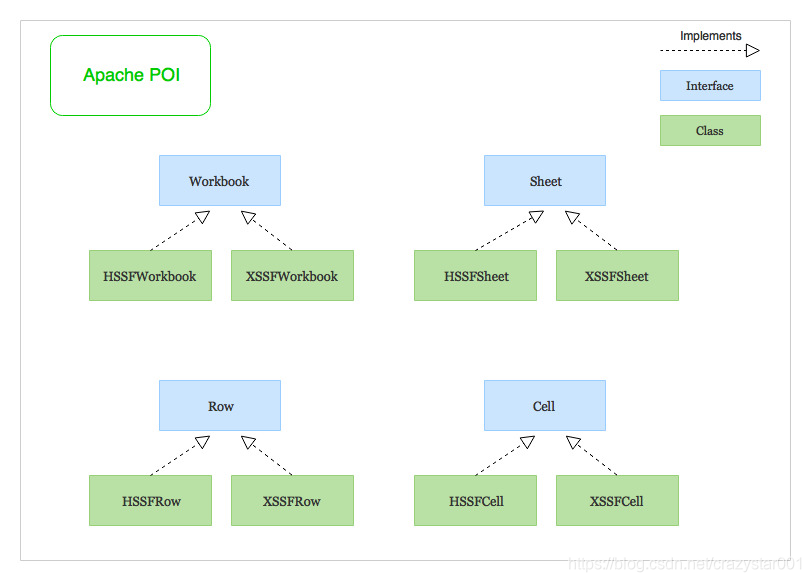
POI的两种implement
HSSF (Horrible SpreadSheet Format) :
HSSFWorkbook,HSSFSheet,HSSFRow和HSSFCell用于工作与旧的二进制文件格式的Excel文件-.xls
XSSF (XML SpreadSheet Format):
XSSF实现用于处理基于XML的新文件格式- .xlsx
使用POI来读取excel–JAVA
该程序显示了在excel文件中的工作表,行和列上进行迭代的三种不同方式
import org.apache.poi.openxml4j.exceptions.InvalidFormatException;
import org.apache.poi.ss.usermodel.*;
import java.io.File;
import java.io.IOException;
import java.util.Iterator;public class ExcelReader {public static final String SAMPLE_XLSX_FILE_PATH = "./sample-xlsx-file.xlsx";public static void main(String[] args) throws IOException, InvalidFormatException {// Creating a Workbook from an Excel file (.xls or .xlsx)Workbook workbook = WorkbookFactory.create(new File(SAMPLE_XLSX_FILE_PATH));// Retrieving the number of sheets in the WorkbookSystem.out.println("Workbook has " + workbook.getNumberOfSheets() + " Sheets : ");/*=============================================================Iterating over all the sheets in the workbook (Multiple ways)=============================================================*/// 1. You can obtain a sheetIterator and iterate over itIterator<Sheet> sheetIterator = workbook.sheetIterator();System.out.println("Retrieving Sheets using Iterator");while (sheetIterator.hasNext()) {Sheet sheet = sheetIterator.next();System.out.println("=> " + sheet.getSheetName());}// 2. Or you can use a for-each loopSystem.out.println("Retrieving Sheets using for-each loop");for(Sheet sheet: workbook) {System.out.println("=> " + sheet.getSheetName());}// 3. Or you can use a Java 8 forEach with lambdaSystem.out.println("Retrieving Sheets using Java 8 forEach with lambda");workbook.forEach(sheet -> {System.out.println("=> " + sheet.getSheetName());});/*==================================================================Iterating over all the rows and columns in a Sheet (Multiple ways)==================================================================*/// Getting the Sheet at index zeroSheet sheet = workbook.getSheetAt(0);// Create a DataFormatter to format and get each cell's value as StringDataFormatter dataFormatter = new DataFormatter();// 1. You can obtain a rowIterator and columnIterator and iterate over themSystem.out.println("\n\nIterating over Rows and Columns using Iterator\n");Iterator<Row> rowIterator = sheet.rowIterator();while (rowIterator.hasNext()) {Row row = rowIterator.next();// Now let's iterate over the columns of the current rowIterator<Cell> cellIterator = row.cellIterator();while (cellIterator.hasNext()) {Cell cell = cellIterator.next();String cellValue = dataFormatter.formatCellValue(cell);System.out.print(cellValue + "\t");}System.out.println();}// 2. Or you can use a for-each loop to iterate over the rows and columnsSystem.out.println("\n\nIterating over Rows and Columns using for-each loop\n");for (Row row: sheet) {for(Cell cell: row) {String cellValue = dataFormatter.formatCellValue(cell);System.out.print(cellValue + "\t");}System.out.println();}// 3. Or you can use Java 8 forEach loop with lambdaSystem.out.println("\n\nIterating over Rows and Columns using Java 8 forEach with lambda\n");sheet.forEach(row -> {row.forEach(cell -> {String cellValue = dataFormatter.formatCellValue(cell);System.out.print(cellValue + "\t");});System.out.println();});// Closing the workbookworkbook.close();}
}
这里我们没有用像HSSFWorkbook和这样的具体类XSSFWorkbook来创建工作簿的实例,而是用一个WorkbookFactory来代替创建工作簿,这样我们两种类型文件都能适用(.xls/.xlsx)
这个程序用了三种遍历方法
这里使用了DataFormatter来格式化并获取每个单元格的值作为String。
通过CellType检索单元格值
private static void printCellValue(Cell cell) {switch (cell.getCellTypeEnum()) {case BOOLEAN:System.out.print(cell.getBooleanCellValue());break;case STRING:System.out.print(cell.getRichStringCellValue().getString());break;case NUMERIC:if (DateUtil.isCellDateFormatted(cell)) {System.out.print(cell.getDateCellValue());} else {System.out.print(cell.getNumericCellValue());}break;case FORMULA:System.out.print(cell.getCellFormula());break;case BLANK:System.out.print("");break;default:System.out.print("");}System.out.print("\t");
}
接下来你可以从主函数调用这个方法来输出每个cell的值
sheet.forEach(row -> {row.forEach(cell -> {printCellValue(cell);});System.out.println();
});
创建一个Excel文件并且向里面写入数据
注:这里用XSSFWorkbook来创建Workbook实例,适用.xlsx文件
import org.apache.poi.openxml4j.exceptions.InvalidFormatException;
import org.apache.poi.ss.usermodel.*;
import org.apache.poi.xssf.usermodel.XSSFWorkbook;import java.io.FileOutputStream;
import java.io.IOException;
import java.util.ArrayList;
import java.util.Calendar;
import java.util.Date;
import java.util.List;public class ExcelWriter {private static String[] columns = {"Name", "Email", "Date Of Birth", "Salary"};private static List<Employee> employees =  new ArrayList<>();// Initializing employees data to insert into the excel filestatic {Calendar dateOfBirth = Calendar.getInstance();dateOfBirth.set(1992, 7, 21);employees.add(new Employee("Rajeev Singh", "rajeev@example.com", dateOfBirth.getTime(), 1200000.0));dateOfBirth.set(1965, 10, 15);employees.add(new Employee("Thomas cook", "thomas@example.com", dateOfBirth.getTime(), 1500000.0));dateOfBirth.set(1987, 4, 18);employees.add(new Employee("Steve Maiden", "steve@example.com", dateOfBirth.getTime(), 1800000.0));}public static void main(String[] args) throws IOException, InvalidFormatException {// Create a WorkbookWorkbook workbook = new XSSFWorkbook(); // new HSSFWorkbook() for generating `.xls` file/* CreationHelper helps us create instances of various things like DataFormat, Hyperlink, RichTextString etc, in a format (HSSF, XSSF) independent way */CreationHelper createHelper = workbook.getCreationHelper();// Create a SheetSheet sheet = workbook.createSheet("Employee");// Create a Font for styling header cellsFont headerFont = workbook.createFont();headerFont.setBold(true);headerFont.setFontHeightInPoints((short) 14);headerFont.setColor(IndexedColors.RED.getIndex());// Create a CellStyle with the fontCellStyle headerCellStyle = workbook.createCellStyle();headerCellStyle.setFont(headerFont);// Create a RowRow headerRow = sheet.createRow(0);// Create cellsfor(int i = 0; i < columns.length; i++) {Cell cell = headerRow.createCell(i);cell.setCellValue(columns[i]);cell.setCellStyle(headerCellStyle);}// Create Cell Style for formatting DateCellStyle dateCellStyle = workbook.createCellStyle();dateCellStyle.setDataFormat(createHelper.createDataFormat().getFormat("dd-MM-yyyy"));// Create Other rows and cells with employees dataint rowNum = 1;for(Employee employee: employees) {Row row = sheet.createRow(rowNum++);row.createCell(0).setCellValue(employee.getName());row.createCell(1).setCellValue(employee.getEmail());Cell dateOfBirthCell = row.createCell(2);dateOfBirthCell.setCellValue(employee.getDateOfBirth());dateOfBirthCell.setCellStyle(dateCellStyle);row.createCell(3).setCellValue(employee.getSalary());}// Resize all columns to fit the content sizefor(int i = 0; i < columns.length; i++) {sheet.autoSizeColumn(i);}// Write the output to a fileFileOutputStream fileOut = new FileOutputStream("poi-generated-file.xlsx");workbook.write(fileOut);fileOut.close();// Closing the workbookworkbook.close();}}
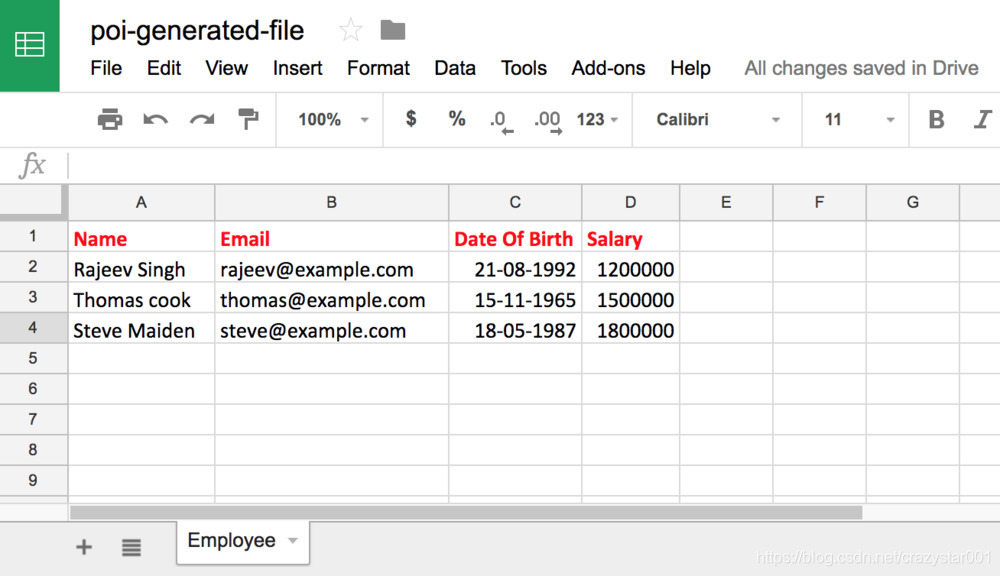
在上面的程序中,我们首先使用XSSFWorkbook类创建了一个工作簿。然后我们创建了一个名为“ Employee”的工作表。之创建了标题行和列。标题单元格用了不同的字体样式。
创建标题行后,我们从employ list中创建了其他行和列。
接下来,我们使用sheet.autoSizeColumn()方法来调整所有列的大小以适合内容的大小。
最后,我们输出写入文件。以下是通过运行上述程序生成的文件:
下面是对现有的文件打开并进行追加读写
private static void modifyExistingWorkbook() throws InvalidFormatException, IOException {// Obtain a workbook from the excel fileWorkbook workbook = WorkbookFactory.create(new File("existing-spreadsheet.xlsx"));// Get Sheet at index 0Sheet sheet = workbook.getSheetAt(0);// Get Row at index 1Row row = sheet.getRow(1);// Get the Cell at index 2 from the above rowCell cell = row.getCell(2);// Create the cell if it doesn't existif (cell == null)cell = row.createCell(2);// Update the cell's valuecell.setCellType(CellType.STRING);cell.setCellValue("Updated Value");// Write the output to the fileFileOutputStream fileOut = new FileOutputStream("existing-spreadsheet.xlsx");workbook.write(fileOut);fileOut.close();// Closing the workbookworkbook.close();
}
附上Github中的实例:
java-read-write-excel-file-using-apache-poi
本文来自互联网用户投稿,文章观点仅代表作者本人,不代表本站立场,不承担相关法律责任。如若转载,请注明出处。 如若内容造成侵权/违法违规/事实不符,请点击【内容举报】进行投诉反馈!