unity水波实现
unity实现简单水波
- 实现水波
- 简单水波通过纹理缩放来搞
- 带点交互的水
- shader 代码
- C# 脚本代码
实现水波
实现一下水的效果
简单水波通过纹理缩放来搞
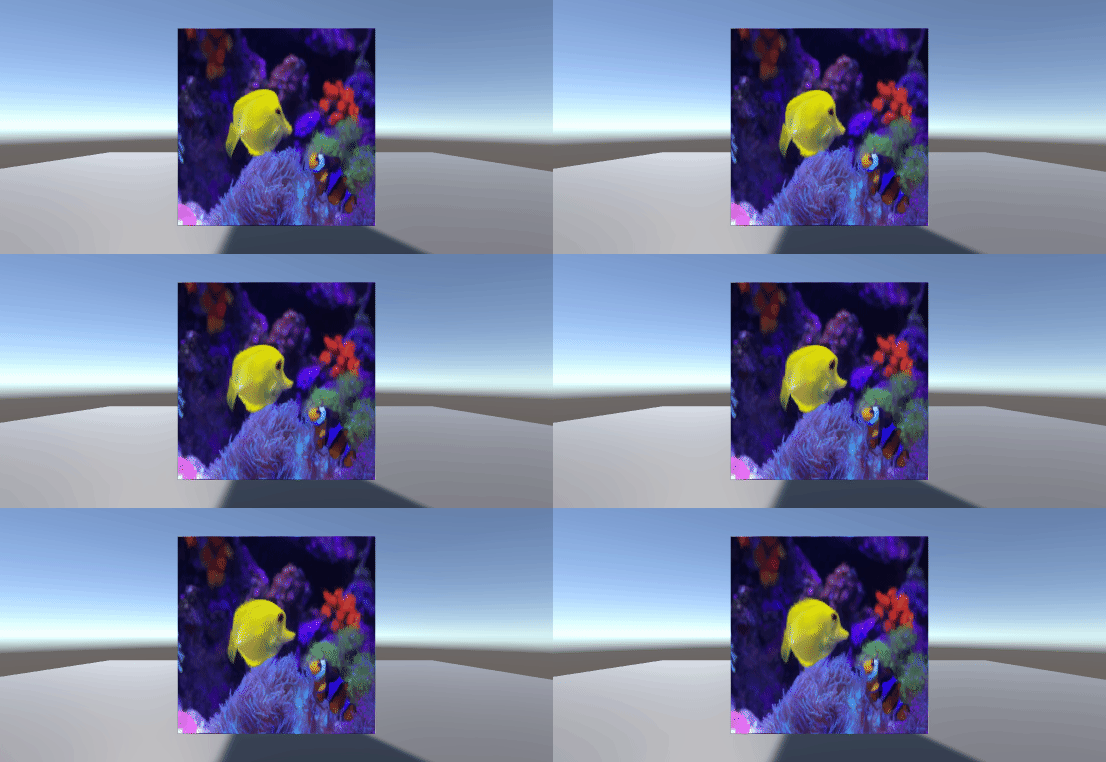
这简直就是简单的一个函数 代码如下
Shader "Custom/s8"
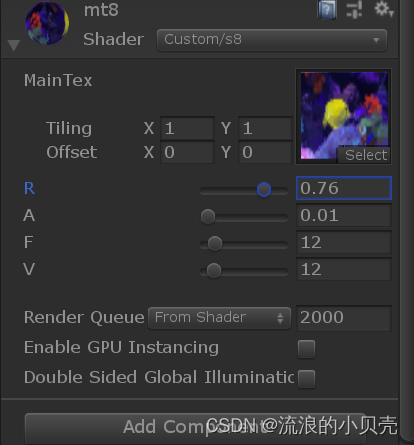
{Properties{_MainTex("MainTex", 2D) = ""{}_R("R", Range(0, 1)) = 0.1_A("A", Range(0, 0.5)) = 0.01_F("F", Range(0, 100)) = 5_V("V", Range(1, 100)) = 1}SubShader{Pass{CGPROGRAM#pragma vertex vert#pragma fragment frag#include "unitycg.cginc"#include "lighting.cginc"sampler2D _MainTex;float4 _MainTex_ST;float _R;float _A;float _F;float _V;struct v2f{float4 pos:POSITION;float2 uv:TEXCOORD;};v2f vert(appdata_base v){v2f o;o.pos = UnityObjectToClipPos(v.vertex);o.uv = TRANSFORM_TEX(v.texcoord, _MainTex);return o;}fixed4 frag(v2f i):COLOR{float2 uv = i.uv;if(_R > 0){float dis = distance(uv, float2(0.5, 0.5));uv += _A * saturate(1- dis/_R) * sin(- dis * UNITY_PI * _F + _Time.y * _V);}return tex2D(_MainTex, uv);}ENDCG}}FallBack "Diffuse"
}
R 半径
A 振幅
F 频率
V 速度
带点交互的水
没有折射什么的 主要是生成水波

我还是喜欢看妹子,尤其大白兔~
shader 代码
Shader "Custom/s9"
{Properties{_MainTex("MainTex", 2D) = ""{}_A("A", range(0,1)) = 0.25}SubShader{Pass{CGPROGRAM#pragma vertex vert#pragma fragment frag#include "unitycg.cginc"#include "lighting.cginc"sampler2D _MainTex;float4 _MainTex_ST;sampler2D _WaveTex;float _A;struct v2f{float4 pos:POSITION;float2 uv:TEXCOORD;};v2f vert(appdata_base v){v2f o;o.pos = UnityObjectToClipPos(v.vertex);o.uv = TRANSFORM_TEX(v.texcoord, _MainTex);return o;}fixed4 frag(v2f i):COLOR{float uv = tex2D(_WaveTex, i.uv).xy;uv = uv * 2 -1;uv *= _A;return tex2D(_MainTex, i.uv + uv);}ENDCG}}FallBack "Diffuse"
}
C# 脚本代码
效率不是很高呀
using System.Collections;
using System.Collections.Generic;
using UnityEngine;public class Wave : MonoBehaviour
{public int waveWidth;public int waveHeight;public float atten;public int radius;float[,] waveA;float[,] waveB;Texture2D tex_uv;// Start is called before the first frame updatevoid Start(){waveA = new float[waveWidth, waveHeight];waveB = new float[waveWidth, waveHeight];tex_uv = new Texture2D(waveWidth, waveHeight);GetComponent<Renderer>().material.SetTexture("_WaveTex", tex_uv);}// Update is called once per framevoid Update(){if (Input.GetMouseButton(0)){RaycastHit hit;Ray ray = Camera.main.ScreenPointToRay(Input.mousePosition);if (Physics.Raycast(ray, out hit)){Vector3 pos = transform.worldToLocalMatrix.MultiplyPoint(hit.point);int w = (int)((pos.x + 0.5f) * waveWidth);int h =(int)((pos.y + 0.5f) * waveHeight);PutDrop(w, h);}}ComputWave();}void PutDrop(int x, int y){float dist = 0.0f;for (int i = -radius; i <= radius; i++){for (int j = -radius; j <= radius; j++){int w = x + i;int h = y + j;if (w >= 0 && w < (waveWidth - 1) && h >= 0 && h <(waveHeight - 1)){dist = Mathf.Sqrt(i * i + j * j);if (dist < radius){waveA[x + i, y + j] = Mathf.Cos(dist * Mathf.PI / radius);}}}}}void ComputWave(){for (int w = 1; w < waveWidth - 1; w++){for (int h = 1; h < waveHeight - 1; h++){waveB[w, h] = (waveA[w - 1, h - 1] + waveA[w - 1, h] + waveA[w - 1, h + 1]+ waveA[w, h - 1] + waveA[w, h + 1]+ waveA[w + 1, h - 1] + waveA[w + 1, h] + waveA[w + 1, h + 1]) / 4.0f - waveB[w, h];if (waveB[w, h] > 1.0f){waveB[w, h] = 1.0f;}if (waveB[w, h] < -1.0f){waveB[w, h] = -1.0f;}float offset_u = (waveB[w - 1, h] - waveB[w + 1, h]) / 2.0f;float offset_v = (waveB[w, h - 1] - waveB[w, h + 1]) / 2.0f;float r = offset_u / 2.0f + 0.5f;float g = offset_v / 2.0f + 0.5f;tex_uv.SetPixel(w, h, new Color(r, g, 0.0f));waveB[w, h] -= waveB[w, h] * atten;}}tex_uv.Apply();float[,] temp = waveA;waveA = waveB;waveB = temp;}
}
还是想学习webgl water的实现 感觉高大上,~
本文来自互联网用户投稿,文章观点仅代表作者本人,不代表本站立场,不承担相关法律责任。如若转载,请注明出处。 如若内容造成侵权/违法违规/事实不符,请点击【内容举报】进行投诉反馈!