React官网 - 井字棋 - 游戏改进参考答案(含汉化和完整范例代码)
React 官网 - 井字棋 - 游戏教程
游戏改进要求
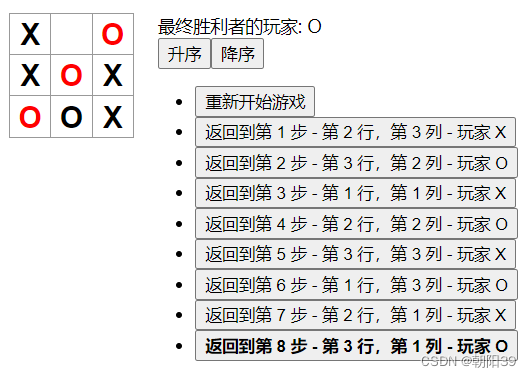
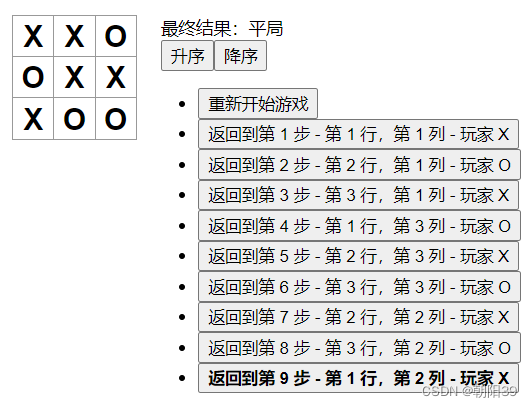
- 在游戏历史记录列表显示每一步棋的坐标,格式为 (列号, 行号)。
- 在历史记录列表中加粗显示当前选择的项目。
- 使用两个循环来渲染出棋盘的格子,而不是在代码里写死(hardcode)。
- 添加一个可以升序或降序显示历史记录的按钮。
- 每当有人获胜时,高亮显示连成一线的 3 颗棋子。
- 当无人获胜时,显示一个平局的消息。
最终效果
完整范例代码
src\index.js
import React from "react";
import ReactDOM from "react-dom";
import "./index.css";function Square(props) {return (<buttonclassName={(props.winList || []).includes(props.num) ? "square win" : "square"}onClick={props.onClick}>{props.value}</button>);
}class Board extends React.Component {renderSquare(i) {return (<SquarewinList={this.props.winList}num={i}key={i.toString()}value={this.props.squares[i]}onClick={() => this.props.onClick(i)}/>);}render() {let arr = Array(3).fill(null);let num = 0;return (<div>{arr.map(() => (<div className="board-row" key={num.toString()}>{arr.map(() => {let cloumn = this.renderSquare(num);num = num + 1;return cloumn;})}</div>))}</div>);}
}class Game extends React.Component {constructor(props) {super(props);this.state = {history: [{squares: Array(9).fill(null),},],stepNumber: 0,xIsNext: true,};}handleClick(i) {const history = this.state.history.slice(0, this.state.stepNumber + 1);const current = history[history.length - 1];const squares = current.squares.slice();if (calculateWinner(squares) || squares[i]) {return;}squares[i] = this.state.xIsNext ? "X" : "O";this.setState({history: history.concat([{squares: squares,position: {row: Math.floor(i / 3) + 1,cloumn: (i % 3) + 1,},player: this.state.xIsNext ? "X" : "O",stepNumber: this.state.stepNumber + 1,},]),stepNumber: history.length,xIsNext: !this.state.xIsNext,});}jumpTo(step) {this.setState({stepNumber: step,xIsNext: step % 2 === 0,});}asc() {this.setState({history: this.state.history.sort((a, b) => a.stepNumber - b.stepNumber),});}des() {this.setState({history: this.state.history.sort((a, b) => b.stepNumber - a.stepNumber),});}render() {const history = this.state.history;let current = {};if (history.length > 1) {history.forEach((item) => {if (item.stepNumber === this.state.stepNumber) {current = item;}});} else {current = history[this.state.stepNumber];}const result = calculateWinner(current.squares);let winner = "";if (result) {winner = result.winner;}const moves = history.map((item, move) => {const desc = move? `返回到第 ${item.stepNumber} 步 - 第 ${item.position.row} 行,第 ${item.position.cloumn} 列 - 玩家 ${item.player} `: "重新开始游戏";return (<li key={move}><buttonclassName={this.state.stepNumber === item.stepNumber ? "bold" : ""}onClick={() => this.jumpTo(move)}>{desc}</button></li>);});let status;if (winner) {status = "最终胜利者的玩家: " + winner;} else {if (this.state.stepNumber >= 9) {status = "最终结果:平局";} else {status = "请玩家  " + (this.state.xIsNext ? "X" : "O") + " 落子";}}return (<div className="game"><div className="game-board"><BoardwinList={result && result.winList}squares={current.squares}onClick={(i) => this.handleClick(i)}/></div><div className="game-info"><div>{status}</div><button onClick={() => this.asc()}>升序</button><button onClick={() => this.des()}>降序</button><ul>{moves}</ul></div></div>);}
}function calculateWinner(squares) {const lines = [[0, 1, 2],[3, 4, 5],[6, 7, 8],[0, 3, 6],[1, 4, 7],[2, 5, 8],[0, 4, 8],[2, 4, 6],];for (let i = 0; i < lines.length; i++) {const [a, b, c] = lines[i];if (squares[a] && squares[a] === squares[b] && squares[a] === squares[c]) {return {winner: squares[a],winList: [a, b, c],};}}return null;
}const root = ReactDOM.createRoot(document.getElementById("root"));
root.render(<Game />);
src\index.css
body {font: 14px "Century Gothic", Futura, sans-serif;margin: 20px;
}ol,
ul {padding-left: 30px;
}.board-row:after {clear: both;content: "";display: table;
}.status {margin-bottom: 10px;
}.square {background: #fff;border: 1px solid #999;float: left;font-size: 24px;font-weight: bold;line-height: 34px;height: 34px;margin-right: -1px;margin-top: -1px;padding: 0;text-align: center;width: 34px;
}.square:focus {outline: none;
}.kbd-navigation .square:focus {background: #ddd;
}.game {display: flex;flex-direction: row;
}.game-info {margin-left: 20px;
}.bold{font-weight: bold;
}.win{color: red;
}
本文来自互联网用户投稿,文章观点仅代表作者本人,不代表本站立场,不承担相关法律责任。如若转载,请注明出处。 如若内容造成侵权/违法违规/事实不符,请点击【内容举报】进行投诉反馈!