编写一个简单的智能家居APP
智能家居APP
- 简介
- 开头页面
- 布局文件
- 代码
- 主页面
- 布局文件
- 代码
简介
- 这个APP是为了通过socket传递指令给树莓派,并从树莓派获取温湿度等信息而设计的,包含两个页面。
开头页面
- hello页面。右上角放一个倒计时,倒计时结束后跳转到主页面。此页面类似一些APP的开头广告。

布局文件
<RelativeLayout xmlns:android="http://schemas.android.com/apk/res/android"xmlns:app="http://schemas.android.com/apk/res-auto"xmlns:tools="http://schemas.android.com/tools"android:layout_width="match_parent"android:layout_height="match_parent"tools:context=".helloActivity"android:background="@mipmap/hello"><TextViewandroid:id="@+id/text"android:layout_width="wrap_content"android:layout_height="wrap_content"android:layout_alignParentRight="true"android:layout_marginTop="30dp"android:layout_marginRight="20dp"android:textSize="23sp"android:textColor="#E91E63"/>RelativeLayout>
代码
public class helloActivity extends AppCompatActivity {@Overrideprotected void onCreate(Bundle savedInstanceState) {super.onCreate(savedInstanceState);setContentView(R.layout.activity_hello);final TextView text = (TextView)findViewById(R.id.text);final Handler handler = new Handler(){@Overridepublic void handleMessage(@NonNull Message msg) {super.handleMessage(msg);text.setText(msg.what + "s");}};final Intent i = new Intent(this,MainActivity.class);Thread t = new Thread(new Runnable() {@Overridepublic void run() {try {int i;for (i=5;i>0;i--){Message mag = new Message();mag.what = i;handler.sendMessage(mag);Thread.sleep(1000);}} catch (InterruptedException e) {e.printStackTrace();}startActivity(i);finish();}});t.start();}
}
主页面
- 该页面包含两部分,上面的部分通过WebView访问树莓派摄像头的网页,显示摄像头画面。
- 下面的部分显示从树莓派获取的温湿度和火焰信息和发送一些命令
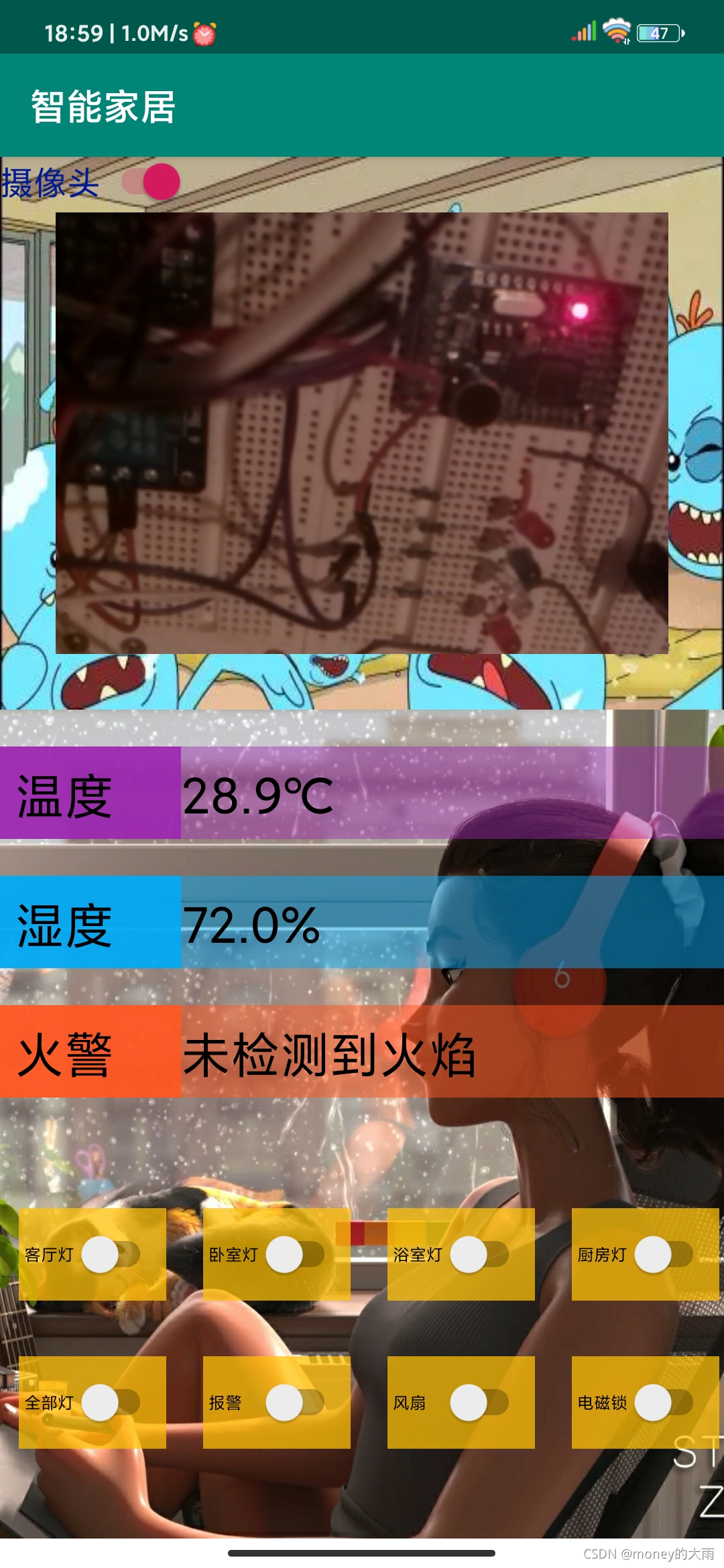
布局文件
<RelativeLayout xmlns:android="http://schemas.android.com/apk/res/android"xmlns:app="http://schemas.android.com/apk/res-auto"xmlns:tools="http://schemas.android.com/tools"android:layout_width="match_parent"android:layout_height="match_parent"tools:context=".MainActivity"><RelativeLayoutandroid:id="@+id/RL1"android:layout_width="match_parent"android:layout_height="300dp"android:background="@mipmap/mr"><WebViewandroid:id="@+id/web"android:layout_width="match_parent"android:layout_height="match_parent"android:layout_margin="30dp"/><Switchandroid:id="@+id/switch1"android:layout_width="wrap_content"android:layout_height="wrap_content"android:text="摄像头"android:textColor="#001B96"android:textSize="18sp" />RelativeLayout><RelativeLayoutandroid:layout_width="match_parent"android:layout_height="match_parent"android:layout_alignRight="@id/RL1"android:layout_below="@id/RL1"android:background="@mipmap/home"><LinearLayoutandroid:id="@+id/LL1"android:layout_width="match_parent"android:layout_height="wrap_content"android:layout_marginTop="20dp"android:orientation="horizontal"android:background="#739C27B0"><TextViewandroid:layout_width="0dp"android:layout_height="50dp"android:layout_weight="1"android:padding="8dp"android:background="#E59C27B0"android:text="温度"android:textSize="27sp"android:textColor="#000"/><TextViewandroid:id="@+id/TMP"android:layout_width="0dp"android:layout_height="50dp"android:layout_weight="3"android:text="0℃"android:textSize="27sp"android:textColor="#000"/>LinearLayout><LinearLayoutandroid:id="@+id/LL2"android:layout_width="match_parent"android:layout_height="wrap_content"android:layout_marginTop="20dp"android:layout_below="@id/LL1"android:orientation="horizontal"android:background="#7C03A9F4"><TextViewandroid:layout_width="0dp"android:layout_height="50dp"android:layout_weight="1"android:padding="8dp"android:background="#E803A9F4"android:text="湿度"android:textSize="27sp"android:textColor="#000"/><TextViewandroid:id="@+id/RH"android:layout_width="0dp"android:layout_height="50dp"android:layout_weight="3"android:text="0%"android:textSize="27sp"android:textColor="#000"/>LinearLayout><LinearLayoutandroid:id="@+id/LL3"android:layout_width="match_parent"android:layout_height="wrap_content"android:layout_marginTop="20dp"android:layout_below="@id/LL2"android:orientation="horizontal"android:background="#80FF5722"><TextViewandroid:layout_width="0dp"android:layout_height="50dp"android:layout_weight="1"android:padding="8dp"android:background="#E7FF5722"android:text="火警"android:textSize="27sp"android:textColor="#000"/><TextViewandroid:id="@+id/fire"android:layout_width="0dp"android:layout_height="50dp"android:layout_weight="3"android:text="未检测到火焰"android:textSize="27sp"android:textColor="#000"/>LinearLayout><LinearLayoutandroid:id="@+id/LL4"android:layout_width="match_parent"android:layout_height="wrap_content"android:layout_marginTop="60dp"android:layout_below="@id/LL3"android:orientation="horizontal"><Switchandroid:id="@+id/S1"android:layout_width="80dp"android:layout_height="50dp"android:layout_marginLeft="10dp"android:padding="3dp"android:text="客厅灯"android:textSize="9sp"android:background="#BDFFC107"/><Switchandroid:id="@+id/S2"android:layout_width="80dp"android:layout_height="50dp"android:layout_marginLeft="20dp"android:padding="3dp"android:text="卧室灯"android:textSize="9sp"android:background="#BDFFC107"/><Switchandroid:id="@+id/S3"android:layout_width="80dp"android:layout_height="50dp"android:layout_marginLeft="20dp"android:padding="3dp"android:text="浴室灯"android:textSize="9sp"android:background="#BDFFC107"/><Switchandroid:id="@+id/S4"android:layout_width="80dp"android:layout_height="50dp"android:layout_marginLeft="20dp"android:padding="3dp"android:text="厨房灯"android:textSize="9sp"android:background="#BDFFC107"/>LinearLayout><LinearLayoutandroid:id="@+id/LL5"android:layout_width="match_parent"android:layout_height="wrap_content"android:layout_marginTop="30dp"android:layout_below="@id/LL4"android:orientation="horizontal"><Switchandroid:id="@+id/S5"android:layout_width="80dp"android:layout_height="50dp"android:layout_marginLeft="10dp"android:padding="3dp"android:text="全部灯"android:textSize="9sp"android:background="#BDFFC107"/><Switchandroid:id="@+id/S6"android:layout_width="80dp"android:layout_height="50dp"android:layout_marginLeft="20dp"android:padding="3dp"android:text="报警"android:textSize="9sp"android:background="#BDFFC107"/><Switchandroid:id="@+id/S7"android:layout_width="80dp"android:layout_height="50dp"android:layout_marginLeft="20dp"android:padding="3dp"android:text="风扇"android:textSize="9sp"android:background="#BDFFC107"/><Switchandroid:id="@+id/S8"android:layout_width="80dp"android:layout_height="50dp"android:layout_marginLeft="20dp"android:padding="3dp"android:text="电磁锁"android:textSize="9sp"android:background="#BDFFC107"/>LinearLayout>RelativeLayout>RelativeLayout>代码
class switchChecked implements CompoundButton.OnCheckedChangeListener{String data;public void onCheckedChanged(CompoundButton buttonView, boolean isChecked){if (isChecked){switch (buttonView.getId()){case R.id.S1:data="LA1";break;case R.id.S2:data="LB1";break;case R.id.S3:data="LC1";break;case R.id.S4:data="LD1";break;case R.id.S5:data="L1";break;case R.id.S6:data="BEEP1";break;}}else {switch (buttonView.getId()){case R.id.S1:data="LA0";break;case R.id.S2:data="LB0";break;case R.id.S3:data="LC0";break;case R.id.S4:data="LD0";break;case R.id.S5:data="L0";break;case R.id.S6:data="BEEP0";break;}}new Thread(new Runnable(){public void run(){try {Socket client = new Socket("192.168.8.110",6666);OutputStream out = client.getOutputStream();out.write(data.getBytes());client.close();} catch (UnknownHostException e) {// TODO Auto-generated catch blocke.printStackTrace();} catch (IOException e) {e.printStackTrace();}}}).start();}
}public class MainActivity extends AppCompatActivity {WebView web;Switch s;Switch s1;Switch s2;Switch s3;Switch s4;Switch s5;Switch s6;Switch s7;Switch s8;TextView TMP;TextView RH;TextView fire;@Overrideprotected void onCreate(Bundle savedInstanceState) {super.onCreate(savedInstanceState);setContentView(R.layout.activity_main);s = (Switch)findViewById(R.id.switch1);s1 = (Switch)findViewById(R.id.S1);s2 = (Switch)findViewById(R.id.S2);s3 = (Switch)findViewById(R.id.S3);s4 = (Switch)findViewById(R.id.S4);s5 = (Switch)findViewById(R.id.S5);s6 = (Switch)findViewById(R.id.S6);s7 = (Switch)findViewById(R.id.S7);s8 = (Switch)findViewById(R.id.S8);TMP = (TextView)findViewById(R.id.TMP);RH = (TextView)findViewById(R.id.RH);fire = (TextView)findViewById(R.id.fire);web = (WebView)findViewById(R.id.web);s.setOnCheckedChangeListener(new CompoundButton.OnCheckedChangeListener() {@Overridepublic void onCheckedChanged(CompoundButton buttonView, boolean isChecked) {web.setWebViewClient(new WebViewClient(){public boolean shouldOverrideUrlLoading(WebView view,String url){view.loadUrl(url);return true;}});if (isChecked){web.loadUrl("http://192.168.8.110:8080");}else {web.loadUrl("https://www.baidu.com/");}}});final Handler handler = new Handler(){int data = 0;@Overridepublic void handleMessage(@NonNull Message msg) {super.handleMessage(msg);data = msg.what;if(data == 0){fire.setText("发现火焰!");}else {RH.setText(((data&0xff)&0xff)+"."+((data >> 8) & 0x000000ff)+"%");TMP.setText(((data >> 16)&0xff)+"."+((data >> 24)&0xff)+"℃");fire.setText("未检测到火焰");}}};new Thread(new Runnable() {String cmd;int len;byte[] data = new byte[64];@Overridepublic void run() {try {while (true) {cmd = "data";Message mag = new Message();Socket client = new Socket("192.168.8.110", 6666);OutputStream out = client.getOutputStream();InputStream in = client.getInputStream();out.write(cmd.getBytes());len = in.read(data);mag.what= byteArrayToInt(data);handler.sendMessage(mag);client.close();Thread.sleep(3000);}} catch (UnknownHostException e) {// TODO Auto-generated catch blocke.printStackTrace();} catch (IOException e) {e.printStackTrace();}catch (InterruptedException e) {e.printStackTrace();}}}).start();s1.setOnCheckedChangeListener(new switchChecked());s2.setOnCheckedChangeListener(new switchChecked());s3.setOnCheckedChangeListener(new switchChecked());s4.setOnCheckedChangeListener(new switchChecked());s5.setOnCheckedChangeListener(new switchChecked());s6.setOnCheckedChangeListener(new switchChecked());}public int byteArrayToInt(byte[] bytes){int value=0;//由高位到低位for(int i = 0; i < 4; i++) {int shift= (4-1-i) * 8;value +=(bytes[i] & 0x000000FF) << shift;//往高位游}return value;}
}
APP写的比较粗糙,希望各位大佬能多批评指正 ❤️
本文来自互联网用户投稿,文章观点仅代表作者本人,不代表本站立场,不承担相关法律责任。如若转载,请注明出处。 如若内容造成侵权/违法违规/事实不符,请点击【内容举报】进行投诉反馈!