ElementUI表单组件,传值,索引传值;组件传值;自动表单校验;多选框组件;选择器组件;;
目录
- 组件传值
- 父组件调用开启
- 子组件调用关闭
- 子组件数据展示区的数值传递
- 子组件
- 父组件
- Vue ElementUI 表单参数校验
- 定义校验规则
- 创建表单时的使用
- 多选框组件
- 效果图
- 报错
- 注意:
- 选中状态的记录
- 选择器组件
- 效果
- 代码
- 遇到的问题
<el-table:key="tableKey"v-loading="listLoading" #决定列表是否处于加载状态的boolean值:data="list" #数据绑定参数border #是否有界限fithighlight-current-rowstyle="width: 100%;" # 宽度@sort-change="sortChange" # 排序改变时触发的回调>
在这个标签内的元素就可以使用row代表每一行,
但是想在表单中显示则必须使用这种格式,下例中的一级标签标识的就是每一竖排的数据
lable表示表头数据名称,
<el-table-column label="" width="120" align="center"><template slot-scope="{row,$index}"> # 在行中插槽绑定row为每一行,并注入$index表示索引,可以在任意地方使用<el-button-group><el-button size="mini" type="primary" icon="el-icon-edit" round /><el-button v-if="row.locked === 1" size="mini" type="info" icon="el-icon-lock" round @click="unLockUser(row.id,$index)" /><el-button v-if="row.locked === 0" size="mini" type="primary" icon="el-icon-lock" round @click="lockUser(row.id,$index)" />el-button-group>template>el-table-column>
组件传值
创建了一个组件B,
要在父组件A引入他,同时用一个boolean控制B的展示;
方法:
在A中定义一个boolean控制组件的开关,并通过prop传值给组件,组件通过这个值决定是否渲染;
关闭时,父组件提供一个方法给子组件调用,父组件修改boolean值达到关闭的效果,
不要直接给改变子组件的值,会报错,。。没啥影响就是刷日志很烦
父组件调用开启

子组件调用关闭
子组件数据展示区的数值传递
由于这里是点击表单一行打开子组件展示
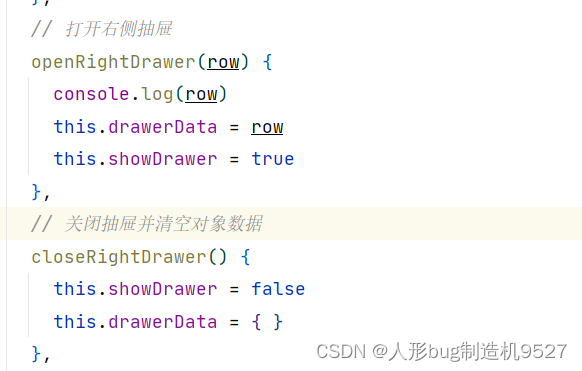
我不想在表单中为每一行都创建一个子组件,所以用了一个公用的组件,,,这里子组件就没法关联每一行的数据,只能在每一行点击事件触发的时候传递本行数据到一个方法,方法再改变boolean打开之前先将row数据写入公共变量,同时将公共变量传递给子组件,并且当关闭子组件的时候一定要清空临时区域的数据
每一行的打开按钮

打开方法和关闭方法
调用子组件

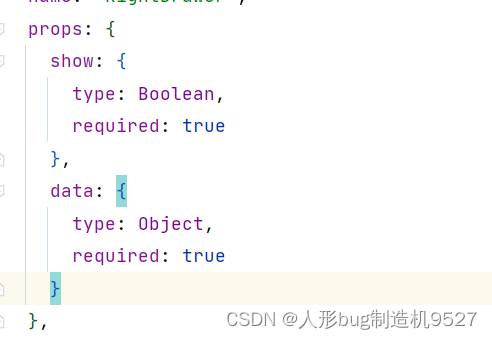
子组件绑定数据
复制粘贴代码部分
子组件
<template><el-drawertitle="我是标题":visible.sync="show":with-header="false":before-close="handleClose">{{ data }}el-drawer>template><script>
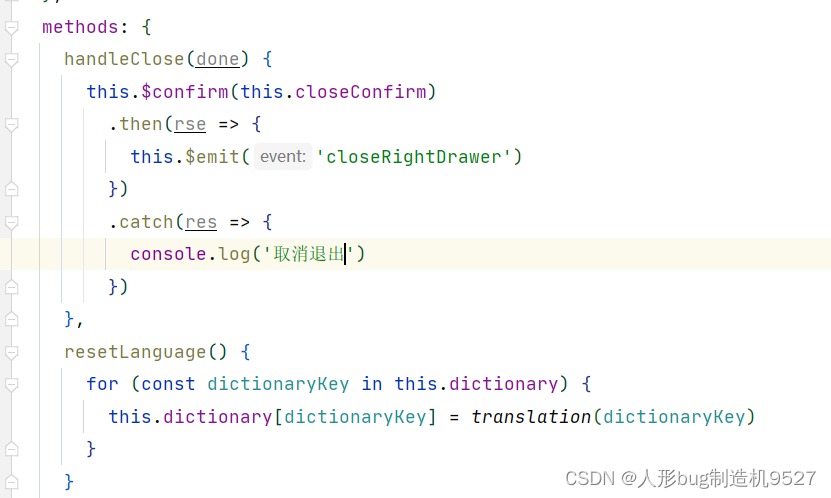
import { translation } from '@/utils/translation'export default {name: 'RightDrawer',props: {show: {type: Boolean,required: true},data: {type: Object,required: true}},data() {return {dictionary: {closeConfirm: 'Confirm to close?',cancel: 'Cancel',confirm: 'Confirm'},drawer: false}},created() {this.resetLanguage()},methods: {handleClose(done) {this.$confirm(this.closeConfirm).then(rse => {this.$emit('closeRightDrawer')}).catch(res => {console.log('取消退出')})},resetLanguage() {for (const dictionaryKey in this.dictionary) {this.dictionary[dictionaryKey] = translation(dictionaryKey)}}}
}
script><style scoped>style>
父组件
<template><div class="app-container"><div class="filter-container" style="margin-bottom: 5px"><el-inputv-model="listQuery.email":placeholder="button.email"style="width: 200px;"class="filter-item"@keyup.enter.native="handleFilter"/><el-buttonv-wavesstyle="margin-left: 12px"class="filter-item"type="primary"icon="el-icon-search"@click="handleFilter">{{ button.search }}el-button><el-buttonclass="filter-item"style="margin-left: 10px;"type="primary"icon="el-icon-edit"@click="handleCreate">{{ button.add }}el-button>div><el-table:key="tableKey"v-loading="listLoading":data="list"borderfithighlight-current-rowstyle="width: 100%;"@sort-change="sortChange"><el-table-column label="" width="120" align="center"><template slot-scope="{row,$index}"><el-button-group><el-button size="mini" type="primary" icon="el-icon-edit" round @click="openRightDrawer(row)" /><el-button v-if="row.locked === 1" size="mini" type="info" icon="el-icon-lock" round @click="unLockUser(row.id,$index)" /><el-button v-if="row.locked === 0" size="mini" type="primary" icon="el-icon-lock" round @click="lockUser(row.id,$index)" />el-button-group>template>el-table-column><el-table-columnlabel="id"prop="id"sortable="custom"align="center"width="180":class-name="getSortClass('id')"><template slot-scope="{row}"><span>{{ row.id }}span>template>el-table-column><el-table-column label="email" width="200px" align="center"><template slot-scope="{row}"><span>{{ row.email }}span>template>el-table-column><el-table-column label="fullName" width="140px" align="center"><template slot-scope="{row}"><span>{{ row.fullName }}span>template>el-table-column><el-table-column label="avatarUrl" width="120px" align="center"><template slot-scope="{row}"><el-imagestyle="width: 70px; height: 70px":src="row.avatarUrl":preview-src-list="[row.avatarUrl]"/>template>el-table-column><el-table-column label="score" width="100px" align="center"><template slot-scope="{row}"><span>{{ row.score }}span>template>el-table-column><el-table-column label="frozenScore" width="110px" align="center"><template slot-scope="{row}"><span>{{ row.frozenScore }}span>template>el-table-column><el-table-column label="gender" width="85px" align="center"><template slot-scope="{row}"><el-tag :type="row.gender === 1 ?'danger':''" effect="dark">{{ row.gender === 1 ? 'woman' : 'man' }}el-tag>template>el-table-column><el-table-column label="locked" width="85px" align="center"><template slot-scope="{row}"><el-tag :type=" row.locked === 1 ?'info':'success'">{{ row.locked === 1 ? 'locked' : 'unLock' }}el-tag>template>el-table-column><el-table-column label="mobile" width="140px" align="center"><template slot-scope="{row}"><span>{{ row.mobile }}span>template>el-table-column><el-table-column label="birthday" width="250px" align="center"><template slot-scope="{row}"><span><el-date-pickerv-model="row.birthday"type="datetime"placeholder="birthday"disabled="disabled"/>span>template>el-table-column><el-table-column label="created" width="250px" align="center"><template slot-scope="{row}"><span><el-date-pickerv-model="row.created"type="datetime"placeholder="created"disabled="disabled"/>span>template>el-table-column><el-table-column label="vipExpiration" width="250px" align="center"><template slot-scope="{row}"><span><el-date-pickerv-model="row.vipExpiration"type="datetime"placeholder="vipExpiration"disabled="disabled"/>span>template>el-table-column><el-table-column label="passWord" width="160px" align="center"><template slot-scope="{row}"><span>{{ tooLongString(row.passWord,12) }}span>template>el-table-column>el-table><paginationv-show="total>0":total="total":page.sync="listQuery.pageNumber":limit.sync="listQuery.limit"@pagination="getList"/><el-dialog :visible.sync="dialogPvVisible" title="Reading statistics"><el-table :data="pvData" border fit highlight-current-row style="width: 100%"><el-table-column prop="key" label="Channel" /><el-table-column prop="pv" label="Pv" />el-table><span slot="footer" class="dialog-footer"><el-button type="primary" @click="dialogPvVisible = false">Confirmel-button>span>el-dialog><div><RightDrawer ref="rightDrawer" :show="showDrawer" :data="drawerData" @closeRightDrawer="closeRightDrawer" />div>div>
template><script>
import { fetchPv, createArticle, updateArticle } from '@/api/article'
import { getUserList, lockUserById, unLockUserById } from '@/api/user'
import { translation } from '@/utils/translation'
import { tooLongStr } from '@/utils/string-utils'
import waves from '@/directive/waves' // waves directive
import { parseTime } from '@/utils'
import Pagination from '@/components/Pagination'
import { showMessage } from '@/utils/show-message'
import RightDrawer from '@/views/user/module/RightDrawer'const calendarTypeOptions = [{ key: 'CN', display_name: 'China' },{ key: 'US', display_name: 'USA' },{ key: 'JP', display_name: 'Japan' },{ key: 'EU', display_name: 'Eurozone' }
]// arr to obj, such as { CN : "China", US : "USA" }
const calendarTypeKeyValue = calendarTypeOptions.reduce((acc, cur) => {acc[cur.key] = cur.display_namereturn acc
}, {})export default {name: 'ComplexTable',components: { RightDrawer, Pagination },directives: { waves },filters: {statusFilter(status) {const statusMap = {published: 'success',draft: 'info',deleted: 'danger'}return statusMap[status]},typeFilter(type) {return calendarTypeKeyValue[type]}},data() {return {button: {edit: 'Edit',search: 'Search',add: 'Add',cancel: 'Cancel',confirm: 'Confirm',email: 'Email'},showDrawer: false,drawerData: {},tableKey: 0,list: null,total: 0,listLoading: true,listQuery: {pageNumber: 1,pageSize: 20,email: ''/* importance: undefined,type: undefined,sort: '+id'*/},importanceOptions: [1, 2, 3],calendarTypeOptions,sortOptions: [{ label: 'ID Ascending', key: '+id' }, { label: 'ID Descending', key: '-id' }],statusOptions: ['published', 'draft', 'deleted'],temp: {id: undefined,importance: 1,remark: '',timestamp: new Date(),title: '',type: '',status: 'published'},dialogFormVisible: false,dialogStatus: '',textMap: {update: 'Edit',create: 'Create'},dialogPvVisible: false,pvData: [],rules: {type: [{ required: true, message: 'type is required', trigger: 'change' }],timestamp: [{ type: 'date', required: true, message: 'timestamp is required', trigger: 'change' }],title: [{ required: true, message: 'title is required', trigger: 'blur' }]},downloadLoading: false}},created() {this.getList()this.resetLanguage()},methods: {tooLongString(str, length) {return tooLongStr(str, length)},// 锁定用户lockUser(userId, index) {lockUserById(userId).then(res => {showMessage(this, res)if (res.flag) {this.list[index].locked = 1}})// this.getList()},// 锁定用户unLockUser(userId, index) {unLockUserById(userId).then(res => {showMessage(this, res)if (res.flag) {this.list[index].locked = 0}})// this.getList()},// 加载list仅仅报错时展示响应结果getList() {this.listLoading = truegetUserList(this.listQuery).then(response => {console.log(response)this.list = response.data.itemthis.total = response.data.totalreturn true}).catch(res => {showMessage(this, res)return false})this.listLoading = false},// 搜索--需要展示响应提示search() {this.listLoading = truegetUserList(this.listQuery).then(response => {console.log(response)this.list = response.data.itemthis.total = response.data.totalshowMessage(this, response)})this.listLoading = false},resetLanguage() {for (const buttonKey in this.button) {this.button[buttonKey] = translation(buttonKey)}},handleFilter() {this.listQuery.pageNumber = 1this.search()},// 打开右侧抽屉openRightDrawer(row) {console.log(row)this.drawerData = rowthis.showDrawer = true},// 关闭抽屉并清空对象数据closeRightDrawer() {this.showDrawer = falsethis.drawerData = { }},handleModifyStatus(row, status) {this.$message({message: '操作Success',type: 'success'})row.status = status},sortChange(data) {const { prop, order } = dataif (prop === 'id') {this.sortByID(order)}},sortByID(order) {if (order === 'ascending') {this.listQuery.sort = '+id'} else {this.listQuery.sort = '-id'}this.handleFilter()},resetTemp() {this.temp = {id: undefined,importance: 1,remark: '',timestamp: new Date(),title: '',status: 'published',type: ''}},handleCreate() {this.resetTemp()this.dialogStatus = 'create'this.dialogFormVisible = truethis.$nextTick(() => {this.$refs['dataForm'].clearValidate()})},createData() {this.$refs['dataForm'].validate((valid) => {if (valid) {this.temp.id = parseInt(Math.random() * 100) + 1024 // mock a idthis.temp.author = 'vue-element-admin'createArticle(this.temp).then(() => {this.list.unshift(this.temp)this.dialogFormVisible = falsethis.$notify({title: 'Success',message: 'Created Successfully',type: 'success',duration: 2000})})}})},handleUpdate(row) {this.temp = Object.assign({}, row) // copy objthis.temp.timestamp = new Date(this.temp.timestamp)this.dialogStatus = 'update'this.dialogFormVisible = truethis.$nextTick(() => {this.$refs['dataForm'].clearValidate()})},updateData() {this.$refs['dataForm'].validate((valid) => {if (valid) {const tempData = Object.assign({}, this.temp)tempData.timestamp = +new Date(tempData.timestamp) // change Thu Nov 30 2017 16:41:05 GMT+0800 (CST) to 1512031311464updateArticle(tempData).then(() => {const index = this.list.findIndex(v => v.id === this.temp.id)this.list.splice(index, 1, this.temp)this.dialogFormVisible = falsethis.$notify({title: 'Success',message: 'Update Successfully',type: 'success',duration: 2000})})}})},handleDelete(row, index) {this.$notify({title: 'Success',message: 'Delete Successfully',type: 'success',duration: 2000})this.list.splice(index, 1)},handleFetchPv(pv) {fetchPv(pv).then(response => {this.pvData = response.data.pvDatathis.dialogPvVisible = true})},handleDownload() {this.downloadLoading = trueimport('@/vendor/Export2Excel').then(excel => {const tHeader = ['timestamp', 'title', 'type', 'importance', 'status']const filterVal = ['timestamp', 'title', 'type', 'importance', 'status']const data = this.formatJson(filterVal)excel.export_json_to_excel({header: tHeader,data,filename: 'table-list'})this.downloadLoading = false})},formatJson(filterVal) {return this.list.map(v => filterVal.map(j => {if (j === 'timestamp') {return parseTime(v[j])} else {return v[j]}}))},getSortClass: function(key) {const sort = this.listQuery.sortreturn sort === `+${key}` ? 'ascending' : 'descending'}}
}
script>
Vue ElementUI 表单参数校验
定义校验规则
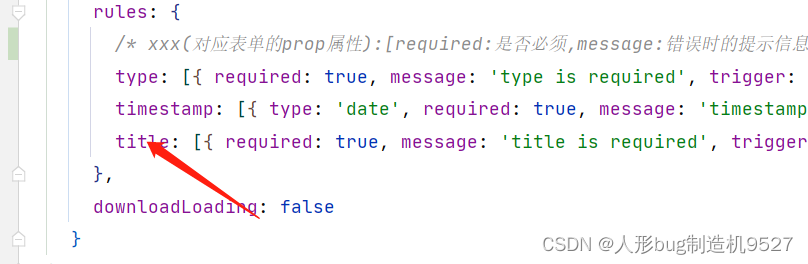
rules: {/* xxx(对应表单的prop属性):[required:是否必须,message:错误时的提示信息,trigger:校验的触发时机]*/type: [{ required: true, message: 'type is required', trigger: 'change' }],timestamp: [{ type: 'date', required: true, message: 'timestamp is required', trigger: 'change' }],title: [{ required: true, message: 'title is required', trigger: 'blur' }]},
创建表单时的使用
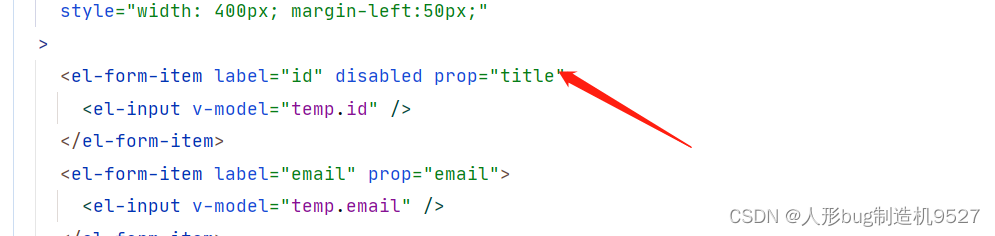
<el-formref="dataForm":rules="rules" 指定校验规则:model="temp"label-position="left"label-width="70px"style="width: 400px; margin-left:50px;">表单单元中使用prop对应与其匹配的规则<el-form-item label="id" disabled prop="title"><el-input v-model="temp.id" />el-form-item>
多选框组件
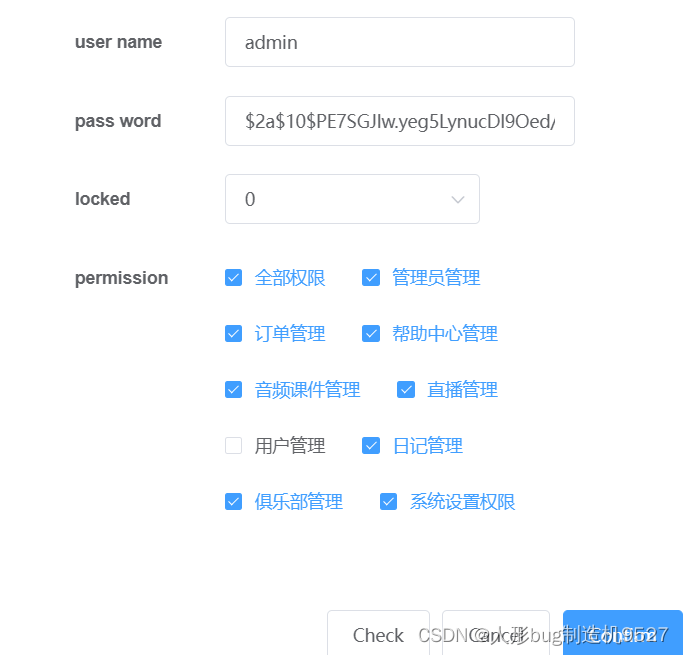
效果图

报错
其中有个和length有关的异常,原因是由于v-modle绑定的的变量层级太深导致的,改为第一层就好了
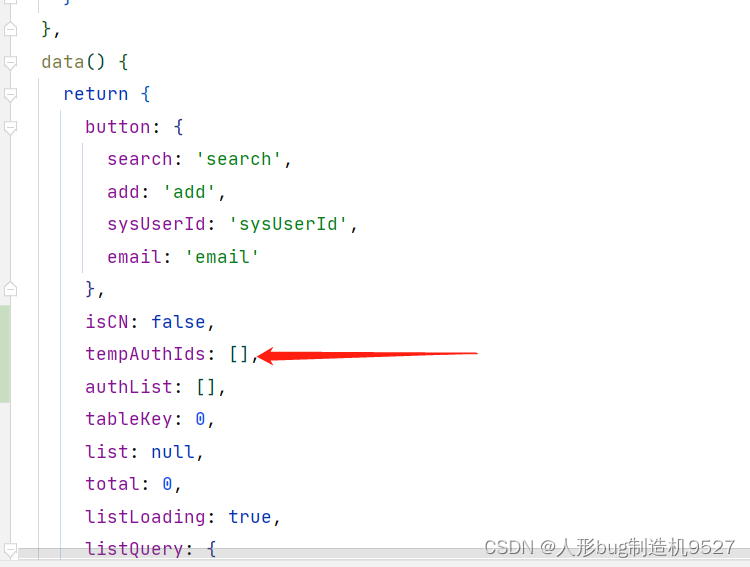
<el-form-item label="permission" prop="permission"><el-checkbox-group v-model="tempAuthIds"><el-checkbox v-for="auth in authList" :key="auth.id" :label="auth.id">{{ isCN ? auth.authRemark : auth.authName }}el-checkbox>el-checkbox-group>
el-form-item>
注意:
如果v-modle和渲染的都是同一个数组,会导致选取选项的时候改变绑定的数组,导致选项越选越多
所以渲染使用一个数组,v-model动态绑定用于收集结果的应该另外使用一个数组
选中状态的记录
选中状态的选中依据是:label属性指定的,也就是说动态绑定的数组里出现了这个数据,那么选项里这个对应属性的选项将会处于被选中状态,同理,当你选中这个选项的时候,数组里也会新增这个属性
比如我这使用:label="auth.id"作为主键,我们需要实现回显效果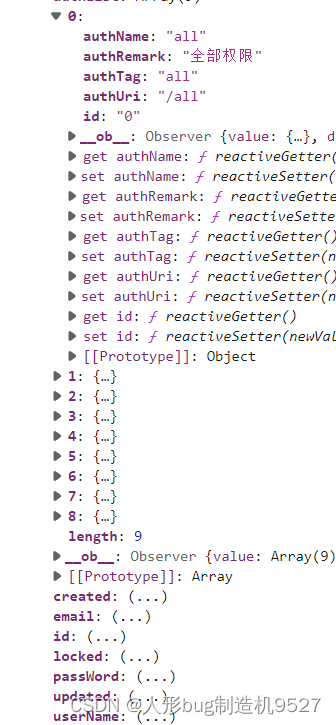
但是用户数据的结构却是一组完整的权限对象,所以我们只需要将对象的id属性全部提取出来放到组件动态绑定的数组里面就可以实现动态渲染,
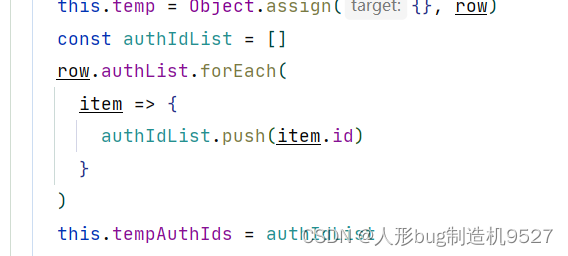
提取出来,放进去就好了
选择器组件
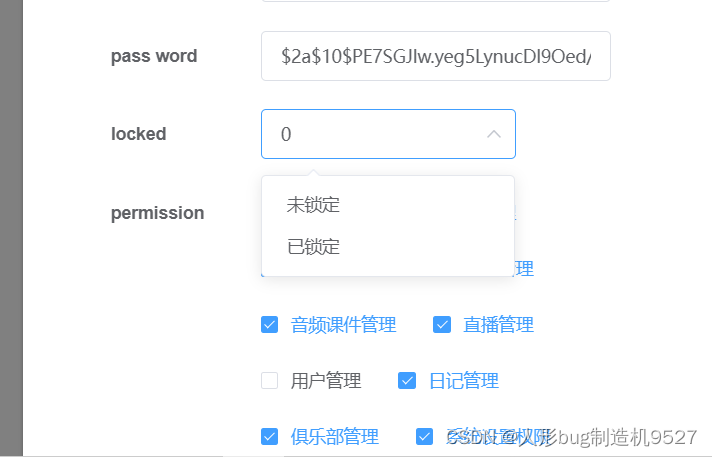
效果
代码
<el-select v-model="temp.locked" class="filter-item" placeholder="Please select"><el-option :label="isCN?'未锁定':'unLock'" value="0" /><el-option :label="isCN?'已锁定':'locked'" value="1" />
el-select>
遇到的问题
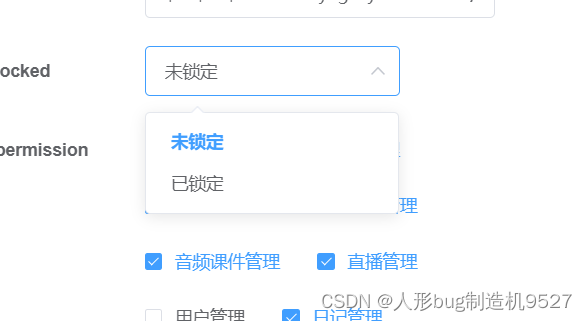
当组件绑定的数据返回的locked属性是Int类型的时候,无法匹配正确的lable属性,所以变成了回显时展示原始数据 0 ,只有当我们选择以后才会改变数据,但是这时候打印控制台发现,是字符串,
相当于我们选中以后就会把value的值替换绑定的值,同样的,绑定的值如果能和value对应上,上面的label也会跟着显示,否则展示原数据
我们需要将后端返回string或者上面value中指定值的时候和后端保持一致;
这里我们把value='0'修改为 :value='0'
本文来自互联网用户投稿,文章观点仅代表作者本人,不代表本站立场,不承担相关法律责任。如若转载,请注明出处。 如若内容造成侵权/违法违规/事实不符,请点击【内容举报】进行投诉反馈!