webman 简单使用 ElasticSearch
环境
Windows
下载
1、先去下载 elasticsearch ,我这里下载的是 7.17 版本,以下代码仅支持 7.X 及以下版本。
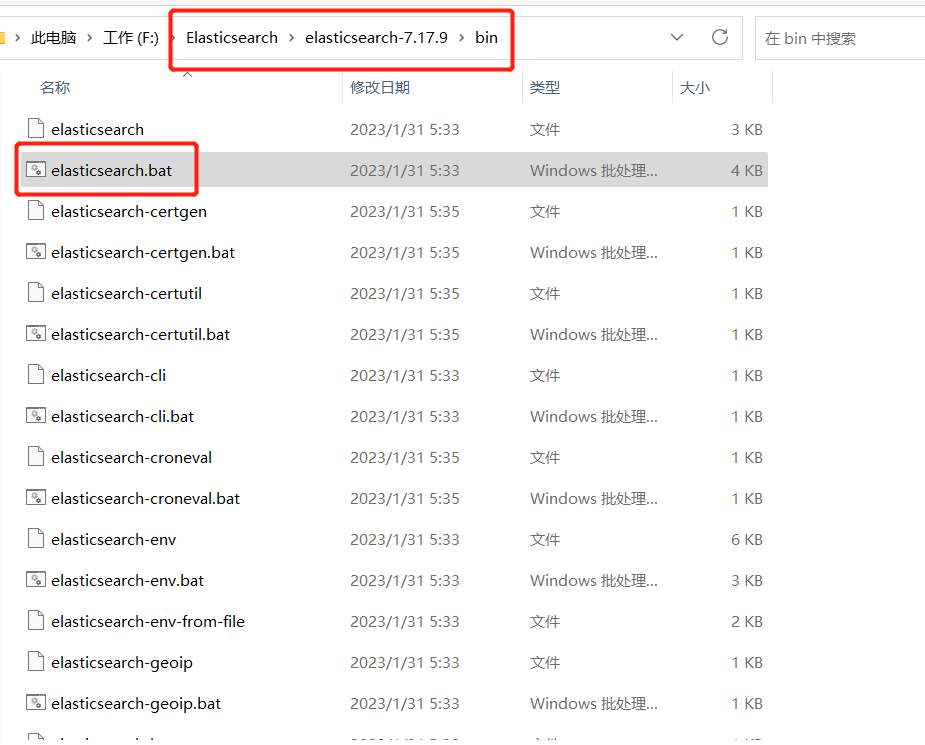
2、解压后,需要先双击运行 elasticsearch.bat 文件。
安装ES
composer require elasticsearch/elasticsearch=7.8.*
添加数据
首先在 app 目录下新建一个 ArticleController 的控制器,在控制器内添加 add 的方法用于数据文档的创建,search 方法用于数据的查询,代码内容如下:
use support\searches\Elasticsearch;public function add()
{// 利用模型获取数据库中需要使用到的数据$data = Article::query()->get()->toArray();$es = new Elasticsearch();if (!$es->exists_index('articles')) {$es->create_index('articles');}foreach ($data as $model) {$es->add_doc($model['id'], $model, 'articles', '_doc');}
}public function search()
{//获取搜索值$search = \request()->get('search');if (!empty($search)) {$es = new Elasticsearch();$body = ['query' => ['match' => ['title' => ['query' => $search]]],'highlight' => ['fields' => ['title' => ['pre_tags' => [''],'post_tags' => ['']]]]];$res = $es->search_doc('articles', '_doc', $body);$data = array_column($res['hits']['hits'], '_source');foreach ($data as $key => &$v) {$v['title'] = $res['hits']['hits'][$key]['highlight']['title'][0];}unset($v);return json($data);}$data = [];return $data;
}
Elasticsearch.php 文件放置在 support/searches 目录下:
namespace support\searches;use Elasticsearch\ClientBuilder;class Elasticsearch
{private $client;/*** 构造函数* MyElasticsearch constructor.*/public function __construct(){$this->client = ClientBuilder::create()->setHosts(['127.0.0.1:9200'])->build();}/*** 判断索引是否存在* @param string $index_name* @return bool|mixed|string*/public function exists_index($index_name = 'test_ik'){$params = ['index' => $index_name];try {return $this->client->indices()->exists($params);} catch (\Elasticsearch\Common\Exceptions\BadRequest400Exception $e) {$msg = $e->getMessage();$msg = json_decode($msg,true);return $msg;}}/*** 创建索引* @param string $index_name* @return array|mixed|string*/public function create_index($index_name = 'test_ik') { // 只能创建一次$params = ['index' => $index_name,'body' => ['settings' => ['number_of_shards' => 5,'number_of_replicas' => 1]]];try {return $this->client->indices()->create($params);} catch (\Elasticsearch\Common\Exceptions\BadRequest400Exception $e) {$msg = $e->getMessage();$msg = json_decode($msg,true);return $msg;}}/*** 删除索引* @param string $index_name* @return array*/public function delete_index($index_name = 'test_ik') {$params = ['index' => $index_name];$response = $this->client->indices()->delete($params);return $response;}/*** 添加文档* @param $id* @param $doc ['id'=>100, 'title'=>'phone']* @param string $index_name* @param string $type_name* @return array*/public function add_doc($id,$doc,$index_name = 'test_ik',$type_name = 'goods') {$params = ['index' => $index_name,'type' => $type_name,'id' => $id,'body' => $doc];$response = $this->client->index($params);return $response;}/*** 判断文档存在* @param int $id* @param string $index_name* @param string $type_name* @return array|bool*/public function exists_doc($id = 1,$index_name = 'test_ik',$type_name = 'goods') {$params = ['index' => $index_name,'type' => $type_name,'id' => $id];$response = $this->client->exists($params);return $response;}/*** 获取文档* @param int $id* @param string $index_name* @param string $type_name* @return array*/public function get_doc($id = 1,$index_name = 'test_ik',$type_name = 'goods') {$params = ['index' => $index_name,'type' => $type_name,'id' => $id];$response = $this->client->get($params);return $response;}/*** 更新文档* @param int $id* @param string $index_name* @param string $type_name* @param array $body ['doc' => ['title' => '苹果手机iPhoneX']]* @return array*/public function update_doc($id = 1,$index_name = 'test_ik',$type_name = 'goods', $body=[]) {// 可以灵活添加新字段,最好不要乱添加$params = ['index' => $index_name,'type' => $type_name,'id' => $id,'body' => $body];$response = $this->client->update($params);return $response;}/*** 删除文档* @param int $id* @param string $index_name* @param string $type_name* @return array*/public function delete_doc($id = 1,$index_name = 'test_ik',$type_name = 'goods') {$params = ['index' => $index_name,'type' => $type_name,'id' => $id];$response = $this->client->delete($params);return $response;}/*** 搜索文档 (分页,排序,权重,过滤)* @param string $index_name* @param string $type_name* @param array $body* $body = ['query' => ['match' => ['fang_name' => ['query' => $fangName]]],'highlight'=>['fields'=>['fang_name'=>['pre_tags'=>[''],'post_tags'=>['']]]]];* @return array*/public function search_doc($index_name = "test_ik",$type_name = "goods",$body=[]) {$params = ['index' => $index_name,'type' => $type_name,'body' => $body];$results = $this->client->search($params);return $results;}
}
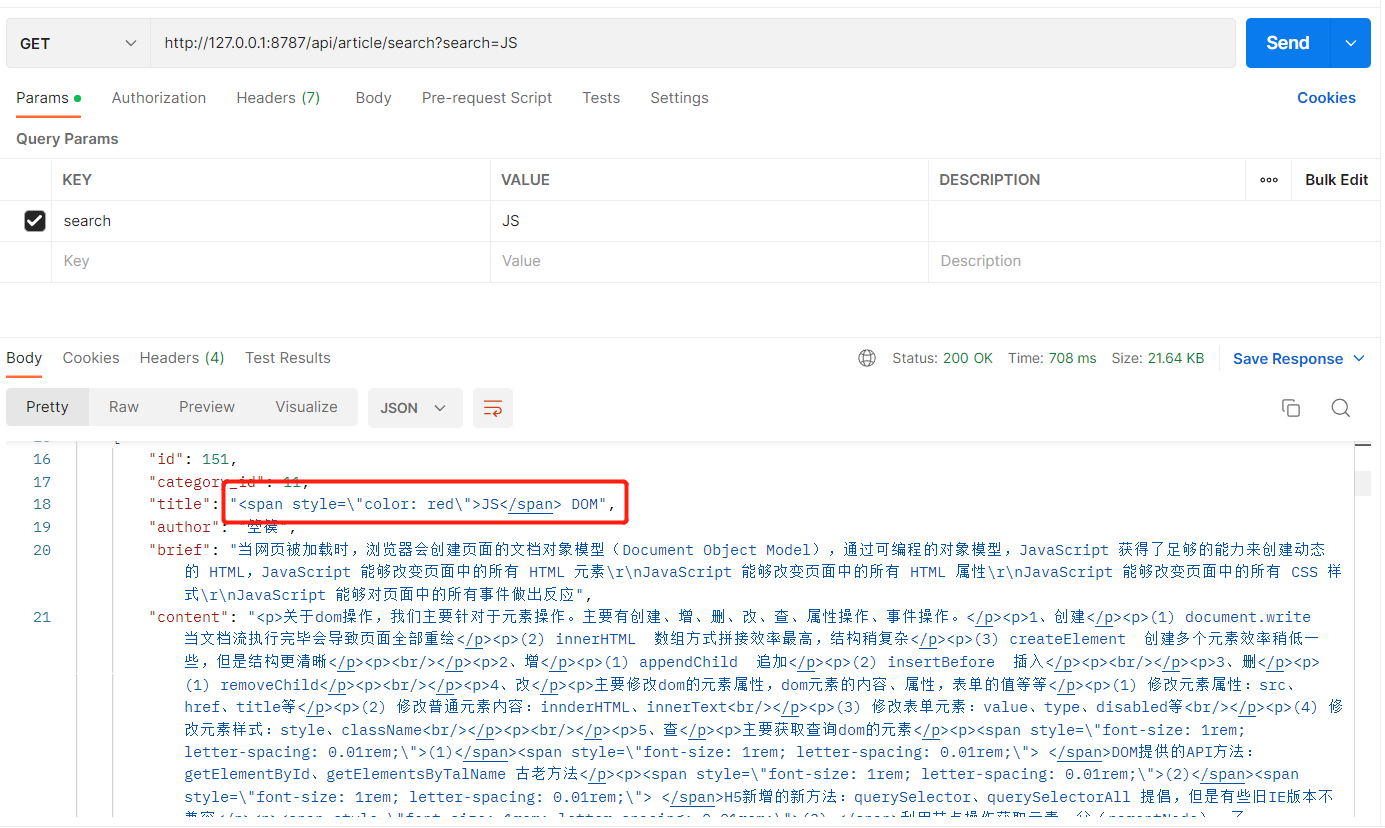
完成上面内容后,执行 add 方法完成文档的创建,执行 search 方法进行数据的查询。
效果如下图:
本文来自互联网用户投稿,文章观点仅代表作者本人,不代表本站立场,不承担相关法律责任。如若转载,请注明出处。 如若内容造成侵权/违法违规/事实不符,请点击【内容举报】进行投诉反馈!