微信公众号_订阅号_被动回复用户消息
node.js 作为服务器
微信公众号(订阅号)
给个人、企业、组织 提供业务服务和用户管理能力的全新服务平台
- 企业微信: 无需开发,直接使用
- 小程序
- 服务号: 单独的一条消息显示;偏向信息查询;一个月只能群发消息 4 条;需要企业认证
- 订阅号: 收录在 "订阅号" 中;一天只能群发 1 条消息
订阅号 与 服务号 开发模式 是一样的

- 常见功能:
- 微信分享
- 群发
- 自定义菜单
- 打赏
注册
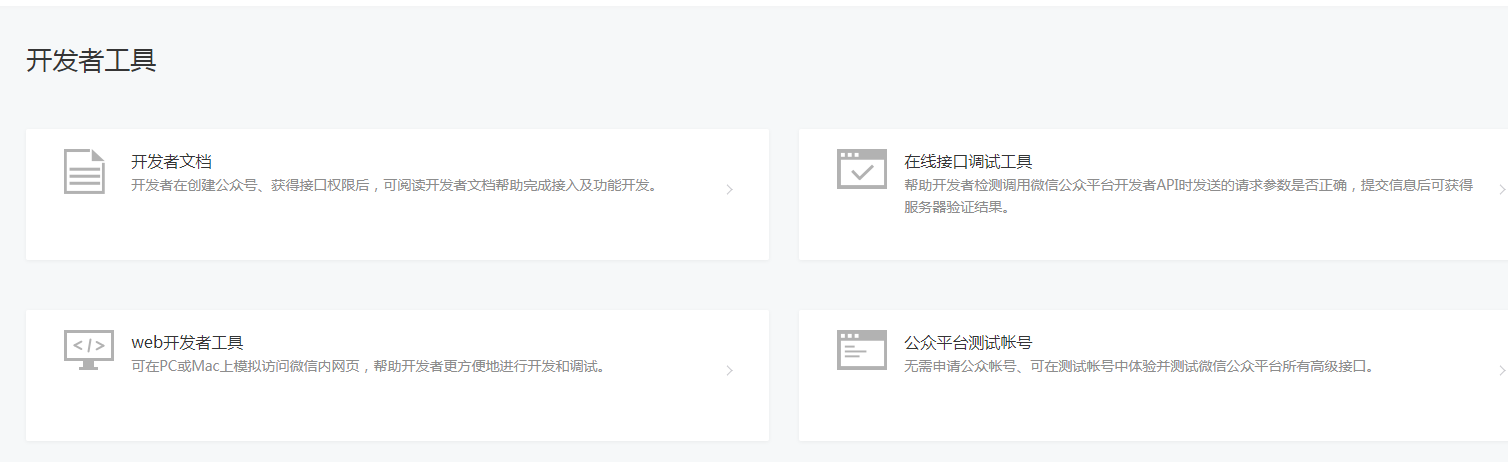
- 在线接口调试工具
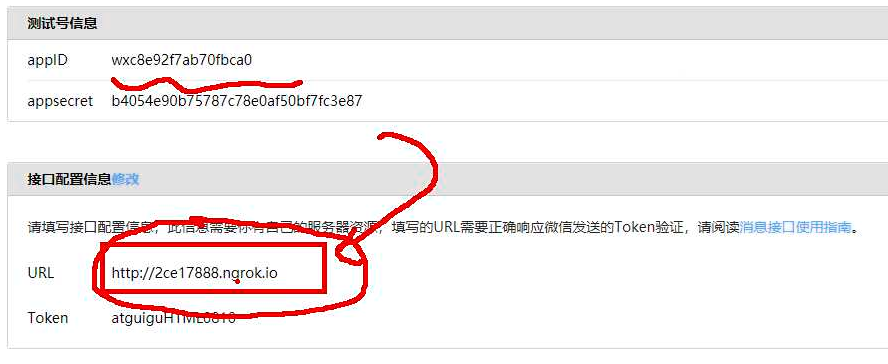
接口: 网址 url
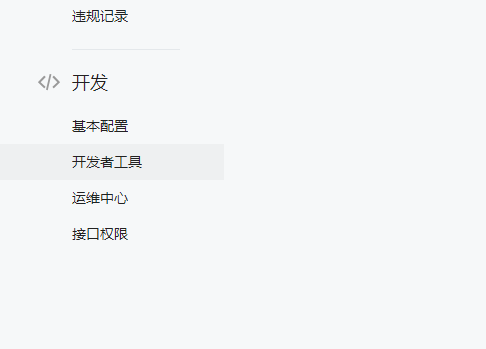
- web开发者工具
- 公众平台测试账号
无需申请公众账号即可在测试账号中测试所有高级接口
- 基本交互流程
- 用户 使用 微信 将消息发送到 微信公众号 上
- 微信客户端 将消息发送到腾讯自己的微信服务器中
- 腾讯的微信服务器 会将用户消息转发到 开发者服务器 上(1. 搭建服务器____需要与服务器进行交互配置)
- 开发者服务器 又将消息响应给 微信服务器器
- 微信服务器 最后将消息响应给相应的用户
- 1. 搭建服务器
一、买域名
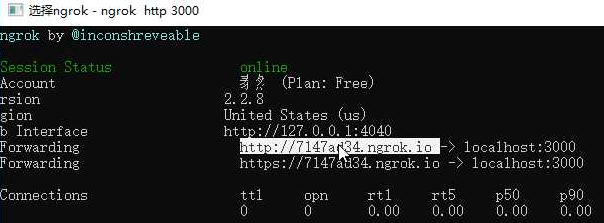
二、使得 开发服务器地址 万维网能访问
开启 node.js 写好的服务器
双击启动 ngrok 客户端(ngrok 内网传透)
ngrok http 3000
- 填写的 接口配置信息 url
- Token 参与微信签名加密的一个字段,越复杂越好
- 确保 服务器开着的,点击 提交
- 微信的加密签名 由 timestamp、nonce、token三个参数加密生成的签名

2. 验证消息来自于服务器(只有验证成功了,才能继续开发。如果步骤无误,多提交几次,总会成功)
// 1. 定义自己的 测试号及接口 配置信息
const myWeChat= {
token: 'atguiguHTML0920',
appID: 'wxc8e92f7aada0fbca0',
appsecret: 'b4054e90b7a8sdasdasd0af50bf7fc3e87'
};
app.use((request, response, next)=>{
// 2. 将 timestamp、nonce、token 三个参数组合成 数组,按照字典序进行排序
const {token} = myWeChat;
const {signature, echostr, timestamp, nonce} = req.query;
const sortArr = [timestamp, nonce, token].sort();
// 3. 将排序后的参数拼接成一个新的字符串,进行 sha1 加密,得到的就是 signature
const sha1Str = sha1(sortArr.join(""));
// 4. 将 加密后的签名 和 微信发送来的 signature 进行对比
if(sha1Str === signature){
// 一样,说明消息来自于服务器,返回 echostr 给微信服务器
response.end(echostr);
}else{
// 不一样,说明消息不来自于微信服务器,返回 error 错误
response.end('error');
};
next();
});
/* 此时,再次点击提交,显示 "配置成功" */
/* 用手机扫描 测试账号的二维码 关注,并发送任意消息____可以看到服务器接受到的数据*/
3. 验证服务器有效性 的模块化 源代码
config/index.js
-
module.exports = {token: 'FinnKou',appID: 'wxba59db235745154d22cd32d',appsecret: '62a454d75919545d2f276680fcb6148d77b2e31'
};
wechat/handleRequest.js
-
const sha1 = require('sha1');
const {token} = require('../config');module.exports = ()=>{return (request, response, next)=>{const {signature, echostr, timestamp, nonce} = request.query;const sha1Str = sha1([timestamp, nonce, token].sort().join(""));if(sha1Str === signature){response.end(echostr);}else{response.end("error");};next();};
};
index.js
-
const express = require('express'); const handleRequest = require('./handleRequest');const app = express();app.use(express.urlencoded({extended: true}));app.use(handleRequest());app.listen(3000,err=>console.log(err?err:'\n\n服务器已启动\n\t\tHunting Happy!') ); - 正式开发功能模块
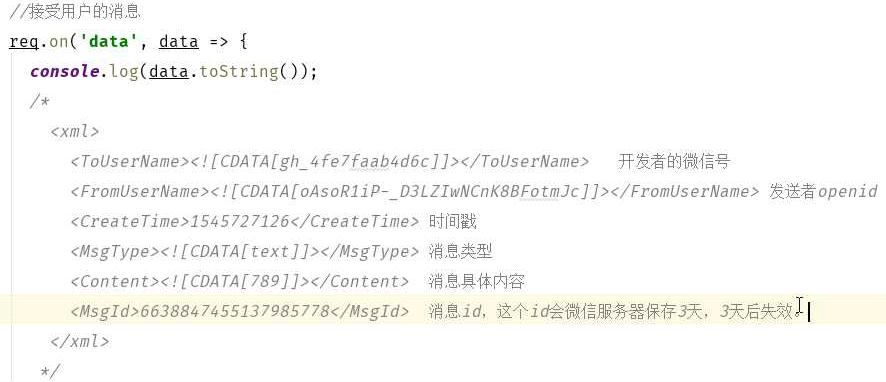
1. 被动回复用户消息789(此时,有两个公众号,一个本人的,一个测试的)
验证服务器 有效性其实是 get 请求
用户发送的消息是 post 请求
if(request.method === 'GET'){ // 非用户发送的消息
if(sha1Str === signature){
response.end(echostr);
}else{
response.end('error');
};
}else if(request.method === 'POST'){ // 可能是用户发送的消息
if(sha1Str !== signature)response.end('error');
// 接收用户信息
const userXMLData = await getUserXMLData(request);
// 将 xml 数据转化为 js 对象____xml2js
}else{
response.end('error');
};
// 当服务器没有返回响应时,微信服务器会发送 3 次请求到开发者服务器
// 每次请求都会占用使用接口的使用次数
// 为了保证后续开发有次数,返回一个响应 resquest.end('');
/*
如果node 服务器 发送一个不正确的 xml 消息,会在用户微信报错
*/
实例源代码:
index.js
-
const express = require('express');
const handleRequest = require('./handleRequest');const app = express();app.use(express.urlencoded({extended: true}));app.use(handleRequest());    // 使用中间件的方式 激活自定义模块

app.listen(3000,err=>console.log(err?err:'\n\n服务器已启动\n\t\tHunting Happy!')
);
config/index.js
-
module.exports = {    // 微信公众号 配置信息token: 'FinnKou',appID: 'wxba554569dbd1127d22cd32d',appsecret: '62ad759915d251f276680fc153b618d77b2e31'
};
handleRequest/index.js
-
const sha1 = require('sha1'); // sha1 加密库 const {token} = require('../config'); const {getUserXMLData} = require('../utils/getUserDataAsync'); const {XML2JSON, JSON2Obj} = require("../utils/tools");module.exports = ()=>{return async (request, response, next)=>{const {signature, echostr, timestamp, nonce} = request.query;const sha1Str = sha1([timestamp, nonce, token].sort().join(""));if(request.method === 'GET'){ // 服务器发过来的消息if(sha1Str === signature){response.end(echostr);}else{response.end("error");};}else if(request.method === 'POST'){if(sha1Str !== signature){ // 非微信用户发过来的消息response.end("error");};// 用户微信客户端 发过来的消息/****1545741162 6638907739305821698 ${Date.now()} ${Date.now()}
utils/tools.js
-
const {parseString} = require('xml2js');    // xml2js 是第三方库,XML 字符串 转 JSON 对象module.exports = {XML2JSON(originXML){    // XML 字符串 转 JSON 对象let JSONData = null;parseString(originXML, {"trim": true}, (err, result)=>{if(!err){JSONData = result;};});return JSONData;},JSON2Obj({xml}){    // JSON 对象 转成 普通对象let Obj = {};for (let attr in xml){const value = xml[attr];Obj[attr] = value[0];};return Obj;}
};
utils/getUserDataAsync.js
-
module.exports = {getUserXMLData(request){    // 获取用户微信客户端 发送到 服务器的 XML 字符串return new Promise((resolve, reject)=>{let resultStr = '';request.on("data", browser_info=>{    // 流方式 接受resultStr += browser_info.toString();}).on("end", ()=>{resolve(resultStr);});});}
};
2. 看手册,根据用户的内容,类型,回复你想要回复的内容
源代码:
index.js
-
const express = require('express');
const handleRequest = require('./handleRequest');const app = express();app.use(express.urlencoded({extended: true}));app.use(handleRequest());app.listen(3000,err=>console.log(err?err:'\n\n服务器已启动\n\t\tHunting Happy!')
);
config/index.js
-
module.exports = {token: 'FinnKou',appID: 'wxba59d182bd7d2245cd32d',appsecret: '62ad7594595d2f276680f454cb618d77b2e31'
};
handleRequest/index.js
-
const sha1 = require('sha1');
const {token} = require('../config');
const {getUserXMLData} = require('../utils/getUserDataAsync');
const {XML2JSON, JSON2Obj} = require('../utils/tools');
const {autoReply} = require('../autoReply');module.exports = ()=>{return async (request, response, next)=>{const {signature, echostr, timestamp, nonce} = request.query;const sha1Str = sha1([timestamp, nonce, token].sort().join(""));if(request.method === 'GET'){    // 服务器发过来的消息if(sha1Str === signature){response.end(echostr);}else{response.end("error");};}else if(request.method === 'POST'){if(sha1Str !== signature){    // 非微信用户发过来的消息response.end("error");};// 用户发过来的消息const XMLData = await getUserXMLData(request);const JSONData = XML2JSON(XMLData);const objData = JSON2Obj(JSONData);console.log(objData);response.send(autoReply(objData));    // 封装 自动回复用户消息
            }else{response.end("error");};};
};
utils/getUserDataAsync.js
-
module.exports = {getUserXMLData(request){return new Promise((resolve, reject)=>{let resultStr = '';request.on("data", browser_info=>{resultStr += browser_info.toString();}).on("end", ()=>{resolve(resultStr);});});} }; /**** 用户发过来的消息
1545741162 6638907739305821698
utils/tools.js
-
const {parseString} = require('xml2js');module.exports = {XML2JSON(originXML){let JSONData = null;parseString(originXML, {"trim": true}, (err, result)=>{if(!err){JSONData = result;};});return JSONData;},JSON2Obj({xml}){let Obj = {};for (let attr in xml){const value = xml[attr];Obj[attr] = value[0];};return Obj;}
};
// 用户微信客户端 发过来的消息
/****{ToUserName: 'gh_d9bf45407d2a',FromUserName: 'oSX3Z1aufrhsCwuEKXbVRfqOC1Wo',CreateTime: '1545744183',MsgType: 'text',Content: '1',MsgId: '6638920714402022972'}
****/
autoReply/index.js
-
const {getReplyInfo} = require('./getReplyInfo');module.exports = {autoReply(objData){const options = getReplyInfo(objData);let replyXML = `${options.createTime} `;switch (options.msgType) {case 'text':{replyXML += ` `;}break;case 'image':{replyXML += ` `;replyXML += ` `;replyXML += ` `;replyXML += ``;}break;case 'music':{replyXML += ` `;replyXML += ` <![CDATA[${options.musicTitle}]]> `;replyXML += ` ${options.content.length} `; options.content.forEach(item => {replyXML += ` `;}break;};replyXML += '<![CDATA[${item.title}]]>
autoReply/getReplyInfo.js
-
module.exports = {getReplyInfo(objData){let options = {toUserName: objData.FromUserName,fromUserName: objData.ToUserName,createTime: Date.now(),msgType: objData.MsgType,/**** 文本 ****/content: objData.Content,/**** 图片 ****/image: objData.MediaId,    // MediaId/**** 语音 ****/voice: objData.MediaId,    // MediaIdrecognition: objData.Recognition,    // MediaId/**** 视频 ****/video: objData.MediaId,    // MediaId
            videoTitle: objData.Title,videoDescription: objData.Description,/**** 音乐 ****/musicTitle: objData.Title,musicDescription:objData.Description,musicUrl: objData.MusicUrl,hqMusicUrl: objData.HQMusicUrl,musicMediaId: objData.MediaId,    // MediaId/**** 地理位置 ****/location_X: objData.Location_X,location_Y: objData.Location_Y,scale: objData.Scale,label: objData.Label,/**** +位置 ****/latitude: objData.Latitude,longitude: objData.Longitude,precision: objData.Precision,/**** 菜单 CLICK ****/eventKey: objData.EventKey};switch (options.msgType) {case 'text':{    // 文本switch (objData.Content) {case 'news':{options.msgType = 'news';options.content = [{title: '微信公众号开发',description: '这里有最新的公众号教程',picUrl: 'https://ss2.baidu.com/6ONYsjip0QIZ8tyhnq/it/u=2136740882,3271518133&fm=58&bpow=630&bpoh=630',url: 'http://www.atguigu.com'}];}break;case '1':{options.content = '我会对你 1 心 1 意~';}break;case '2':{options.content = '其实你一点都不 2 ~';}break;case '3':{options.content = '可能也会 3 心 二 意~';}break;};}break;case 'voice':{    // 语音options.msgType = 'text';options.content = `语音识别结果为:${options.recognition}`;}break;case 'location':{    // + 位置options.msgType = 'text';options.content = ` 地理位置纬度:${options.location_X}地理位置经度:${options.location_Y}地图缩放大小: ${options.scale}地理位置信息: ${options.label}`;}break;case 'event':{    // 事件推送switch (objData.Event) {case 'subscribe':{    // 订阅options.msgType = 'text';options.content = '欢迎订阅 FinnKou 的内容!'if (objData.EventKey) {//扫描带参数二维码关注的。 一般应用在活动上options.content = '扫描带参数二维码关注, 欢迎您关注公众号~';}}break;case 'unsubscribe':{    // 取消订阅console.log('无情取关~');}break;case 'LOCATION':{    // 用户上报地理位置// 当用户关注公众号时,它会问你是否允许上报地理位置,如果允许才会触发当前事件options.msgType = 'text';options.content = ` 地理位置纬度:${options.latitude}地理位置经度:${options.longitude}位置信息: ${options.precision}`;}break;case 'CLICK':{    // 用户点击菜单按钮options.msgType = 'text';options.content = `菜单 key:${options.eventKey}`;}break;};}break;case 'link':{    // 链接消息
        }break;case 'image':{    // 图片
            }break;case 'video':{    // 视频
            }break;case 'shortvideo':{    // 小视频
        }break;case 'music':{    // 音乐
            }break;case 'news':{    // 图文
            }break;};return options;}
};
转载于:https://www.cnblogs.com/tianxiaxuange/p/10174357.html
本文来自互联网用户投稿,文章观点仅代表作者本人,不代表本站立场,不承担相关法律责任。如若转载,请注明出处。 如若内容造成侵权/违法违规/事实不符,请点击【内容举报】进行投诉反馈!