Linux防火墙(firewall-cmd)相关命令详解(CentOS 7)
在CentOS 7中,新引入了firewalld服务(防火墙),取代了CentOS 6之前的iptables服务(防火墙)。
iptables用于过滤数据包,属于网络层防火墙。iptables主要是基于接口,来设置规则,从而判断网络的安全性。
firewalld能够允许哪些服务可用,哪些端口可用等等,属于更高一层的防火墙。firewalld提供了支持网络区域所定义的网络链接以及接口安全等级的动态防火墙管理工具。它支持IPv4、IPv6防火墙设置以及以太网桥(在某些高级服务可能会用到,比如云计算), 并且拥有两种配置模式:运行时(Runtime)模式、永久(Permanent)模式。
firewalld和iptables都是用来管理防火墙的工具(属于用户态)来定义防火墙的各种规则功能,内部结构都指向netfilter网络过过滤子系统(属于内核态)来实现包过滤防火墙功能。
firewall-cmd是firewalld的字符界面管理工具,firewall-config是firewalld的图形用户界面管理工具。
firewalld配置的防火墙策略,分为运行时(Runtime)模式、永久(Permanent)模式两种。
1、默认的是运行时(Runtime)模式,配置的策略便会立即生效,但是,系统一旦重启就会失效。
2、永久生效(Permanent)模式,可以使firewalld配置永久生效,但是,此模式需要重启系统,或者手动执行firewall-cmd --reload命令,配置的策略才会立即生效。
firewall还引入了防火墙的“zone”概念,即事先准备好的若干套防火墙策略模板。
首先,将所有网络流量分为多个区域(zone),然后,根据数据包的源IP地址或传入的网络接口等条件将流量传入相应区域,
同时,每个区域都定义了自己打开或者关闭的端口和服务列表。
一、firewall-cmd命令详解(基于字符界面的firewall管理工具)
1、CentOS 7中,默认预装了firewalld、firewall-config命令,否则,可以通过yum手动安装,或者更新至最新版本。
[root@centos7 ~]# yum list firewalld firewall-config
[root@centos7 ~]# yum -y update firewalld firewall-config
2、CentOS 7中,使用systemctl命令,查看firewalld(防火墙)的状态(status)、重新启动(restart)、临时关闭(stop)、临时开启(start)防火墙服务。
[root@centos7 ~]# systemctl status firewalld.service
[root@centos7 ~]# systemctl is-active firewalld.service
active
[root@centos7 ~]# firewall-cmd --state
running[root@centos7 ~]# systemctl start firewalld.service
[root@centos7 ~]# systemctl stop firewalld.service
[root@centos7 ~]# systemctl restart firewalld.service
3、CentOS 7中,使用systemctl命令,设置开机禁用(disable)、开机启动(enable)防火墙服务。
检查是否已经设置(is-enabled)开机启动防火墙服务。
[root@centos7 ~]# systemctl disable firewalld.service
[root@centos7 ~]# systemctl enable firewalld.service[root@centos7 ~]# systemctl is-enabled firewalld.service;echo $?
enabled
0
4、CentOS 7中,使用firewall-cmd命令,查看是否开启了应急模式(query-panic)、开启应急模式(panic-on)、关闭应急模式(panic-off),
应急模式开启,可以临时阻止所有流量对本机的访问,以保护主机的安全。
[root@y460a ~]# firewall-cmd --query-panic
no
[root@y460a ~]# firewall-cmd --panic-on
[root@y460a ~]# firewall-cmd --panic-off
5、CentOS 7中,使用firewall-cmd命令,更新(reload)防火墙规则、断开连接并更新(complete-reload)防火墙规则。
将已经配置好的(运行时)防火墙规则,从运行时(runtime)模式转变为永久生效(permanent)模式,最后要reload防火墙规则。
检查(check-config)已经防火墙配置规则中,是否有错误。
[root@centos7 ~]# firewall-cmd --reload
success
[root@centos7 ~]# firewall-cmd --complete-reload
success[root@centos7 ~]# firewall-cmd --runtime-to-permanent
success
[root@centos7 ~]# firewall-cmd --check-config
success
6、CentOS 7中,使用firewall-cmd命令,查看默认的使用中的防火墙区域,查看当前处于活动状态的区域(zone)及其对应的网卡接口(interfaces),
查看当前系统中所有预定义的防火墙区域(zone),zone包括block dmz drop external home internal public trusted work。
[root@centos7 ~]# firewall-cmd --get-default-zone
public
[root@centos7 ~]# firewall-cmd --get-active-zones
publicinterfaces: ens33
[root@centos7 ~]# firewall-cmd --get-zones
block dmz drop external home internal public trusted work
7、CentOS 7中,使用firewall-cmd命令,查看指定防火墙区域名称(public)的全部配置信息。
设置防火墙使用的区域(zone)为public
[root@centos7 ~]# firewall-cmd --zone=public --list-all
public (active)target: defaulticmp-block-inversion: nointerfaces: ens33sources: services: dhcpv6-client sshports: 80/tcpprotocols: masquerade: noforward-ports: source-ports: icmp-blocks: rich rules:
[root@centos7 ~]# firewall-cmd --info-zone=public [root@centos7 ~]# firewall-cmd --set-default-zone=public
success
8、CentOS 7中,使用firewall-cmd命令,查看指定的防火墙区域名称(public)中,指定的网卡接口(Interfaces)、开启的端口(ports)、开启的服务(services)、开启的数据传输协议(protocols)等详细信息。
[root@centos7 ~]# firewall-cmd --zone=public --list-interfaces
ens33
[root@centos7 ~]# firewall-cmd --zone=public --list-ports
80/tcp
[root@centos7 ~]# firewall-cmd --zone=public --list-services
dhcpv6-client ssh
[root@centos7 ~]# firewall-cmd --zone=public --list-protocols
9、CentOS 7中,使用firewall-cmd命令,向指定的防火墙区域名称(public)中,永久生效的(permanent)添加、更改、删除指定的配置信息,最后要reload防火墙规则。
假如,只是临时性(runtime,运行时)生效配置防火墙信息,则不需要添加(permanent)参数,配置完成也无须reload防火墙规则。
向指定的防火墙区域名称(public)中,永久生效的(permanent)添加、更改、删除网卡接口(Interfaces),最后要reload防火墙规则。
[root@centos7 ~]# firewall-cmd --zone=public --list-interfaces
ens33
[root@centos7 ~]# firewall-cmd --get-zone-of-interface=ens33
public
[root@centos7 ~]# firewall-cmd --zone=public --query-interface=ens33
yes
[root@centos7 ~]# firewall-cmd --zone=public --add-interface=ens33 --permanent
success
[root@centos7 ~]# firewall-cmd --zone=public --change-interface=ens33 --permanent
success
[root@centos7 ~]# firewall-cmd --zone=public --remove-interface=ens33 --permanent
success[root@centos7 ~]# firewall-cmd --reload
[root@centos7 ~]# firewall-cmd --complete-reload向指定的防火墙区域名称(public)中,永久生效的(permanent)添加、删除开启的端口(ports),最后要reload防火墙规则。
注意,指定端口的同时一定要指定是协议,比如,是tcp 还是 udp。
还有,通过添加指定端口号开放的(防火墙规则),就一定要通过指定端口号(包括指定协议)来关闭(防火墙规则),也就是删除掉这个端口和协议。
[root@centos7 ~]# firewall-cmd --zone=public --list-ports
80/tcp 8080/tcp
[root@centos7 ~]# firewall-cmd --zone=public --query-port=8080/tcp
yes
[root@centos7 ~]# firewall-cmd --zone=public --add-port=8080/tcp --permanent
success
[root@centos7 ~]# firewall-cmd --zone=public --remove-port=8080/tcp --permanent
success[root@centos7 ~]# firewall-cmd --reload
[root@centos7 ~]# firewall-cmd --complete-reload向指定的防火墙区域名称(public)中,永久生效的(permanent)添加、删除开启的服务(services),最后要reload防火墙规则。
[root@centos7 ~]# firewall-cmd --zone=public --list-services
dhcpv6-client ssh
[root@centos7 ~]# firewall-cmd --zone=public --add-service=https --permanent
success
[root@centos7 ~]# firewall-cmd --zone=public --query-service=https
yes
[root@centos7 ~]# firewall-cmd --zone=public --remove-service=https --permanent
success[root@centos7 ~]# firewall-cmd --reload
[root@centos7 ~]# firewall-cmd --complete-reload查询系统防火墙中,所有已预定义的服务列表(get-services),
查询指定服务名称(info-service=ssh、https、ftp等)的服务详细信息,
查询指定服务(path-service=ssh)的配置文件信息。
更多有关自定义新增服务的内容讲解,请跳转至:https://blog.csdn.net/Jackliu200911/article/details/115412727
[root@centos7 ~]# firewall-cmd --get-services
RH-Satellite-6 RH-Satellite-6-capsule amanda-client amanda-k5-client amqp amqps apcupsd audit bacula bacula-client bgp bitcoin bitcoin-rpc bitcoin-testnet bitcoin-testnet-rpc ceph ceph-mon cfengine condor-collector ctdb dhcp dhcpv6 dhcpv6-client distcc dns docker-registry docker-swarm dropbox-lansync elasticsearch etcd-client etcd-server finger freeipa-ldap freeipa-ldaps freeipa-replication freeipa-trust ftp ganglia-client ganglia-master git gre high-availability http https imap imaps ipp ipp-client ipsec irc ircs iscsi-target isns jenkins kadmin kerberos kibana klogin kpasswd kprop kshell ldap ldaps libvirt libvirt-tls lightning-network llmnr managesieve matrix mdns minidlna mongodb mosh mountd mqtt mqtt-tls ms-wbt mssql murmur mysql nfs nfs3 nmea-0183 nrpe ntp nut openvpn ovirt-imageio ovirt-storageconsole ovirt-vmconsole plex pmcd pmproxy pmwebapi pmwebapis pop3 pop3s postgresql privoxy proxy-dhcp ptp pulseaudio puppetmaster quassel radius redis rpc-bind rsh rsyncd rtsp salt-master samba samba-client samba-dc sane sip sips slp smtp smtp-submission smtps snmp snmptrap spideroak-lansync squid ssh steam-streaming svdrp svn syncthing syncthing-gui synergy syslog syslog-tls telnet tftp tftp-client tinc tor-socks transmission-client upnp-client vdsm vnc-server wbem-http wbem-https wsman wsmans xdmcp xmpp-bosh xmpp-client xmpp-local xmpp-server zabbix-agent zabbix-server
[root@centos7 ~]# firewall-cmd --info-service=ssh
sshports: 22/tcpprotocols: source-ports: modules: destination:
[root@centos7 ~]# firewall-cmd --info-service=https
httpsports: 443/tcpprotocols: source-ports: modules: destination:
[root@legion ~]# firewall-cmd --path-service=ssh --permanent
/usr/lib/firewalld/services/ssh.xml
[--zone=
[--zone=
[--zone=
firewall-cmd --get-icmptypes :显示所有 ICMP 类型
一、firewall-config是firewalld的图形用户界面管理工具。
使用firewall-config命令打开图形管理工具,由于配置相对简单不做过多说明。
[root@centos7 ~]# firewall-config 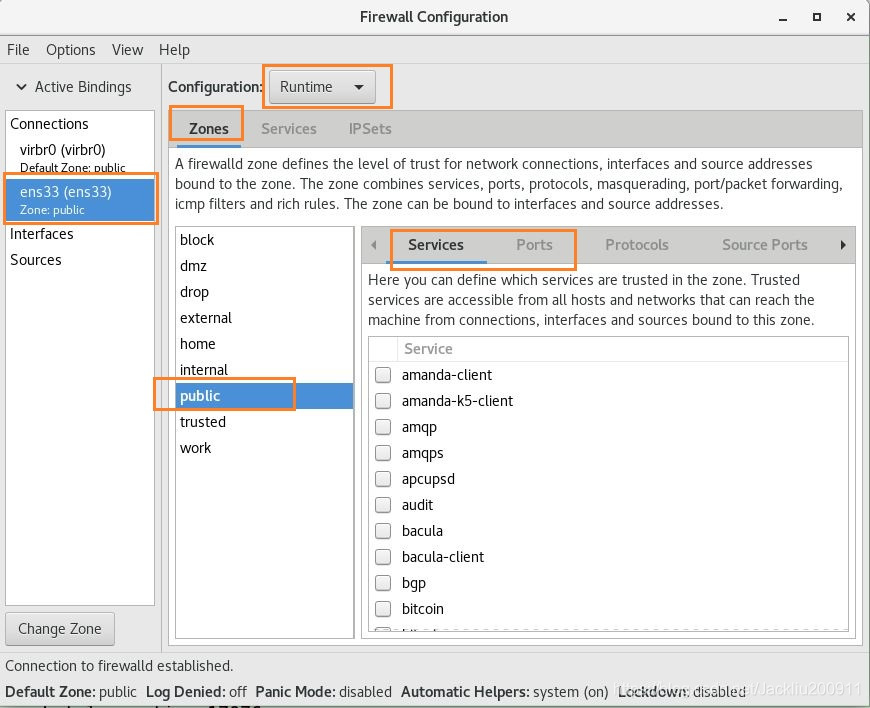
本文来自互联网用户投稿,文章观点仅代表作者本人,不代表本站立场,不承担相关法律责任。如若转载,请注明出处。 如若内容造成侵权/违法违规/事实不符,请点击【内容举报】进行投诉反馈!