Shiro简述和Spring集成
1.Shiro是什么?
1.1 Shiro简介
Apache Shiro是一个强大且易用的Java安全框架,有身份验证、授权、密码学和会话管理。
Spring security 重量级安全框架(配置很麻烦 做的比较细)
Apache Shiro轻量级安全框架 (配置很容易 很方便,很容易使用)
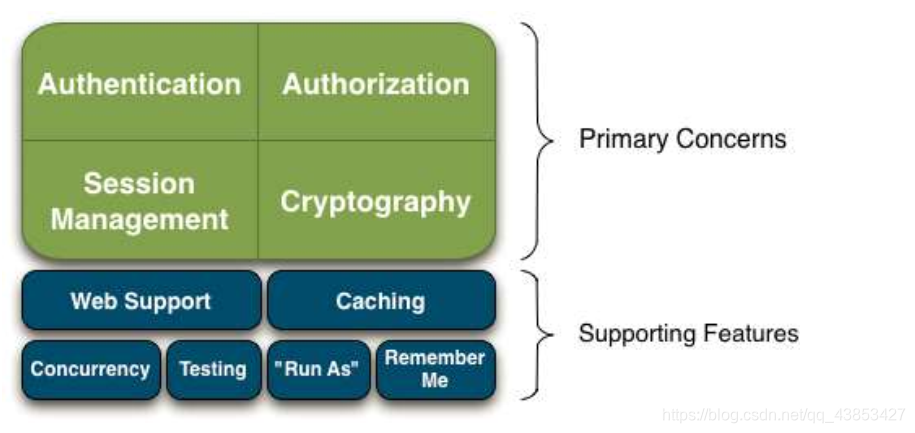 身份验证:登录
授权:验证是否有权限,没有权限就不能访问,有权限就能访问
密码:加密加盐
会话管理:shiro 自己有套会话机制,使用方式类似javaweb session机制
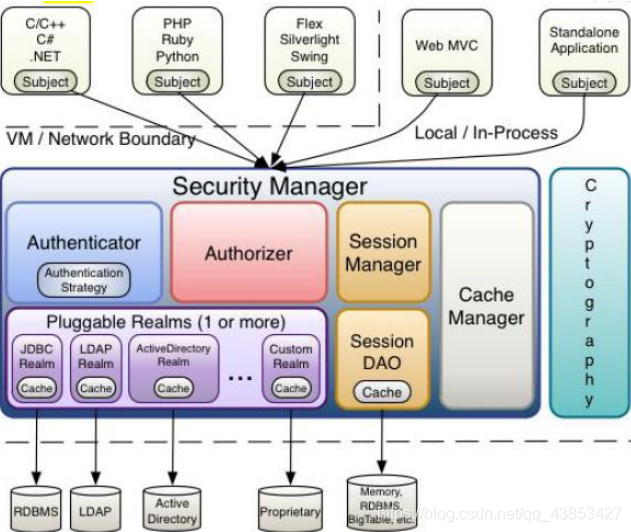
Shiro内部看:
 1.2 Shiro入门
导入架包:
<dependencies><dependency><groupId>org.apache.shiro</groupId><artifactId>shiro-core</artifactId><version>1.4.0</version></dependency><dependency><groupId>commons-logging</groupId><artifactId>commons-logging</artifactId><version>1.2</version></dependency><dependency><groupId>junit</groupId><artifactId>junit</artifactId><version>4.12</version></dependency>
</dependencies>
1.3 小程序
(1)得到一个SecurityManager对象
DefaultSecurityManager defaultSecurityManager = new DefaultSecurityManager();defaultSecurityManager.setRealm(myRealm);//设置到shiro环境SecurityUtils.setSecurityManager(defaultSecurityManager);
(2)通过SecurityManager得到一个Subject主体
Subject subject = SecurityUtils.getSubject();
(3)判断主体是否登录过
如果没有登录过,就进行登录认证
if(!subject.isAuthenticated()){//登录认证try {UsernamePasswordToken usernamePasswordToken = new UsernamePasswordToken("mm","xxxmm" );subject.login(usernamePasswordToken);System.out.println("登录成功");}catch (UnknownAccountException e){System.out.println("账号不存在异常");}catch (IncorrectCredentialsException e){System.out.println("密码不正确");}catch (AuthenticationException e) {System.out.println("其他认证异常");e.printStackTrace();}}
(4)进入realm里面进行认证
//密码匹配器HashedCredentialsMatcher matcher = new HashedCredentialsMatcher();matcher.setHashAlgorithmName("MD5");//设置加密算法matcher.setHashIterations(10);//设置加密次数myRealm.setCredentialsMatcher(matcher);
(5) 进行授权
//=====================================授权===============================================================================//判断该用户是否有角色if(subject.hasRole("admin")){System.out.println("用户具备admin角色");}//权限判断if(subject.isPermitted("employee:save")){System.out.println("该用户具备save权限:员工保存");}else{System.out.println("该用户没有保存权限");}
1.3 密码加密功能
- algorithmName:加密算法(md5,sha)
- source:原始密码
- salt,加盐
- hashIterations:遍历次数
2.集成Spring
2.1 集成的目的
我们的项目基本都是通过Spring来管理bean的,如果要想使用Shiro,那就要把shiro集成到Spring。集成Spring的核心就是把shiro框架的核心类(SecurityManager,Subject,Realm)交给Spring管理!
2.2 集成
pom.xml:
<!-- shiro的支持包 --><dependency><groupId>org.apache.shiro</groupId><artifactId>shiro-all</artifactId><version>1.4.0</version><type>pom</type>
</dependency><!-- shiro与Spring的集成包 --><dependency><groupId>org.apache.shiro</groupId><artifactId>shiro-spring</artifactId><version>1.4.0</version></dependency>
web.xml:
filter><filter-name>shiroFilter</filter-name><filter-class>org.springframework.web.filter.DelegatingFilterProxy</filter-class><init-param><param-name>targetFilterLifecycle</param-name><param-value>true</param-value></init-param>
</filter><filter-mapping><filter-name>shiroFilter</filter-name><url-pattern>/*
applicationContext-shiro.xml
<?xml version="1.0" encoding="UTF-8" ?>
<beans xmlns="http://www.springframework.org/schema/beans"xmlns:xsi="http://www.w3.org/2001/XMLSchema-instance"xsi:schemaLocation="http://www.springframework.org/schema/beanshttp://www.springframework.org/schema/beans/spring-beans.xsd
"><!--配置安全管理器--><bean id="securityManager" class="org.apache.shiro.web.mgt.DefaultWebSecurityManager"><property name="realm" ref="myRealm"></property></bean><!--配置realm--><bean id="myRealm" class="cn.itsource.aisell.shiro.MyRealm"><property name="credentialsMatcher" ><bean class="org.apache.shiro.authc.credential.HashedCredentialsMatcher"><property name="hashAlgorithmName" value="MD5"></property><property name="hashIterations" value="10"></property></bean></property></bean><!-- 3.lifecycleBeanPostProcessor:可以自动调用在Spring IoC窗口中 Shiro bean的生成周期方法 --><bean id="lifecycleBeanPostProcessor" class="org.apache.shiro.spring.LifecycleBeanPostProcessor"/><!-- 4.启动ioc容器中使用 shiro的注解,但是必需配置在Spring Ioc容器中Shiro bean的生成周期方法 --><bean class="org.springframework.aop.framework.autoproxy.DefaultAdvisorAutoProxyCreator"depends-on="lifecycleBeanPostProcessor"/><bean class="org.apache.shiro.spring.security.interceptor.AuthorizationAttributeSourceAdvisor"><property name="securityManager" ref="securityManager"/></bean><!-- 真实的过滤器处理 id这个名字 必须和web.xml里面配置的代理的过滤器的名称一样,才行--><bean id="shiroFilter" class="org.apache.shiro.spring.web.ShiroFilterFactoryBean"><property name="securityManager" ref="securityManager"></property><!-- 如果没有认证,会跳转该页面--><property name="loginUrl" value="/s/login.jsp"></property><!--认证成功,跳转的页面--><property name="successUrl" value="/s/main.jsp"></property><!--没有权限--><property name="unauthorizedUrl" value="/s/unauthorized.jsp"></property><!-- 拦截配置--><!--<property name="filterChainDefinitions">--><!--<value>--><!--/s/login.jsp = anon--><!--/login = anon--><!--/s/permission.jsp=perms[user:*]--><!--/** =  authc-->
还要在applicationContext.xml中加一句
<!--加载shiro的配置文件--><import resource="applicationContext-shiro.xml"></import>
3.总结
shiro的身份认证流程(登录流程)
步骤
a)前台传入用户名和密码到controllerb)得到主体SecurityUtils.getSubject()c)判断主体是否认证过没有认证 --调用login方法去认证--调用realm的认证代码如果已经认证--跳转到主页面登录认证里面 加密加盐流程:我们告诉shiro 我们使用MD5加密 和加密次数,以及盐值,我们shiro它会自动把页面的密码进行加密加盐在和数据库密码进行比较
shiro的授权流程
如果要测试授权,必须先登录
当我认证通过之后,如果要去访问一个需要授权的页面(permission.jsp)--判断代码是shiro这个框架自己做shiro这个框架,就会判断当前该用户是否具备相应的权限如果有访问权限--让你访问如果没有访问的权限--跳转未授权的页面代码写到realm里面 doGetAuthorizationInfo
本文来自互联网用户投稿,文章观点仅代表作者本人,不代表本站立场,不承担相关法律责任。如若转载,请注明出处。 如若内容造成侵权/违法违规/事实不符,请点击【内容举报】进行投诉反馈!