集合类和泛型
集合类
集合——动态数组
在Java.util 包下
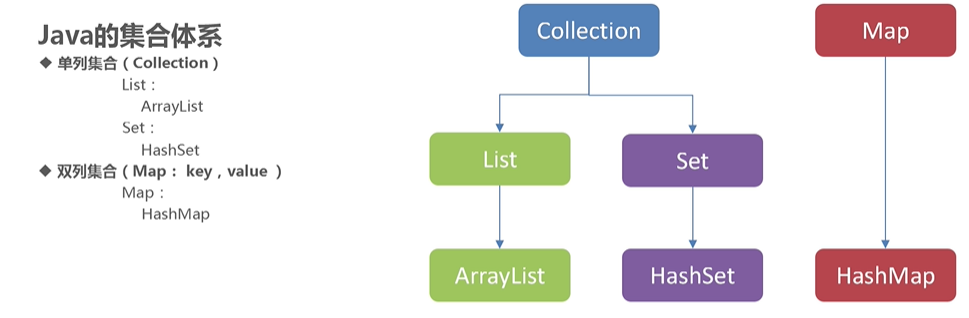
集合和数组的区别:
- 集合只能存储引用数据类型
- 数组可以存放基本数据类型和引用数据类型
List集合
- 创建集合对象
- 创建元素对象
- 将元素对象添加到集合对象中
- 遍历集合
package 集合类;
public class Student {private String name;private int id;public Student() {}public Student(String name, int id) {this.name = name;this.id = id;}public String getName() {return name;}public void setName(String name) {this.name = name;}public int getId() {return id;}public void setId(int id) {this.id = id;}@Overridepublic String toString() {return "Student{" +"name='" + name + '\'' +", id=" + id +'}';}
}
package 集合类;import java.util.ArrayList;
import java.util.List;public class TestList01 {public static void main(String[] args) {//1.创建集合对象List list = new ArrayList();//2.创建元素对象Student s1 = new Student("佩奇",3);Student s2 = new Student("佩奇",3);Student s3 = new Student("乔治",4);Student s4 = new Student("猪妈妈",41);//3.将元素对象添加到集合对象中list.add(s1);list.add(s2);list.add(s3);list.add(s4);
//直接打印System.out.println(list);//4.遍历集合for (int i=0;i<list.size();i++){Object obj = list.get(i);System.out.println("索引为 "+i +"的元素是"+list.get(i));}}
}

增强for的使用:
for(元素的数据类型 变量名: 要遍历的数组或集合){//循环体 }
快捷键
iter ---->回车
注意:
增强for的底层依赖的是迭代器(iterator)
迭代器
常用方法:
hasnext(); 如果仍有元素可以迭代,则返回true
next(); 返回迭代的下一个元素对象
为什么需要迭代器?
对过程的重复,称为迭代
迭代器是遍历Collection集合的通用方式,可以在对集合遍历的同时进行添加、删除等操作。
1.普通迭代器在遍历集合的同时不能添加或删除元素,否则会报:并发修改异常
package 集合类;import java.util.ArrayList;
import java.util.Iterator;
import java.util.List;public class TestIterator01 {public static void main(String[] args) {List list = new ArrayList();list.add("a");list.add("b");list.add("c");list.add("d");Iterator it = list.iterator();while (it.hasNext()){ //如果迭代器中有元素,就一直迭代//如果有就获取元素String s = (String) it.next();//it.next()返回的是object类型System.out.println(s);}}
}

2.列表迭代器在遍历集合的同时可以修改集合中的元素(添加、修改等),但必须使用迭代器中的方法
package 集合类;import java.util.ArrayList;
import java.util.List;
import java.util.ListIterator;public class TestIterator02 {public static void main(String[] args) {List list = new ArrayList();list.add("a");list.add("b");list.add("c");list.add("d");ListIterator lit = list.listIterator();while (lit.hasNext()){String s = (String) lit.next();if(s.equals("b")){lit.add("java");}System.out.println(s);}System.out.println("************************************");System.out.println(list);}
}

泛型
什么是泛型?
即泛指任意类型,又叫参数化类型
对具体类型的使用起辅助作用,类似于方法的参数。
-
集合类型泛型的解释: 表示该集合中存放指定类型的参数
-
泛型的好处:类型安全、避免了类型转换
- package 集合类;import java.util.ArrayList;
import java.util.Iterator;
import java.util.List;
import java.util.ListIterator;public class TestFanXing {public static void main(String[] args) {List<String> list = new ArrayList<>();list.add("abc");list.add("bcd");list.add("cde");list.add("efg");for (String s : list) {System.out.println(s);}}
}

Collections工具
针对集合进行操作的工具类
成员方法
- sort(List)
- 根据元素的自然顺序,将指定列表按升序排序
- max(Collection)
- 返回集合中最大元素
- reverse(List)
- 翻转List集合元素
- shuffle(List)
- 使用默认的随机源随机置换指定的列表
package 集合类;import java.util.ArrayList;
import java.util.Collection;
import java.util.Collections;
import java.util.List;public class TestCollections {public static void main(String[] args) {List<Integer> list = new ArrayList<>();list.add(1);list.add(2);list.add(3);list.add(4);list.add(5);System.out.println("原集合:" +list );System.out.println("------------------");Integer max = Collections.max(list);System.out.println("集合中最大数为: "+max);System.out.println("------------------");Collections.sort(list);System.out.println("升序: "+list);System.out.println("------------------");Collections.shuffle(list);System.out.println("随即洗牌 : "+list);System.out.println("------------------");Collections.sort(list);Collections.reverse(list);System.out.println("倒序:"+list);}
}

Set集合
Set集合特点:不可重复、无序
语法:Set set = new HashSet<>() ;
Set集合唯一性依赖:equals(); 和hashCode( ); -----(需要重写)
package 集合类;import java.util.HashSet;
import java.util.Iterator;
import java.util.Set;public class TestSet {public static void main(String[] args) {/*单列集合(Collection)之Set集合:特点:无序(元素的存取顺序不一致),唯一*/
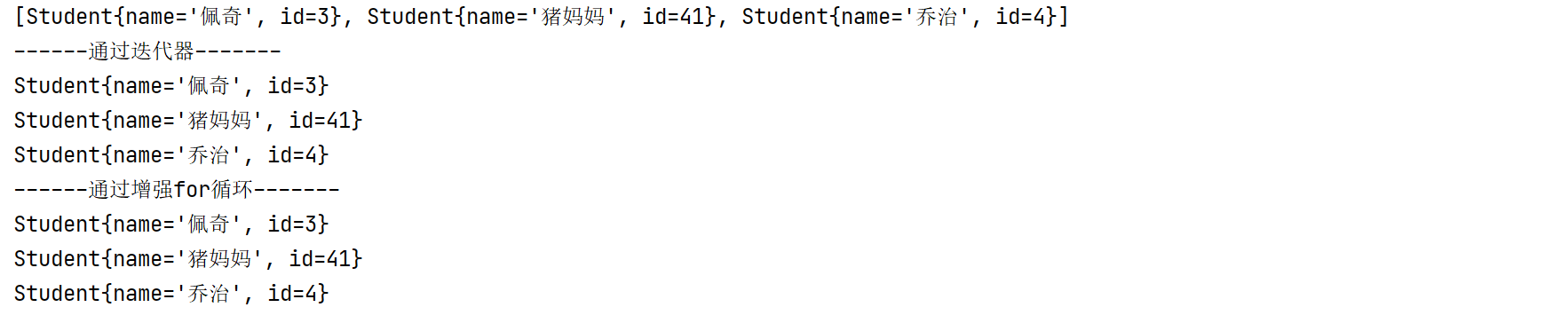
//Student类在上面写过,注意:Student类中还用重写equals() 和hashCode()方法Set<Student> set = new HashSet<>();Student s1 = new Student("佩奇",3);Student s2 = new Student("佩奇",3);Student s3 = new Student("乔治",4);Student s4 = new Student("猪妈妈",41);Student s5 = new Student("佩奇",3);set.add(s1);set.add(s2);set.add(s3);set.add(s4);set.add(s5);System.out.println(set);/*为什么Set集合没有“去重”?因为Set集合唯一性依赖于:equals();  和hashCode( );而Student类中没有重写这俩个方法,默认调用的是Object方法而Object方法中equals()默认比较的是地址值是否相同解决方案:在Student类中重写equals();  和hashCode( );方法*///通过迭代器System.out.println("------通过迭代器-------");Iterator<Student> it = set.iterator();while (it.hasNext()){System.out.println(it.next());}//通过增强for循环System.out.println("------通过增强for循环-------");for (Student student : set) {System.out.println(student);}       }
}
Map集合(双链集合)
-
特点:双列集合,元素有键值对(Entry)构成;
Key-------value key不可以重复,value可以重复
-
**语法:**Map
- T1:键的数据类型
- T2:值的数据类型
-
成员方法:
-
V put(K Key,V value); 添加元素(键值对的形式),
元素第一次添加返回null,
重复添加会用新值覆盖旧值,并返回旧值
-
V get(Object key); 根据键获取其对应的值
-
Set KeySet(); 获取所有键的集合;
-
package 集合类;import java.util.HashMap;
import java.util.Iterator;
import java.util.Map;
import java.util.Set;public class TestMap {
/*   成员方法:1. V  put(K Key,V value);   添加元素(键值对的形式),元素第一次添加返回null,重复添加会用新值覆盖旧值,并返回旧值2. V  get(Object key);      根据键获取其对应的值3. Set KeySet();         获取所有键的集合;*/
//注意:键(key)不可以重复,值(value)可以重复public static void main(String[] args) {//1.创建集合对象Map<Integer,Student> map = new HashMap<>();//2.创建元素对象Student s1 = new Student("佩奇",3);Student s2 = new Student("乔治",4);Student s3 = new Student("佩奇",3);//3.将元素对象添加到集合中去
// 测试第一条:       Student stu1 = map.put(1, s1);
//                   System.out.println("stu1"+stu1);//put方法map.put(1,s1);map.put(2,s2);map.put(3,s3);//根据键,获取值Student stu3 = map.get(2);System.out.println("key:"+2+",value:"+stu3);//打印集合System.out.println(map);System.out.println("-----------------");//4.遍历集合
/*   遍历步骤:(要将双链集合转为单链集合)4.1、获取所有键的集合              KeySet()4.2、遍历所有的键,获取到每一个键   迭代器,增强for4.3、根据键,获取指定的值          get()*/
//        Set keys = map.keySet();
//        Iterator it = keys.iterator();
//        while (it.hasNext()){
//            Integer key = it.next();
//            Student value = map.get(key);
//            System.out.println("key:"+key+"--->value:"+value);
//        }//通过迭代器Set<Integer> keys = map.keySet();for (Integer key : keys) {Student value = map.get(key);System.out.println("key:"+key+"--->value:"+value);}}
}
注:本笔记在学习B站视频时记录
点我跳转B站学习
©Liu啊牛的Blog
<我爱学习,天天棒!>
本文来自互联网用户投稿,文章观点仅代表作者本人,不代表本站立场,不承担相关法律责任。如若转载,请注明出处。 如若内容造成侵权/违法违规/事实不符,请点击【内容举报】进行投诉反馈!