SpringBoot启动器加载器-run方法(callRunners)
在项目开发中,经常需要在项目启动的时候去读取配置文件、或者把数据库的数据加载到缓存中。Spring Boot提供了ApplicationRunner和CommandLineRunner来帮助我们实现这些需求,他们都是在Spring容器初始化完毕之后执行起run方法。
SpringApplication-run方法
callRunners(context, applicationArguments);
public ConfigurableApplicationContext run(String... args) {// 1、创建并启动计时监控类StopWatch stopWatch = new StopWatch();stopWatch.start();// 2、初始化应用上下文和异常报告集合ConfigurableApplicationContext context = null;Collection<SpringBootExceptionReporter> exceptionReporters = new ArrayList<>();// 3、设置系统属性 `java.awt.headless` 的值,默认值为:trueconfigureHeadlessProperty();// 4、创建所有 Spring 运行监听器并发布应用启动事件SpringApplicationRunListeners listeners = getRunListeners(args);listeners.starting();try {// 5、 参数封装,也就是在命令行下启动应用带的参数,如--server.port=9000ApplicationArguments applicationArguments = new DefaultApplicationArguments(args);// 6、根据运行监听器和应用参数来准备 Spring 环境(本文重点)ConfigurableEnvironment environment = prepareEnvironment(listeners,applicationArguments);configureIgnoreBeanInfo(environment);// 7、创建 Banner 打印类Banner printedBanner = printBanner(environment);// 8、创建应用上下文context = createApplicationContext();// 9、准备异常报告器exceptionReporters = getSpringFactoriesInstances(SpringBootExceptionReporter.class,new Class[] { ConfigurableApplicationContext.class }, context);// 10、准备应用上下文prepareContext(context, environment, listeners, applicationArguments,printedBanner);// 11、刷新应用上下文refreshContext(context);// 12、应用上下文刷新后置处理afterRefresh(context, applicationArguments);// 13、停止计时监控类stopWatch.stop();// 14、输出日志记录执行主类名、时间信息if (this.logStartupInfo) {new StartupInfoLogger(this.mainApplicationClass).logStarted(getApplicationLog(), stopWatch);}// 15、发布应用上下文启动完成事件listeners.started(context);// 16、执行所有 Runner 运行器callRunners(context, applicationArguments);}catch (Throwable ex) {handleRunFailure(context, ex, exceptionReporters, listeners);throw new IllegalStateException(ex);}try {// 17、发布应用上下文就绪事件listeners.running(context);}catch (Throwable ex) {handleRunFailure(context, ex, exceptionReporters, null);throw new IllegalStateException(ex);}// 18、返回应用上下文return context;
}
实现逻辑
让我们来看看这个方法callRunners(context, applicationArguments);
逻辑比较简单分为三部分
- 首先分别获取ApplicationRunner和CommandLineRunner的bean放入List中
- 根据实现类上面的Order值进行排序
- 分别执行它们的run方法
private void callRunners(ApplicationContext context, ApplicationArguments args) {List<Object> runners = new ArrayList<>();runners.addAll(context.getBeansOfType(ApplicationRunner.class).values());runners.addAll(context.getBeansOfType(CommandLineRunner.class).values());AnnotationAwareOrderComparator.sort(runners);for (Object runner : new LinkedHashSet<>(runners)) {if (runner instanceof ApplicationRunner) {callRunner((ApplicationRunner) runner, args);}if (runner instanceof CommandLineRunner) {callRunner((CommandLineRunner) runner, args);}}}
那么如果是ApplicationRunner和CommandLineRunner的order是相同的谁会先执行呢?
- 准备两个ApplicationRunner实现类的Order值为1,2
- 准备两个CommandLineRunner实现类的Order值为1,2
测试结果
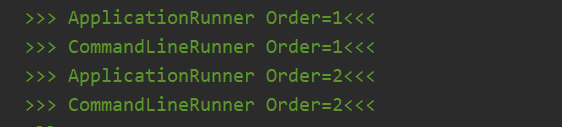
Order值相同的话ApplicationRunner先执行
在callRunner中发现ApplicationRunner和CommandLineRunner的run方法args用的不一样
private void callRunner(ApplicationRunner runner, ApplicationArguments args) {try {(runner).run(args);}catch (Exception ex) {throw new IllegalStateException("Failed to execute ApplicationRunner", ex);}}private void callRunner(CommandLineRunner runner, ApplicationArguments args) {try {(runner).run(args.getSourceArgs());}catch (Exception ex) {throw new IllegalStateException("Failed to execute CommandLineRunner", ex);}}
ApplicationArguments args是什么
- 传递参数的一种方式; 例如启动的时候
java -jar --spring.profiles.active=prod - 使用方式是 --key=value
它的配置优先于项目里面的配置;
在run方法里面我们跟踪这个看
ApplicationArguments applicationArguments = new DefaultApplicationArguments(args);
找到解析args的类
class SimpleCommandLineArgsParser {/*** Parse the given {@code String} array based on the rules described {@linkplain* SimpleCommandLineArgsParser above}, returning a fully-populated* {@link CommandLineArgs} object.* @param args command line arguments, typically from a {@code main()} method*/public CommandLineArgs parse(String... args) {CommandLineArgs commandLineArgs = new CommandLineArgs();for (String arg : args) {if (arg.startsWith("--")) {String optionText = arg.substring(2, arg.length());String optionName;String optionValue = null;if (optionText.contains("=")) {optionName = optionText.substring(0, optionText.indexOf('='));optionValue = optionText.substring(optionText.indexOf('=')+1, optionText.length());}else {optionName = optionText;}if (optionName.isEmpty() || (optionValue != null && optionValue.isEmpty())) {throw new IllegalArgumentException("Invalid argument syntax: " + arg);}commandLineArgs.addOptionArg(optionName, optionValue);}else {commandLineArgs.addNonOptionArg(arg);}}return commandLineArgs;}}就是解析--key=value的格式。
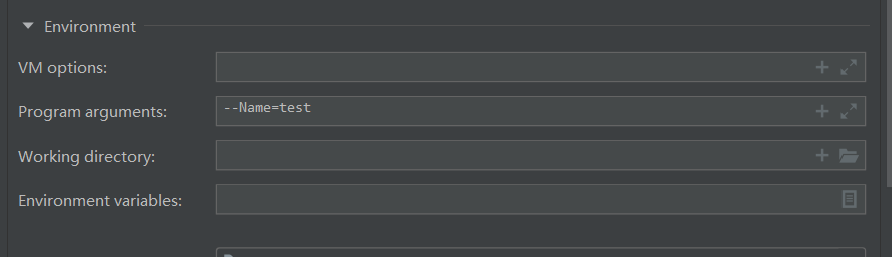
我们在启动的时候加上参数
通过断点可以清楚的看到,上面是ApplicationRunner,下面是CommandLineRunner的入参
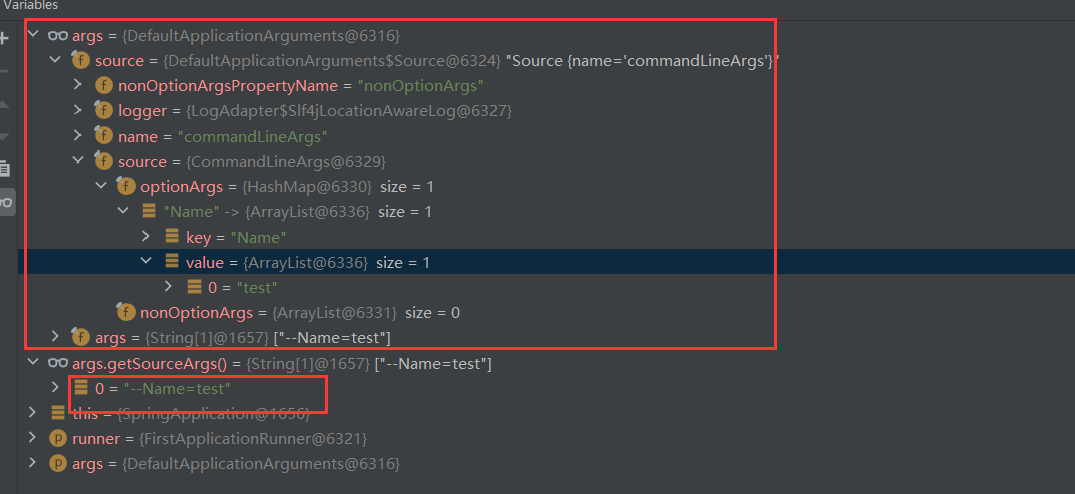
区别
- ApplicationRunner优先于CommandLineRunner执行,在Order相同的情况下
- ApplicationRunner的入参是解析过的,CommandLineRunner的入参没有处理
本文来自互联网用户投稿,文章观点仅代表作者本人,不代表本站立场,不承担相关法律责任。如若转载,请注明出处。 如若内容造成侵权/违法违规/事实不符,请点击【内容举报】进行投诉反馈!