Oauth2.0 授权访问之 授权码模式(authorization_code)访问
第一步, 申请授权码
第二步, 请求连接,获取code
http://localhost:8080/oauth/authorize?response_type=code&client_id=pair&redirect_uri=http://baidu.com如果没有登录, 会首先重定向到登录页面
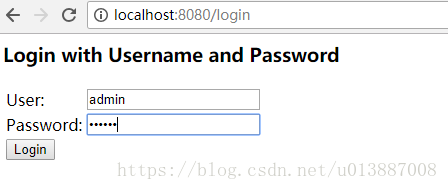
第三步, 授权(authrization)
确保用户是已经登陆的情况,在浏览器中输入和步骤1一样的地址( 注意是get请求 )
http://localhost:8080/oauth/authorize?response_type=code&client_id=pair&redirect_uri=http://baidu.com此时会出现让用户授权的页面:
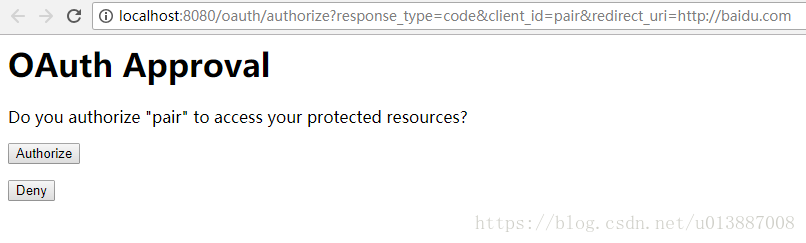
如果拒绝,则会重定向到redirect_uri的地址:
如果同意授权,跳转到redirect_uri地址,并且在uri后面追加返回的code,
https://www.baidu.com/?code=o4YrCS:
第四步, 根据 code 获取 access_token
通过 postman 发送 post 请求,grant_type为authorization_code, code为上一步拿到的参数 ,请求url如下:
http://localhost:8080/oauth/token?grant_type=authorization_code&code=o4YrCS&client_id=pair&client_secret=secret&redirect_uri=http://baidu.com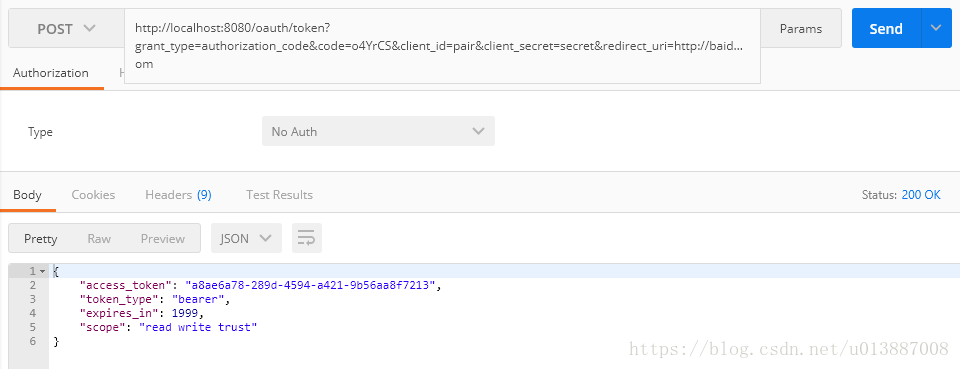
返回access_token格式
{"access_token": "a8ae6a78-289d-4594-a421-9b56aa8f7213","token_type": "bearer","expires_in": 1999,"scope": "read write trust"
}
第五步, 根据 access_token 获取资源
http://localhost:8080/rest/api/ping?access_token=a8ae6a78-289d-4594-a421-9b56aa8f7213返回资源结果:
{"key": "Hello Oauth2"
}
刷新 token ( refresh_token )
http://localhost:8080/oauth/token?grant_type=refresh_token&refresh_token=ce3dd10e-ec60-4399-9076-ee2140b04a61&client_id=pair&client_secret=secret返回结果:
{"access_token": "436423b4-fc22-4f41-8186-d8706ae9396f","token_type": "bearer","refresh_token": "ce3dd10e-ec60-4399-9076-ee2140b04a61","expires_in": 1999,"scope": "read write trust"
}
转载于:https://my.oschina.net/u/3901362/blog/3076080
本文来自互联网用户投稿,文章观点仅代表作者本人,不代表本站立场,不承担相关法律责任。如若转载,请注明出处。 如若内容造成侵权/违法违规/事实不符,请点击【内容举报】进行投诉反馈!