Spring Security oauth2(四)密码模式源码解析
前言,因为最近的项目是用Spring Security Aauth2来实现用户授权平台,本来想有时间的时候把整个流程写一下博客,实在抽不出时间,刚好有水友用密码模式有问题,就顺便把这密码模式整理下。
1.Oauth2原理
OAuth2.0是一种授权机制,正常情况,不使用OAuth2.0等授权机制的系统,客户端是可以直接访问资源服务器的资源的,为了用户安全访问数据,在访问中间添加了Access Token机制。客户端需要携带Access Token去访问受到保护的资源。所以OAuth2.0确保了资源不被恶意客户端访问,从而提高了系统的安全性。
引用下官方的的总体流程:
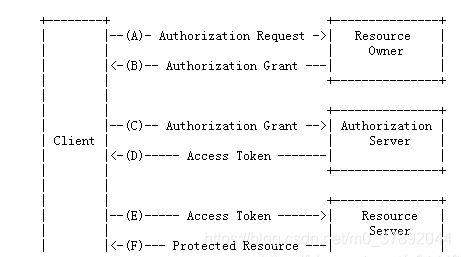
(A)客户端向从资源所有者请求授权。
(B)客户端收到授权许可,资源所有者给客户端颁发授权许可(比如授权码code)
(C)客户端与授权服务器进行身份认证并出示授权许可(比如授权码code)请求访问令牌。
(D)授权服务器验证客户端身份并验证授权许可,若有效则颁发访问令牌(accept token)。
(E)客户端从资源服务器请求受保护资源并出示访问令牌(accept token)进行身份验证。
(F)资源服务器验证访问令牌(accept token),若有效则满足该请求。
2.Oauth2原生的5中授权模式
授权码模式(authorization code)
简化模式(implicit)
密码模式(resource owner password credentials)
客户端模式(client credentials)
刷新模式(refresh_token)
本文主要讲密码模式,其他模式以后有时间在补吧。
2.1.授权码模式
以后有时间在写了
2.2.简化模式
以后有时间在写了
2.3.密码模式
2.3.1.使用场景
用户从授权平台那里获取accessToken时,提供自己的账号密码。
用户向客户端提供自己的用户名和密码,这通常用在用户对客户端高度信任的情况。这种情况大多是内部系统之间进行访问。
2.3.1.使用场景
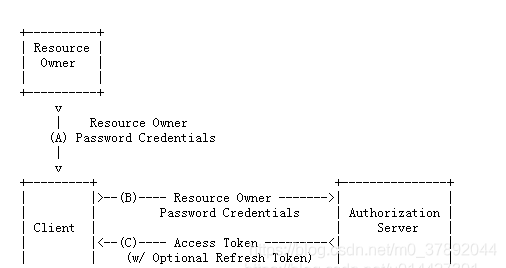
(A)用户访问客户端,提供URI连接包含用户名和密码信息给授权服务器
(B)授权服务器对客户端进行身份验证
(C)授权通过,返回acceptToken给客户端
2.4.客户端模式
以后有时间在写了
2.5.刷新模式
以后有时间在写了
3.使用密码模式的准备工作
3.1.用户信息准备:UserInfo
用户访问,提供的用户名和密码
/**@Description:用户信息* @author hutao* @date 2021年1月23日  */
public class UserInfo {/**登录用户名*/private String userName = "hutao";/**登录密码*/private String passWord = "123";/**用户权限*/private String role = "admin";//省略get set tostring
}
3.2.授权客户端信息准备:ClientInfo
/**@Description:客户端信息 * @author hutao* @date 2021年1月23日  */
public class ClientInfo {/**客户端ID*/private String clientId = "clientId_hutao";/**客户端秘钥*/private String clientSecret = "{noop}clientSecret_hutao";/**授权范围*/private String scop = "all";/**token有效期*/private int tokenValid = 60*30*4;/**flush_token有效期*/private int flushTokenValid = 60*30*4;/**授权模式*/private String [] grantTypes= {"password","refresh_token"};//省略get set tostring
}
4.实现oauth2的密码模式初级版本
4.1.授权服务器配置
4.1.1.AuthorizationServerConfigurer介绍
配置授权服务器之前,我们需要了解一个接口AuthorizationServerConfigurer
org.springframework.security.oauth2.config.annotation.web.configuration.AuthorizationServerConfigurer
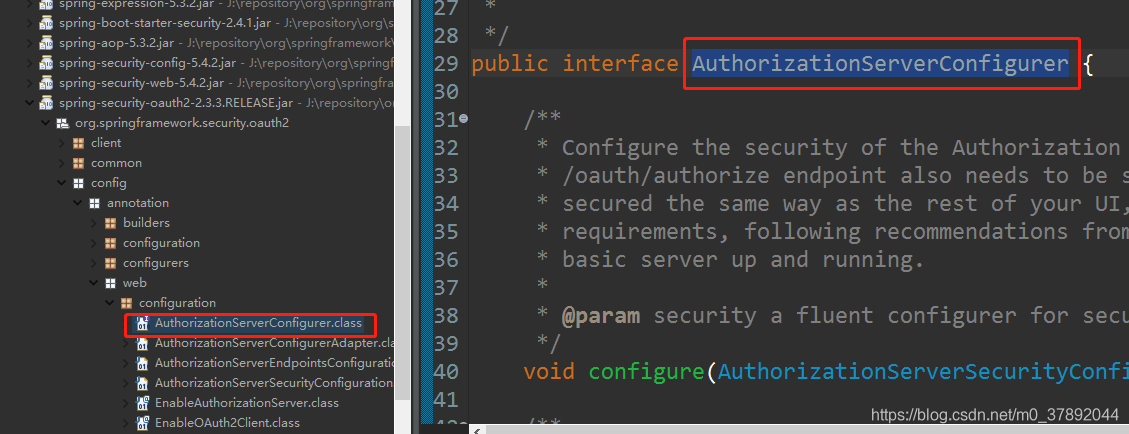
AuthorizationServerConfigurer的作用:
@EnableAuthorizationServer注解的作用是:开启OAUth2授权服务器配置策略。
该借口定义了三个方法
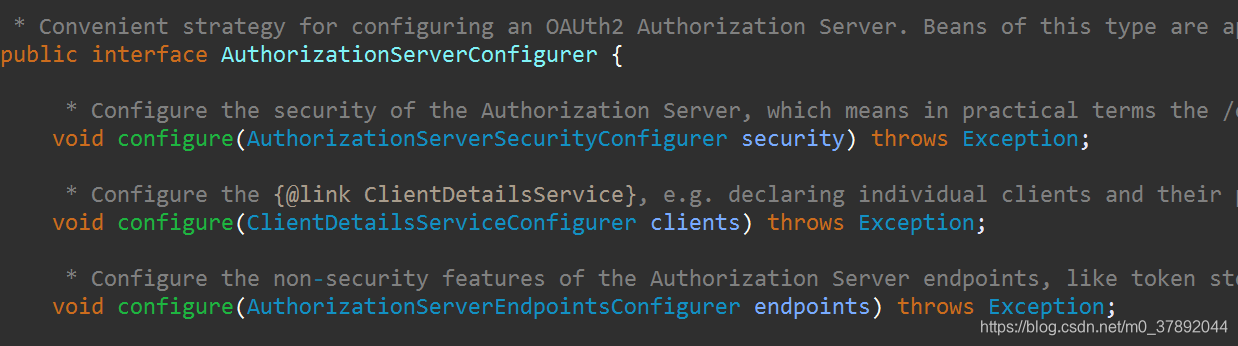
/**配置授权服务器的安全性*/
void configure(AuthorizationServerSecurityConfigurer security);
/**配置客户端属性*/
void configure(ClientDetailsServiceConfigurer clients);
/**配置授权服务器端点的非安全特性:如token store、token*/
void configure(AuthorizationServerEndpointsConfigurer endpoints)
4.1.2.配置AuthorizationServerConfigurer
4.1.2.1.实现接口AuthorizationServerConfigurer配置
配置授权服务器下面两种方式其实是一样的,任选其一即可
public class ConfigAuthorization implements AuthorizationServerConfigurer
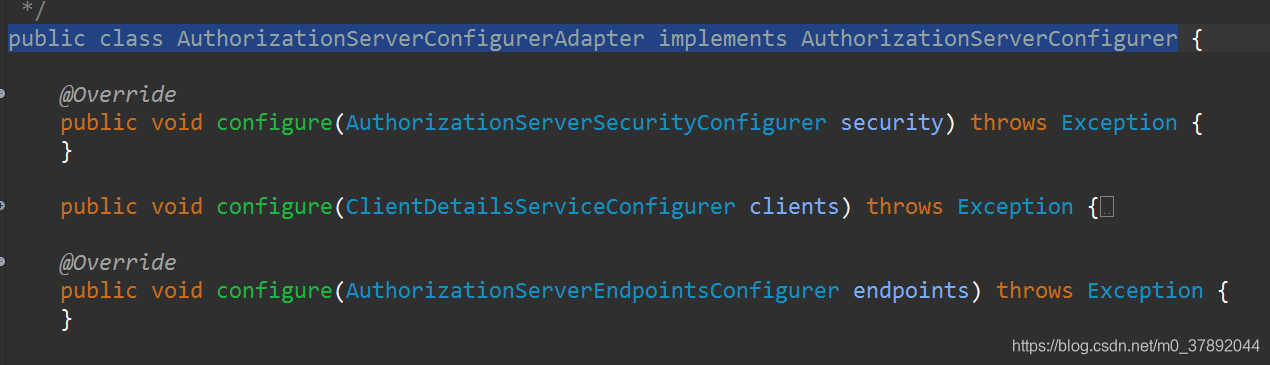
4.1.2.2.继承AuthorizationServerConfigurer配置
public class ConfigAuthorization extends AuthorizationServerConfigurerAdapter
AuthorizationServerConfigurerAdapter本质其实也是实现了AuthorizationServerConfigurer
4.1.2.3.完整授权服务器配置
/*** @Description:授权服务器配置  * @author hutao* @date 2021年1月23日*/
@SpringBootConfiguration
@EnableAuthorizationServer
//public class ConfigAuthorization extends AuthorizationServerConfigurerAdapter {
public class ConfigAuthorization implements AuthorizationServerConfigurer {ClientInfo clientInfo = new ClientInfo();@Autowiredprivate AuthenticationManager authenticationManager;/*** @Description:配置客户端属性 * @author hutao* @date 2021年1月23日*/@Overridepublic void configure(ClientDetailsServiceConfigurer clients) throws Exception {clients// 使用内存存储.inMemory()//标记客户端id.withClient(clientInfo.getClientId())//客户端安全码.secret(clientInfo.getClientSecret())//允许授权范围.scopes(clientInfo.getScop())//token 时间秒.accessTokenValiditySeconds(clientInfo.getTokenValid())//刷新token 时间秒.refreshTokenValiditySeconds(clientInfo.getFlushTokenValid())//允许授权类型.authorizedGrantTypes(clientInfo.getGrantTypes());}/*** @Description:配置授权服务器端点的非安全特性:如token store、token* @author hutao* @date 2021年1月23日*/@Overridepublic void configure(AuthorizationServerEndpointsConfigurer endpoints) throws Exception {// 使用内存保存生成的tokenendpoints.authenticationManager(authenticationManager).tokenStore(new InMemoryTokenStore());}/*** @Description:认证服务器的安全配置 * @author hutao* @date 2021年1月23日*/@Overridepublic void configure(AuthorizationServerSecurityConfigurer security) throws Exception {security// 开启/oauth/token_key验证端口认证权限访问.tokenKeyAccess("isAuthenticated()")//  开启/oauth/check_token验证端口认证权限访问.checkTokenAccess("isAuthenticated()")//允许表单认证.allowFormAuthenticationForClients();}
}
4.2.Web安全配置
4.2.1.WebSecurityConfigurerAdapter介绍
WebSecurityConfigurerAdapter相对于上述的AuthorizationServerConfigurer就复杂多了,我们先来看看这个类的继承关系图。
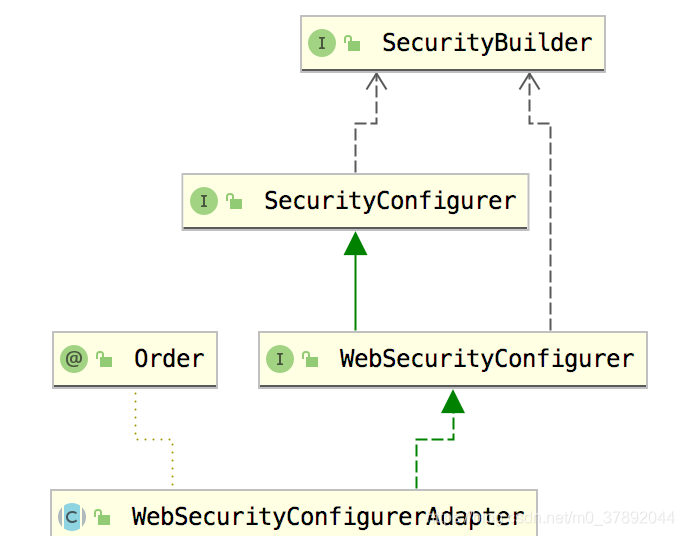
通过查看WebSecurityConfigurerAdapter的源码,我们看到它实现了WebSecurityConfigurer,并且受到@Order(100)修饰

4.2.1.1.@Order()注解
Spring @Order注释是在Spring 2.0中首次引入的。然后,它仅用于定义AspectJ建议中的顺序。
在Spring 4.0的后面,对该注释的实现进行了进一步改进。从那时起,它还支持对Java数组或List之类的集合中的Spring组件或bean进行排序。
参数的值越低,其优先级越高。
@Order批注的一些常见用例包括:
1、它最初引入的真正意图是对AspectJ中的advices建议进行排序;
2、当我们想要为加载CommandLineRunner或ApplicationRunner类定义一个订单时;
3、用于在Java数组或列表中以有序方式注入bean列表;
4、定义过滤器执行的顺序,比如在Spring安全的情况下;
4.2.1.2.WebSecurityConfigurer接口
我们可以看到该接口它里边约束了一些泛型,如下:
public interface WebSecurityConfigurer<T extends SecurityBuilder<Filter>>extends SecurityConfigurer<Filter, T> {
}
这里边的泛型很关键:
1、SecurityBuilder 中的泛型 Filter,表示 SecurityBuilder 最终的目的是为了构建一个 Filter 对象出来;
2、SecurityConfigurer 中两个泛型,第一个表示的含义也是 SecurityBuilder 最终构建的对象;
3、同时这里还定义了新的泛型 T,T 需要继承自 SecurityBuilder;
4、根据 WebSecurityConfigurerAdapter 中的定义,我们可以知道,T 就是 WebSecurity,我们也大概能猜出 WebSecurity 就是 SecurityBuilder 的子类;
综上所述: WebSecurityConfigurer 的目的我们可以理解为就是为了配置 WebSecurity。
4.2.2.配置WebSecurity
/*** @Description:配置 WebSecurity* @author hutao* @date 2021年1月23日*/
@SpringBootConfiguration
@EnableWebSecurity
@Order(1)
public class ConfigWebSecurity extends WebSecurityConfigurerAdapter {UserInfo userInfo = new UserInfo();/*** @Description:创建验证对象* @author hutao* @date 2021年1月23日*/@Bean@Overridepublic AuthenticationManager authenticationManagerBean() throws Exception {return super.authenticationManagerBean();}/*** @Description:构建身份认证,这里使用内存方式* @author hutao* @date 2021年1月23日*/@Overrideprotected void configure(AuthenticationManagerBuilder auth) throws Exception {auth.inMemoryAuthentication().withUser(userInfo.getUserName()).password("{noop}"+userInfo.getPassWord()).roles(userInfo.getRole());}
}
本文来自互联网用户投稿,文章观点仅代表作者本人,不代表本站立场,不承担相关法律责任。如若转载,请注明出处。 如若内容造成侵权/违法违规/事实不符,请点击【内容举报】进行投诉反馈!