pip安装django
创建虚拟环境
conda create -n Djiango2 python==3.7
激活虚拟环境
conda activate Djiango2
直接pip报错
pip install django
(Djiango2) C:\Users\ThinkStation>pip install Django==2.2.14
WARNING: Retrying (Retry(total=4, connect=None, read=None, redirect=None, status=None)) after connection broken by 'ProxyError('Cannot connect to proxy.', OSError(0, 'Error'))': /simple/django/
WARNING: Retrying (Retry(total=3, connect=None, read=None, redirect=None, status=None)) after connection broken by 'ProxyError('Cannot connect to proxy.', OSError(0, 'Error'))': /simple/django/
WARNING: Retrying (Retry(total=2, connect=None, read=None, redirect=None, status=None)) after connection broken by 'ProxyError('Cannot connect to proxy.', OSError(0, 'Error'))': /simple/django/
WARNING: Retrying (Retry(total=1, connect=None, read=None, redirect=None, status=None)) after connection broken by 'ProxyError('Cannot connect to proxy.', OSError(0, 'Error'))': /simple/django/
WARNING: Retrying (Retry(total=0, connect=None, read=None, redirect=None, status=None)) after connection broken by 'ProxyError('Cannot connect to proxy.', OSError(0, 'Error'))': /simple/django/
ERROR: Could not find a version that satisfies the requirement Django==2.2.14 (from versions: none)
ERROR: No matching distribution found for Django==2.2.14
WARNING: There was an error checking the latest version of pip.
换一种pip
pip install django==2.2.17 -i http://pypi.douban.com/simple/ --trusted-host pypi.douban.com
Successfully installed django-2.2.17
安装成功。
打开pycharm,右下角Add Interpreter,进行配置。
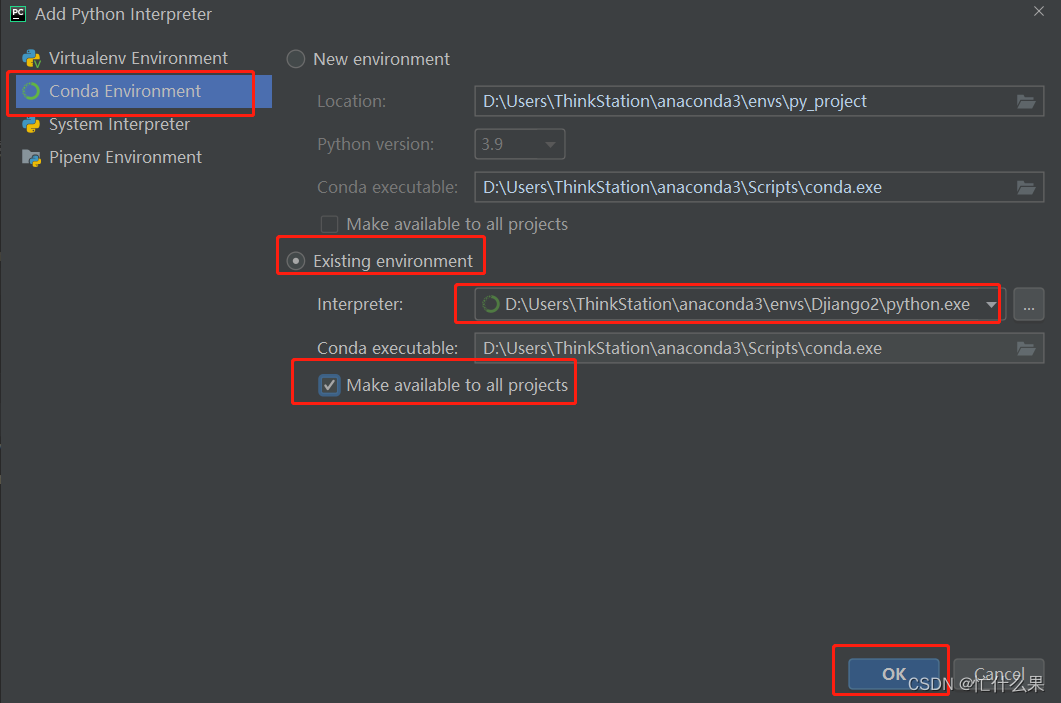
import django
没有报错,安装配置完成。
本文来自互联网用户投稿,文章观点仅代表作者本人,不代表本站立场,不承担相关法律责任。如若转载,请注明出处。 如若内容造成侵权/违法违规/事实不符,请点击【内容举报】进行投诉反馈!