获取Java程序运行的路径 | 获取当前jar包的路径
获取Java程序运行的路径 | 获取当前jar包的路径
转自 Itype 用户snoopy7713 http://marsvaadin.iteye.com/blog/1671046
不管是否是 Jar 包,不管是否是 Tomcat 部署,以下三个方法均可实现。
package test;public class MyPath {/*** 获取项目所在路径(包括jar)* * @return*/public static String getProjectPath() {java.net.URL url = MyPath.class.getProtectionDomain().getCodeSource().getLocation();String filePath = null;try {filePath = java.net.URLDecoder.decode(url.getPath(), "utf-8");} catch (Exception e) {e.printStackTrace();}if (filePath.endsWith(".jar"))filePath = filePath.substring(0, filePath.lastIndexOf("/") + 1);java.io.File file = new java.io.File(filePath);filePath = file.getAbsolutePath();return filePath;}/*** 获取项目所在路径* * @return*/public static String getRealPath() {String realPath = MyPath.class.getClassLoader().getResource("").getFile();java.io.File file = new java.io.File(realPath);realPath = file.getAbsolutePath();try {realPath = java.net.URLDecoder.decode(realPath, "utf-8");} catch (Exception e) {e.printStackTrace();}return realPath;}public static String getAppPath(Class cls) {// 检查用户传入的参数是否为空if (cls == null)throw new java.lang.IllegalArgumentException("参数不能为空!");ClassLoader loader = cls.getClassLoader();// 获得类的全名,包括包名String clsName = cls.getName();// 此处简单判定是否是Java基础类库,防止用户传入JDK内置的类库if (clsName.startsWith("java.") || clsName.startsWith("javax.")) {throw new java.lang.IllegalArgumentException("不要传送系统类!");}// 将类的class文件全名改为路径形式String clsPath = clsName.replace(".", "/") + ".class";// 调用ClassLoader的getResource方法,传入包含路径信息的类文件名java.net.URL url = loader.getResource(clsPath);// 从URL对象中获取路径信息String realPath = url.getPath();// 去掉路径信息中的协议名"file:"int pos = realPath.indexOf("file:");if (pos > -1) {realPath = realPath.substring(pos + 5);}// 去掉路径信息最后包含类文件信息的部分,得到类所在的路径pos = realPath.indexOf(clsPath);realPath = realPath.substring(0, pos - 1);// 如果类文件被打包到JAR等文件中时,去掉对应的JAR等打包文件名if (realPath.endsWith("!")) {realPath = realPath.substring(0, realPath.lastIndexOf("/"));}java.io.File file = new java.io.File(realPath);realPath = file.getAbsolutePath();try {realPath = java.net.URLDecoder.decode(realPath, "utf-8");} catch (Exception e) {throw new RuntimeException(e);}return realPath;}// getAppPath定义结束public static void main(String[] args) {System.out.println(getRealPath());System.out.println(getProjectPath());}}
使用Jar包,在Tomcat的运行结果如下:
ProjectPath: D:\J2EE\Tomcat 6.0\webapps\MyService1WebP\WEB-INF\lib
RealPath: D:\J2EE\Tomcat 6.0\webapps\MyService1WebP\WEB-INF\classes
Apppath: D:\J2EE\Tomcat 6.0\webapps\MyService1WebP\WEB-INF\classes
java的System.getProperty()方法可以获取的值
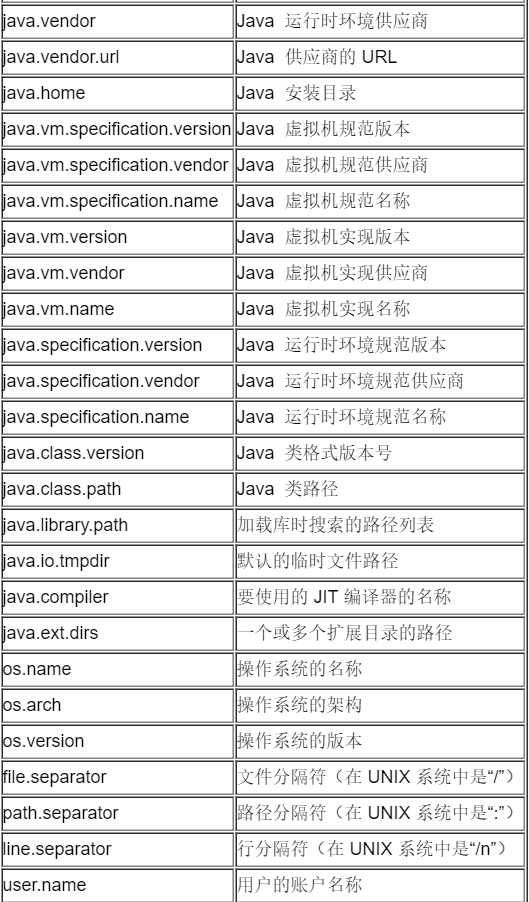

获取的代码示例:
public   class  SystemProperty {  public   static   void  main(String args[]) {     System.out.println("java_vendor:"  + System.getProperty( "java.vendor" ));     System.out.println("java_vendor_url:"      + System.getProperty("java.vendor.url" ));     System.out.println("java_home:"  + System.getProperty( "java.home" ));     System.out.println("java_class_version:"      + System.getProperty("java.class.version" ));     System.out.println("java_class_path:"      + System.getProperty("java.class.path" ));     System.out.println("os_name:"  + System.getProperty( "os.name" ));     System.out.println("os_arch:"  + System.getProperty( "os.arch" ));     System.out.println("os_version:"  + System.getProperty( "os.version" ));     System.out.println("user_name:"  + System.getProperty( "user.name" ));     System.out.println("user_home:"  + System.getProperty( "user.home" ));     System.out.println("user_dir:"  + System.getProperty( "user.dir" ));     System.out.println("java_vm_specification_version:"      + System.getProperty("java.vm.specification.version" ));     System.out.println("java_vm_specification_vendor:"      + System.getProperty("java.vm.specification.vendor" ));     System.out.println("java_vm_specification_name:"      + System.getProperty("java.vm.specification.name" ));     System.out.println("java_vm_version:"      + System.getProperty("java.vm.version" ));     System.out.println("java_vm_vendor:"      + System.getProperty("java.vm.vendor" ));     System.out     .println("java_vm_name:"  + System.getProperty( "java.vm.name" ));     System.out.println("java_ext_dirs:"      + System.getProperty("java.ext.dirs" ));     System.out.println("file_separator:"      + System.getProperty("file.separator" ));     System.out.println("path_separator:"      + System.getProperty("path.separator" ));     System.out.println("line_separator:"      + System.getProperty("line.separator" ));
}
=======================================================================
System.setProperties( “proxySet”, “true” );
System.setProperties( “proxyHost”, “192.168.31.117” );
System.setProperties( “proxyPort”, “80” );
这里的proxySet,proxyHost,proxyPort等等这些系统的属性名称是从哪里知道的?
——通过JDK文档中对java.lang.system的static Properties getProperties()方法的介绍,可以获知所有可用属性的含义。
——根本没有proxySet,proxyHost和proxyPort, 这些是user defined property,那么用户定义的属性如何起作用的?
JavaVM实现Proxy的方法
要想让java应用使用代理连接网络,只需要设置一下system properties,有两种方法可以设置,一是直接在java代码里面调用System.setProperty()方法,还有就是通过-D选项添加 java虚拟机参数,如 java -Dhttp.proxyHost=192.168.254.254 -Dhttp.proxyPort=9000 ,当然也可以指定不使用代理访问的网站或者主机,http.nonProxyHosts属性指定不使用代理访问的域。示例如下所示:
System.setProperty(“http.proxyHost”, “192.168.254.254”);
System.setProperty(“http.proxyPort”, “9000”);
System.setProperty(“http.nonProxyHosts”, “localhost”);
如果你想使用ftp代理可以以相同的方式设定如下系统属性:ftp.proxyHost, ftp.proxyPort , and 使用socket代理可以设定socks.ProxyHost socks.ProxyPort 也可以使用如下代码:
Properties sysProperties = System.getProperties();
//Specify proxy settings
sysProperties.put(“proxyHost”, “myhost”);//myhost设置为代理的地址
sysProperties.put(“proxyPort”, “myport”);//myport设置为代理端口
sysProperties.put(“proxySet”, “true”);
补充:
Java网络代理服务器环境变量
Java 是一种面向对象的网络语言,Java 的JVM已经提供了可以设置与网络代理服务相关的环境变量,这些环境变量是按照键值名(Key)和值(Value)实现配置的。而这些环境变量与应用程序 息息相关。比如:大家比较熟悉的classpath环境变量等。从表面上看,JVM的环境变量有点类似Windows的*.ini,该环境变量是按照纯文 本的格式存储的。
Http 代理服务是目前Internet环境下,应有最为广泛的代理服务。一般的网络浏览器,如:微软的IE和网景的Netscape都提供对Http代理服务的 配置选项。在Java应用程序中,对Http代理服务的使用是通过配置Java 虚拟机的JVM的环境变量来实现的。针对http代理服务,Java 虚拟机提供了如下环境变量:
http.proxySet 该环境变量用以设置应用程序是否使用http协议代理,值为True/False。
注意:在设置环境变量时候,变量值True/False是按照字符串的形式进行设置的。
http.proxyHost 该环境变量用以设置应用程序所使用的http协议代理服务器的主机,比如:我们使用 http://172.14.10.34 作为http的代理服务器主机。
http.proxyport 该环境变量用以设置应用程序所使用的http协议代理服务器的主机的端口号。比如:我们使用 http://172.14.10.34 的8080端口作为http的代理服务器。
如:将Java应用程序的Http代理服务器设为http://172.14.10.34 ,端口为8080,可以使用如下代码:
String host=”http://172.14.10.34 “;
String port=”8080”;
System.setproperty(“http.proxySet”, “true”);
System.setproperty(“http.proxyHost”, host);
System.setproperty(“http.proxyport”, port);
一旦设置好了Java应用程序的http代理环境变量,Java应用程序就可以通过http代理服务透明地访问与http相关的网络资源。
本文来自互联网用户投稿,文章观点仅代表作者本人,不代表本站立场,不承担相关法律责任。如若转载,请注明出处。 如若内容造成侵权/违法违规/事实不符,请点击【内容举报】进行投诉反馈!