JavaScript系列之内置对象Math
文章の目录
- 1、属性
- 1.1、Math.E
- 1.2、Math.LN2
- 1.3、Math.LN10
- 1.4、Math.LOG10E
- 1.5、Math.LOG2E
- 1.6、Math.PI
- 1.7、Math.SQRT1_2
- 1.8、Math.SQRT2
- 2、方法
- 2.1、Math.abs()
- 2.1.1、概述
- 2.1.2、语法
- 2.1.3、参数
- 2.1.4、示例
- 2.2、Math.acos()
- 2.2.1、概述
- 2.2.2、语法
- 2.2.3、参数
- 2.2.4、示例
- 2.3、Math.acosh()
- 2.3.1、概述
- 2.3.2、语法
- 2.3.3、参数
- 2.3.4、返回值
- 2.3.5、示例
- 2.3.6、向下兼容
- 2.4、Math.asin()
- 2.4.1、概述
- 2.4.2、语法
- 2.4.3、参数
- 2.4.4、返回值
- 2.4.5、示例
- 2.5、Math.asinh()
- 2.5.1、概述
- 2.5.2、语法
- 2.5.3、参数
- 2.5.4、返回值
- 2.5.5、示例
- 2.5.6、向下兼容
- 2.6、Math.atan()
- 2.6.1、概述
- 2.6.2、语法
- 2.6.3、参数
- 2.6.4、返回值
- 2.6.5、示例
- 2.7、Math.atan2()
- 2.7.1、概述
- 2.7.2、语法
- 2.7.3、参数
- 2.7.4、返回值
- 2.7.5、示例
- 2.8、Math.atanh()
- 2.8.1、概述
- 2.8.2、语法
- 2.8.3、参数
- 2.8.4、示例
- 2.8.5、向下兼容
- 2.9、Math.cbrt()
- 2.9.1、概述
- 2.9.2、语法
- 2.9.3、参数
- 2.9.4、返回值
- 2.9.5、示例
- 2.9.6、向下兼容
- 2.10、Math.ceil()
- 2.10.1、概述
- 2.10.2、语法
- 2.10.3、参数
- 2.10.4、返回值
- 2.10.5、示例
- 2.11、Math.clz32()
- 2.11.1、概述
- 2.11.2、语法
- 2.11.3、参数
- 2.11.4、返回值
- 2.11.5、示例
- 2.12、Math.cos()
- 2.12.1、概述
- 2.12.2、语法
- 2.12.3、参数
- 2.12.4、返回值
- 2.12.5、示例
- 2.13、Math.cosh()
- 2.13.1、概述
- 2.13.2、语法
- 2.13.3、参数
- 2.13.4、示例
- 2.13.5、向下兼容
- 2.14、Math.exp()
- 2.14.1、概述
- 2.14.2、语法
- 2.14.3、参数
- 2.14.4、示例
- 2.15、Math.expm1()
- 2.15.1、概述
- 2.15.2、语法
- 2.15.3、参数
- 2.15.4、示例
- 2.15.5、向下兼容
- 2.16、Math.floor()
- 2.16.1、概述
- 2.16.2、语法
- 2.16.3、参数
- 2.16.4、返回值
- 2.16.5、示例
- 2.17、Math.fround()
- 2.17.1、概述
- 2.17.2、语法
- 2.17.3、参数
- 2.17.4、返回值
- 2.17.5、示例
- 2.17.6、向下兼容
- 2.18、Math.hypot()
- 2.18.1、概述
- 2.18.2、语法
- 2.18.3、参数
- 2.18.4、返回值
- 2.18.5、示例
- 2.18.6、向下兼容
- 2.19、Math.imul()
- 2.19.1、概述
- 2.19.2、语法
- 2.19.3、参数
- 2.19.4、返回值
- 2.19.5、示例
- 2.19.6、向下兼容
- 2.20、Math.log()
- 2.20.1、概述
- 2.10.2、语法
- 2.10.3、参数
- 2.10.4、返回值
- 2.10.5、示例
- 2.21、Math.log10()
- 2.21.1、概述
- 2.21.2、语法
- 2.21.3、参数
- 2.21.4、返回值
- 2.21.5、示例
- 2.22、Math.log1p()
- 2.22.1、概述
- 2.22.2、语法
- 2.22.3、参数
- 2.22.4、返回值
- 2.22.5、示例
- 2.23、Math.log2()
- 2.23.1、概述
- 2.23.2、语法
- 2.23.3、参数
- 2.23.4、返回值
- 2.23.5、示例
- 2.24、Math.max()
- 2.24.1、概述
- 2.24.2、语法
- 2.24.3、参数
- 2.24.4、返回值
- 2.24.5、示例
- 2.25、Math.min()
- 2.25.1、概述
- 2.25.2、语法
- 2.25.3、参数
- 2.25.4、返回值
- 2.25.5、示例
- 2.26、Math.pow()
- 2.26.1、概述
- 2.26.2、语法
- 2.26.3、参数
- 2.26.4、示例
- 2.27、Math.random()
- 2.27.1、概述
- 2.27.2、语法
- 2.27.3、返回值
- 2.27.4、示例
- 2.27.4.1、得到一个大于等于 0,小于 1 之间的随机数
- 2.27.4.2、得到一个两数之间的随机数
- 2.27.4.3、得到一个两数之间的随机整数
- 2.27.4.4、得到一个两数之间的随机整数,包括两个数在内
- 2.28、Math.round()
- 2.28.1、概述
- 2.28.2、语法
- 2.28.3、参数
- 2.28.4、返回值
- 2.28.5、示例
- 2.29、Math.sign()
- 2.29.1、概述
- 2.29.2、语法
- 2.29.3、参数
- 2.29.4、返回值
- 2.29.5、示例
- 2.29.6、向下兼容
- 2.30、Math.sin()
- 2.30.1、概述
- 2.30.2、语法
- 2.30.3、参数
- 2.30.4、返回值
- 2.30.5、示例
- 2.31、Math.sinh()
- 2.31.1、概述
- 2.31.2、语法
- 2.31.3、参数
- 2.31.4、示例
- 2.32、Math.sqrt()
- 2.32.1、概述
- 2.32.2、语法
- 2.32.3、参数
- 2.32.4、返回值
- 2.32.5、示例
- 2.33、Math.tan()
- 2.33.1、概述
- 2.33.2、语法
- 2.33.3、参数
- 2.33.4、返回值
- 2.33.5、示例
- 2.34、Math.tanh()
- 2.34.1、概述
- 2.34.2、语法
- 2.34.3、参数
- 2.34.4、返回值
- 2.34.5、示例
- 2.34.6、向下兼容
- 2.35、Math.trunc()
- 2.35.1、概述
- 2.35.2、语法
- 2.35.3、参数
- 2.35.4、返回值
- 2.35.5、示例
- 2.35.6、向下兼容
- 写在最后
Math 是一个内置对象,它拥有一些数学常数属性和数学函数方法。Math 不是一个函数对象。
注意:
Math用于Number类型。它不支持BigInt。Math不是一个构造器。Math的所有属性与方法都是静态的。
1、属性
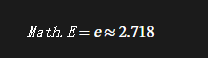
1.1、Math.E
欧拉常数,也是自然对数的底数(或称为基数),约等于 2.718。
function getNapier() {return Math.E;
}getNapier(); // 2.718281828459045
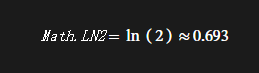
1.2、Math.LN2
表示 2 的自然对数,约为 0.693
function getNatLog2() {return Math.LN2;
}getNatLog2(); // 0.6931471805599453
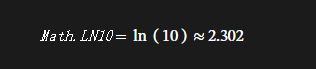
1.3、Math.LN10
表示 10 的自然对数,约为 2.302
function getNatLog10() {return Math.LN10;
}getNatLog10(); // 2.302585092994046
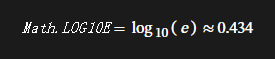
1.4、Math.LOG10E
表示以 10 为底数,e 的对数,约为 0.434
function getLog10e() {return Math.LOG10E;
}getLog10e(); // 0.4342944819032518
1.5、Math.LOG2E
表示以 2 为底数,e 的对数,约为 1.442
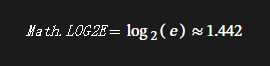
function getLog2e() {return Math.LOG2E;
}getLog2e(); // 1.4426950408889634
1.6、Math.PI
表示一个圆的周长与直径的比例,约为 3.14159
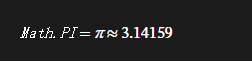
function calculateCircumference(radius) {return 2 * Math.PI * radius;
}calculateCircumference(1); // 6.283185307179586
1.7、Math.SQRT1_2
表示 1/2 的平方根,约为 0.707
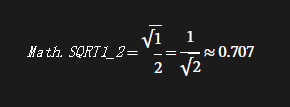
function getRoot1_2() {return Math.SQRT1_2;
}getRoot1_2(); // 0.7071067811865476
1.8、Math.SQRT2
表示 2 的平方根,约为 1.414
function getRoot2() {return Math.SQRT2;
}getRoot2(); // 1.4142135623730951
2、方法
2.1、Math.abs()
2.1.1、概述
返回指定数字 “x“ 的绝对值。
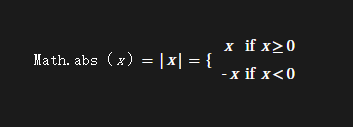
2.1.2、语法
Math.abs(x);
2.1.3、参数
x:一个数值
2.1.4、示例
传入一个非数字形式的字符串或者 undefined/empty 变量,将返回 NaN。传入 null 将返回 0。
Math.abs("-1"); // 1
Math.abs(-2); // 2
Math.abs(null); // 0
Math.abs(""); // 0
Math.abs([]); // 0
Math.abs([2]); // 2
Math.abs([1, 2]); // NaN
Math.abs({}); // NaN
Math.abs("string"); // NaN
Math.abs(); // NaN
2.2、Math.acos()
2.2.1、概述
返回一个数的反余弦值(单位为弧度)

acos 方法以 -1 到 1 的一个数为参数,返回一个 0 到 pi(弧度)的数值。如果传入的参数值超出了限定的范围,将返回 NaN。
2.2.2、语法
Math.acos(x)
2.2.3、参数
x:一个数值
2.2.4、示例
Math.acos(-2); // NaN
Math.acos(-1); // 3.141592653589793
Math.acos(0); // 1.5707963267948966
Math.acos(0.5); // 1.0471975511965979
Math.acos(1); // 0
Math.acos(2); // NaN
2.3、Math.acosh()
2.3.1、概述
返回一个数的反双曲余弦值

2.3.2、语法
Math.acosh(x)
2.3.3、参数
x:一个数字。
2.3.4、返回值
返回给定数的反双曲余弦值,如果该数小于 1 则返回 NaN。
2.3.5、示例
Math.acosh(-1); // NaN
Math.acosh(0); // NaN
Math.acosh(0.5); // NaN
Math.acosh(1); // 0
Math.acosh(2); // 1.3169578969248166
2.3.6、向下兼容

Math.acosh =Math.acosh ||function (x) {return Math.log(x + Math.sqrt(x * x - 1));};
2.4、Math.asin()
2.4.1、概述
返回一个数值的反正弦(单位为弧度)

2.4.2、语法
Math.asin(x)
2.4.3、参数
x:一个数值
2.4.4、返回值
asin 方法接受 -1 到 1 之间的数值作为参数,返回一个介于 弧度的数值。如果接受的参数值超出范围,则返回 NaN。
2.4.5、示例
Math.asin(-2); // NaN
Math.asin(-1); // -1.5707963267948966 (-pi/2)
Math.asin(0); // 0
Math.asin(0.5); // 0.5235987755982989
Math.asin(1); // 1.570796326794897 (pi/2)
Math.asin(2); // NaN
2.5、Math.asinh()
2.5.1、概述
Math.asinh() 返回一个数值的反双曲正弦值

2.5.2、语法
Math.asinh(x)
2.5.3、参数
x:一个数值。
2.5.4、返回值
返回指定数值的反双曲正弦值。
2.5.5、示例
Math.asinh(1); // 0.881373587019543
Math.asinh(0); // 0
2.5.6、向下兼容
Math.asinh =Math.asinh ||function (x) {if (x === -Infinity) {return x;} else {return Math.log(x + Math.sqrt(x * x + 1));}};
2.6、Math.atan()
2.6.1、概述
Math.atan() 函数返回一个数值的反正切(以弧度为单位)

2.6.2、语法
Math.atan(x)
2.6.3、参数
x:一个数值
2.6.4、返回值
atan 返回一个 弧度之间的数值。
2.6.5、示例
Math.atan(1); // 0.7853981633974483
Math.atan(0); // 0
2.7、Math.atan2()
2.7.1、概述
Math.atan2() 返回从原点 (0,0) 到 (x,y) 点的线段与 x 轴正方向之间的平面角度 (弧度值),也就是 Math.atan2(y,x)
2.7.2、语法
Math.atan2(y, x)
2.7.3、参数
y,x:数值
2.7.4、返回值
atan2 方法返回一个 -pi 到 pi 之间的数值,表示点 (x, y) 对应的偏移角度。这是一个逆时针角度,以弧度为单位,正 X 轴和点 (x, y) 与原点连线之间。注意此函数接受的参数:先传递 y 坐标,然后是 x 坐标。
2.7.5、示例
Math.atan2(90, 15); // 1.4056476493802699
Math.atan2(15, 90); // 0.16514867741462683Math.atan2(±0, -0); // ±PI.
Math.atan2(±0, +0); // ±0.
Math.atan2(±0, -x); // ±PI for x > 0.
Math.atan2(±0, x); // ±0 for x > 0.
Math.atan2(-y, ±0); // -PI/2 for y > 0.
Math.atan2(y, ±0); // PI/2 for y > 0.
Math.atan2(±y, -Infinity); // ±PI for finite y > 0.
Math.atan2(±y, +Infinity); // ±0 for finite y > 0.
Math.atan2(±Infinity, x); // ±PI/2 for finite x.
Math.atan2(±Infinity, -Infinity); // ±3*PI/4.
Math.atan2(±Infinity, +Infinity); // ±PI/4.
2.8、Math.atanh()
2.8.1、概述
Math.atanh() 函数返回一个数值反双曲正切值

2.8.2、语法
Math.atanh(x)
2.8.3、参数
x:一个数值
2.8.4、示例
对于大于 1 或是小于 -1 的值,函数返回 NaN 。
Math.atanh(-2); // NaN
Math.atanh(-1); // -Infinity
Math.atanh(0); // 0
Math.atanh(0.5); // 0.5493061443340548
Math.atanh(1); // Infinity
Math.atanh(2); // NaN
2.8.5、向下兼容
Math.atanh =Math.atanh ||function (x) {return Math.log((1 + x) / (1 - x)) / 2;};
2.9、Math.cbrt()
2.9.1、概述
Math.cbrt() 函数返回任意数字的立方根。
2.9.2、语法
Math.cbrt(x)
2.9.3、参数
x:任意数字。
2.9.4、返回值
给定数字的立方根
2.9.5、示例
Math.cbrt(NaN); // NaN
Math.cbrt(-1); // -1
Math.cbrt(-0); // -0
Math.cbrt(-Infinity); // -Infinity
Math.cbrt(0); // 0
Math.cbrt(1); // 1
Math.cbrt(Infinity); // Infinity
Math.cbrt(null); // 0
Math.cbrt(2); // 1.2599210498948734
2.9.6、向下兼容
为了与旧版浏览器兼容,可使用下方函数模拟 cbrt():
if (!Math.cbrt) {Math.cbrt = function (x) {var y = Math.pow(Math.abs(x), 1 / 3);return x < 0 ? -y : y;};
}
2.10、Math.ceil()
2.10.1、概述
Math.ceil() 函数返回大于或等于一个给定数字的最小整数。
2.10.2、语法
Math.ceil(x)
2.10.3、参数
x:一个数值。
2.10.4、返回值
大于或等于给定数字的最小整数。
2.10.5、示例
// Closure
(function () {/*** Decimal adjustment of a number.** @param {String}  type  The type of adjustment.* @param {Number}  value The number.* @param {Integer} exp   The exponent (the 10 logarithm of the adjustment base).* @returns {Number} The adjusted value.*/function decimalAdjust(type, value, exp) {// If the exp is undefined or zero...if (typeof exp === "undefined" || +exp === 0) {return Math[type](value);}value = +value;exp = +exp;// If the value is not a number or the exp is not an integer...if (isNaN(value) || !(typeof exp === "number" && exp % 1 === 0)) {return NaN;}// Shiftvalue = value.toString().split("e");value = Math[type](+(value[0] + "e" + (value[1] ? +value[1] - exp : -exp)));// Shift backvalue = value.toString().split("e");return +(value[0] + "e" + (value[1] ? +value[1] + exp : exp));}// Decimal roundif (!Math.round10) {Math.round10 = function (value, exp) {return decimalAdjust("round", value, exp);};}// Decimal floorif (!Math.floor10) {Math.floor10 = function (value, exp) {return decimalAdjust("floor", value, exp);};}// Decimal ceilif (!Math.ceil10) {Math.ceil10 = function (value, exp) {return decimalAdjust("ceil", value, exp);};}
})();// Round
Math.round10(55.55, -1); // 55.6
Math.round10(55.549, -1); // 55.5
Math.round10(55, 1); // 60
Math.round10(54.9, 1); // 50
Math.round10(-55.55, -1); // -55.5
Math.round10(-55.551, -1); // -55.6
Math.round10(-55, 1); // -50
Math.round10(-55.1, 1); // -60
// Floor
Math.floor10(55.59, -1); // 55.5
Math.floor10(59, 1); // 50
Math.floor10(-55.51, -1); // -55.6
Math.floor10(-51, 1); // -60
// Ceil
Math.ceil10(55.51, -1); // 55.6
Math.ceil10(51, 1); // 60
Math.ceil10(-55.59, -1); // -55.5
Math.ceil10(-59, 1); // -50
2.11、Math.clz32()
2.11.1、概述
Math.clz32() 函数返回一个数字在转换成 32 无符号整形数字的二进制形式后,开头的 0 的个数,比如 1000000 转换成 32 位无符号整形数字的二进制形式后是 00000000000011110100001001000000,开头的 0 的个数是 12 个,则 Math.clz32(1000000) 返回 12。
2.11.2、语法
Math.clz32 (x)
2.11.3、参数
x:一个数字。
2.11.4、返回值
如果 x 不是数字类型,则它首先会被转换成数字类型,然后再转成 32 位无符号整形数字。
如果转换后的 32 位无符号整形数字是 0,则返回 32;因为此时所有位上都是 0。
NaN,Infinity,-Infinity 这三个数字转成 32 位无符号整形数字后都是 0。
2.11.5、示例
Math.clz32(1); // 31
Math.clz32(1000); // 22
Math.clz32() // 32[(NaN, Infinity, -Infinity, 0, -0, null, undefined, "foo", {}, [])].filter(function (n) {return Math.clz32(n) !== 32;}); // []
Math.clz32(true); // 31
Math.clz32(3.5); // 30
2.12、Math.cos()
2.12.1、概述
Math.cos() 函数返回一个数值的余弦值。
2.12.2、语法
Math.cos(x)
2.12.3、参数
x:一个以弧度为单位的数值。
2.12.4、返回值
cos 方法返回一个 -1 到 1 之间的数值,表示角度(单位:弧度)的余弦值。
2.12.5、示例
Math.cos(0); // 1
Math.cos(1); // 0.5403023058681398Math.cos(Math.PI); // -1
Math.cos(2 * Math.PI); // 1
2.13、Math.cosh()
2.13.1、概述
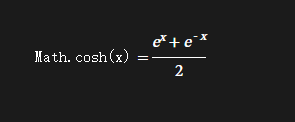
Math.cosh() 函数返回数值的双曲余弦函数
2.13.2、语法
Math.cosh(x)
2.13.3、参数
x:数值。
2.13.4、示例
Math.cosh(0); // 1
Math.cosh(1); // 1.5430806348152437
Math.cosh(-1); // 1.5430806348152437
2.13.5、向下兼容
Math.cosh =Math.cosh ||function (x) {return (Math.exp(x) + Math.exp(-x)) / 2;};
2.14、Math.exp()
2.14.1、概述
Math.exp() 函数返回 e^x,x 表示参数,e 是欧拉常数,自然对数的底数。
2.14.2、语法
Math.exp(x)
2.14.3、参数
x:一个数值
2.14.4、示例
Math.exp(-1); // 0.36787944117144233
Math.exp(0); // 1
Math.exp(1); // 2.718281828459045
2.15、Math.expm1()
2.15.1、概述
Math.expm1() 函数返回 E^x - 1, 其中 x 是该函数的参数,E 是自然对数的底数 2.718281828459045。
2.15.2、语法
Math.expm1(x)
2.15.3、参数
x:任意数字。
参数 x 会被自动类型转换成 number 类型。
2.15.4、示例
Math.expm1(1); // 1.7182818284590453
Math.expm1(-38); // -1
Math.expm1("-38"); // -1
Math.expm1("foo"); // NaN
2.15.5、向下兼容
Math.expm1 =Math.expm1 ||function (x) {return Math.exp(x) - 1;};
2.16、Math.floor()
2.16.1、概述
Math.floor() 返回小于或等于一个给定数字的最大整数。
向下取整
2.16.2、语法
Math.floor(x)
2.16.3、参数
x:一个数字。
2.16.4、返回值
一个表示小于或等于指定数字的最大整数的数字。
2.16.5、示例
Math.floor(45.95);
// 45
Math.floor(45.05);
// 45
Math.floor(4);
// 4
Math.floor(-45.05);
// -46
Math.floor(-45.95);
// -46
// Closure
(function () {/*** Decimal adjustment of a number.** @param	{String}	type	The type of adjustment.* @param	{Number}	value	The number.* @param	{Integer}	exp		The exponent (the 10 logarithm of the adjustment base).* @returns	{Number}			The adjusted value.*/function decimalAdjust(type, value, exp) {// If the exp is undefined or zero...if (typeof exp === "undefined" || +exp === 0) {return Math[type](value);}value = +value;exp = +exp;// If the value is not a number or the exp is not an integer...if (isNaN(value) || !(typeof exp === "number" && exp % 1 === 0)) {return NaN;}// Shiftvalue = value.toString().split("e");value = Math[type](+(value[0] + "e" + (value[1] ? +value[1] - exp : -exp)));// Shift backvalue = value.toString().split("e");return +(value[0] + "e" + (value[1] ? +value[1] + exp : exp));}// Decimal roundif (!Math.round10) {Math.round10 = function (value, exp) {return decimalAdjust("round", value, exp);};}// Decimal floorif (!Math.floor10) {Math.floor10 = function (value, exp) {return decimalAdjust("floor", value, exp);};}// Decimal ceilif (!Math.ceil10) {Math.ceil10 = function (value, exp) {return decimalAdjust("ceil", value, exp);};}
})();// Round
Math.round10(55.55, -1); // 55.6
Math.round10(55.549, -1); // 55.5
Math.round10(55, 1); // 60
Math.round10(54.9, 1); // 50
Math.round10(-55.55, -1); // -55.5
Math.round10(-55.551, -1); // -55.6
Math.round10(-55, 1); // -50
Math.round10(-55.1, 1); // -60
// Floor
Math.floor10(55.59, -1); // 55.5
Math.floor10(59, 1); // 50
Math.floor10(-55.51, -1); // -55.6
Math.floor10(-51, 1); // -60
// Ceil
Math.ceil10(55.51, -1); // 55.6
Math.ceil10(51, 1); // 60
Math.ceil10(-55.59, -1); // -55.5
Math.ceil10(-59, 1); // -50
2.17、Math.fround()
2.17.1、概述
Math.fround() 可以将任意的数字转换为离它最近的单精度浮点数形式的数字。
2.17.2、语法
Math.fround(doubleFloat)
2.17.3、参数
doubleFloat:一个 Number。若参数为非数字类型,则会被转投成数字。无法转换时,设置成NaN。
2.17.4、返回值
指定数字最接近的 32 位单精度浮点数表示。
2.17.5、示例
数字 1.5 可以在二进制数字系统中精确表示,32 位和 64 位的值相同:
Math.fround(1.5); // 1.5
Math.fround(1.5) === 1.5; // true
但是,数字 1.337 却无法在二进制数字系统中精确表示,所以 32 位和 64 位的值是不同的:
Math.fround(1.337); // 1.3370000123977661
Math.fround(1.337) === 1.337; // false
2^150 超出 32 位浮点,所以返回Infinity:
2 ** 150; // 1.42724769270596e+45
Math.fround(2 ** 150); // Infinity
如果参数无法转换成数字,或者为 NaN(NaN),Math.fround() 会返回 NaN:
Math.fround("abc"); // NaN
Math.fround(NaN); // NaN
在某些精度不高的场合下,可以通过将二个浮点数转换成 32 位浮点数进行比较,以解决 64 位浮点数比较结果不正确的问题:
0.1 + 0.2 == 0.3; //falsefunction equal(v1, v2) {return Math.fround(v1) == Math.fround(v2);
}equal(0.1 + 0.2, 0.3); //true
2.17.6、向下兼容
Math.fround =Math.fround ||(function (array) {return function (x) {return (array[0] = x), array[0];};})(new Float32Array(1));
2.18、Math.hypot()
2.18.1、概述
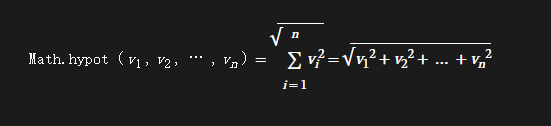
Math.hypot() 函数返回所有参数的平方和的平方根
2.18.2、语法
Math.hypot([value1[,value2, ...]])
2.18.3、参数
value1, value2, …:任意个数字。
2.18.4、返回值
将所提供的参数求平方和后开平方根。如果有参数不能转换为数字,则返回 NaN。
如果不传入任何参数,则返回 +0。
如果参数列表中有至少一个参数不能被转换为数字,则返回 NaN。
如果只传入一个参数,Math.hypot(x) 等同于 Math.abs(x)。
2.18.5、示例
Math.hypot(3, 4); // 5
Math.hypot(3, 4, 5); // 7.0710678118654755
Math.hypot(); // 0
Math.hypot(NaN); // NaN
Math.hypot(3, 4, "foo"); // NaN, +'foo' => NaN
Math.hypot(3, 4, "5"); // 7.0710678118654755, +'5' => 5
Math.hypot(-3); // 3, the same as Math.abs(-3)
2.18.6、向下兼容
if (!Math.hypot)Math.hypot = function () {var y = 0,i = arguments.length;while (i--) y += arguments[i] * arguments[i];return Math.sqrt(y);};
另一种避免结果溢出的实现:
if (!Math.hypot)Math.hypot = function (x, y) {// https://bugzilla.mozilla.org/show_bug.cgi?id=896264#c28var max = 0;var s = 0;for (var i = 0; i < arguments.length; i += 1) {var arg = Math.abs(Number(arguments[i]));if (arg > max) {s *= (max / arg) * (max / arg);max = arg;}s += arg === 0 && max === 0 ? 0 : (arg / max) * (arg / max);}return max === 1 / 0 ? 1 / 0 : max * Math.sqrt(s);};
2.19、Math.imul()
2.19.1、概述
该函数将两个参数分别转换为 32 位整数,相乘后返回 32 位结果,类似 C 语言的 32 位整数相乘。
2.19.2、语法
var product = Math.imul(a, b)
2.19.3、参数
a:被乘数。
b:乘数。
2.19.4、返回值
类似 C 语言 32 位整数相乘的结果。
2.19.5、示例
Math.imul(2, 4); // 8
Math.imul(-1, 8); // -8
Math.imul(-2, -2); // 4
Math.imul(0xffffffff, 5); //-5
Math.imul(0xfffffffe, 5); //-10
2.19.6、向下兼容
if (!Math.imul)Math.imul = function (a, b) {var aHi = (a >>> 16) & 0xffff;var aLo = a & 0xffff;var bHi = (b >>> 16) & 0xffff;var bLo = b & 0xffff;// the shift by 0 fixes the sign on the high part// the final |0 converts the unsigned value into a signed valuereturn (aLo * bLo + (((aHi * bLo + aLo * bHi) << 16) >>> 0)) | 0;};
下面的实现性能会更好一些。
if (!Math.imul)Math.imul = function (opA, opB) {opB |= 0; // ensure that opB is an integer. opA will automatically be coerced.// floating points give us 53 bits of precision to work with plus 1 sign bit// automatically handled for our convienence:// 1. 0x003fffff /*opA & 0x000fffff*/ * 0x7fffffff /*opB*/ = 0x1fffff7fc00001// 0x1fffff7fc00001 < Number.MAX_SAFE_INTEGER /*0x1fffffffffffff*/var result = (opA & 0x003fffff) * opB;// 2. We can remove an integer coersion from the statement above because:// 0x1fffff7fc00001 + 0xffc00000 = 0x1fffffff800001// 0x1fffffff800001 < Number.MAX_SAFE_INTEGER /*0x1fffffffffffff*/if (opA & 0xffc00000 /*!== 0*/) result += ((opA & 0xffc00000) * opB) | 0;return result | 0;};
2.20、Math.log()
2.20.1、概述
Math.log() 函数返回一个数的自然对数,即:

2.10.2、语法
Math.log(x)
2.10.3、参数
x:一个数字。
2.10.4、返回值
如果指定的 number 为负数,则返回值为 NaN。
2.10.5、示例
Math.log(-1); // NaN, out of range
Math.log(0); // -Infinity
Math.log(1); // 0
Math.log(10); // 2.302585092994046
使用 Math.log 时基于不同的底数
下面的函数返回以 x 为底 y 的对数:
function getBaseLog(x, y) {return Math.log(y) / Math.log(x);
}
如果你运行 getBaseLog(10, 1000),则会返回2.9999999999999996,非常接近实际答案:3,原因是浮点数精度问题。
2.21、Math.log10()
2.21.1、概述
Math.log10() 函数返回一个数字以 10 为底的对数。
2.21.2、语法
Math.log10(x)
2.21.3、参数
x:任意数字。
2.21.4、返回值
如果传入的参数小于 0,则返回 NaN。
2.21.5、示例
Math.log10(10); // 1
Math.log10(100); // 2
Math.log10("100"); // 2
Math.log10(1); // 0
Math.log10(0); // -Infinity
Math.log10(-2); // NaN
Math.log10("foo"); // NaN
2.22、Math.log1p()
2.22.1、概述
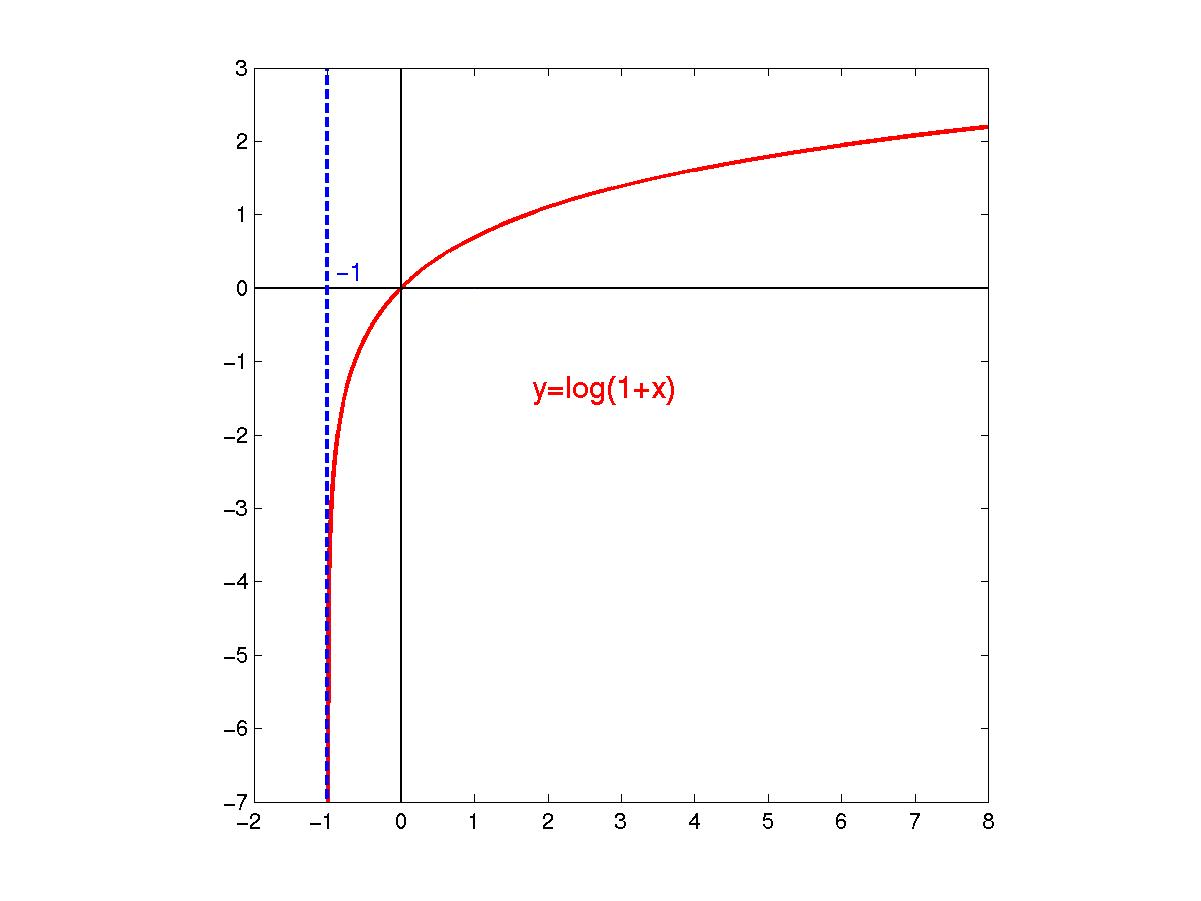
Math.log1p() 函数返回一个数字加 1 后的自然对数 (底为 E), 既log(x+1)。
2.22.2、语法
Math.log1p(x)
2.22.3、参数
x:任意数字。
2.22.4、返回值
如果参数的值小于 -1,则返回 NaN。
函数 y = log(x+1) 的图形是这样的:
2.22.5、示例
Math.log1p(Math.E - 1); // 1
Math.log1p(0); // 0
Math.log1p("0"); // 0
Math.log1p(-1); // -Infinity
Math.log1p(-2); // NaN
Math.log1p("foo"); // NaN
2.23、Math.log2()
2.23.1、概述
Math.log2() 函数返回一个数字以 2 为底的对数。
2.23.2、语法
Math.log2(x)
2.23.3、参数
x:任意数字。
2.23.4、返回值
如果传入的参数小于 0,则返回 NaN。
2.23.5、示例
Math.log2(2); // 1
Math.log2(1024); // 10
Math.log2(1); // 0
Math.log2(0); // -Infinity
Math.log2(-2); // NaN
Math.log2("1024"); // 10
Math.log2("foo"); // NaN
2.24、Math.max()
2.24.1、概述
Math.max() 函数返回一组数中的最大值。
2.24.2、语法
Math.max(value1[,value2, ...])
2.24.3、参数
value1, value2, …:一组数值
2.24.4、返回值
返回给定的一组数字中的最大值。如果给定的参数中至少有一个参数无法被转换成数字,则会返回 NaN。
如果没有参数,则结果为 - Infinity。
2.24.5、示例
Math.max(10, 20); //  20
Math.max(-10, -20); // -10
Math.max(-10, 20); //  20
下面的方法使用 apply 方法寻找一个数值数组中的最大元素。getMaxOfArray([1,2,3]) 等价于 Math.max(1, 2, 3),但是你可以使用 getMaxOfArray() 作用于任意长度的数组上。
function getMaxOfArray(numArray) {return Math.max.apply(null, numArray);
}
或者通过使用最新的扩展语句,获得数组中的最大值变得更容易。
var arr = [1, 2, 3];
var max = Math.max(...arr);
2.25、Math.min()
2.25.1、概述
Math.min() 返回零个或更多个数值的最小值。
2.25.2、语法
Math.min([value1[,value2, ...]])
2.25.3、参数
value1, value2, …:一组数值
2.25.4、返回值
给定数值中最小的数。如果任一参数不能转换为数值,则返回NaN。
如果没有参数,结果为Infinity。
2.25.5、示例
var x = 10,y = -20;
var z = Math.min(x, y);
2.26、Math.pow()
2.26.1、概述
Math.pow() 函数返回基数(base)的指数(exponent)次幂
2.26.2、语法
Math.pow(base, exponent)
2.26.3、参数
base:基数
exponent:指数
2.26.4、示例
function raisePower(x, y) {return Math.pow(x, y);
}
如果 x 是 2 ,且 y 是 7,则 raisePower 函数返回 128(2 的 7 次幂)。
2.27、Math.random()
2.27.1、概述
Math.random() 函数返回一个浮点数, 伪随机数在范围从0 到小于1,也就是说,从 0(包括 0)往上,但是不包括 1(排除 1),然后您可以缩放到所需的范围。实现将初始种子选择到随机数生成算法;它不能被用户选择或重置。
[0, 1)
2.27.2、语法
Math.random()
2.27.3、返回值
一个浮点型伪随机数字,在0(包括 0)和1(不包括)之间。
[0, 1)
2.27.4、示例
2.27.4.1、得到一个大于等于 0,小于 1 之间的随机数
function getRandom() {return Math.random();
}
2.27.4.2、得到一个两数之间的随机数
function getRandomArbitrary(min, max) {return Math.random() * (max - min) + min;
}
2.27.4.3、得到一个两数之间的随机整数
function getRandomInt(min, max) {min = Math.ceil(min);max = Math.floor(max);return Math.floor(Math.random() * (max - min)) + min; //不含最大值,含最小值
}
2.27.4.4、得到一个两数之间的随机整数,包括两个数在内
function getRandomIntInclusive(min, max) {min = Math.ceil(min);max = Math.floor(max);return Math.floor(Math.random() * (max - min + 1)) + min; //含最大值,含最小值
}
2.28、Math.round()
2.28.1、概述
Math.round() 函数返回一个数字四舍五入后最接近的整数。
2.28.2、语法
Math.round(x)
2.28.3、参数
x:一个数值。
2.28.4、返回值
给定数字的值四舍五入到最接近的整数。
2.28.5、示例
x = Math.round(20.49); //20
x = Math.round(20.5); //21
x = Math.round(-20.5); //-20
x = Math.round(-20.51); //-21
// 闭包
(function () {/*** Decimal adjustment of a number.** @param {String}  type  The type of adjustment.* @param {Number}  value The number.* @param {Integer} exp   The exponent (the 10 logarithm of the adjustment base).* @returns {Number}      The adjusted value.*/function decimalAdjust(type, value, exp) {// If the exp is undefined or zero...if (typeof exp === "undefined" || +exp === 0) {return Math[type](value);}value = +value;exp = +exp;// If the value is not a number or the exp is not an integer...if (isNaN(value) || !(typeof exp === "number" && exp % 1 === 0)) {return NaN;}// Shiftvalue = value.toString().split("e");value = Math[type](+(value[0] + "e" + (value[1] ? +value[1] - exp : -exp)));// Shift backvalue = value.toString().split("e");return +(value[0] + "e" + (value[1] ? +value[1] + exp : exp));}// Decimal roundif (!Math.round10) {Math.round10 = function (value, exp) {return decimalAdjust("round", value, exp);};}// Decimal floorif (!Math.floor10) {Math.floor10 = function (value, exp) {return decimalAdjust("floor", value, exp);};}// Decimal ceilif (!Math.ceil10) {Math.ceil10 = function (value, exp) {return decimalAdjust("ceil", value, exp);};}
})();// Round
Math.round10(55.55, -1); // 55.6
Math.round10(55.549, -1); // 55.5
Math.round10(55, 1); // 60
Math.round10(54.9, 1); // 50
Math.round10(-55.55, -1); // -55.5
Math.round10(-55.551, -1); // -55.6
Math.round10(-55, 1); // -50
Math.round10(-55.1, 1); // -60
Math.round10(1.005, -2); // 1.01 -- compare this with Math.round(1.005*100)/100 above
// Floor
Math.floor10(55.59, -1); // 55.5
Math.floor10(59, 1); // 50
Math.floor10(-55.51, -1); // -55.6
Math.floor10(-51, 1); // -60
// Ceil
Math.ceil10(55.51, -1); // 55.6
Math.ceil10(51, 1); // 60
Math.ceil10(-55.59, -1); // -55.5
Math.ceil10(-59, 1); // -50
function round(number, precision) {return Math.round(+number + "e" + precision) / Math.pow(10, precision);//same as://return Number(Math.round(+number + 'e' + precision) + 'e-' + precision);
}round(1.005, 2); //1.01
2.29、Math.sign()
2.29.1、概述
Math.sign() 函数返回一个数字的符号,指示数字是正数,负数还是零。
2.29.2、语法
Math.sign(x);
2.29.3、参数
x:任意数字。
2.29.4、返回值
此函数共有 5 种返回值,分别是 1,-1,0,-0,NaN. 代表的各是正数,负数,正零,负零,NaN。
传入该函数的参数会被隐式转换成数字类型。
2.29.5、示例
Math.sign(3); //  1
Math.sign(-3); // -1
Math.sign("-3"); // -1
Math.sign(0); //  0
Math.sign(-0); // -0
Math.sign(NaN); // NaN
Math.sign("foo"); // NaN
Math.sign(); // NaN
2.29.6、向下兼容
function sign(x) {x = +x; // convert to a numberif (x === 0 || isNaN(x)) return x;return x > 0 ? 1 : -1;
}
if (!Math.sign) {Math.sign = function (x) {// If x is NaN, the result is NaN.// If x is -0, the result is -0.// If x is +0, the result is +0.// If x is negative and not -0, the result is -1.// If x is positive and not +0, the result is +1.x = +x; // convert to a numberif (x === 0 || isNaN(x)) {return Number(x);}return x > 0 ? 1 : -1;};
}
2.30、Math.sin()
2.30.1、概述
Math.sin() 函数返回一个数值的正弦值。
2.30.2、语法
Math.sin(x)
2.30.3、参数
x:一个数值(以弧度为单位)。
2.30.4、返回值
sin 方法返回一个 -1 到 1 之间的数值,表示给定角度(单位:弧度)的正弦值。
2.30.5、示例
Math.sin(0); // 0
Math.sin(1); // 0.8414709848078965Math.sin(Math.PI / 2); // 1
2.31、Math.sinh()
2.31.1、概述
Math.sinh() 函数返回一个数字 (单位为角度) 的双曲正弦值。
2.31.2、语法
Math.sinh(x)
2.31.3、参数
x:任意数字 (单位为度)。
2.31.4、示例
Math.sinh(0); // 0
Math.sinh(1); // 1.1752011936438014
Math.sinh("-1"); // -1.1752011936438014
Math.sinh("foo"); // NaN
2.32、Math.sqrt()
2.32.1、概述
Math.sqrt() 函数返回一个数的平方根

2.32.2、语法
Math.sqrt(x)
2.32.3、参数
x:一个数值
2.32.4、返回值
如果参数 number 为负值,则 sqrt 返回NaN。
2.32.5、示例
Math.sqrt(9); // 3
Math.sqrt(2); // 1.414213562373095Math.sqrt(1); // 1
Math.sqrt(0); // 0
Math.sqrt(-1); // NaN
Math.sqrt(-0); // -0
2.33、Math.tan()
2.33.1、概述
Math.tan() 方法返回一个数值的正切值。
2.33.2、语法
Math.tan(x)
2.33.3、参数
x:一个数值,表示一个角(单位:弧度)。
2.33.4、返回值
tan 方法返回一个数值,表示一个角的正切值。
2.33.5、示例
function getTan(x) {return Math.tan(x);
}
由于 Math.tan() 函数接受弧度数值,但是通常使用度更方便,下面的函数可以接受以度为单位的数值,将其转为弧度,然后返回其正切值。
function getTanDeg(deg) {var rad = (deg * Math.PI) / 180;return Math.tan(rad);
}
2.34、Math.tanh()
2.34.1、概述
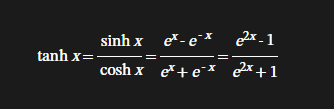
Math.tanh() 函数将会返回一个数的双曲正切函数值
2.34.2、语法
Math.tanh(x)
2.34.3、参数
x:待计算的数字。
2.34.4、返回值
所给数字的双曲正切值。
2.34.5、示例
Math.tanh(0); // 0
Math.tanh(Infinity); // 1
Math.tanh(1); // 0.7615941559557649
2.34.6、向下兼容
Math.tanh =Math.tanh ||function (x) {var a = Math.exp(+x),b = Math.exp(-x);return a == Infinity ? 1 : b == Infinity ? -1 : (a - b) / (a + b);};
2.35、Math.trunc()
2.35.1、概述
Math.trunc() 方法会将数字的小数部分去掉,只保留整数部分。
2.35.2、语法
Math.trunc(value)
2.35.3、参数
value:任意数字
传入该方法的参数会被隐式转换成数字类型。
2.35.4、返回值
给定数字的整数部分
2.35.5、示例
Math.trunc(13.37); // 13
Math.trunc(42.84); // 42
Math.trunc(0.123); //  0
Math.trunc(-0.123); // -0
Math.trunc("-1.123"); // -1
Math.trunc(NaN); // NaN
Math.trunc("foo"); // NaN
Math.trunc(); // NaN
2.35.6、向下兼容
if (!Math.trunc) {Math.trunc = function (v) {v = +v;if (!isFinite(v)) return v;return v - (v % 1) || (v < 0 ? -0 : v === 0 ? v : 0);// 返回://  0        ->  0// -0        -> -0//  0.2      ->  0// -0.2      -> -0//  0.7      ->  0// -0.7      -> -0//  Infinity ->  Infinity// -Infinity -> -Infinity//  NaN      ->  NaN//  null     ->  0};
}
或
if (!Math.trunc) {Math.trunc = function (v) {v = +v;return v - (v % 1) || (!isFinite(v) || v === 0 ? v : v < 0 ? -0 : 0);};
}
写在最后
如果你感觉文章不咋地
//(ㄒoㄒ)//,就在评论处留言,作者继续改进;o_O???
如果你觉得该文章有一点点用处,可以给作者点个赞;\\*^o^*//
如果你想要和作者一起进步,可以微信扫描二维码,关注前端老L;~~~///(^v^)\\\~~~
谢谢各位读者们啦(^_^)∠※!!!
本文来自互联网用户投稿,文章观点仅代表作者本人,不代表本站立场,不承担相关法律责任。如若转载,请注明出处。 如若内容造成侵权/违法违规/事实不符,请点击【内容举报】进行投诉反馈!