第四节 电商分析之广告业务
电商分析之广告业务
互联网平台通行的商业模式是利用免费的基础服务吸引凝聚大量用户,并利用这些用户资源开展广告或其他增值业务实现盈利从而反哺支撑免费服务的生存和发展。广告收入不仅成为互联网平台的重要收入之一,更决定了互联网平台的发展程度。
电商平台本身就汇聚了海量的商品、店铺的信息,天然适合进行商品的推广。对于电商和广告主来说,广告投放的目的无非就是吸引更多的用户,最终实现营销转化。因此非常关注不同位置广告的曝光量、点击量、购买量、点击率、购买率。
第1节 需求分析
事件日志数据样例:
{"lagou_event": [{"name": "loading","json": {"loading_time": "10","action": "2","loading_type": "1","type": "2"},"time": 1595297586761}, {"name": "notification","json": {"action": "2","type": "1"},"time": 1595327851731}, {"name": "praise","json": {"id": 6,"type": 3,"add_time": "1597832569942","userid": 5,"target": 9},"time": 1595286066942}],"attr": {"area": "赤峰","uid": "2F10092A2321","app_v": "1.1.5","event_type": "common","device_id": "1FB872-9A1002321","os_type": "0.35","channel": "BB","language": "chinese","brand": "Huawei-5"}
}
采集的信息包括:
- 商品详情页加载:goods_detail_loading
- 商品列表:loading
- 消息通知:notification
- 商品评论:comment
- 收藏:favorites
- 点赞:praise
- 广告:ad
-
- action。用户行为;0 曝光;1 曝光后点击;2 购买
- duration。停留时长
- shop_id。商家id
- event_type。"ad"
- ad_type。格式类型;1 JPG;2 PNG;3 GIF;4 SWF
- show_style。显示风格,0 静态图;1 动态图
- product_id。产品id
- place。广告位置;首页=1,左侧=2,右侧=3,列表页=4
- sort。排序位置
需求指标:
1、点击次数统计(分时统计)
曝光次数、不同用户id数、不同用户数
点击次数、不同用户id数、不同用户数
购买次数、不同用户id数、不同用户数
2、转化率-漏斗分析
点击率 = 点击次数 / 曝光次数
购买率 = 购买次数 / 点击次数
3、活动曝光效果评估:
行为(曝光、点击、购买)、时间段、广告位、产品,统计对应的次数
时间段、广告位、商品,曝光次数最多的前N个
第2节 事件日志采集
1、启动Flume Agent(适当的修改参数,128M滚动一次)
# 启动flume
flume-ng agent --conf /opt/apps/flume-1.9/conf --conf-file /data/lagoudw/conf/flume-log2hdfs3.conf -name a1 -Dflume.root.logger=INFO,console
2、生成数据(文件大小约640M,100W条事件日志)
cd /data/lagoudw/jarsjava -cp data-generator-1.1-SNAPSHOT-jar-with-dependencies.jar com.lagou.ecommerce.AppEvent 1000000 2020-08-02 > /data/lagoudw/logs/event/events0802.log3、数据采集完成后,检查HDFS结果
hdfs dfs -ls /user/data/logs/event
第3节 ODS层建表和数据加载
drop table if exists ods.ods_log_event;
CREATE EXTERNAL TABLE ods.ods_log_event(`str` string)
PARTITIONED BY (`dt` string)
STORED AS TEXTFILE
LOCATION '/user/data/logs/event';
/data/lagoudw/script/advertisement/ods_load_event_log.sh
#!/bin/bash
source /etc/profile
if [ -n "$1" ]
thendo_date=$1
elsedo_date=`date -d "-1 day" +%F`
fi
sql="
alter table ods.ods_log_event add partition (dt='$do_date');
-- 解决select count(*) from tableName 查询语句统计不到条数问题
ANALYZE TABLE ods.ods_log_event partition(dt='$do_date') COMPUTE STATISTICS;
"
hive -e "$sql"
第4节 DWD层建表和数据加载
ODS:分区;事件的主要信息在json串中(json数组),公共信息在另外一个json串中;
ODS => 解析json,从json串中,提取jsonArray数据;将公共信息从json串中解析出来 => 所有事件的明细
所有事件的明细,包括:
- 分区
- 事件(json串)
- 公共信息字段
所有事件的明细 => 广告json串解析 => 广告事件的明细
广告事件的明细:
- 分区
- 广告信息字段
- 公共信息字段
4.1、DWD层建表
-- 所有事件明细
drop table if exists dwd.dwd_event_log;
CREATE EXTERNAL TABLE dwd.dwd_event_log(
`device_id` string,
`uid` string,
`app_v` string,
`os_type` string,
`event_type` string,
`language` string,
`channel` string,
`area` string,
`brand` string,
`name` string,
`event_json` string,
`report_time` string)
PARTITIONED BY (`dt` string)
stored as parquet;-- 与广告点击明细
drop table if exists dwd.dwd_ad;
CREATE TABLE dwd.dwd_ad(`device_id` string,`uid` string,`app_v` string,`os_type` string,`event_type` string,`language` string,`channel` string,`area` string,`brand` string,`report_time` string,`duration` int,`ad_action` int,`shop_id` int,`ad_type` int,`show_style` smallint,`product_id` int,`place` string,`sort` int,`hour` string
)
PARTITIONED BY (`dt` string)
stored as parquet;
4.2、事件json串解析
内建函数、UDF、SerDe(json是所有的信息)
详细内容参见 第三部分 电商分析之--会员活跃度 => 第4节 json数据处理 => 使用 UDF(处理jsonArray)
package cn.lagou.dw.hive.udf;import com.alibaba.fastjson.JSON;
import com.alibaba.fastjson.JSONArray;
import com.google.common.base.Strings;
import org.apache.hadoop.hive.ql.exec.UDF;import java.util.ArrayList;public class ParseJsonArray extends UDF {public ArrayList evaluate(String jsonStr) {// 传入空字符串,返回nullif (Strings.isNullOrEmpty(jsonStr)) {return null;}try {// 获取jsonArrayJSONArray jsonArray = JSON.parseArray(jsonStr);ArrayList lst = new ArrayList<>();for (Object o : jsonArray) {lst.add(o.toString());}return lst;} catch (Exception e) {return null;}}
}
4.3、DWD层数据加载
主要功能:解析json串;得到全部的事件日志
/data/lagoudw/script/advertisement/dwd_load_event_log.sh
#!/bin/bash
source /etc/profile
if [ -n "$1" ] ;thendo_date=$1
elsedo_date=`date -d "-1 day" +%F`
fisql="
use dwd;
add jar /data/lagoudw/jars/cn.lagou.dw-1.0-SNAPSHOT-jar-with-dependencies.jar;
create temporary function json_array as 'cn.lagou.dw.hive.udf.ParseJsonArray';
with tmp_start as
(select split(str, ' ')[7] as line from ods.ods_log_event where dt='$do_date'
)
insert overwrite table dwd.dwd_event_log
PARTITION (dt='$do_date')
select
device_id,
uid,
app_v,
os_type,
event_type,
language,
channel,
area,
brand,
get_json_object(k,'$.name') as name,
get_json_object(k,'$.json') as json,
get_json_object(k,'$.time') as time
from
(
selectget_json_object(line,'$.attr.device_id') as device_id,get_json_object(line,'$.attr.uid') as uid,get_json_object(line,'$.attr.app_v')  as app_v,get_json_object(line,'$.attr.os_type') as os_type,get_json_object(line,'$.attr.event_type') as event_type,get_json_object(line,'$.attr.language') as language,get_json_object(line,'$.attr.channel') as channel,get_json_object(line,'$.attr.area') as area,get_json_object(line,'$.attr.brand') as brand,get_json_object(line,'$.lagou_event') as lagou_event
from tmp_start
) A lateral view explode(json_array(lagou_event)) B as k
"
hive -e "$sql"
从全部的事件日志中获取广告点击事件:
/data/lagoudw/script/advertisement/dwd_load_ad_log.sh
#!/bin/bash
source /etc/profile
if [ -n "$1" ] ;thendo_date=$1
elsedo_date=`date -d "-1 day" +%F`
fi
sql="
insert overwrite table dwd.dwd_ad
PARTITION (dt='$do_date')
selectdevice_id,uid,app_v,os_type,event_type,language,channel,area,brand,report_time,get_json_object(event_json,'$.duration') ,get_json_object(event_json,'$.ad_action') ,get_json_object(event_json,'$.shop_id') ,get_json_object(event_json,'$.ad_type'),get_json_object(event_json,'$.show_style'),get_json_object(event_json,'$.product_id'),get_json_object(event_json,'$.place'),get_json_object(event_json,'$.sort'),from_unixtime(ceil(report_time/1000), 'HH')
from dwd.dwd_event_log
where dt='$do_date' and name='ad';
"
hive -e "$sql"
日志 => Flume => ODS => 清洗、转换 => 广告事件详细信息
第5节 广告点击次数分析
5.1 需求分析
广告:ad
- action。用户行为;0 曝光;1 曝光后点击;2 购买
- duration。停留时长
- shop_id。商家id
- event_type。"ad"
- ad_type。格式类型;1 JPG;2 PNG;3 GIF;4 SWF
- show_style。显示风格,0 静态图;1 动态图
- product_id。产品id
- place。广告位置;首页=1,左侧=2,右侧=3,列表页=4
- sort。排序位置
公共字段
分时统计:
曝光次数、不同用户id数(公共信息中的uid)、不同用户数(公共信息中的 device_id)
点击次数、不同用户id数、不同用户数(device_id)
购买次数、不同用户id数、不同用户数(device_id)
DWD => DWS(不需要) => ADS;在某个分析中不是所有的层都会用到
5.2、创建ADS层表
drop table if exists ads.ads_ad_show;
create table ads.ads_ad_show(cnt bigint,u_cnt bigint,device_cnt bigint,ad_action tinyint,hour string
) PARTITIONED BY (`dt` string)
row format delimited fields terminated by ',';
5.3、加载ADS层数据
/data/lagoudw/script/advertisement/ads_load_ad_show.sh
#!/bin/bash
source /etc/profile
if [ -n "$1" ] ;thendo_date=$1
elsedo_date=`date -d "-1 day" +%F`
fi
sql="
insert overwrite table ads.ads_ad_show
partition (dt='$do_date')
select count(1),count(distinct uid),count(distinct device_id),ad_action,hourfrom dwd.dwd_adwhere dt='$do_date'
group by ad_action, houra
"
hive -e "$sql"
第6节 漏斗分析(点击率购买率)
6.1、需求分析
分时统计:
点击率 = 点击次数 / 曝光次数
购买率 = 购买次数 / 点击次数
6.2、创建ADS层表
drop table if exists ads.ads_ad_show_rate;
create table ads.ads_ad_show_rate(hour string,click_rate double,buy_rate double
) PARTITIONED BY (`dt` string)
row format delimited fields terminated by ',';
行转列
-- 方法一
select sum(case when ad_action='0' then cnt end) show_cnt,sum(case when ad_action='1' then cnt end) click_cnt,sum(case when ad_action='2' then cnt end) buy_cnt,hourfrom ads.ads_ad_showwhere dt='2020-07-20' and hour='01'
group by hour ;-- 方法二
select max(case when ad_action='0' then cnt end) show_cnt,max(case when ad_action='1' then cnt end) click_cnt,max(case when ad_action='2' then cnt end) buy_cnt,hourfrom ads.ads_ad_showwhere dt='2020-07-20' and hour='01'
group by hour ;
6.2、加载ADS层数据
/data/lagoudw/script/advertisement/ads_load_ad_show_rate.sh
#!/bin/bash
source /etc/profile
if [ -n "$1" ] ;thendo_date=$1
elsedo_date=`date -d "-1 day" +%F`
fisql="
with tmp as(
select max(case when ad_action='0' then cnt end) show_cnt,max(case when ad_action='1' then cnt end) click_cnt,max(case when ad_action='2' then cnt end) buy_cnt,hourfrom ads.ads_ad_showwhere dt='$do_date'
group by hour
)
insert overwrite table ads.ads_ad_show_rate
partition (dt='$do_date')
select hour,click_cnt / show_cnt as click_rate,buy_cnt / click_cnt as buy_ratefrom tmp;
"
hive -e "$sql"
第7节 广告效果分析
7.1、需求分析
活动曝光效果评估: 行为(曝光、点击、购买)、时间段、广告位、商品,统计对应的次数
时间段、广告位、商品,曝光次数最多的前100个
7.2、创建ADS层表
drop table if exists ads.ads_ad_show_place;
create table ads.ads_ad_show_place(ad_action tinyint,hour string,place string,product_id int,cnt bigint
)PARTITIONED BY (`dt` string)
row format delimited fields terminated by ',';
drop table if exists ads.ads_ad_show_place_window;
create table ads.ads_ad_show_place_window(hour string,place string,product_id int,cnt bigint,rank int
)PARTITIONED BY (`dt` string)
row format delimited fields terminated by ',';
7.3、加载ADS层数据
/data/lagoudw/script/advertisement/ads_load_ad_show_page.sh
#!/bin/bash
source /etc/profile
if [ -n "$1" ] ;thendo_date=$1
elsedo_date=`date -d "-1 day" +%F`
fi
sql="
insert overwrite table ads.ads_ad_show_place
partition (dt='$do_date')
select ad_action,hour,place,product_id,count(1)from dwd.dwd_adwhere dt='$do_date'
group by ad_action, hour, place, product_id;
"
hive -e "$sql"
/data/lagoudw/script/advertisement/ads_load_ad_show_page_window.sh
#!/bin/bash
source /etc/profile
if [ -n "$1" ] ;thendo_date=$1
elsedo_date=`date -d "-1 day" +%F`
fisql="
insert overwrite table ads.ads_ad_show_place_window
partition (dt='$do_date')
select *from (select hour,place,product_id,cnt,row_number() over (partition by hour, place, product_id order by cnt desc) rankfrom ads.ads_ad_show_placewhere dt='$do_date' and ad_action='0'
) t
where rank <= 100
"
hive -e "$sql"
小结:分析简单,没有DWS层
Flume、json解析在会员分析讲解
第8节 广告分析小结
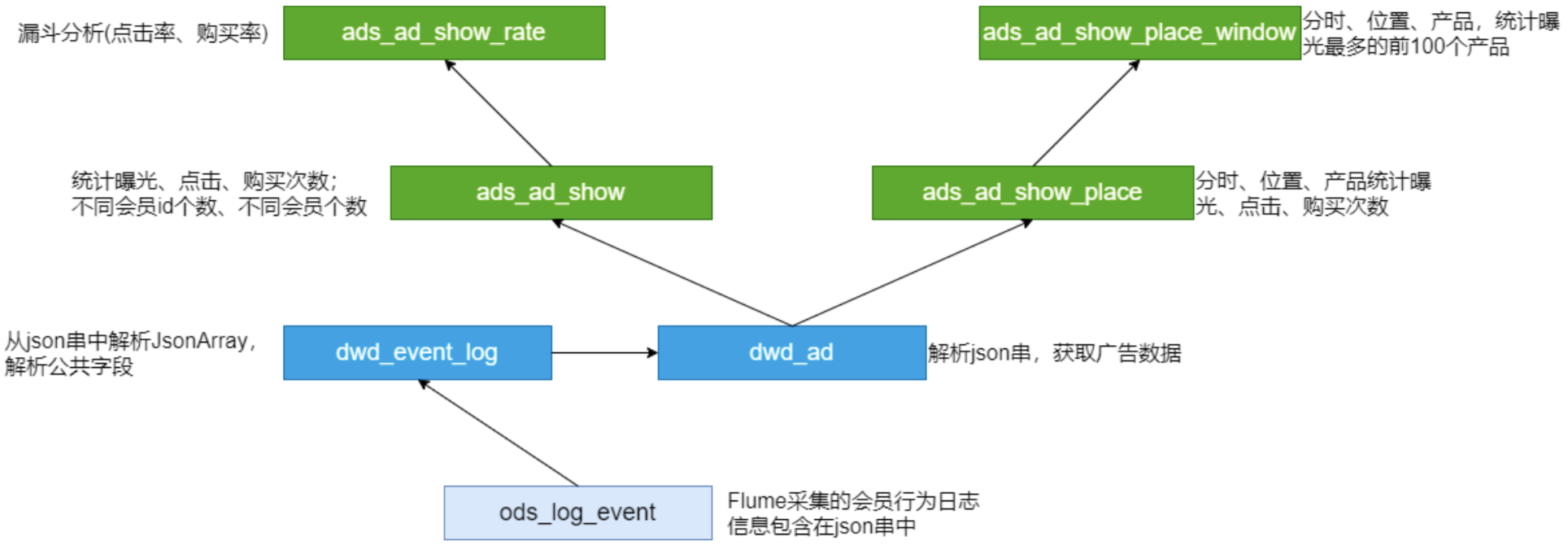
脚本调用次序:
ods_load_event_log.sh
dwd_load_event_log.sh
dwd_load_ad_log.sh
ads_load_ad_show.sh
ads_load_ad_show_rate.sh
ads_load_ad_show_page.sh
ads_load_ad_show_page_window.sh
第9节 ADS层数据导出(DataX)
步骤:
- 在MySQL创建对应的表
- 创建配置文件(json)
- 执行命令,使用json配置文件;测试
- 编写执行脚本(shell)
- shell脚本的测试
1、MySQL建表
drop table if exists dwads.ads_ad_show_place;
create table dwads.ads_ad_show_place(ad_action tinyint,hour varchar(2),place varchar(20),product_id int,cnt int,dt varchar(10)
);
2、创建配置文件
/data/lagoudw/script/advertisement/ads_ad_show_place.json
{"job": {"setting": {"speed": {"channel": 1}},"content": [{"reader": {"name": "hdfsreader","parameter": {"path": "/lagou/hive/warehouse/ads.db/ads_ad_show_place/dt=$do_date/*","defaultFS": "hdfs://linux121:9000","column": [{"index": 0,"type": "string"}, {"index": 1,"type": "string"},{"index": 2,"type": "string"},{"index": 3,"type": "string"},{"index": 4,"type": "string"},{"type": "string","value": "$do_date"}],"fileType": "text","encoding": "UTF-8","fieldDelimiter": ","}},"writer": {"name": "mysqlwriter","parameter": {"writeMode": "insert","username": "hive","password": "12345678","column": ["ad_action","hour","place","product_id","cnt","dt"],"preSql": ["delete from ads_ad_show_place where dt='$do_date'"],"connection": [{"jdbcUrl": "jdbc:mysql://linux123:3306/dwads?useUnicode=true&characterEncoding=utf-8 ","table": ["ads_ad_show_place"]}]}}}]}
}
3、执行命令(测试)
python /data/modules/datax/bin/datax.py -p "-Ddo_date=2020-08-02" /data/lagoudw/script/advertisement/ads_ad_show_place.json4、编写脚本
/data/lagoudw/script/advertisement/ads_ad_show_place.sh
#!/bin/bash
source /etc/profile
JSON=/data/lagoudw/script
if [ -n "$1" ] ;thendo_date=$1
elsedo_date=`date -d "-1 day" +%F`
fi
python $DATAX_HOME/bin/datax.py -p "-Ddo_date=$do_date" $JSON/advertisement/ads_ad_show_place.json
5、执行脚本
sh /data/lagoudw/script/advertisement/ads_ad_show_place.sh 2020-08-02
本文来自互联网用户投稿,文章观点仅代表作者本人,不代表本站立场,不承担相关法律责任。如若转载,请注明出处。 如若内容造成侵权/违法违规/事实不符,请点击【内容举报】进行投诉反馈!