学习spring MVC第一课20170523
1.Spring MVC概述:
视图解析器:选择结果应该如何渲染
2.SpringMVC运行原理
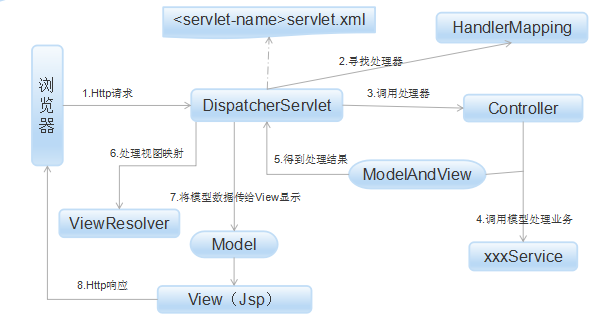
(2) 寻找处理器:由DispatcherServlet控制器查询一个或多个HandlerMapping,找到处理请求的Controller。
(3) 调用处理器:DispatcherServlet将请求提交到Controller。
(4)(5)调用业务处理和返回结果:Controller调用业务逻辑处理后,返回ModelAndView。
(6)(7)处理视图映射并返回模型: DispatcherServlet查询一个或多个ViewResoler视图解析器,找到ModelAndView指定的视图。
(8) Http响应:视图负责将结果显示到客户端。
3.SpringMVC接口解释
Spring提供的前端控制器,所有的请求都有经过它来统一分发。在DispatcherServlet将请求分发给Spring Controller之前,需要借助于Spring提供的HandlerMapping定位到具体的Controller。
(2)HandlerMapping接口:
能够完成客户请求到Controller映射。
(3)Controller接口:
需要为并发用户处理上述请求,因此实现Controller接口时,必须保证线程安全并且可重用。
Controller将处理用户请求,这和Struts Action扮演的角色是一致的。一旦Controller处理完用户请求,则返回ModelAndView对象给DispatcherServlet前端控制器,ModelAndView中包含了模型(Model)和视图(View)。
从宏观角度考虑,DispatcherServlet是整个Web应用的控制器;从微观考虑,Controller是单个Http请求处理过程中的控制器,而ModelAndView是Http请求过程中返回的模型(Model)和视图(View)。
(4)ViewResolver接口:
Spring提供的视图解析器(ViewResolver)在Web应用中查找View对象,从而将相应结果渲染给客户。
4.DispatcherServlet:
(1)截获符合特定格式的URL请求。
(2)初始化DispatcherServlet上下文对应WebApplicationContext,并将其与业务层、持久化层的WebApplicationContext建立关联。
(3)初始化Spring MVC的各个组成组件,并装配到DispatcherServlet中。
5. SpringMVC配置

(1)在web.xml文件中进行配置,在配置中设置springmvc-context.xml的路径,代码如下:
<servlet><servlet-name>appServlet</servlet-name><servlet-class>org.springframework.web.servlet.DispatcherServlet</servlet-class><init-param><param-name>contextConfigLocation</param-name><param-value>classpath:META-INF/spring/springmvc-context.xml</param-value></init-param><load-on-startup>1</load-on-startup></servlet><servlet-mapping><servlet-name>appServlet</servlet-name><url-pattern>/</url-pattern></servlet-mapping>- 1
- 2
- 3
- 4
- 5
- 6
- 7
- 8
- 9
- 10
- 11
- 12
- 13
- 1
- 2
- 3
- 4
- 5
- 6
- 7
- 8
- 9
- 10
- 11
- 12
- 13
<beans:beans xmlns:beans="http://www.springframework.org/schema/beans"xmlns:xsi="http://www.w3.org/2001/XMLSchema-instance" xmlns:context="http://www.springframework.org/schema/context"xmlns:mvc="http://www.springframework.org/schema/mvc" xmlns:p="http://www.springframework.org/schema/p"xsi:schemaLocation="http://www.springframework.org/schema/mvc http://www.springframework.org/schema/mvc/spring-mvc-3.0.xsdhttp://www.springframework.org/schema/beans http://www.springframework.org/schema/beans/spring-beans-3.0.xsdhttp://www.springframework.org/schema/context http://www.springframework.org/schema/context/spring-context-3.0.xsd "><mvc:annotation-driven /><context:component-scan base-package="com.zjn" /><beans:bean
        class="org.springframework.web.servlet.mvc.annotation.DefaultAnnotationHandlerMapping" /><beans:bean
        class="org.springframework.web.servlet.mvc.annotation.AnnotationMethodHandlerAdapter" /><beans:bean id="viewResolver"class="org.springframework.web.servlet.view.InternalResourceViewResolver"><beans:property name="prefix" value="/WEB-INF/pages/" /><beans:property name="suffix" value=".jsp" />beans:bean>beans:beans>
- 1
- 2
- 3
- 4
- 5
- 6
- 7
- 8
- 9
- 10
- 11
- 12
- 13
- 14
- 15
- 16
- 17
- 18
- 19
- 20
- 21
- 22
- 23
- 24
- 25
- 26
- 1
- 2
- 3
- 4
- 5
- 6
- 7
- 8
- 9
- 10
- 11
- 12
- 13
- 14
- 15
- 16
- 17
- 18
- 19
- 20
- 21
- 22
- 23
- 24
- 25
- 26
两个jsp界面:
create.jsp
<%@ page language="java" contentType="text/html; charset=UTF-8"pageEncoding="UTF-8"%>

<html>
<head>
<meta http-equiv="Content-Type" content="text/html; charset=UTF-8">
<title>Add User Fromtitle>
head>
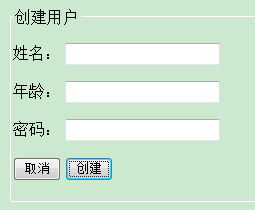
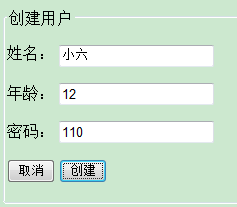
<body><form action="save" method="post"><fieldset><legend>创建用户legend><p><label>姓名:label> <input type="text" id="name" name="name"tabindex="1">p><p><label>年龄:label> <input type="text" id="age" name="age"tabindex="2">p><p><label>密码:label> <input type="text" id="pwd" name="pwd"tabindex="3">p><p id="buttons"><input id="reset" type="reset" tabindex="4" value="取消"> <input
                    id="submit" type="submit" tabindex="5" value="创建">p>fieldset>form>
body>
html>- 1
- 2
- 3
- 4
- 5
- 6
- 7
- 8
- 9
- 10
- 11
- 12
- 13
- 14
- 15
- 16
- 17
- 18
- 19
- 20
- 21
- 22
- 23
- 24
- 25
- 26
- 27
- 28
- 29
- 30
- 31
- 32
- 1
- 2
- 3
- 4
- 5
- 6
- 7
- 8
- 9
- 10
- 11
- 12
- 13
- 14
- 15
- 16
- 17
- 18
- 19
- 20
- 21
- 22
- 23
- 24
- 25
- 26
- 27
- 28
- 29
- 30
- 31
- 32
<%@ page language="java" contentType="text/html; charset=UTF-8"pageEncoding="UTF-8"%>

<html>
<head>
<meta http-equiv="Content-Type" content="text/html; charset=UTF-8">
<title>Insert title heretitle>
head>
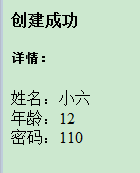
<body><div id="gloobal"><h4>创建成功h4><p><h5>详情:h5>姓名:${user.name}<br /> 年龄:${user.age}<br /> 密码:${user.pwd}<br />p>div>
body>
html>- 1
- 2
- 3
- 4
- 5
- 6
- 7
- 8
- 9
- 10
- 11
- 12
- 13
- 14
- 15
- 16
- 17
- 18
- 1
- 2
- 3
- 4
- 5
- 6
- 7
- 8
- 9
- 10
- 11
- 12
- 13
- 14
- 15
- 16
- 17
- 18
package com.zjn.controller;import org.springframework.stereotype.Controller;
import org.springframework.ui.Model;
import org.springframework.web.bind.annotation.ModelAttribute;
import org.springframework.web.bind.annotation.RequestMapping;import com.zjn.entity.User;/*** 用户管理* * @author zjn*/
@Controller
public class UserController {@RequestMapping("")public String Create(Model model) {return "create";}@RequestMapping("/save")public String Save(@ModelAttribute("form") User user, Model model) { // user:视图层传给控制层的表单对象;model:控制层返回给视图层的对象model.addAttribute("user", user);return "detail";}
}
- 1
- 2
- 3
- 4
- 5
- 6
- 7
- 8
- 9
- 10
- 11
- 12
- 13
- 14
- 15
- 16
- 17
- 18
- 19
- 20
- 21
- 22
- 23
- 24
- 25
- 26
- 27
- 28
- 29
- 1
- 2
- 3
- 4
- 5
- 6
- 7
- 8
- 9
- 10
- 11
- 12
- 13
- 14
- 15
- 16
- 17
- 18
- 19
- 20
- 21
- 22
- 23
- 24
- 25
- 26
- 27
- 28
- 29
package com.zjn.entity;import java.io.Serializable;
import java.util.Date;public class User implements Serializable {/*** @author zjn*/private static final long serialVersionUID = 1L;private Integer id; // idprivate String name; // nameprivate String pwd; // pwdprivate Integer age; // ageprivate Date creatTime; // creatTimepublic Integer getId() {return id;}public void setId(Integer id) {this.id = id;}public String getName() {return name;}public void setName(String name) {this.name = name;}public String getPwd() {return pwd;}public void setPwd(String pwd) {this.pwd = pwd;}public Integer getAge() {return age;}public void setAge(Integer age) {this.age = age;}public Date getCreatTime() {return creatTime;}public void setCreatTime(Date creatTime) {this.creatTime = creatTime;}}- 1
- 2
- 3
- 4
- 5
- 6
- 7
- 8
- 9
- 10
- 11
- 12
- 13
- 14
- 15
- 16
- 17
- 18
- 19
- 20
- 21
- 22
- 23
- 24
- 25
- 26
- 27
- 28
- 29
- 30
- 31
- 32
- 33
- 34
- 35
- 36
- 37
- 38
- 39
- 40
- 41
- 42
- 43
- 44
- 45
- 46
- 47
- 48
- 49
- 50
- 51
- 52
- 53
- 54
- 55
- 56
- 57
- 1
- 2
- 3
- 4
- 5
- 6
- 7
- 8
- 9
- 10
- 11
- 12
- 13
- 14
- 15
- 16
- 17
- 18
- 19
- 20
- 21
- 22
- 23
- 24
- 25
- 26
- 27
- 28
- 29
- 30
- 31
- 32
- 33
- 34
- 35
- 36
- 37
- 38
- 39
- 40
- 41
- 42
- 43
- 44
- 45
- 46
- 47
- 48
- 49
- 50
- 51
- 52
- 53
- 54
- 55
- 56
- 57
本文来自互联网用户投稿,文章观点仅代表作者本人,不代表本站立场,不承担相关法律责任。如若转载,请注明出处。 如若内容造成侵权/违法违规/事实不符,请点击【内容举报】进行投诉反馈!