自动化测试(七)01-UI测试利器Nightmare——简介-Segment的高级浏览器自动化库,用于UI测试和爬网 Nightmare安装 nightmare配合mocha进行页面测试
自动化测试(七)01-UI测试利器Nightmare——简介-Segment的高级浏览器自动化库,用于UI测试和爬网 & Nightmare安装 & nightmare配合mocha进行页面测试
UI测试利器Nightmare
Nightmare是Segment的高级浏览器自动化库。
目标是公开一些模仿用户操作(例如goto,type和click)的简单方法,使用对每个脚本块感觉同步的API,而不是深层嵌套的回调。它最初设计用于在没有API的站点之间自动执行任务,但最常用于UI测试和爬网。
它使用Electron,它与PhantomJS类似,但大约快两倍,更现代。
安装与起步
Nightmare测试目录
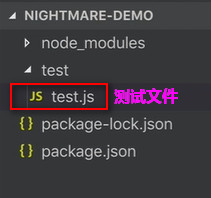
- 安装
nightmare
// 初始化项目
npm init -ynpm install --save-dev nightmarenpm install --save-dev mocha
- 淘宝源加速
// 使用淘宝源加速electron的安装
export ELECTRON_MIRROR=“https://npm.taobao.org/mirrors/electron/”
- 起步测试:
const Nightmare = require('nightmare')
const assert = require('assert')describe('Load a Page', function () {// Recommended: 5s locally, 10s to remote server, 30s from airplane ¯\_(ツ)_/¯this.timeout('30s')let nightmare = nullbeforeEach(() => {nightmare = new Nightmare()})describe('/ (Home Page)', () => {it('should load without error', done => {// your actual testing urls will likely be `http://localhost:port/path`nightmare.goto('https://www.baidu.com').end().then(function (result) {done()}).catch(done)})})
})
测试指令
npx mocha
nightmare配合mocha测试
nightmare可以进行网页的抓取,配合mocha进行页面的测试:
安装mocha
npm install --save-dev mocha
还可以安装一些断言库,如:
chai
新建测试:
const Nightmare = require('nightmare')
const assert = require('assert')describe('Search nightmare', () => {this.timeout('30s')let nightmare = nullbeforeEach(() => {nightmare = new Nightmare()})it('should load with result nightmare', done => {const selector = 'em'nightmare.goto('https://www.baidu.com').type('#kw', 'nightmare').click('#su').wait('em').evaluate(selector => {// now we're executing inside the browser scope.return document.querySelector(selector).innerText}, selector) // <-- that's how you pass parameters from Node scope to browser scope.end().then(function (result) {console.log(result)assert.equal(result, 'nightmare')done()}).catch(done)})
})
测试指令
npx mocha
将mocha作为测试脚本添加到您的 package.json:
"scripts": {"test": "mocha"
}
本文来自互联网用户投稿,文章观点仅代表作者本人,不代表本站立场,不承担相关法律责任。如若转载,请注明出处。 如若内容造成侵权/违法违规/事实不符,请点击【内容举报】进行投诉反馈!