Java基于Redis的自增流水号详细代码解释
今天介绍个基于redis实现自增流水号的一个案例
为什么使用redis来实现自增流水号呢?
因为现在的项目很多都整合redis,而且redis是单线程,且基于内存操作,速度快,实现自增流水号代码也简单
小编实现的方式是Vue+springBoot,但是Vue就是做个页面按钮为了测试,你们可以写个测试类来测试,现在放上后端代码,亲测有效!!!
首先先引入依赖,在pom文件加
<!--redis-->
<dependency><groupId>org.springframework.boot</groupId><artifactId>spring-boot-starter-data-redis</artifactId>
</dependency>
<!-- 测试 -->
<dependency><groupId>org.springframework.boot</groupId><artifactId>spring-boot-starter-test</artifactId><scope>test</scope>
</dependency>
<dependency><groupId>com.alibaba</groupId><artifactId>fastjson</artifactId>
</dependency>
创建一个实体,便于操作,也可以不创建随意
import lombok.Data;@Data
public class GenCode {// 流水号生成依赖的类,会使用类的名称作为redis的keyprivate String name;// 前缀private String prefix;// 自增数位数 自增数达不到此位数自动补零private Integer num;public GenCode(String name, String prefix, Integer num) {this.name = name;this.prefix = prefix;this.num = num;}
}
创建两个Util工具类,一个是redis实现流水号自增,另一个是fastJson转换
FastJsonUtils.java
import com.alibaba.fastjson.JSON;
import com.alibaba.fastjson.JSONArray;
import com.alibaba.fastjson.TypeReference;import java.util.List;
import java.util.Map;public class FastJsonUtils {/*** 功能描述:把JSON数据转换成指定的java对象** @param jsonData JSON数据* @param clazz 指定的java对象* @return 指定的java对象*/public static <T> T getJsonToBean(String jsonData, Class<T> clazz) {return JSON.parseObject(jsonData, clazz);}/*** 功能描述:把java对象转换成JSON数据** @param object java对象* @return JSON数据*/public static String getBeanToJson(Object object) {return JSON.toJSONString(object);}/*** 功能描述:把JSON数据转换成指定的java对象列表** @param jsonData JSON数据* @param clazz 指定的java对象* @return List*/ public static <T> List<T> getJsonToList(String jsonData, Class<T> clazz) {return JSON.parseArray(jsonData, clazz);}/*** 功能描述:把JSON数据转换成较为复杂的List>** @param jsonData JSON数据* @return List public static List<Map<String, Object>> getJsonToListMap(String jsonData) {return JSON.parseObject(jsonData, new TypeReference<List<Map<String, Object>>>() {});}/*** List 转 json 保存到数据库*/ public static <T> String listToJson(List<T> ts) {String jsons = JSON.toJSONString(ts);return jsons;}/*** 两个类之间值的转换* 从object》》tClass** @param object 有数据的目标类* @param tClass 转换成的类* @param * @return 返回tClass类*/ public static <T> T getObjectToClass(Object object, Class<T> tClass) {String json = getBeanToJson(object);return getJsonToBean(json, tClass);}/*** json 转 List*/ public static <T> List<T> jsonToList(String jsonString, Class<T> clazz) {@SuppressWarnings("unchecked")List<T> ts = JSONArray.parseArray(jsonString, clazz);return ts;}
}
RedisUtil.java
import lombok.extern.slf4j.Slf4j;
import org.springframework.beans.factory.annotation.Autowired;
import org.springframework.data.redis.core.StringRedisTemplate;
import org.springframework.stereotype.Component;import java.time.LocalDate;
import java.time.LocalDateTime;
import java.time.ZoneOffset;
import java.time.format.DateTimeFormatter;
import java.util.Optional;
import java.util.Random;
import java.util.concurrent.TimeUnit;@Component
@Slf4j
public class RedisUtil {@AutowiredStringRedisTemplate stringRedisTemplate;public Optional<String> gen() {// 获取实体类的名称String redisKey = "流水号测试";// 判断是不是有初始化此实体类if (null != stringRedisTemplate.opsForValue().get(redisKey)) {// 从缓存获取流水号的生成信息GenCode GenCode = FastJsonUtils.getJsonToBean(stringRedisTemplate.opsForValue().get(redisKey).toString(), GenCode.class);// 根据流水号的前缀判断今天是否有生成过流水号if (stringRedisTemplate.opsForValue().get(GenCode.getPrefix()) == null) {// 没有则新建一个存入缓存 格式(key:OR  value:0)// 设置到第二天早上00:00:01过期Long todayTime = LocalDate.now().plusDays(1).atTime(0, 0, 0, 1).atOffset(ZoneOffset.ofHours(8)).toEpochSecond();Long nowTime = LocalDateTime.now().atOffset(ZoneOffset.ofHours(8)).toEpochSecond();Long expireTime = todayTime - nowTime;stringRedisTemplate.opsForValue().set(GenCode.getPrefix(), String.valueOf(0), expireTime*1000, TimeUnit.MILLISECONDS);}// 进行自增操作StringBuffer sn = new StringBuffer();// 和前缀、时间、随机数进行组合sn.append(GenCode.getPrefix());String date = LocalDate.now().format(DateTimeFormatter.ofPattern("yyyyMMdd"));sn.append(date);//流水号自动自增Long num = stringRedisTemplate.opsForValue().increment(GenCode.getPrefix());sn.append(addZero(String.valueOf(num), GenCode.getNum()));//介于0-1000之前生成随机数
//            String random = String.valueOf(new Random().nextInt(1000));
//            sn.append(random);// 生成最终的流水号返回log.info("=====重新生成流水号" + sn.toString() + "开始=====");stringRedisTemplate.opsForValue().set(redisKey, sn.toString());log.info("=====重新生成流水号" + sn.toString() + "完毕=====");//java8判断是否是nullreturn Optional.ofNullable(sn.toString());}return Optional.ofNullable(null);}// 自动补零public String addZero(String numStr, Integer maxNum) {int addNum = maxNum - numStr.length();StringBuffer rStr = new StringBuffer();for (int i = 0; i < addNum; i++) {rStr.append("0");}rStr.append(numStr);return rStr.toString();}
}
现在来写controller层的具体调用操作
import lombok.extern.slf4j.Slf4j;
import org.springframework.beans.factory.annotation.Autowired;
import org.springframework.data.redis.core.StringRedisTemplate;
import org.springframework.web.bind.annotation.PostMapping;
import org.springframework.web.bind.annotation.RequestMapping;
import org.springframework.web.bind.annotation.RestController;
import javax.annotation.Resource;
import java.util.ArrayList;
import java.util.List;@RestController
@Slf4j
@RequestMapping("/redisTest")
public class RedisTestController {@AutowiredStringRedisTemplate stringRedisTemplate;@ResourceRedisUtil redisUtil;@PostMapping("/getNumber")public void test() throws Exception {log.info("=====开始初始化流水号=====");List<GenCode> GenCodeList = new ArrayList<>();GenCodeList.add(new GenCode("流水号测试", "自增号", 6));init(GenCodeList);redisUtil.gen();log.info("=====初始化流水号完毕=====");}public void init(List<GenCode> GenCodes) {// 流水号初始化入缓存for (GenCode GenCode : GenCodes) {String redisKey = GenCode.getName();// 存入缓存 key:key:实体类名称 value:流水号数据(前缀、自增数位数)stringRedisTemplate.opsForValue().set(redisKey, FastJsonUtils.getBeanToJson(GenCode));log.info(GenCode.getName() + "已初始化");}}
}
其实redis工具类可以不用写,也可以直接创建数据,但是我前面的操作就是为了测试redis能否存入,redisTemplate是否为空
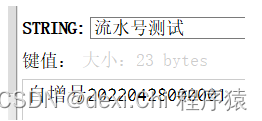
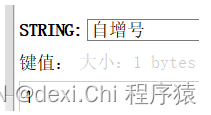
结果,测试自增
本文来自互联网用户投稿,文章观点仅代表作者本人,不代表本站立场,不承担相关法律责任。如若转载,请注明出处。 如若内容造成侵权/违法违规/事实不符,请点击【内容举报】进行投诉反馈!