JavaSE进阶--网络编程
文章目录
- 前言
- 一、网络编程
- 二、通信
- 1、两个重要的要素
- 2、通信协议
- 三 、Socket
- 四、基于TCP的网络编程
- 1、单向通信
- 1.1 服务端
- 1.2 客户端
- 2、双向通信
- 2.1 服务端
- 2.2 客户端
- 3、传输对象
- 3.1 服务端
- 3.2 客户端
- 4、保持通信
- 4.1 服务端
- 4.2 客户端
- 五、基于UDP的网络编程
- 1、单向通信
- 1.1 发送方
- 1.2 接收方
- 2、双向通信
- 2.1 发送方
- 2.2 接收方
- 3、保持通信
- 3.1 发送方
- 3.2 接收方
- 六、 总结
前言
📢 大家好,我是程序员Forlan,本篇内容主要分享网络编程的知识,属于基础内容,说实话,这块在大部分公司中,使用很少甚至可能用不上,游戏行业、视频行业可能使用多一些,可以根据情况学习,作一个知识补充~
一、网络编程
把分布在不同地方的计算机,用通信线路互连成一个规模大、功能强的网络系统,从而使众多的计算机可以方便地互相传递信息、共享硬件、软件、数据信息等资源
计算机在网络中进行数据的传输,发送/接收数据
二、通信
1、两个重要的要素
IP+端口号
- 通过IP可以定位到每台机器的唯一IP(IP定位机器)
- 通过端口号可以定位到机器中的应用程序(端口号定位应用程序)
InetAddress:封装了IP
InetAddress ia2 = InetAddress.getByName("localhost");// 本地ip地址
System.out.println(ia2);
InetAddress ia3 = InetAddress.getByName("127.0.0.1");// 本地ip地址
System.out.println(ia3);
InetAddress ia4 = InetAddress.getByName("Forlan");// 计算机名
System.out.println(ia4); // 计算机名+ip
InetAddress ia5 = InetAddress.getByName("www.baidu.com");// 域名
System.out.println(ia5); // 域名+ip
InetSocketAddress:封装了IP,端口号
InetSocketAddress isa = new InetSocketAddress("127.0.0.1",8080);
System.out.println(isa);
System.out.println(isa.getHostName());
System.out.println(isa.getPort());
2、通信协议
表面看来,计算机之间的通信,是应用层之间的通信,但实际传输需要经过多层,如下图:
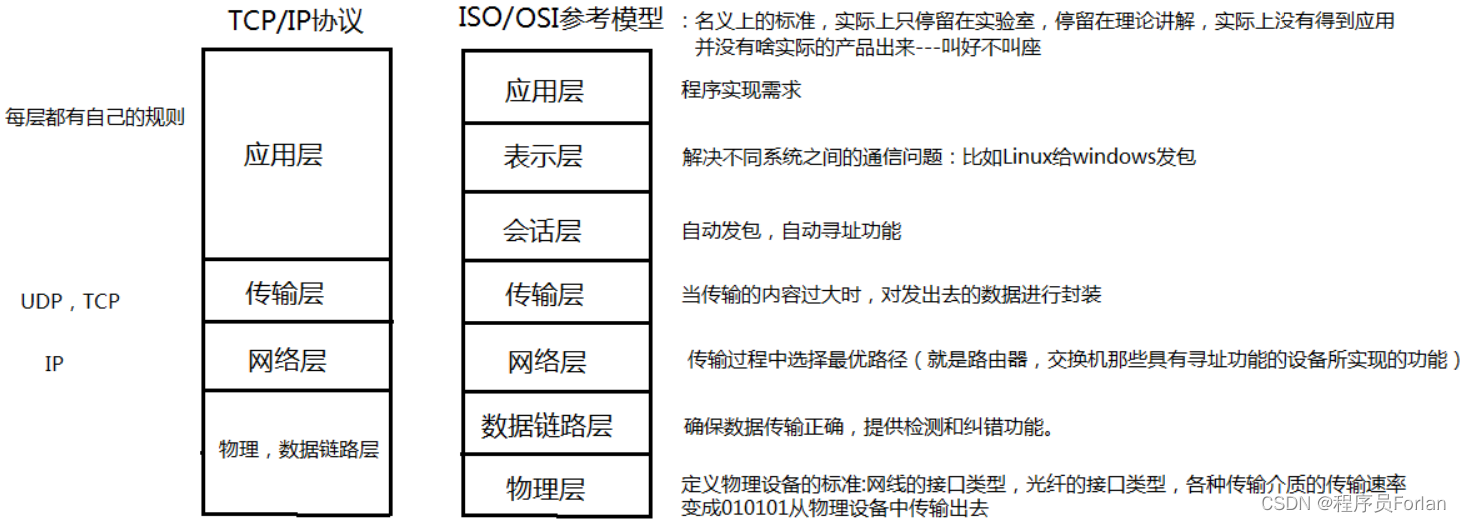
主要看的是传输层的协议,有TCP和UDP,两者的一个区别就是可不可靠,TCP需要三次握手和四次挥手,是比较可靠的,后面我们也会演示下不同的编程方式
三 、Socket
一般网络编程也叫Socket编程,Socket就是套接字,中文意思是插座
所谓套接字(Socket),就是对网络中不同主机上的应用进程之间进行双向通信的端点的抽象。一个套接字就是网络上进程通信的一端,提供了应用层进程利用网络协议交换数据的机制。
Socket是由IP地址和端口结合的,它存在于通信区域,其实就是处理应用层和传输层,获取传输协议
- 应用层:程序员写的代码,我们写的IO流,们最直接的感受,就是IO流的传输
- 传输层:TCP或UDP传输
四、基于TCP的网络编程
1、单向通信
客户端给服务端发送一句话
注:先启动服务端,否则会报错Connection refused: connect
1.1 服务端
ServerSocket ss = null;
Socket s = null;
InputStream is = null;
DataInputStream dis = null;
try {// 1、创建套接字: 指定服务器的端口号ss = new ServerSocket(8888);// 2、阻塞等待接收客户端的数据,会返回客户端的Socket,才真正连接s = ss.accept();// 3、得到输入流,接收信息is = s.getInputStream();dis = new DataInputStream(is);System.out.println("收到客户端的信息:" + dis.readUTF());
} catch (IOException e) {e.printStackTrace();
} finally {try {if (null != ss) {ss.close();}if (null != s) {s.close();}if (null != is) {is.close();}if (null != dis) {dis.close();}} catch (IOException e) {e.printStackTrace();}
1.2 客户端
Socket s = null;
OutputStream os = null;
DataOutputStream dos = null;
try {// 1、创建套接字Socket,指定ip和端口号s = new Socket("127.0.0.1", 8888);// 2、得到输出流os = s.getOutputStream();// 转为处理流DataOutputStream,方面我们发文本dos = new DataOutputStream(os);dos.writeUTF("你好,我是程序员Forlan");
} catch (IOException e) {e.printStackTrace();
} finally {try {if (null != s) {s.close();}if (null != os) {os.close();}if (null != dos) {dos.close();}} catch (IOException e) {e.printStackTrace();}
}
2、双向通信
客户端给服务端发送一句话,服务端回话
在单向通信的基础上,进行了优化简写,利用try(),无需关闭资源了
2.1 服务端
try (ServerSocket ss = new ServerSocket(8888);Socket s = ss.accept();InputStream is = s.getInputStream();DataInputStream dis = new DataInputStream(is);OutputStream os = s.getOutputStream();DataOutputStream dos = new DataOutputStream(os);) {System.out.println("收到客户端的信息:" + dis.readUTF());dos.writeUTF("服务器已经收到啦~");
} catch (IOException e) {e.printStackTrace();
}
2.2 客户端
try (Socket s = new Socket("127.0.0.1", 8888);OutputStream os = s.getOutputStream();DataOutputStream dos = new DataOutputStream(os);InputStream is = s.getInputStream();DataInputStream dis = new DataInputStream(is);) {dos.writeUTF("你好,我是程序员Forlan");System.out.println("收到服务端的信息:" + dis.readUTF());
} catch (IOException e) {e.printStackTrace();
}
3、传输对象
定义Money对象,实现Serializable接口,进行传输
3.1 服务端
try (ServerSocket ss = new ServerSocket(8888);Socket s = ss.accept();InputStream is = s.getInputStream();ObjectInputStream ois = new ObjectInputStream(is);OutputStream os = s.getOutputStream();DataOutputStream dos = new DataOutputStream(os);) {String msg = "转账成功";Money money = (Money) ois.readObject();System.out.println("收到客户端的信息:" + money);BigDecimal zero = new BigDecimal("0.0");if (null == money || money.getAmout().compareTo(zero) < 0) {msg = "转账失败";}dos.writeUTF(msg);
} catch (Exception e) {e.printStackTrace();
}
3.2 客户端
try (Socket s = new Socket("127.0.0.1", 8888);OutputStream os = s.getOutputStream();ObjectOutputStream oos = new ObjectOutputStream(os);InputStream is = s.getInputStream();DataInputStream dis = new DataInputStream(is);) {// 录入信息,发给服务端Scanner sc = new Scanner(System.in);System.out.println("请输入账户:");String account = sc.next();System.out.println("请输入金额:");BigDecimal amout = sc.nextBigDecimal();Money money = new Money(account, amout);oos.writeObject(money);// 接收服务端信息System.out.println("收到服务端的信息:" + dis.readUTF());
} catch (IOException e) {e.printStackTrace();
}
4、保持通信
前面实现的服务器,是针对一个请求服务,之后服务器就关闭了,想让服务器必须一直在监听 ,一直开着,等待客户端的请求
4.1 服务端
try (ServerSocket ss = new ServerSocket(8888);Socket s = ss.accept();InputStream is = s.getInputStream();ObjectInputStream ois = new ObjectInputStream(is);OutputStream os = s.getOutputStream();DataOutputStream dos = new DataOutputStream(os);) {while (true) {String msg = "转账成功";Money money = (Money) ois.readObject();System.out.println("收到客户端的信息:" + money);BigDecimal zero = new BigDecimal("0.0");if (null == money || money.getAmout().compareTo(zero) < 0) {msg = "转账失败";}dos.writeUTF(msg);}
} catch (Exception e) {e.printStackTrace();
}
4.2 客户端
try (Socket s = new Socket("127.0.0.1", 8888);OutputStream os = s.getOutputStream();ObjectOutputStream oos = new ObjectOutputStream(os);InputStream is = s.getInputStream();DataInputStream dis = new DataInputStream(is);) {while (true) {// 录入信息,发给服务端Scanner sc = new Scanner(System.in);System.out.println("请输入账户:");String account = sc.next();if (Objects.equals("退钱", account)) {System.out.println("告辞");break;}System.out.println("请输入金额:");BigDecimal amout = sc.nextBigDecimal();Money money = new Money(account, amout);oos.writeObject(money);// 接收服务端信息System.out.println("收到服务端的信息:" + dis.readUTF());}
} catch (IOException e) {e.printStackTrace();
}
五、基于UDP的网络编程
1、单向通信
1.1 发送方
// 1、创建套接字,指定我方的端口号
try (DatagramSocket ds = new DatagramSocket(1111);) {// 2、准备数据包,需要四个参数:数据的字节数组、字节数组长度、接收方的ip、接收方的端口号String str = "hello";byte[] bytes = str.getBytes();DatagramPacket dp = new DatagramPacket(bytes, bytes.length, InetAddress.getByName("127.0.0.1"), 2222);// 3、发送数据包ds.send(dp);
} catch (IOException e) {e.printStackTrace();
}
1.2 接收方
// 1、创建套接字,指定我方的端口号
try (DatagramSocket ds = new DatagramSocket(2222);) {// 2、准备空的数据包,用来接收其它地方传过来的byte[] b = new byte[1024];DatagramPacket dp = new DatagramPacket(b, b.length);// 3、接收对方的数据包,填充到dp中ds.receive(dp);// 4、取出数据byte[] data = dp.getData();String s = new String(data, 0, dp.getLength());System.out.println("程序员B说:" + s);
} catch (IOException e) {e.printStackTrace();
}
不需要存在接收方也不会报错
2、双向通信
2.1 发送方
try (Socket s = new Socket("127.0.0.1", 8888);OutputStream os = s.getOutputStream();ObjectOutputStream oos = new ObjectOutputStream(os);InputStream is = s.getInputStream();DataInputStream dis = new DataInputStream(is);) {// 录入信息,发给服务端Scanner sc = new Scanner(System.in);System.out.println("请输入账户:");String account = sc.next();System.out.println("请输入金额:");BigDecimal amout = sc.nextBigDecimal();Money money = new Money(account, amout);oos.writeObject(money);// 接收服务端信息System.out.println("收到服务端的信息:" + dis.readUTF());
} catch (IOException e) {e.printStackTrace();
}
2.2 接收方
// 1、创建套接字,指定我方的端口号
try (DatagramSocket ds = new DatagramSocket(2222);) {// 2、准备空的数据包,用来接收其它地方传过来的byte[] b = new byte[1024];DatagramPacket dp = new DatagramPacket(b, b.length);// 3、接收对方的数据包,填充到dp中ds.receive(dp);// 4、取出数据byte[] data = dp.getData();String s = new String(data, 0, dp.getLength());System.out.println("程序员B说:" + s);// 5、回复信息String str = "hi";byte[] bytes = str.getBytes();DatagramPacket dp2 = new DatagramPacket(bytes, bytes.length, InetAddress.getByName("127.0.0.1"), 1111);ds.send(dp2);
} catch (IOException e) {e.printStackTrace();
}
3、保持通信
下面实现一种可以保持通信的UDP,发送方发送的时候,接收方要启动,不然发送方一直等着,接收方也一直等着
3.1 发送方
// 1、创建套接字,指定我方的端口号
try (DatagramSocket ds = new DatagramSocket(1111);) {while (true) {// 2、准备数据包,需要四个参数:数据的字节数组、字节数组长度、接收方的ip、接收方的端口号Scanner sc = new Scanner(System.in);System.out.print("请输入消息:");String msg = sc.next();byte[] bytes = msg.getBytes();DatagramPacket dp = new DatagramPacket(bytes, bytes.length, InetAddress.getByName("127.0.0.1"), 2222);// 3、发送数据包ds.send(dp);if (Objects.equals("bye", msg)) {System.out.println("溜了~");break;}// 4、接收回复byte[] b = new byte[1024];DatagramPacket dp2 = new DatagramPacket(b, b.length);ds.receive(dp2);byte[] data = dp2.getData();String s = new String(data, 0, dp2.getLength());System.out.println("程序员A说:" + s);}
} catch (IOException e) {e.printStackTrace();
}
3.2 接收方
// 1、创建套接字,指定我方的端口号
try (DatagramSocket ds = new DatagramSocket(2222);) {while (true) {// 2、准备空的数据包,用来接收其它地方传过来的byte[] b = new byte[1024];DatagramPacket dp = new DatagramPacket(b, b.length);// 3、接收对方的数据包,填充到dp中ds.receive(dp);// 4、取出数据byte[] data = dp.getData();String msg = new String(data, 0, dp.getLength());System.out.print("程序员B说:" + msg);if (Objects.equals("bye", msg)) {System.out.println("程序员B开心去了");break;}// 5、回复信息Scanner sc = new Scanner(System.in);System.out.println("请输入消息:");String str = sc.next();byte[] bytes = str.getBytes();DatagramPacket dp2 = new DatagramPacket(bytes, bytes.length, InetAddress.getByName("127.0.0.1"), 1111);ds.send(dp2);}
} catch (IOException e) {e.printStackTrace();
}
六、 总结
TCP和UDP网络编程的区别:
- TCP
客户端: 使用Socket,发送使用输出流,接收使用输入流
服务端: 使用ServerSocket监听得到Socket,接收使用输入流,发送使用输出流
客户端和服务端地位不平等
由客户端主动发起,和服务端建立连接,完成通信
服务端得先启动,不然客户端会报错
- UDP
发送方和接收方,都是使用DatagramSocket 发送和接收的是DatagramPacket(数据包)
发送方和接收方的地位是平等的
本文来自互联网用户投稿,文章观点仅代表作者本人,不代表本站立场,不承担相关法律责任。如若转载,请注明出处。 如若内容造成侵权/违法违规/事实不符,请点击【内容举报】进行投诉反馈!