矫正自己的机器人
转载出处:http://www.cnblogs.com/zxouxuewei/
1.每个人在制作自己的机器人时,都会遇到一个问题就是你的机器人实际移动的数据和发布的里程计数据不匹配(更具体一点是误差太大),导致机器人的移动出现问题,其中自己总结有以下几点容易出现问题:
1》机器人在通过usart或者can上传到pc机上的编码器或者惯性测量单元的频率和发布里程计数据的频率问题。2》在通过编码器或者惯性测量单元计算里程计信息时参数误差太大。3》就是编码器输入捕捉的数据有问题或者惯性测量单元的滤波震荡过大。
2.所以矫正线速度和角速度是必须的。矫正之前首先需要一把卷尺和一张颜色鲜艳的纸(因为你可以在纸上画线不弄脏地板)
3.进行线速度矫正,将卷尺和纸张如下放置。
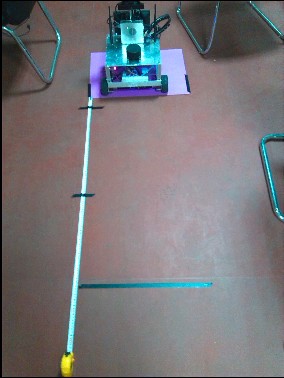
安装完成后开始矫正机器人,
首先确保自己的机器人能够正常订阅cmd_val话题下的移动数据,其次能够读取下位机透传的数据。以下是我的机器人ros的启动代码的代码,可供参考:
#include
#include
#include
#include
#include
#include
#include
#include
#include
#include "string.h"using namespace std;
using namespace boost::asio;double x = 0.0;
double y = 0.0;
double th = 0.0;
double vx = 0.0;
double vy = 0.0;
double vth = 0.0;
double dt = 0.0;//Defines the packet protocol for communication between upper and lower computers
#pragma pack(1)
typedef union _Upload_speed_
{unsigned char buffer[16];struct _Speed_data_{float Header;float X_speed;float Y_speed;float Z_speed;}Upload_Speed;
}Struct_Union;
#pragma pack(4) //Initializes the protocol packet data
Struct_Union Reciver_data        = {0,0,0,0,0,0,0,0,0,0,0,0,0,0,0,0};
Struct_Union Transmission_data   = {0,0,0,0,0,0,0,0,0,0,0,0,0,0,0,0};   //Defines the message type to be transmitted geometry_msgs
geometry_msgs::Quaternion odom_quat;void cmd_velCallback(const geometry_msgs::Twist &twist_aux)
{geometry_msgs::Twist twist = twist_aux;Transmission_data.Upload_Speed.Header = header_data;Transmission_data.Upload_Speed.X_speed = twist_aux.linear.x;Transmission_data.Upload_Speed.Y_speed = twist_aux.linear.y;Transmission_data.Upload_Speed.Z_speed = twist_aux.angular.z;
}int main(int argc, char** argv)
{unsigned char check_buf[1];std::string usart_port,robot_frame_id,smoother_cmd_vel;int baud_data;float p,i,d;ros::init(argc, argv, "base_controller");ros::NodeHandle n;ros::Time current_time, last_time;//Gets the parameters in the launch fileros::NodeHandle nh_private("~");nh_private.param("usart_port", usart_port, "/dev/robot_base"); nh_private.param("baud_data", baud_data, 115200); nh_private.param("robot_frame_id", robot_frame_id, "base_link");nh_private.param("smoother_cmd_vel", smoother_cmd_vel, "/cmd_vel");//Create a boot node for the underlying driver layer of the robot base_controllerros::Subscriber cmd_vel_sub = n.subscribe(smoother_cmd_vel, 50, cmd_velCallback);ros::Publisher odom_pub = n.advertise("odom", 50);tf::TransformBroadcaster odom_broadcaster;//Initializes the data related to the boost serial portio_service iosev;serial_port sp(iosev, usart_port);sp.set_option(serial_port::baud_rate(baud_data));sp.set_option(serial_port::flow_control(serial_port::flow_control::none));sp.set_option(serial_port::parity(serial_port::parity::none));sp.set_option(serial_port::stop_bits(serial_port::stop_bits::one));sp.set_option(serial_port::character_size(8));while(ros::ok()){ros::spinOnce(); //Gets the cycle of two time slice rotations. The purpose is to calculate the odom message datacurrent_time = ros::Time::now();dt = (current_time - last_time).toSec();last_time = ros::Time::now();//Read the data from the lower computerread(sp, buffer(Reciver_data.buffer));if(Reciver_data.Upload_Speed.Header > 15.4 && Reciver_data.Upload_Speed.Header < 15.6){vx  = Reciver_data.Upload_Speed.X_speed;vy  = Reciver_data.Upload_Speed.Y_speed;vth = Reciver_data.Upload_Speed.Z_speed;//ROS_INFO("%2f    %2f    %2f",vx,vy,vth);}else{  //ROS_INFO("------Please wait while the robot is connected!-----");read(sp, buffer(check_buf));}//Send the next bit machine under the cmd_val topic to monitor the speed informationwrite(sp, buffer(Transmission_data.buffer,16));//Calculate odometer datadouble delta_x = (vx * cos(th) - vy * sin(th)) * dt;double delta_y = (vx * sin(th) + vy * cos(th)) * dt;double delta_th = vth * dt;x += delta_x;y += delta_y;th += delta_th;geometry_msgs::Quaternion odom_quat = tf::createQuaternionMsgFromYaw(th);geometry_msgs::TransformStamped odom_trans;odom_trans.header.stamp = current_time;odom_trans.header.frame_id = "odom";odom_trans.child_frame_id = robot_frame_id;odom_trans.transform.translation.x = x;odom_trans.transform.translation.y = y;odom_trans.transform.translation.z = 0.0;odom_trans.transform.rotation = odom_quat;odom_broadcaster.sendTransform(odom_trans);nav_msgs::Odometry odom;odom.header.stamp = current_time;odom.header.frame_id = "odom";odom.pose.pose.position.x = x;odom.pose.pose.position.y = y;odom.pose.pose.position.z = 0.0;odom.pose.pose.orientation = odom_quat;odom.child_frame_id = robot_frame_id;odom.twist.twist.linear.x = vx;odom.twist.twist.linear.y = vy;odom.twist.twist.angular.z = vth;//Release odometer data between odom-> base_link odom_pub.publish(odom);}iosev.run();
}
然后打开线速度校准节点:
 rosrun rbx1_nav calibrate_linear.py
rosrun rqt_reconfigure rqt_reconfigure
 点击start_test开始测试机器人,测试距离为一米,看实际机器人走了多少,记录下实际移动的值除以目标距离1米,然后用计算出来的值去乘以odom_linear_scale_correction的值,并且修改odom_linear_scale_correction为最终计算出来的值,经过反复多次测试后,你会看到你的机器人非常准确的走了1m。然后用这个最终测试的精确值去修改发布里程计数据时计算的速度,具体是用你的ticks_meter处以odom_linear_scale_correction的值为最终ticks_meter的值。此时线速度矫正到此结束。
4.以同样的方式去矫正角速度:
rosrun rbx1_nav calibrate_angular.py
rosrun rqt_reconfigure rqt_reconfigure
 测试完成后得到odom_angular_scale_correction新的值。然后去修改你的轴距,用你的base_width除以odom_angular_scale_correction得到矫正后的轴距。以下是我矫正后的代码。(下位机的代码,确保自己的PID控制器量纲为速度,单位保持统一。阶跃超调较小,恢复快,就是PID参数要整定好)
struct Encoder_{float d_left;float d_right;int enc_left;        //wheel encoder readingsint enc_right;int left;          // actual values coming back from robotint right;
}self;
float d,th;
#define ticks_meter 123077.0   //每米编码器的值   linear = 2.6
#define base_width 0.31f;      //轴距  angule = 0.316
#define robot_timer 0.53f      //周期union Max_Value
{unsigned char buf[12];struct _Float_{float hander;float _float_vx;float _float_vth;}Float_RAM;
}Send_Data;extern int encoder_0;extern int encoder_1;
void Updata_velocities_Data()
{u8 i=0;self.right = encoder_0;self.left  = encoder_1;if(self.enc_left == 0){self.d_left  = 0;self.d_right = 0;}else{self.d_left = (self.left - self.enc_left) / ticks_meter;self.d_right = (self.right - self.enc_right) / ticks_meter;}self.enc_left = self.left;self.enc_right = self.right;d  = ( self.d_left + self.d_right ) / 2;    //distance traveled is the average of the two wheels        th = ( self.d_right - self.d_left ) / base_width;  //this approximation works (in radians) for small anglesself.dx = d / robot_timer;   //calculate velocitiesself.dr = th / robot_timer;Send_Data.Float_RAM.hander = 15.5;Send_Data.Float_RAM._float_vx = self.dx;Send_Data.Float_RAM._float_vth = self.dr;for(i=0;i<12;i++)sendchar_usart1(Send_Data.buf[i]);
}
本文来自互联网用户投稿,文章观点仅代表作者本人,不代表本站立场,不承担相关法律责任。如若转载,请注明出处。 如若内容造成侵权/违法违规/事实不符,请点击【内容举报】进行投诉反馈!