Unity Game Optimization - Third Edition 阅读笔记 Chapter 1 分析性能问题
Chapter 1 分析性能问题
目录
- Chapter 1 分析性能问题
- 使用Unity Profiler 获取数据
- Profile 远程连接iOS
- Profile 远程连接Android
- Deep Profile
- Allocation Callstack (2019以上)
- 性能分析Check List
- 自定义脚本分析
使用Unity Profiler 获取数据
- 设备上连接profile,数据并不完全准确
- 由于Development 模式和连接Unity profile 导致CPU 负荷增加和内存大量增加。如果在一些大的项目中运行时,会照成内存溢出,脚本不运行,物理效果停止update等情况
- 为了规避一些上述情况,我们要使用benchmarking(基准化分析法): 在一些切换点,性能明显变差时关注一段时间。
- Editor 中的Profile 数据不可靠,需要在真机中使用。
Profile 远程连接iOS
注意:连接iOS设备时,Unity必须是在Mac机器上运行
- 打包时Development Build 和 Autoconnect Profiler 打勾
- 电脑和手机连接相同的本地WiFi
- 用usb连接手机和mac电脑
- 打包
- 在Unity中打开Profiler,然后选择iOS设备
如果连接还有问题,查看这里:https://docs.unity3d.com/Manual/TroubleShootingIPhone.html
Profile 远程连接Android
和iOS相似。
如果连接有问题,查看这里:[https://docs.unity3d.com/Manual/TroubleShootingAndroid. html](https://docs.unity3d.com/Manual/TroubleShootingAndroid. html)
Deep Profile
能看到几乎所有的调用方法。但是消耗很大。
Allocation Callstack (2019以上)
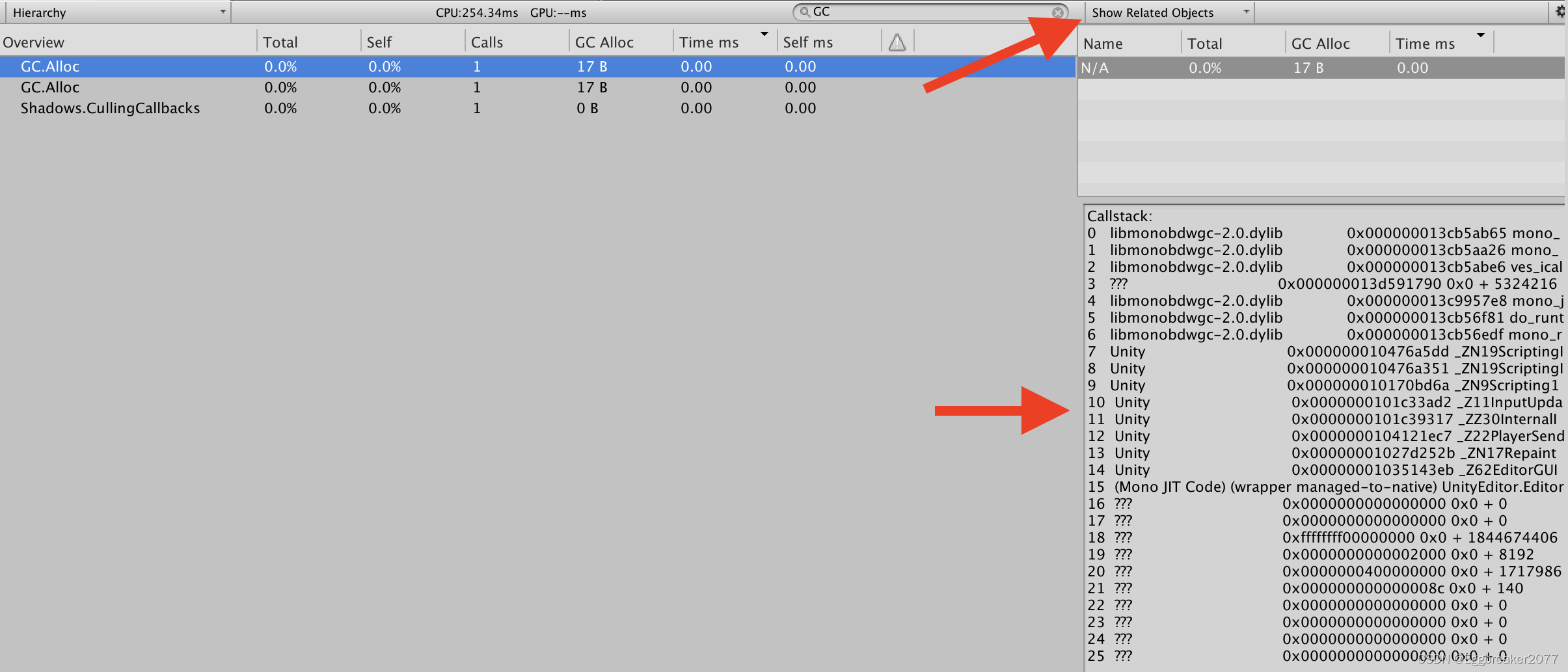
激活Call Stacks 按钮后,在不开启DeepProfile的情况下。Profiler也会收集更多的内存分配问题。
然后通过Show Related Objects 按钮,我们就能看到调用堆栈了。
性能分析Check List
- 验证目标脚本是否出现在场景中
- 验证目标脚本出现的次数是否正确
- 验证事件的正确顺序
- 最小化正在进行的代码更改
- 尽量减少内部干扰
- 尽量减少外部干扰
自定义脚本分析
使用stopwatch 类创建计时工具:
using System.Diagnostics;
public class CustomTimer : IDisposable {
private string _timerName;
private int _numTests;
private Stopwatch _watch;
// give the timer a name, and a count of the
// number of tests we're running
public CustomTimer(string timerName, int numTests) {_timerName = timerName;_numTests = numTests;if (_numTests <= 0) {_numTests = 1;}_watch = Stopwatch.StartNew();
}// automatically called when the 'using()' block endspublic void Dispose() {_watch.Stop();float ms = _watch.ElapsedMilliseconds;UnityEngine.Debug.Log(string.Format("{0} finished: {1:0.00} " +"milliseconds total, {2:0.000000} milliseconds per-test " +"for {3} tests", _timerName, ms, ms / _numTests, _numTests));}
}
使用示例:
const int numTests = 1000;
using (new CustomTimer("My Test", numTests)) {for(int i = 0; i < numTests; ++i) {TestFunction();}
} // 执行完成后timer's Dispose() 会被调用
本文来自互联网用户投稿,文章观点仅代表作者本人,不代表本站立场,不承担相关法律责任。如若转载,请注明出处。 如若内容造成侵权/违法违规/事实不符,请点击【内容举报】进行投诉反馈!