2:协议栈无线控制LED
1:工程文件目录讲解
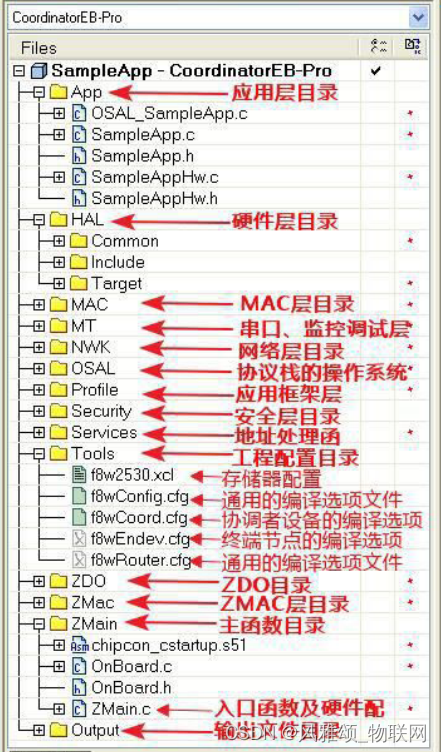
- App:应用层目录,这是用户创建各种不同工程的区域,在这个目录中包含了应用层的 内容和这个项目的主要内容。
- HAL:硬件层目录,包含有与硬件相关的配置和驱动及操作函数。
- MAC:MAC 层目录,包含了 MAC 层的参数配 置文件及其 MAC 的 LIB 库的函数接口文件。
- MT:实现通过串口可控制各层,并与各层进行直接交互
- NWK:网络层目录,包含网络层配置参数文件网络层库的函数接口文件及 APS 层库的函数接口。
- OSAL:协议栈的操作系统。
- Profile: Application framework 应用框架层目录,包含 AF 层处理函数文件。应用框架层是应用程序和 APS 层的无线数据接口。
- Security:安全层目录,包含安全层处理函数,比如加密函数等。
- Services:地址处理函数目录,包括地址模式的定义及地址处理函数。
- Tools:工程配置目录,包括空间划分及Z-Stack 相关配置信息。
- ZDO:ZDO 目录
- ZMac:MAC 层目录,包括 MAC 层参数配置及MAC 层 LIB 库函数回调处理函数。
- ZMain:主函数目录,包括入口函数及硬件 配置文件。
- Output:输出文件目录,由 IAR IDE 自动 生成。
2:工程低版本导入高版本的报错解决
- 把bebug文件夹里面的《 chipcon_cstartup.s51 》放入
- ZStack-CC2530-2.3.0-1.4.0\Projects\zstack\ZMain
- 底下的两个目录内都需要替换即可不报错。
- 如果还有报错option选项卡进入以后把默认配置 number of virtual 的16改为8即可。
- 工程即可正常编译
3:分析协议栈工作流程
把程序分别烧录到终端与路由组网成功后 D1 灯闪烁。 下面来分析协议栈工作流程:
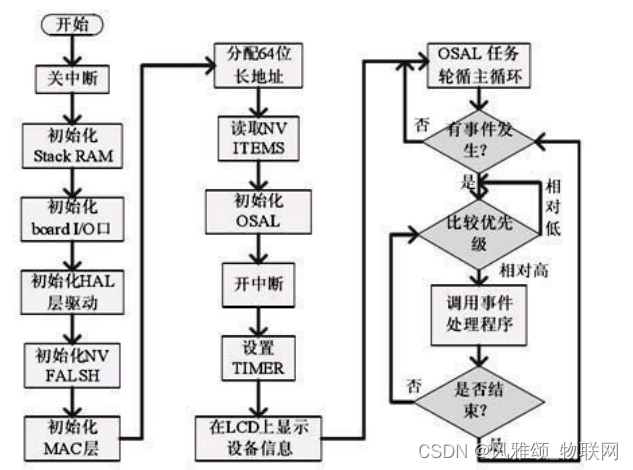
调用过程: main()—> osal_init_system()—> osalInitTasks()—> SampleApp_Init()
- 打开 ZMain.c 找到 main 函数。
- 看了上面的代码后,可能感觉很多函数不认识。没关系刚开始大概了解流程即可,main 函数 先执行初始化工作,包括硬件、网络层、任务等的初始化。然后执行 osal_start_system(); 操作系统进去后可不会回来了。
在这里,我们重点了解 2 个函数:
- 初始化操作系统 osal_init_system();
- 运行操作系统 osal_start_system();
4:初始化操作系统 osal_init_system();
先来看 osal_init_system();系统初始化函 数,进入函数。如果用 IAR 看代码可在函数名上单击右键 ——go to definitio n of…,便可以进入函数。发现里面有 6 个初始化函数,这里我们只关心 osalInitTasks(); 任务初始化函数,继续由该函数进入。
void osalInitTasks( void )
{uint8 taskID = 0;// 分配内存,返回指向缓冲区的指针tasksEvents = (uint16 *)osal_mem_alloc( sizeof( uint16 ) * tasksCnt);// 设置所分配的内存空间单元值为0osal_memset( tasksEvents, 0, (sizeof( uint16 ) * tasksCnt));// 任务优先级由高向低依次排列,高优先级对应taskID 的值反而小macTaskInit( taskID++ );  //macTaskInit(0) ,                  用户 不需考虑nwk_init( taskID++ );     //nwk_init(1),                      用户 不需考虑Hal_Init( taskID++ );     //Hal_Init(2) ,                     用户 需考虑  ######
#if defined( MT_TASK )MT_TaskInit( taskID++ );
#endifAPS_Init( taskID++ );      //APS_Init(3) ,                    用户 不需考虑
#if defined ( ZIGBEE_FRAGMENTATION )APSF_Init( taskID++ );
#endifZDApp_Init( taskID++ );    //ZDApp_Init(4) ,                  用户 需考虑  ######
#if defined ( ZIGBEE_FREQ_AGILITY ) || defined ( ZIGBEE_PANID_CONFLICT )ZDNwkMgr_Init( taskID++ );
#endif//用户创建的任务SampleApp_Init( taskID );  // SampleApp_Init _Init(5) ,       用户 需考虑  ######
}
5: osal_start_system( );运行操作系统
void osal_start_system( void )
{
#if !defined ( ZBIT ) && !defined ( UBIT )for(;;)  // Forever Loop
#endif{uint8 idx = 0;osalTimeUpdate();   //扫描哪个事件被触发了,然后置相应的标志位Hal_ProcessPoll();  //轮询TIMER与UART This replaces MT_SerialPoll() and osal_check_timer().do {if (tasksEvents[idx])  // Task is highest priority that is ready.{break;               //得到待处理的最高优先级任务索引号 idx}} while (++idx < tasksCnt);if (idx < tasksCnt){uint16 events;halIntState_t intState;HAL_ENTER_CRITICAL_SECTION(intState);// 进入临界区,保护events = tasksEvents[idx];           //提取需要处理的任务中的事件tasksEvents[idx] = 0;                //清除本次任务的事件HAL_EXIT_CRITICAL_SECTION(intState); // 退出临界区/* 通过指针调用任务处理函数,关键, 关键, 关键 */	events = (tasksArr[idx])( idx, events );/* 通过指针调用任务处理函数,关键, 关键, 关键 */	HAL_ENTER_CRITICAL_SECTION(intState);   //进入临界区tasksEvents[idx] |= events;  // 保存未处理的事件 Add back unprocessed events to the current task.HAL_EXIT_CRITICAL_SECTION(intState);    // 退出临界区}
#if defined( POWER_SAVING )else  // Complete pass through all task events with no activity?{osal_pwrmgr_powerconserve();  // Put the processor/system into sleep}
#endif}
}
我 们看一下 events = tasksEvents[idx]; 进入 tas ksEvents[idx]数 组定义 ,发现恰好是 **osalInitTasks()**函数里面分配空间初始化过的 tasksEven ts。而且 taskID 一一对应。这就 是初始化与调用的关系。taskID 把任务联系起来了。
// The order in this table must be identical to the task initialization calls below in osalInitTask.
// 此表中的顺序必须与下面osalInitTask中的任务初始化调用相同。
const pTaskEventHandlerFn tasksArr[] = {macEventLoop,nwk_event_loop,Hal_ProcessEvent,
#if defined( MT_TASK )MT_ProcessEvent,
#endifAPS_event_loop,
#if defined ( ZIGBEE_FRAGMENTATION )APSF_ProcessEvent,
#endifZDApp_event_loop,
#if defined ( ZIGBEE_FREQ_AGILITY ) || defined ( ZIGBEE_PANID_CONFLICT )ZDNwkMgr_event_loop,
#endifSampleApp_ProcessEvent
};
6:Sample App_Init()用户应用任务初始化函数
void SampleApp_Init( uint8 task_id )
{ SampleApp_TaskID = task_id;   //osal分配的任务ID随着用户添加任务的增多而改变SampleApp_NwkState = DEV_INIT;//设备状态设定为ZDO层中定义的初始化状态SampleApp_TransID = 0;        //消息发送ID(多消息时有顺序之分)// Device hardware initialization can be added here or in main() (Zmain.c).// If the hardware is application specific - add it here.// If the hardware is other parts of the device add it in main().#if defined ( BUILD_ALL_DEVICES )// The "Demo" target is setup to have BUILD_ALL_DEVICES and HOLD_AUTO_START// We are looking at a jumper (defined in SampleAppHw.c) to be jumpered// together - if they are - we will start up a coordinator. Otherwise,// the device will start as a router.if ( readCoordinatorJumper() )zgDeviceLogicalType = ZG_DEVICETYPE_COORDINATOR;elsezgDeviceLogicalType = ZG_DEVICETYPE_ROUTER;
#endif // BUILD_ALL_DEVICES//该段的意思是,如果设置了HOLD_AUTO_START宏定义,将会在启动芯片的时候会暂停启动
//流程,只有外部触发以后才会启动芯片。其实就是需要一个按钮触发它的启动流程。
#if defined ( HOLD_AUTO_START )// HOLD_AUTO_START is a compile option that will surpress ZDApp//  from starting the device and wait for the application to//  start the device.ZDOInitDevice(0);
#endif// Setup for the periodic message's destination address 设置发送数据的方式和目的地址寻址模式// Broadcast to everyone 发送模式:广播发送SampleApp_Periodic_DstAddr.addrMode = (afAddrMode_t)AddrBroadcast;//广播SampleApp_Periodic_DstAddr.endPoint = SAMPLEAPP_ENDPOINT; //指定端点号SampleApp_Periodic_DstAddr.addr.shortAddr = 0xFFFF;//指定目的网络地址为广播地址// Setup for the flash command's destination address - Group 1 组播发送SampleApp_Flash_DstAddr.addrMode = (afAddrMode_t)afAddrGroup; //组寻址SampleApp_Flash_DstAddr.endPoint = SAMPLEAPP_ENDPOINT; //指定端点号SampleApp_Flash_DstAddr.addr.shortAddr = SAMPLEAPP_FLASH_GROUP;//组号0x0001// Fill out the endpoint description. 定义本设备用来通信的APS层端点描述符SampleApp_epDesc.endPoint = SAMPLEAPP_ENDPOINT; //指定端点号SampleApp_epDesc.task_id = &SampleApp_TaskID;   //SampleApp 描述符的任务IDSampleApp_epDesc.simpleDesc= (SimpleDescriptionFormat_t *)&SampleApp_SimpleDesc;//SampleApp简单描述符SampleApp_epDesc.latencyReq = noLatencyReqs;    //延时策略// Register the endpoint description with the AFafRegister( &SampleApp_epDesc );    //向AF层登记描述符// Register for all key events - This app will handle all key eventsRegisterForKeys( SampleApp_TaskID ); // 登记所有的按键事件// By default, all devices start out in Group 1SampleApp_Group.ID = 0x0001;//组号osal_memcpy( SampleApp_Group.name, "Group 1", 7  );//设定组名aps_AddGroup( SAMPLEAPP_ENDPOINT, &SampleApp_Group );//把该组登记添加到APS中#if defined ( LCD_SUPPORTED )HalLcdWriteString( "SampleApp", HAL_LCD_LINE_1 ); //如果支持LCD,显示提示信息
#endif
}
7: Sample App_ProcessEvent() 用户应 用任务的事件处理函数
//用户应用任务的事件处理函数
uint16 SampleApp_ProcessEvent( uint8 task_id, uint16 events )
{afIncomingMSGPacket_t *MSGpkt;(void)task_id;  // Intentionally unreferenced parameterif ( events & SYS_EVENT_MSG ) //接收系统消息再进行判断{//接收属于本应用任务SampleApp的消息,以SampleApp_TaskID标记MSGpkt = (afIncomingMSGPacket_t *)osal_msg_receive( SampleApp_TaskID );while ( MSGpkt ){switch ( MSGpkt->hdr.event ){// Received when a key is pressedcase KEY_CHANGE://按键事件SampleApp_HandleKeys( ((keyChange_t *)MSGpkt)->state, ((keyChange_t *)MSGpkt)->keys );break;// Received when a messages is received (OTA) for this endpointcase AF_INCOMING_MSG_CMD://接收数据事件,调用函数AF_DataRequest()接收数据SampleApp_MessageMSGCB( MSGpkt );//调用回调函数对收到的数据进行处理break;// Received whenever the device changes state in the networkcase ZDO_STATE_CHANGE://只要网络状态发生改变,就通过ZDO_STATE_CHANGE事件通知所有的任务。//同时完成对协调器,路由器,终端的设置SampleApp_NwkState = (devStates_t)(MSGpkt->hdr.status);//if ( (SampleApp_NwkState == DEV_ZB_COORD)//实验中协调器只接收数据所以取消发送事件if ( (SampleApp_NwkState == DEV_ROUTER) || (SampleApp_NwkState == DEV_END_DEVICE) ){// Start sending the periodic message in a regular interval.//这个定时器只是为发送周期信息开启的,设备启动初始化后从这里开始//触发第一个周期信息的发送,然后周而复始下去osal_start_timerEx( SampleApp_TaskID,SAMPLEAPP_SEND_PERIODIC_MSG_EVT,SAMPLEAPP_SEND_PERIODIC_MSG_TIMEOUT );}else{// Device is no longer in the network}break;default:break;}// Release the memory 事件处理完了,释放消息占用的内存osal_msg_deallocate( (uint8 *)MSGpkt );// Next - if one is available 指针指向下一个放在缓冲区的待处理的事件,//返回while ( MSGpkt )重新处理事件,直到缓冲区没有等待处理事件为止MSGpkt = (afIncomingMSGPacket_t *)osal_msg_receive( SampleApp_TaskID );}// return unprocessed events 返回未处理的事件return (events ^ SYS_EVENT_MSG);}// Send a message out - This event is generated by a timer//  (setup in SampleApp_Init()).if ( events & SAMPLEAPP_SEND_PERIODIC_MSG_EVT ){// Send the periodic message 处理周期性事件,//利用SampleApp_SendPeriodicMessage()处理完当前的周期性事件,然后启动定时器//开启下一个周期性事情,这样一种循环下去,也即是上面说的周期性事件了,//可以做为传感器定时采集、上传任务SampleApp_SendPeriodicMessage();// Setup to send message again in normal period (+ a little jitter)osal_start_timerEx( SampleApp_TaskID, SAMPLEAPP_SEND_PERIODIC_MSG_EVT,(SAMPLEAPP_SEND_PERIODIC_MSG_TIMEOUT + (osal_rand() & 0x00FF)) );// return unprocessed events 返回未处理的事件return (events ^ SAMPLEAPP_SEND_PERIODIC_MSG_EVT);}// Discard unknown eventsreturn 0;
}
8:分析接收数据 函数 SampleApp_MessageMSGCB()
//接收数据,参数为接收到的数据
void SampleApp_MessageMSGCB( afIncomingMSGPacket_t *pkt )
{uint16 flashTime;byte buf[3]; switch ( pkt->clusterId ) //判断簇ID{case SAMPLEAPP_PERIODIC_CLUSTERID: //收到广播数据osal_memset(buf, 0 , 3);osal_memcpy(buf, pkt->cmd.Data, 2); //复制数据到缓冲区中if(buf[0]=='D' && buf[1]=='1')      //判断收到的数据是否为"D1"         {HalLedBlink(HAL_LED_1, 0, 50, 100);//如果是则Led1间隔500ms闪烁
#if defined(ZDO_COORDINATOR) //协调器收到"D1"后,返回"D1"给终端,让终端Led1也闪烁SampleApp_SendPeriodicMessage();
#endif}else{HalLedSet(HAL_LED_1, HAL_LED_MODE_ON);                   }break;case SAMPLEAPP_FLASH_CLUSTERID: //收到组播数据flashTime = BUILD_UINT16(pkt->cmd.Data[1], pkt->cmd.Data[2] );HalLedBlink( HAL_LED_4, 4, 50, (flashTime / 4) );break;}
}
本文来自互联网用户投稿,文章观点仅代表作者本人,不代表本站立场,不承担相关法律责任。如若转载,请注明出处。 如若内容造成侵权/违法违规/事实不符,请点击【内容举报】进行投诉反馈!