mysql基础1.1
4.2 DML操作
DML操作包括增(INSERT)、删(DELETE)、改(UPDATE)、查(SELECT),均属针对表的操作。
4.2.1 INSERT语句
//DML操作之增操作insert
//语法:INSERT [INTO] table_name [(column_name,...)] {VALUES | VALUE} (value1,...),(...),...
MariaDB [(none)]> use runtime
MariaDB [runtime]> create  table  linux(id int not null,name varchar(10) not null,age tinyint);
Query OK, 0 rows affected (0.005 sec)
MariaDB [runtime]> desc linux;
+-------+-------------+------+-----+---------+-------+
| Field | Type        | Null | Key | Default | Extra |
+-------+-------------+------+-----+---------+-------+
| id    | int(11)     | NO   |     | NULL    |       |
| name  | varchar(10) | NO   |     | NULL    |       |
| age   | tinyint(4)  | YES  |     | NULL    |       |
+-------+-------------+------+-----+---------+-------+
3 rows in set (0.002 sec)
MariaDB [runtime]> insert  linux(id ,name,age)  values(1,'jerry',23),(2,'wangqing',25),(3,'sean',28);
Query OK, 3 rows affected (0.003 sec)
Records: 3  Duplicates: 0  Warnings: 0MariaDB [runtime]> insert  linux(id ,name,age)  values(4,'yu',22),(5,'li',19),(6,'kij',26);
Query OK, 3 rows affected (0.003 sec)
Records: 3  Duplicates: 0  Warnings: 0
MariaDB [runtime]> select * from linux;
+----+----------+------+
| id | name     | age  |
+----+----------+------+
|  1 | jerry    |   23 |
|  2 | wangqing |   25 |
|  3 | sean     |   28 |
|  4 | yu       |   22 |
|  5 | li       |   19 |
|  6 | kij      |   26 |
+----+----------+------+
6 rows in set (0.001 sec)
4.2.2 SELECT语句
字段column表示法
| 表示符 | 代表什么? |
| * | 所有字段 |
| as | 字段别名,如col1 AS alias1 |
MariaDB [runtime]> select name as 姓名, age as 年龄 from linux;
+----------+--------+
| 姓名     | 年龄   |
+----------+--------+
| jerry    |     23 |
| wangqing |     25 |
| sean     |     28 |
| yu       |     22 |
| li       |     19 |
| kij      |     26 |
+----------+--------+
6 rows in set (0.002 sec)MariaDB [runtime]>
条件判断语句WHERE
| 操作类型 | 常用操作符 |
| 操作符 | >,<,>=,<=,=,!= |
| 条件逻辑操作 | AND |
MariaDB [runtime]> select * from linux;
+----+----------+------+
| id | name     | age  |
+----+----------+------+
|  1 | jerry    |   23 |
|  2 | wangqing |   25 |
|  3 | sean     |   28 |
|  4 | yu       |   22 |
|  5 | li       |   19 |
|  6 | kij      |   26 |
+----+----------+------+
6 rows in set (0.001 sec)MariaDB [runtime]> select * from linux where id=4;
+----+------+------+
| id | name | age  |
+----+------+------+
|  4 | yu   |   22 |
+----+------+------+
1 row in set (0.001 sec)MariaDB [runtime]> select * from linux where name='li';
+----+------+------+
| id | name | age  |
+----+------+------+
|  5 | li   |   19 |
+----+------+------+
1 row in set (0.001 sec)MariaDB [runtime]> select * from linux where id=4 and  name='yu';
+----+------+------+
| id | name | age  |
+----+------+------+
|  4 | yu   |   22 |
+----+------+------+
1 row in set (0.001 sec)MariaDB [runtime]> select * from linux where id>=3;
+----+------+------+
| id | name | age  |
+----+------+------+
|  3 | sean |   28 |
|  4 | yu   |   22 |
|  5 | li   |   19 |
|  6 | kij  |   26 |
+----+------+------+
4 rows in set (0.001 sec)MariaDB [runtime]> select * from linux where id>3;
+----+------+------+
| id | name | age  |
+----+------+------+
|  4 | yu   |   22 |
|  5 | li   |   19 |
|  6 | kij  |   26 |
+----+------+------+
3 rows in set (0.001 sec)MariaDB [runtime]> MariaDB [runtime]> select * from linux where id!=3;
+----+----------+------+
| id | name     | age  |
+----+----------+------+
|  1 | jerry    |   23 |
|  2 | wangqing |   25 |
|  4 | yu       |   22 |
|  5 | li       |   19 |
|  6 | kij      |   26 |
+----+----------+------+
5 rows in set (0.001 sec)MariaDB [runtime]> select * from linux where age   between 23 and  26;
+----+----------+------+
| id | name     | age  |
+----+----------+------+
|  1 | jerry    |   23 |
|  2 | wangqing |   25 |
|  6 | kij      |   26 |
+----+----------+------+
3 rows in set (0.001 sec)MariaDB [runtime]> select * from linux where  name  like '%g';
+----+----------+------+
| id | name     | age  |
+----+----------+------+
|  2 | wangqing |   25 |
+----+----------+------+
1 row in set (0.001 sec)MariaDB [runtime]> MariaDB [runtime]> select  * from linux where company is not  null;
+----+------+------+---------+
| id | name | age  | company |
+----+------+------+---------+
|  6 | kij  |   26 |         |
+----+------+------+---------+
1 row in set (0.000 sec)MariaDB [runtime]> select  * from linux where company is null;
+----+----------+------+---------+
| id | name     | age  | company |
+----+----------+------+---------+
|  1 | jerry    |   23 | NULL    |
|  2 | wangqing |   25 | NULL    |
|  3 | sean     |   28 | NULL    |
|  4 | yu       |   22 | NULL    |
|  5 | li       |   19 | NULL    |
+----+----------+------+---------+
5 rows in set (0.000 sec)MariaDB [runtime]> select  * from linux where id=5  or name='tre' ;
+----+------+------+---------+
| id | name | age  | company |
+----+------+------+---------+
|  5 | li   |   19 | NULL    |
+----+------+------+---------+
1 row in set (0.001 sec)MariaDB [runtime]> MariaDB [runtime]> select  * from linux where id=10  or name='tre' ;
Empty set (0.000 sec)MariaDB [runtime]>
MariaDB [runtime]> MariaDB [runtime]> select  * from linux where not  id=5  and not id=4;
+----+----------+------+---------+
| id | name     | age  | company |
+----+----------+------+---------+
|  1 | jerry    |   23 | NULL    |
|  2 | wangqing |   25 | NULL    |
|  3 | sean     |   28 | NULL    |
|  6 | kij      |   26 |         |
+----+----------+------+---------+
4 rows in set (0.000 sec)MariaDB [runtime]>
4.2.3增加字段
MariaDB [runtime]> alter table  linux  add company  varchar(20) null ;
Query OK, 0 rows affected (0.004 sec)
Records: 0  Duplicates: 0  Warnings: 0MariaDB [runtime]> select  * from linux;
+----+----------+------+---------+
| id | name     | age  | company |
+----+----------+------+---------+
|  1 | jerry    |   23 | NULL    |
|  2 | wangqing |   25 | NULL    |
|  3 | sean     |   28 | NULL    |
|  4 | yu       |   22 | NULL    |
|  5 | li       |   19 | NULL    |
|  6 | kij      |   26 | NULL    |
+----+----------+------+---------+
6 rows in set (0.001 sec)
4.2.4 update语句
MariaDB [runtime]> update linux  set company = ' '  where id = 6 ;
Query OK, 1 row affected (0.002 sec)
Rows matched: 1  Changed: 1  Warnings: 0MariaDB [runtime]> select  * from linux;
+----+----------+------+---------+
| id | name     | age  | company |
+----+----------+------+---------+
|  1 | jerry    |   23 | NULL    |
|  2 | wangqing |   25 | NULL    |
|  3 | sean     |   28 | NULL    |
|  4 | yu       |   22 | NULL    |
|  5 | li       |   19 | NULL    |
|  6 | kij      |   26 |         |
+----+----------+------+---------+
6 rows in set (0.000 sec)MariaDB [runtime]> update  linux set company ='runtime.linux' where name = 'kij' ;
Query OK, 1 row affected (0.002 sec)
Rows matched: 1  Changed: 1  Warnings: 0MariaDB [runtime]> select * from linux;
+----+----------+------+---------------+
| id | name     | age  | company       |
+----+----------+------+---------------+
|  1 | jerry    |   23 | NULL          |
|  2 | wangqing |   25 | NULL          |
|  3 | sean     |   28 | NULL          |
|  4 | yu       |   22 | NULL          |
|  5 | li       |   19 | NULL          |
|  6 | kij      |   26 | runtime.linux |
+----+----------+------+---------------+
6 rows in set (0.000 sec)MariaDB [runtime]> update  linux set age =21 where id = 1 ;
Query OK, 1 row affected (0.002 sec)
Rows matched: 1  Changed: 1  Warnings: 0MariaDB [runtime]> select * from linux;
+----+----------+------+---------------+
| id | name     | age  | company       |
+----+----------+------+---------------+
|  1 | jerry    |   21 | NULL          |
|  2 | wangqing |   25 | NULL          |
|  3 | sean     |   28 | NULL          |
|  4 | yu       |   22 | NULL          |
|  5 | li       |   19 | NULL          |
|  6 | kij      |   26 | runtime.linux |
+----+----------+------+---------------+
6 rows in set (0.001 sec)
ORDER BY:排序,默认为升序(ASC)
| ORDER BY语句 | 意义 |
| ORDER BY ‘column_name' | 根据column_name进行升序排序 |
| ORDER BY 'column_name' DESC | 根据column_name进行降序排序 |
| ORDER BY ’column_name' LIMIT 2 | 根据column_name进行升序排序 |
| ORDER BY ‘column_name' LIMIT 1,2 | 根据column_name进行升序排序 |
MariaDB [runtime]> select * from  linux   order by age;
+----+----------+------+---------+
| id | name     | age  | company |
+----+----------+------+---------+
|  5 | li       |   19 | NULL    |
|  4 | yu       |   22 | NULL    |
|  1 | jerry    |   23 | NULL    |
|  2 | wangqing |   25 | NULL    |
|  6 | kij      |   26 |         |
|  3 | sean     |   28 | NULL    |
+----+----------+------+---------+
6 rows in set (0.001 sec)MariaDB [runtime]> select * from  linux   order by age desc;
+----+----------+------+---------+
| id | name     | age  | company |
+----+----------+------+---------+
|  3 | sean     |   28 | NULL    |
|  6 | kij      |   26 |         |
|  2 | wangqing |   25 | NULL    |
|  1 | jerry    |   23 | NULL    |
|  4 | yu       |   22 | NULL    |
|  5 | li       |   19 | NULL    |
+----+----------+------+---------+
6 rows in set (0.001 sec)MariaDB [runtime]> select * from  linux   order by age limit 2;
+----+------+------+---------+
| id | name | age  | company |
+----+------+------+---------+
|  5 | li   |   19 | NULL    |
|  4 | yu   |   22 | NULL    |
+----+------+------+---------+
2 rows in set (0.000 sec)MariaDB [runtime]> select * from  linux   order by age limit 3;
+----+-------+------+---------+
| id | name  | age  | company |
+----+-------+------+---------+
|  5 | li    |   19 | NULL    |
|  4 | yu    |   22 | NULL    |
|  1 | jerry |   23 | NULL    |
+----+-------+------+---------+
3 rows in set (0.001 sec)MariaDB [runtime]> select * from  linux   order by age limit 1, 3;
+----+----------+------+---------+
| id | name     | age  | company |
+----+----------+------+---------+
|  4 | yu       |   22 | NULL    |
|  1 | jerry    |   23 | NULL    |
|  2 | wangqing |   25 | NULL    |
+----+----------+------+---------+
3 rows in set (0.001 sec)MariaDB [runtime]>
MariaDB [runtime]> select * from  linux   order by age limit 1, 2;
+----+-------+------+---------+
| id | name  | age  | company |
+----+-------+------+---------+
|  4 | yu    |   22 | NULL    |
|  1 | jerry |   23 | NULL    |
+----+-------+------+---------+
2 rows in set (0.000 sec)
4.2.5 delete语句
MariaDB [runtime]> create  table yuli(id int not null ,name varchar(10) not null , age tinyint(2));
Query OK, 0 rows affected (0.006 sec)MariaDB [runtime]> desc tables;
ERROR 1146 (42S02): Table 'runtime.tables' doesn't exist
MariaDB [runtime]>
MariaDB [runtime]>
MariaDB [runtime]> desc yuli;
+-------+-------------+------+-----+---------+-------+
| Field | Type        | Null | Key | Default | Extra |
+-------+-------------+------+-----+---------+-------+
| id    | int(11)     | NO   |     | NULL    |       |
| name  | varchar(10) | NO   |     | NULL    |       |
| age   | tinyint(2)  | YES  |     | NULL    |       |
+-------+-------------+------+-----+---------+-------+
3 rows in set (0.001 sec)MariaDB [runtime]> MariaDB [runtime]> insert yuli(name,age,id) values('lisi',12,1),('uio',25,2),('retr',20,3);
Query OK, 3 rows affected (0.001 sec)
Records: 3  Duplicates: 0  Warnings: 0MariaDB [runtime]> select * from yuli;
+----+------+------+
| id | name | age  |
+----+------+------+
|  1 | lisi |   12 |
|  2 | uio  |   25 |
|  3 | retr |   20 |
+----+------+------+
3 rows in set (0.000 sec)MariaDB [runtime]> delete from yuli where id =1 ;    //删除某条记录
Query OK, 1 row affected (0.001 sec)MariaDB [runtime]> select * from yuli;
+----+------+------+
| id | name | age  |
+----+------+------+
|  2 | uio  |   25 |
|  3 | retr |   20 |
+----+------+------+
2 rows in set (0.000 sec)MariaDB [runtime]> delete from yuli ;
Query OK, 2 rows affected (0.002 sec)MariaDB [runtime]> select * from yuli;    //删除整张表的内容
Empty set (0.000 sec)MariaDB [runtime]> desc yuli;
+-------+-------------+------+-----+---------+-------+
| Field | Type        | Null | Key | Default | Extra |
+-------+-------------+------+-----+---------+-------+
| id    | int(11)     | NO   |     | NULL    |       |
| name  | varchar(10) | NO   |     | NULL    |       |
| age   | tinyint(2)  | YES  |     | NULL    |       |
+-------+-------------+------+-----+---------+-------+
3 rows in set (0.001 sec)MariaDB [runtime]>
4.2.6 truncate语句
truncate与delete的区别:
| 语句类型 | 特点 |
| delete | DELETE删除表内容时仅删除内容,但会保留表结构 |
| truncate | 删除表中所有数据,且无法恢复 |
MariaDB [runtime]> insert yuli(name,age,id) values('lisi',12,1),('uio',25,2),('retr',20,3);
Query OK, 3 rows affected (0.002 sec)
Records: 3  Duplicates: 0  Warnings: 0MariaDB [runtime]> select * from yuli;
+----+------+------+
| id | name | age  |
+----+------+------+
|  1 | lisi |   12 |
|  2 | uio  |   25 |
|  3 | retr |   20 |
+----+------+------+MariaDB [runtime]> truncate yuli;
Query OK, 0 rows affected (0.007 sec)MariaDB [runtime]> select * from yuli;
Empty set (0.000 sec)MariaDB [runtime]> desc yuli;
+-------+-------------+------+-----+---------+-------+
| Field | Type        | Null | Key | Default | Extra |
+-------+-------------+------+-----+---------+-------+
| id    | int(11)     | NO   |     | NULL    |       |
| name  | varchar(10) | NO   |     | NULL    |       |
| age   | tinyint(2)  | YES  |     | NULL    |       |
+-------+-------------+------+-----+---------+-------+
3 rows in set (0.002 sec)MariaDB [runtime]>
4.3 DCL操作
4.3.1 创建授权grant
权限类型(priv_type)
| 权限类型 | 代表什么? |
| ALL | 所有权限 |
| SELECT | 读取内容的权限 |
| INSERT | 插入内容的权限 |
| UPDATE | 更新内容的权限 |
| DELETE | 删除内容的权限 |
指定要操作的对象db_name.table_name
| 表示方式 | 意义 |
| *.* | 所有库的所有表 |
| db_name | 指定库的所有表 |
| db_name.table_name | 指定库的指定表 |
WITH GRANT OPTION:被授权的用户可将自己的权限副本转赠给其他用户,说白点就是将自己的权限完全复制给另一个用户。不建议使用。
//授权root用户在数据库本机上登录访问所有数据库
MariaDB [(none)]> grant all on *.* to 'root'@'192.168.119.151' identified by 'yuli123' ;
Query OK, 0 rows affected (0.001 sec)MariaDB [(none)]> MariaDB [(none)]> GRANT ALL ON *.* TO 'root'@'192.168.119.1' IDENTIFIED BY 'yuli123';
Query OK, 0 rows affected (0.000 sec)    //授权物理主机MariaDB [(none)]> flush privileges;
Query OK, 0 rows affected (0.000 sec)
4.3.2 查看授权
//查看当前登录用户的授权信息
MariaDB [(none)]> show grants;
+----------------------------------------------------------------------------------------------------------------------------------------+
| Grants for root@localhost                                                                                                              |
+----------------------------------------------------------------------------------------------------------------------------------------+
| GRANT ALL PRIVILEGES ON *.* TO `root`@`localhost` IDENTIFIED BY PASSWORD '*6BB4837EB74329105EE4568DDA7DC67ED2CA2AD9' WITH GRANT OPTION |
| GRANT PROXY ON ''@'%' TO 'root'@'localhost' WITH GRANT OPTION                                                                          |
+----------------------------------------------------------------------------------------------------------------------------------------+
2 rows in set (0.000 sec)//查看指定用户wangqing的授权信息
MariaDB [(none)]> show grants for 'root'@'192.168.119.151';
+----------------------------------------------------------------------------------------------------------------------------+
| Grants for root@192.168.119.151                                                                                            |
+----------------------------------------------------------------------------------------------------------------------------+
| GRANT ALL PRIVILEGES ON *.* TO `root`@`192.168.119.151` IDENTIFIED BY PASSWORD '*8F89B0266D673FC55BE92CF2FDD1CC88976F826E' |
+----------------------------------------------------------------------------------------------------------------------------+
1 row in set (0.000 sec)MariaDB [(none)]> show grants for 'root'@'localhost';
+----------------------------------------------------------------------------------------------------------------------------------------+
| Grants for root@localhost                                                                                                              |
+----------------------------------------------------------------------------------------------------------------------------------------+
| GRANT ALL PRIVILEGES ON *.* TO `root`@`localhost` IDENTIFIED BY PASSWORD '*6BB4837EB74329105EE4568DDA7DC67ED2CA2AD9' WITH GRANT OPTION |
| GRANT PROXY ON ''@'%' TO 'root'@'localhost' WITH GRANT OPTION                                                                          |
+----------------------------------------------------------------------------------------------------------------------------------------+
2 rows in set (0.000 sec)MariaDB [(none)]> show grants for 'root'@'127.0.0.1';
+---------------------------------------------------------------------+
| Grants for root@127.0.0.1                                           |
+---------------------------------------------------------------------+
| GRANT ALL PRIVILEGES ON *.* TO `root`@`127.0.0.1` WITH GRANT OPTION |
+---------------------------------------------------------------------+
1 row in set (0.000 sec)MariaDB [(none)]> flush privileges;      //刷新一下权限
Query OK, 0 rows affected (0.001 sec)MariaDB [(none)]> 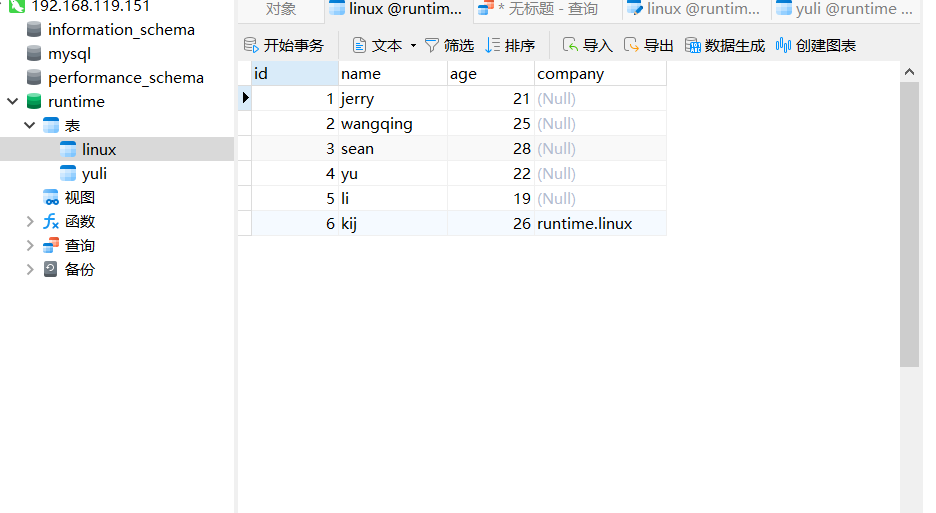
4.3.3 取消授权REVOKE
//语法:REVOKE priv_type,... ON db_name.table_name FROM 'username'@'host';
MariaDB [runtime]> revoke  all on *.* from 'root'@'192.168.119.151' ;
Query OK, 0 rows affected (0.001 sec)MariaDB [runtime]>
MariaDB [runtime]> flush privileges;
Query OK, 0 rows affected (0.000 sec)MariaDB [runtime]> |
MariaDB [runtime]> show grants for 'root'@'192.168.119.151';
+-------------------------------------------------------------------------------------------------------------------+
| Grants for root@192.168.119.151                                                                                   |
+-------------------------------------------------------------------------------------------------------------------+
| GRANT USAGE ON *.* TO `root`@`192.168.119.151` IDENTIFIED BY PASSWORD '*8F89B0266D673FC55BE92CF2FDD1CC88976F826E' |
+-------------------------------------------------------------------------------------------------------------------+
1 row in set (0.000 sec)
注意:mysql服务进程启动时会读取mysql库中的所有授权表至内存中:
- GRANT或REVOKE等执行权限操作会保存于表中,mysql的服务进程会自动重读授权表,并更新至内存中
- 对于不能够或不能及时重读授权表的命令,可手动让mysql的服务进程重读授权表
mysql> FLUSH PRIVILEGES;
实战案例
1.搭建mysql服务
//配置mysql的yum源
[root@fuwu ~]# wget http://dev.mysql.com/get/mysql57-community-release-el7-11.noarch.rpm
[root@fuwu ~]# rpm -Uvh  mysql57-community-release-el7-11.noarch.rpm
[root@fuwu ~]# yum module disable mysql
//安装mysql5.7版本的因为开源免费
[root@fuwu ~]# dnf -y install mysql-community-server mysql-community-client  mysql-community-common mysql-community-devel  --nogpgcheck#启动mysql并设置开机自动启动
[root@fuwu src]# systemctl enable --now mysqld
[root@fuwu src]# systemctl status mysqld
● mysqld.service - MySQL ServerLoaded: loaded (/usr/lib/systemd/system/mysqld.service; enabled; vendor preset: disabled)Active: active (running) since Mon 2022-07-26 10:04:56 CST; 10s agoDocs: man:mysqld(8)http://dev.mysql.com/doc/refman/en/using-systemd.htmlProcess: 2666 ExecStart=/usr/sbin/mysqld --daemonize --pid-file=/var/run/mysqld/mysqld.pid $MYSQLD_OPTS (code=exited, stat>Process: 2612 ExecStartPre=/usr/bin/mysqld_pre_systemd (code=exited, status=0/SUCCESS)Main PID: 2668 (mysqld)Tasks: 27 (limit: 49288)Memory: 347.8MCGroup: /system.slice/mysqld.service└─2668 /usr/sbin/mysqld --daemonize --pid-file=/var/run/mysqld/mysqld.pidJul 25 10:04:51 fuwu systemd[1]: Starting MySQL Server...
Jul 25 10:04:56 fuwu systemd[1]: Started MySQL Server.
[root@fuwu src]# #启动mysql并设置开机自动启动
[root@fuwu ~]# ss -anltup | grep mysql
tcp   LISTEN 0      80                 *:3306             *:*    users:(("mysqld",pid=1778,fd=29))
[root@fuwu ~]# #使用获取到的临时密码登录mysql
[root@fuwu src]# grep "password" /var/log/mysqld.log
2022-07-25T02:04:53.996584Z 1 [Note] A temporary password is generated for root@localhost: fq5sjjwAgF=K #临时密码
2022-07-25T02:06:33.375577Z 2 [Note] Access denied for user 'root'@'localhost' (using password: YES)
[root@fuwu src]# #使用获取到的临时密码登录mysql
[root@fuwu src]# mysql -uroot -p
Enter password:
Welcome to the MySQL monitor.  Commands end with ; or \g.
Your MySQL connection id is 3
Server version: 5.7.38Copyright (c) 2000, 2022, Oracle and/or its affiliates.Oracle is a registered trademark of Oracle Corporation and/or its
affiliates. Other names may be trademarks of their respective
owners.Type 'help;' or '\h' for help. Type '\c' to clear the current input statement.mysql>   //看到有这样的标识符则表示成功登录了//修改mysql登录密码
mysql> set global validate_password_policy=0;
Query OK, 0 rows affected (0.00 sec)
#设置全局validate\u password\u策略=0;mysql> set global validate_password_length=1;
Query OK, 0 rows affected (0.00 sec)
#设置全局validate\u password\u length=1;mysql> ALTER USER 'root'@'localhost' IDENTIFIED BY '123456';
Query OK, 0 rows affected (0.00 sec)mysql> //为避免mysql自动升级,这里需要卸载最开始安装的yum源
[root@fuwu src]# rpm -e mysql57-community-release
[root@fuwu src]# echo $?
0
[root@fuwu src]#
2.创建一个以你名字为名的数据库,并创建一张表student,该表包含三个字段(id,name,age),表结构如下:
mysql> desc student;
+-------+--------------+------+-----+---------+----------------+
| Field | Type         | Null | Key | Default | Extra          |
+-------+--------------+------+-----+---------+----------------+
| id    | int(11)      | NO   | PRI | NULL    | auto_increment |
| name  | varchar(100) | NO   |     | NULL    |                |
| age   | tinyint(4)   | YES  |     | NULL    |                |
+-------+--------------+------+-----+---------+----------------+
3 rows in set (0.01 sec)
0
MariaDB [(none)]> create database yl;
Query OK, 1 row affected (0.001 sec)MariaDB [(none)]> show databases;
+--------------------+
| Database           |
+--------------------+
| information_schema |
| mysql              |
| performance_schema |
| runtime            |
| yl                 |
+--------------------+
5 rows in set (0.001 sec)MariaDB [(none)]> use yl
Database changed
MariaDB [yl]>
MariaDB [yl]> create table student(id int(11) primary key auto_increment,name varchar(100) not null,age tinyint(4));
Query OK, 0 rows affected (0.005 sec)MariaDB [yl]> desc student;
+-------+--------------+------+-----+---------+----------------+
| Field | Type         | Null | Key | Default | Extra          |
+-------+--------------+------+-----+---------+----------------+
| id    | int(11)      | NO   | PRI | NULL    | auto_increment |
| name  | varchar(100) | NO   |     | NULL    |                |
| age   | tinyint(4)   | YES  |     | NULL    |                |
+-------+--------------+------+-----+---------+----------------+
3 rows in set (0.002 sec)MariaDB [yl]>
3.查看下该新建的表有无内容(用select语句)
MariaDB [yl]> select * from student;
Empty set (0.001 sec)MariaDB [yl]>
4.往新建的student表中插入数据(用insert语句),结果应如下所示:
+----+-------------+------+
| id | name        | age  |
+----+-------------+------+
|  1 | tom         |   20 |
|  2 | jerry       |   23 |
|  3 | wangqing    |   25 |
|  4 | sean        |   28 |
|  5 | zhangshan   |   26 |
|  6 | zhangshan   |   20 |
|  7 | lisi        | NULL |
|  8 | chenshuo    |   10 |
|  9 | wangwu      |    3 |
| 10 | qiuyi       |   15 |
| 11 | qiuxiaotian |   20 |
+----+-------------+------+
MariaDB [yl]> insert into student (name,age) values('tom',20),('jerry',23),('wangqing',25),('sean',28),('zhangshan',26),('zhangsan',20),('lisi',null),('chenshuo',10),('wangwu',3),('qiuyi',15),('qiuxiaotian',20);
Query OK, 11 rows affected (0.002 sec)
Records: 11 Duplicates: 0 Warnings: 0MariaDB [yl]>
MariaDB [yl]>
MariaDB [yl]> select * from student;
+----+-------------+------+
| id | name | age |
+----+-------------+------+
| 1 | tom | 20 |
| 2 | jerry | 23 |
| 3 | wangqing | 25 |
| 4 | sean | 28 |
| 5 | zhangshan | 26 |
| 6 | zhangsan | 20 |
| 7 | lisi | NULL |
| 8 | chenshuo | 10 |
| 9 | wangwu | 3 |
| 10 | qiuyi | 15 |
| 11 | qiuxiaotian | 20 |
+----+-------------+------+
11 rows in set (0.001 sec)MariaDB [yl]>
MariaDB [yl]> 5.修改lisi的年龄为50
MariaDB [yl]>  update student set age = 50 where name = 'lisi';
Query OK, 1 row affected (0.004 sec)
Rows matched: 1  Changed: 1  Warnings: 0MariaDB [yl]> select * from student where name = 'lisi';
+----+------+------+
| id | name | age  |
+----+------+------+
|  7 | lisi |   50 |
+----+------+------+
1 row in set (0.001 sec)MariaDB [yl]>
6.以age字段降序排序
MariaDB [yl]> select * from student order by age desc;
+----+-------------+------+
| id | name        | age  |
+----+-------------+------+
|  7 | lisi        |   50 |
|  4 | sean        |   28 |
|  5 | zhangshan   |   26 |
|  3 | wangqing    |   25 |
|  2 | jerry       |   23 |
|  1 | tom         |   20 |
|  6 | zhangsan    |   20 |
| 11 | qiuxiaotian |   20 |
| 10 | qiuyi       |   15 |
|  8 | chenshuo    |   10 |
|  9 | wangwu      |    3 |
+----+-------------+------+
11 rows in set (0.001 sec)
7.查询student表中年龄最小的3位同学跳过前2位
MariaDB [yl]> select * from student order by age limit 2,3;
+----+-------------+------+
| id | name        | age  |
+----+-------------+------+
| 10 | qiuyi       |   15 |
|  1 | tom         |   20 |
| 11 | qiuxiaotian |   20 |
+----+-------------+------+
3 rows in set (0.001 sec)
8.查询student表中年龄最大的4位同学
MariaDB [yl]> select * from student order by age desc limit 4;
+----+-----------+------+
| id | name      | age  |
+----+-----------+------+
|  7 | lisi      |   50 |
|  4 | sean      |   28 |
|  5 | zhangshan |   26 |
|  3 | wangqing  |   25 |
+----+-----------+------+
4 rows in set (0.001 sec)
9.查询student表中名字叫zhangshan的记录
MariaDB [yl]> select * from student where name = 'zhangshan';
+----+-----------+------+
| id | name      | age  |
+----+-----------+------+
|  5 | zhangshan |   26 |
+----+-----------+------+
1 row in set (0.001 sec)
10.查询student表中名字叫zhangshan且年龄大于20岁的记录
MariaDB [yl]> select * from student where name = 'zhangshan' and age > 20;
+----+-----------+------+
| id | name      | age  |
+----+-----------+------+
|  5 | zhangshan |   26 |
+----+-----------+------+
1 row in set (0.001 sec)
11.查询student表中年龄在23到30之间的记录
MariaDB [yl]> select * from student where age between 23 and 30;
+----+-----------+------+
| id | name      | age  |
+----+-----------+------+
|  2 | jerry     |   23 |
|  3 | wangqing  |   25 |
|  4 | sean      |   28 |
|  5 | zhangshan |   26 |
+----+-----------+------+
4 rows in set (0.001 sec)
12.修改wangwu的年龄为100
MariaDB [yl]> update student set age = 100 where name = 'wangwu';
Query OK, 1 row affected (0.002 sec)
Rows matched: 1  Changed: 1  Warnings: 0MariaDB [yl]> select * from student where name = 'wangwu';
+----+--------+------+
| id | name   | age  |
+----+--------+------+
|  9 | wangwu |  100 |
+----+--------+------+
1 row in set (0.000 sec)
13.删除student中名字叫zhangshan且年龄小于等于20的记录
MariaDB [yl]> delete from student where name = 'zhangshan' and age <= 20;
Query OK, 0 rows affected (0.001 sec)MariaDB [yl]> select * from student;
+----+-------------+------+
| id | name        | age  |
+----+-------------+------+
|  1 | tom         |   20 |
|  2 | jerry       |   23 |
|  3 | wangqing    |   25 |
|  4 | sean        |   28 |
|  5 | zhangshan   |   26 |
|  6 | zhangsan    |   20 |
|  7 | lisi        |   50 |
|  8 | chenshuo    |   10 |
|  9 | wangwu      |  100 |
| 10 | qiuyi       |   15 |
| 11 | qiuxiaotian |   20 |
+----+-------------+------+
11 rows in set (0.000 sec)
本文来自互联网用户投稿,文章观点仅代表作者本人,不代表本站立场,不承担相关法律责任。如若转载,请注明出处。 如若内容造成侵权/违法违规/事实不符,请点击【内容举报】进行投诉反馈!