CMS识别——简单工具开发

什么是CMS?
内容管理系统(英语:content management system,缩写为 CMS)是指在一个合作模式下,用于管理工作流程的一套制度。
内容管理系统在物品或文案或数据的存储、掌管、修订(盘存)、语用充实、文档发布等方面有着广泛的应用。现在流行的开源CMS系统有WordPress、Joomla!、Drupal、Xoops、CmsTop等。
识别的意义:
当我们知道了目标使用的cms之后,便可以通过cms源码确定目标使用的WEB源码,WEB源码在安全测试中是非常重要的信息来源,可以用来代码审计漏洞也可以用来做信息突破口。
常见的源码直接就可以再网上搜索到,而一些小众不常见的就得到淘宝、咸鱼等其他平台上获取了。
具体思路:
1、准备一个cms指纹字典,可以参考http://xiaodi8.com/?id=182
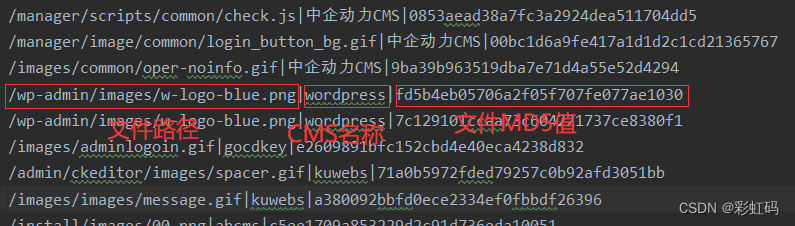
2、根据文件路径,在目标服务器寻找对应文件(这里我使用的自己的虚拟环境)

3、将文件保存在本地,并查看它的md5值
- windows:certutil -hashfile [文件名] md5
- linux:md5sum [文件名]

4、最后对比指纹字典的MD5,相对即可确定所使用的CMS
从上可以看出,整各过程其实非常地简单,原理就和密码的暴力破解类似,关键就在与指纹字典
Python自动识别:
安装第三方库:
pip install requests
pip install wget
import requests
import wget
import hashlib
import os
import shutildef check_url(url):headers = {'User-Agent': 'Mozilla/5.0 (Windows NT 10.0; Win64; x64) AppleWebKit/537.36 (KHTML, like Gecko) Chrome/116.0.0.0 Safari/537.36'}try:response1 = requests.get(url=url,headers=headers)if response1.status_code == 200:return urlelse:returnexcept Exception as e:returndef wget_file(url):if not os.path.exists('tmp_CCMMSS12123'):os.mkdir('tmp_CCMMSS12123')path = 'tmp_CCMMSS12123/{}'.format(url.split('/')[-1])if os.path.exists(path):os.remove(path)wget.download(url,path)return pathdef check_md5(file_path,cms_md5,cms_source):with open(file_path, 'rb') as f:md5 = hashlib.md5(f.read()).hexdigest()if str(md5) == str(cms_md5.strip()):print('#' * 10 + '\n')print("此站CMS:" + cms_source)print("\n{}\n{}\n".format(file_path,cms_md5) + '#'*10)else:passdef main(file):ip = input("请输入ip或者域名:")with open(file, 'r', encoding='utf-8') as f:context = f.readlines()print("正在查询")for line in context:if len(line.strip('\n').strip('|').split('|')) != 3:print("指纹库有错误格式存在")print(line)else:passcms_url = "http://{}/".format(ip) + line.split('|')[0]cms_source = line.split('|')[1]cms_md5 = line.split('|')[2]url_key = check_url(cms_url)if url_key:file_path = wget_file(url_key)check_md5(file_path,cms_md5,cms_source)else:passshutil.rmtree("tmp_CCMMSS12123")print("查询完毕")if __name__ == '__main__':main('fingerprint.txt')             #fingerprint.txt:指纹库,请按实际改写
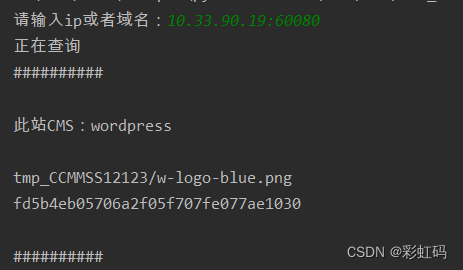
效果如下
本文来自互联网用户投稿,文章观点仅代表作者本人,不代表本站立场,不承担相关法律责任。如若转载,请注明出处。 如若内容造成侵权/违法违规/事实不符,请点击【内容举报】进行投诉反馈!