JavaScript从入门到精通(书籍包含案例)
JavaScript从入门到精通(书籍包含案例)
点我下载js从入门到精通这里写链接内容所有案例
第一章
alert应用
index.html
<html xmlns="http://www.w3.org/1999/xhtml">
<head>
<meta http-equiv="Content-Type" content="text/html; charset=utf-8" />
<title>无标题文档title>
head>
<body>
<script language="javascript">alert("我喜欢学习javascript!!!");
script>
body>
html>
调用外部js
index.html
<html xmlns="http://www.w3.org/1999/xhtml">
<head>
<meta http-equiv="Content-Type" content="text/html; charset=utf-8" />
<title>无标题文档title>
head>
<body>
<script src="function.js" language="javascript">script>
body>
html>
function.js
document.writeln('我被调用了!');
alert("我喜欢JAVASCRIPT");
获取Date对象的一个实例
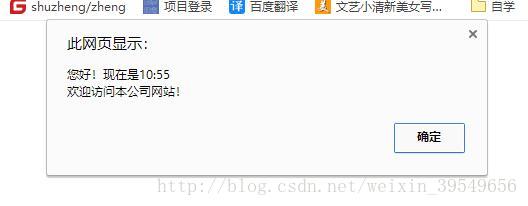
<html xmlns="http://www.w3.org/1999/xhtml">
<head>
<meta http-equiv="Content-Type" content="text/html; charset=utf-8" />
<title>无标题文档title>
head><body>
<script language="javascript">var now=new Date();             //获取Date对象的一个实例var hour=now.getHours();            //获取小时数var minu=now.getMinutes();          //获取分钟数alert("您好!现在是"+hour+":"+minu+"\r欢迎访问本公司网站!");   //弹出提示对话框
script>
body>
html>
第二章
字义字符串数据类型
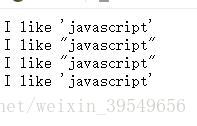
<html xmlns="http://www.w3.org/1999/xhtml">
<head>
<meta http-equiv="Content-Type" content="text/html; charset=utf-8" />
<title>字义字符串数据类型title>
head><body>
<script language="javascript">var string1="I like 'javascript'";      //双引号中包含单引号var string2='I like "javascript"';      //单引号中包含双引号var string3="I like \"javascript\"";        //双引号中包含双引号var string4='I like \'javascript\'';        //单引号中包含单引号document.write(string1+"
");document.write(string2+"
");document.write(string3+"
");document.write(string4+"
");
script>body>
html>
运用JavaScript运算符
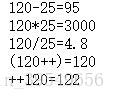
<html xmlns="http://www.w3.org/1999/xhtml">
<head>
<meta http-equiv="Content-Type" content="text/html; charset=utf-8" />
<title>字义字符串数据类型title>
head><body>
<script language="javascript">var string1="I like 'javascript'";      //双引号中包含单引号var string2='I like "javascript"';      //单引号中包含双引号var string3="I like \"javascript\"";        //双引号中包含双引号var string4='I like \'javascript\'';        //单引号中包含单引号document.write(string1+"
");document.write(string2+"
");document.write(string3+"
");document.write(string4+"
");
script>body>
html>
比较运算符的使用
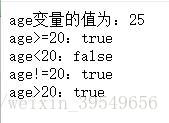
<html xmlns="http://www.w3.org/1999/xhtml">
<head>
<meta http-equiv="Content-Type" content="text/html; charset=utf-8" />
<title>比较运算符的使用title>
head><body>
<script>var age = 25;                                       //定义变量document.write("age变量的值为:"+age+"
");     //输出变量值document.write("age>=20:"+(age>=20)+"
");        //实现变量值比较document.write("age<20:"+(age<20)+"
");document.write("age!=20:"+(age!=20)+"
");document.write("age>20:"+(age>20)+"
");
script>body>
html>
字符串连接
<html xmlns="http://www.w3.org/1999/xhtml">
<head>
<meta http-equiv="Content-Type" content="text/html; charset=utf-8" />
<title>无标题文档title>
head><body>
<script language="javascript">var a="One "+"world ";      //将两个字符串连接后的值赋值给变量a
a+="One Dream"          //连接两个字符串,并将结果赋给第一个字符串
alert(a);script>
body>
html>
判断变量类型
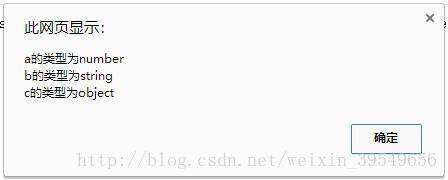
<html xmlns="http://www.w3.org/1999/xhtml">
<head>
<meta http-equiv="Content-Type" content="text/html; charset=utf-8" />
<title>无标题文档title>
head><body>
<script language="javascript">var a=3;var b="name";var c=null;alert("a的类型为"+(typeof a)+"\nb的类型为"+(typeof b)+"\nc的类型为"+(typeof c));
script>
body>
html>
运算符优先级
<html xmlns="http://www.w3.org/1999/xhtml">
<head>
<meta http-equiv="Content-Type" content="text/html; charset=utf-8" />
<title>无标题文档title>
head><body>
<script language="javascript">

script>body>
html>
本文来自互联网用户投稿,文章观点仅代表作者本人,不代表本站立场,不承担相关法律责任。如若转载,请注明出处。 如若内容造成侵权/违法违规/事实不符,请点击【内容举报】进行投诉反馈!