react -- 错误边界
用途:
错误边界:用于解决部分 UI 的 JavaScript 错误不应该导致整个应用崩溃的问题
注意
错误边界无法捕获以下场景中产生的错误:
- 事件处理(了解更多)
- 异步代码(例如
setTimeout或requestAnimationFrame回调函数) - 服务端渲染
- 它自身抛出来的错误(并非它的子组件)
如果一个 class 组件中定义了 static getDerivedStateFromError() 或 componentDidCatch() 这两个生命周期方法中的任意一个(或两个)时,那么它就变成一个错误边界。当抛出错误后,请使用 static getDerivedStateFromError() 渲染备用 UI ,使用 componentDidCatch() 打印错误信息。
class ErrorBoundary extends React.Component {constructor(props) {super(props);this.state = { hasError: false };}static getDerivedStateFromError(error) {// 更新 state 使下一次渲染能够显示降级后的 UIreturn { hasError: true };}componentDidCatch(error, errorInfo) {// 你同样可以将错误日志上报给服务器logErrorToMyService(error, errorInfo);}render() {if (this.state.hasError) {// 你可以自定义降级后的 UI 并渲染return <h1>Something went wrong.</h1>;}return this.props.children; }
}
然后你可以将它作为一个常规组件去使用:
<ErrorBoundary><MyWidget />
</ErrorBoundary>
使用的实现:
// 错误边界: ErrorBoundary.js文件
import React, { Component } from "react"class ErrorBoundary extends Component {constructor(props) {super(props)this.state = {hasError: false,}}static getDerivedStateFromError(error) {return { hasError: true }}componentDidCatch(error, errorInfo) {console.log(error, errorInfo)}render() {if (this.state.hasError) {return <h1>出现错误,显示边界内容</h1>}return this.props.children}
}export default ErrorBoundary
// 出现错误文件:BuggyCounter
import React, { Component } from "react"class BuggyCounter extends Component {constructor(props) {super(props)this.state = {counter: 0}this.handleClick = this.handleClick.bind(this)}handleClick () {this.setState(({ counter }) => ({counter: counter + 1}))}render () {if (this.state.counter === 5) {throw new Error('I crashed!')}return <h1 onClick={this.handleClick}>{this.state.counter}</h1>;}
}export default BuggyCounter
页面中显示使用
<div><p><b>This is an example of error boundaries in React 16. <br /> <br />Click on the numbers to increase the counters. <br />The counter is programmed to throw when it reaches 5. This simulates a JavaScript error in a component.b>p><hr /><ErrorBoundary><p> These two counters are inside the same error boundary.If one crashes, the error boundary will replace both of them. p><BuggyCounter /><BuggyCounter />ErrorBoundary><hr /><p> These two counters are each inside of their own error boundary.So if one crashes, the other is not affected. p><ErrorBoundary><BuggyCounter />ErrorBoundary><ErrorBoundary><BuggyCounter />ErrorBoundary>div>
页面效果:
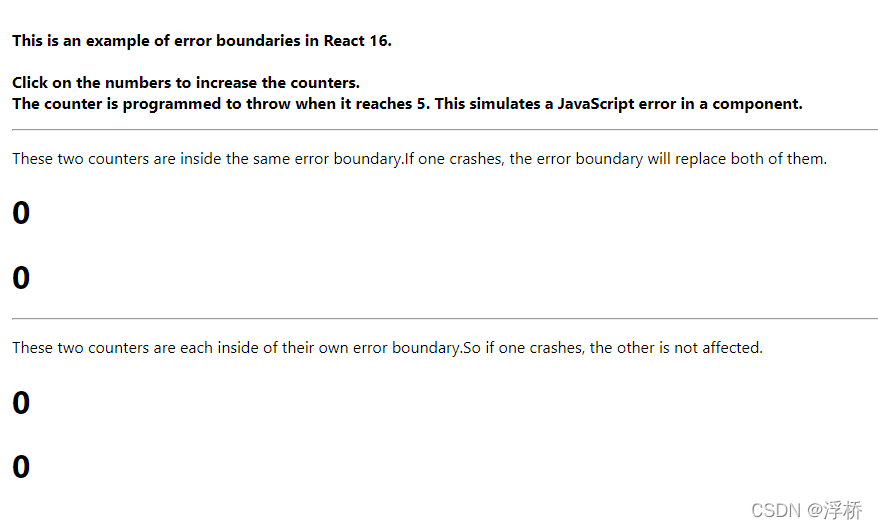
当点击数字时,数字增加1,知道等于5时报错,显示错误边界内容
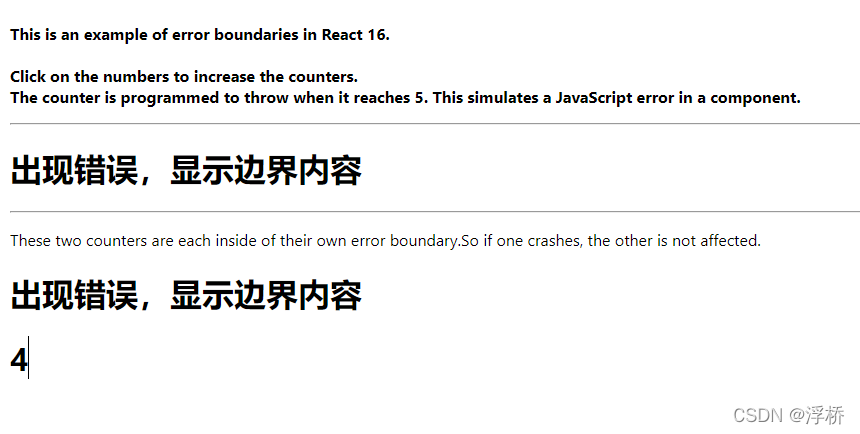
从点击效果可以看出,第一个块的两个 ErrorBoundary 错误边界组件包裹,当其中一个 ErrorBoundary错误边界组件包裹的任何内容产生错误,整个ErrorBoundary内的内容都将替换。
本文来自互联网用户投稿,文章观点仅代表作者本人,不代表本站立场,不承担相关法律责任。如若转载,请注明出处。 如若内容造成侵权/违法违规/事实不符,请点击【内容举报】进行投诉反馈!