ORCH可视化高可用集群
1. ORCH介绍
Orchestrator(orch):go编写的MySQL高可用性和复制拓扑管理工具,支持复制拓扑结构的调整,自动故障转移和手动主从切换等。后端数据库用MySQL或SQLite存储元数据,并提供Web界面展示MySQL复制的拓扑关系及状态,通过Web可更改MySQL实例的复制关系和部分配置信息,同时也提供命令行和api接口,方便运维管理。相对比MHA来看最重要的是解决了管理节点的单点问题,其通过raft协议保证本身的高可用。GitHub的一部分管理也在用该工具进行管理。
功能
① 自动发现MySQL的复制拓扑,并且在web上展示。
② 重构复制关系,可以在web进行拖图来进行复制关系变更。
③ 检测主异常,并可以自动或手动恢复,通过Hooks进行自定义脚本。
④ 支持命令行和web界面管理复制。
2. ORCH部署规划
节点规划表(3306是ORCH后端数据库,8026是mysql主从架构)
| IP地址 | 主机名 | 安装软件 | 数据库端口 |
|---|---|---|---|
| 172.31.0.101 | Wl01 | orchestrator、mysql | 3306、8026 |
| 172.31.0.102 | Wl02 | orchestrator、mysql | 3306、8026 |
| 172.31.0.103 | Wl03 | orchestrator、mysql | 3306、8026 |
各软件版本
| 软件名 | 版本 | 下载地址 |
|---|---|---|
| MySQL | 8.0.26 | https://downloads.mysql.com/archives/community/ |
| Orchestrator | version: 3.2.6 | https://github.com/openark/orchestrator |
mysql数据库目录规划
| MySQL目录作用 | 路径 |
|---|---|
| basedir | /usr/loca/mysql-8026 |
| datadir | /mysql-8026/8026/data/ |
| errorlog | /mysql-8026/8026/log/error.log |
| binlogdir | /mysql-8026/8026/binlog/ |
| relaylogdir | /mysql-8026/8026/relaylog/ |
| Tmpdir | /mysql-8026/8026/tmp |
| pid | /mysql-8026/8026/run/mysql-8026.pid |
| socket | /mysql-8026/8026/run/mysql-8026.sock |
orchestrator数据库目录规划
| orchestrator目录作用 | 路径 |
|---|---|
| basedir | /usr/loca/mysql-8026 |
| datadir | /mysql-8026/3306/data/ |
| errorlog | /mysql-8026/3306/log/error.log |
| binlogdir | /mysql-8026/3306/binlog/ |
| relaylogdir | /mysql-8026/3306/relaylog/ |
| Tmpdir | /mysql-8026/3306/tmp |
| pid | /mysql-8026/3306/run/mysql-8026.pid |
| socket | /mysql-8026/3306/run/mysql-8026.sock |
3. 环境准备
3.1 环境准备(所有节点)
#安装依赖软件
[root@wl01 ~]# yum install -y gcc gcc-c++ ncurses-devel.x86_64 libaio bison gcc-c++.x86_64 perl perl-devel libssl-dev autoconf openssl-devel openssl numactl wget *libncurses.so.5*#配置环境变量
#将准备好的mysql-8.0.26二进制压缩包上传到/opt目录
[root@wl01 ~]# cd /opt/
[root@wl01 opt]# tar xf mysql-8.0.26-linux-glibc2.12-x86_64.tar.xz
[root@wl01 opt]# ln -s /opt/mysql-8.0.26-linux-glibc2.12-x86_64 /usr/local/mysql-8026
[root@wl01 opt]# ll /usr/local/mysql-8026
lrwxrwxrwx 1 root root 40 Jan 14 16:59 /usr/local/mysql-8026 -> /opt/mysql-8.0.26-linux-glibc2.12-x86_64
[root@wl01 opt]# echo "export PATH=/usr/local/mysql-8026/bin:$PATH">> /etc/profile
[root@wl01 opt]# source /etc/profile
[root@wl01 opt]# mysql -V
mysql  Ver 8.0.26 for Linux on x86_64 (MySQL Community Server - GPL)#配置域名解析
[root@wl01 opt]# vim /etc/hosts
172.31.0.101 wl01
172.31.0.102 wl02
172.31.0.103 wl03#配置互信
rm -rf /root/.ssh #清理旧的ssh密钥
ssh-keygen #生成新密钥,一路回车
ssh-copy-id root@wl01 #输入root@wl01的密码
ssh-copy-id root@wl02	#输入root@wl02的密码
ssh-copy-id root@wl03	#输入root@wl03的密码#各节点互信验证
ssh root@wl01 date
ssh root@wl02 date
ssh root@wl03 date#禁用防火墙
systemctl stop firewalld.service
systemctl disable firewalld.service#创建用户及目录
useradd mysql -M -s /sbin/nologin
mkdir -p /mysql-8026/8026/{binlog,relaylog,data,log,run,tmp}
mkdir -p /mysql-8026/3306/{binlog,relaylog,data,log,run,tmp}
chown -R mysql.mysql /mysql-8026
3.2 创建所有实例
`注意不同的节点修改对应server_id,report_host,report_port`
#编辑配置文件(以orch库为例)
#配置mysql库时,将配置文件中的端口号批量替换掉 sed -i 's/3306/8026/g' /mysql-8026/8026/my.cnf
vim /mysql-8026/3306/my.cnf
[mysql]
no-auto-rehash
max_allowed_packet=128M
prompt="\u@\h \R:\m:\s[\d]> "
default_character_set=utf8mb4
socket=/mysql-8026/3306/run/mysql.sock[mysqldump]
quick
max_allowed_packet=128M
socket=/mysql-8026/3306/run/mysql.sock
[mysqladmin]
socket=/mysql-8026/3306/run/mysql.sock
[mysqld]
user=mysql
port=3306
report_host='172.31.0.101'
report_host=3306
server-id=1013306   # ip末尾+端口号
default-time_zone='+8:00'
log_timestamps=SYSTEM
datadir=/mysql-8026/3306/data
basedir=/usr/local/mysql-8026
tmpdir=/mysql-8026/3306/tmp
socket=/mysql-8026/3306/run/mysql.sock
pid-file=/mysql-8026/3306/run/mysql.pid
character-set-server=utf8mb4##redolog
innodb_log_file_size=2G
innodb_log_buffer_size=16M
innodb_log_files_in_group=2
innodb_log_group_home_dir=/mysql-8026/3306/data
##undolog
innodb_undo_directory=/mysql-8026/3306/data
innodb_max_undo_log_size=2G
innodb_undo_log_truncate=on
#innodb_undo_tablespaces=4 #8.0.14 已删除,可以使用 SQL 创建额外的撤消表空间##binlog
binlog_format=row
log-bin=/mysql-8026/3306/binlog/mysql-bin
max_binlog_size=1G
binlog_cache_size=1M
sync_binlog=1##relaylog
relay-log=/mysql-8026/3306/relaylog/mysql-relay
relay-log-purge=on
relay-log-recovery=on
##general log
#general_log=on
#general_log_file=/mysql-8026/3306/log/general.log
##error log
log-error=/mysql-8026/3306/log/error.log##slow log
long_query_time=1
slow-query-log=on
slow-query-log-file=/mysql-8026/3306/log/slow.log##connection
skip-external-locking
skip-name-resolve
max_connections=4000
max_user_connections=2500
max_connect_errors=10000
wait_timeout=7200
interactive_timeout=7200
connect_timeout=20
max_allowed_packet=512M##gtid
gtid_mode=on
enforce_gtid_consistency=1
#log_slave_updates=1
log_replica_updates=1 #8.0##parallel replication mysql>5.7.22
# master
loose-binlog_transaction_dependency_tracking=WRITESET
#loose-transaction_write_set_extraction=XXHASH64 #8.0之前
binlog_transaction_dependency_history_size=25000 #默认
# slave
#slave-parallel-type=LOGICAL_CLOCK
replica_parallel_type=LOGICAL_CLOCK #8.0
#slave-parallel-workers=4 #8.0以前
replica_parallel_workers=4 #8.0
#master_info_repository=TABLE #8.0以前
#relay_log_info_repository=TABLE #8.0以前##memory size
key_buffer_size=2M
table_open_cache=2048
table_definition_cache=4096
sort_buffer_size=2M
read_buffer_size=2M
read_rnd_buffer_size=2M
join_buffer_size=2M
myisam_sort_buffer_size=2M
tmp_table_size=64M
max_heap_table_size=64M
##lock and transaction
transaction_isolation=READ-COMMITTED
innodb_lock_wait_timeout=30
lock_wait_timeout=3600
##InnoDB
innodb_data_home_dir=/mysql-8026/3306/data
innodb_data_file_path=ibdata1:1G:autoextend
innodb_buffer_pool_size=1G
innodb_buffer_pool_instances=2
innodb_flush_log_at_trx_commit=1
innodb_max_dirty_pages_pct=75
innodb_flush_method=O_DIRECT
innodb_file_per_table=1
innodb_read_io_threads=16
innodb_write_io_threads=16
innodb_io_capacity=2000
innodb_io_capacity_max=4000
innodb_purge_threads=2#初始化启动
mysqld --defaults-file=/mysql-8026/3306/my.cnf --initialize-insecure
mysqld_safe --defaults-file=/mysql-8026/3306/my.cnf &
mysql -S /mysql-8026/3306/run/mysql.sockmysqld --defaults-file=/mysql-8026/8026/my.cnf --initialize-insecure
mysqld_safe --defaults-file=/mysql-8026/8026/my.cnf &
mysql -S /mysql-8026/8026/run/mysql.sock
3.3 配置所有实例
`(1)获取软件(所有节点)
wget https://github.com/openark/orchestrator/releases/download/v3.2.6/orchestrator-3.2.6-1.x86_64.rpm
wget https://github.com/openark/orchestrator/releases/download/v3.2.6/orchestrator-cli-3.2.6-1.x86_64.rpm`(2)安装软件(所有节点)
ll /opt/orch*
-rw-r--r-- 1 root root 10970627 May 11 13:37 /opt/orchestrator-3.2.6-1.x86_64.rpm
-rw-r--r-- 1 root root 10543813 May 11 13:39 /opt/orchestrator-cli-3.2.6-1.x86_64.rpm
yum localinstall -y orchestrator-*
#如果遇到报错(Error: Package: Requires: ****  jq >= 1.5 **),请按如下方式解决
wget http://www6.atomicorp.com/channels/atomic/centos/7/x86_64/RPMS/oniguruma-5.9.5-3.el7.art.x86_64.rpm
yum install -y oniguruma-5.9.5-3.el7.art.x86_64.rpm
wget http://www6.atomicorp.com/channels/atomic/centos/7/x86_64/RPMS/jq-1.5-1.el7.art.x86_64.rpm
yum install -y jq-1.5-1.el7.art.x86_64.rpm`(3)配置orch数据库及用户(所有3306实例)
mysql -S /mysql-8026/3306/run/mysql.sock
CREATE DATABASE IF NOT EXISTS orchdb;
CREATE USER 'orchuser'@'127.0.0.1' IDENTIFIED BY '123456';
GRANT ALL ON orchdb.* TO 'orchuser'@'127.0.0.1';`(4)被管理节点配置主从关系(所有8026实例)
# 主库创建复制专用用户
mysql -S /mysql-8026/8026/run/mysql.sock
create user 'repl'@'172.31.0.%' IDENTIFIED WITH mysql_native_password BY '123456';
GRANT replication slave on *.* TO 'repl'@'172.31.0.%';
flush privileges;
# 从库
#这里需要注意的是,orch检测主库宕机依赖从库的IO线程(本身连不上主库后,还会通过从库再去检测主库是否异常),所以默认change搭建的主从感知主库宕机的等待时间过长,需要需要稍微改下:
mysql -S /mysql-8026/8026/run/mysql.sock
reset master;
change master to
master_host='172.31.0.102',
master_port=8026,
master_user='repl',
master_password='123456',
master_auto_position=1,
MASTER_HEARTBEAT_PERIOD=2,
MASTER_CONNECT_RETRY=1,
MASTER_RETRY_COUNT=86400;
start slave;
set global slave_net_timeout=8;
set global read_only=1;
set global super_read_only=1;
#说明:
slave_net_timeout(全局变量):MySQL5.7.7之后,默认改成60秒。该参数定义了从库从主库获取数据等待的秒数,超过这个时间从库会主动退出读取,中断连接,并尝试重连。
master_heartbeat_period:复制心跳的周期。默认是slave_net_timeout的一半。Master在没有数据的时候,每master_heartbeat_period秒发送一个心跳包,这样 Slave 就能知道 Master 是不是还正常。
slave_net_timeout:是设置在多久没收到数据后认为网络超时,之后 Slave 的 IO 线程会重新连接 Master 。结合这两个设置就可以避免由于网络问题导致的复制延误。master_heartbeat_period 单位是秒,可以是个带上小数,如 10.5,最高精度为 1 毫秒。`(5)被管理MySQL数据库的用户权限(主库172.31.0.101 8026节点)
CREATE USER 'orchctl'@'%' IDENTIFIED WITH mysql_native_password BY '123456';
GRANT SUPER, PROCESS, REPLICATION SLAVE,REPLICATION CLIENT, RELOAD ON *.* TO 'orchctl'@'%';
GRANT SELECT ON mysql.slave_master_info TO 'orchctl'@'%';
4. 准备配置文件和脚本
4.1 修改ORCH配置文件
cp /usr/local/orchestrator/orchestrator-sample.conf.json /etc/orchestrator.conf.json
vim /etc/orchestrator.conf.json
{"Debug": true,"EnableSyslog": false,"ListenAddress": ":3000","MySQLTopologyUser": "orchctl","MySQLTopologyPassword": "123456","MySQLTopologyCredentialsConfigFile": "","MySQLTopologySSLPrivateKeyFile": "","MySQLTopologySSLCertFile": "","MySQLTopologySSLCAFile": "","MySQLTopologySSLSkipVerify": true,"MySQLTopologyUseMutualTLS": false,"BackendDB": "mysql","MySQLOrchestratorHost": "127.0.0.1","MySQLOrchestratorPort": 3306,"MySQLOrchestratorDatabase": "orchdb","MySQLOrchestratorUser": "orchuser","MySQLOrchestratorPassword": "123456","MySQLConnectTimeoutSeconds": 1,"DefaultInstancePort": 3306,"DiscoverByShowSlaveHosts": true,"InstancePollSeconds": 5,"DiscoveryIgnoreReplicaHostnameFilters": ["a_host_i_want_to_ignore[.]example[.]com",".*[.]ignore_all_hosts_from_this_domain[.]example[.]com","a_host_with_extra_port_i_want_to_ignore[.]example[.]com:3307"],"UnseenInstanceForgetHours": 240,"SnapshotTopologiesIntervalHours": 0,"InstanceBulkOperationsWaitTimeoutSeconds": 10,"HostnameResolveMethod": "default","MySQLHostnameResolveMethod": "@@hostname","SkipBinlogServerUnresolveCheck": true,"ExpiryHostnameResolvesMinutes": 60,"RejectHostnameResolvePattern": "","ReasonableReplicationLagSeconds": 10,"ProblemIgnoreHostnameFilters": [],"VerifyReplicationFilters": false,"ReasonableMaintenanceReplicationLagSeconds": 20,"CandidateInstanceExpireMinutes": 60,"AuditLogFile": "","AuditToSyslog": false,"RemoveTextFromHostnameDisplay": ".mydomain.com:3306","ReadOnly": false,"AuthenticationMethod": "","HTTPAuthUser": "","HTTPAuthPassword": "","AuthUserHeader": "","PowerAuthUsers": ["*"],"ClusterNameToAlias": {"127.0.0.1": "test suite"},"ReplicationLagQuery": "","DetectClusterAliasQuery": "SELECT SUBSTRING_INDEX(@@hostname, '.', 1)","DetectClusterDomainQuery": "","DetectInstanceAliasQuery": "","DetectPromotionRuleQuery": "","DataCenterPattern": "[.]([^.]+)[.][^.]+[.]mydomain[.]com","PhysicalEnvironmentPattern": "[.]([^.]+[.][^.]+)[.]mydomain[.]com","PromotionIgnoreHostnameFilters": [],"DetectSemiSyncEnforcedQuery": "","ServeAgentsHttp": false,"AgentsServerPort": ":3001","AgentsUseSSL": false,"AgentsUseMutualTLS": false,"AgentSSLSkipVerify": false,"AgentSSLPrivateKeyFile": "","AgentSSLCertFile": "","AgentSSLCAFile": "","AgentSSLValidOUs": [],"UseSSL": false,"UseMutualTLS": false,"SSLSkipVerify": false,"SSLPrivateKeyFile": "","SSLCertFile": "","SSLCAFile": "","SSLValidOUs": [],"URLPrefix": "","StatusEndpoint": "/api/status","StatusSimpleHealth": true,"StatusOUVerify": false,"AgentPollMinutes": 60,"UnseenAgentForgetHours": 6,"StaleSeedFailMinutes": 60,"SeedAcceptableBytesDiff": 8192,"PseudoGTIDPattern": "","PseudoGTIDPatternIsFixedSubstring": false,"PseudoGTIDMonotonicHint": "asc:","DetectPseudoGTIDQuery": "","BinlogEventsChunkSize": 10000,"SkipBinlogEventsContaining": [],"ReduceReplicationAnalysisCount": true,"FailureDetectionPeriodBlockMinutes": 5,"RecoveryPeriodBlockSeconds": 30,"RecoveryIgnoreHostnameFilters": [],"RecoverMasterClusterFilters": ["*"],"RecoverIntermediateMasterClusterFilters": ["*"],"OnFailureDetectionProcesses": ["echo '`date +'%Y-%m-%d %T'` Detected {failureType} on {failureCluster}. Affected replicas: {countSlaves}' >> /tmp/recovery.log"],"PreGracefulTakeoverProcesses": ["echo '`date +'%Y-%m-%d %T'` Planned takeover about to take place on {failureCluster}. Master will switch to read_only' >> /tmp/recovery.log"],"PreFailoverProcesses": ["echo '`date +'%Y-%m-%d %T'` Will recover from {failureType} on {failureCluster}' >> /tmp/recovery.log"],"PostFailoverProcesses": ["echo '`date +'%Y-%m-%d %T'` (for all types) Recovered from {failureType} on {failureCluster}. Failed: {failedHost}:{failedPort}; Successor: {successorHost}:{successorPort}; failureClusterAlias:{failureClusterAlias}' >> /tmp/recovery.log","/usr/local/orchestrator/orch_hook.sh {failureType} {failureClusterAlias} {failedHost} {successorHost} >> /tmp/orch.log"],"PostUnsuccessfulFailoverProcesses": [ "echo '`date +'%Y-%m-%d %T'` Unsuccessful Failover ' >> /tmp/recovery.log"],"PostMasterFailoverProcesses": ["echo '`date +'%Y-%m-%d %T'` Recovered from {failureType} on {failureCluster}. Failed: {failedHost}:{failedPort}; Promoted: {successorHost}:{successorPort}' >> /tmp/recovery.log"],"PostIntermediateMasterFailoverProcesses": ["echo '`date +'%Y-%m-%d %T'` Recovered from {failureType} on {failureCluster}. Failed: {failedHost}:{failedPort}; Successor: {successorHost}:{successorPort}' >> /tmp/recovery.log"],"PostGracefulTakeoverProcesses": ["echo '`date +'%Y-%m-%d %T'` Planned takeover complete' >> /tmp/recovery.log"],"CoMasterRecoveryMustPromoteOtherCoMaster": true,"DetachLostSlavesAfterMasterFailover": true,"ApplyMySQLPromotionAfterMasterFailover": true,"PreventCrossDataCenterMasterFailover": false,"PreventCrossRegionMasterFailover": false,"MasterFailoverDetachReplicaMasterHost": false,"MasterFailoverLostInstancesDowntimeMinutes": 0,"PostponeReplicaRecoveryOnLagMinutes": 0,"OSCIgnoreHostnameFilters": [],"GraphiteAddr": "","GraphitePath": "","GraphiteConvertHostnameDotsToUnderscores": true,"ConsulAddress": "","ConsulAclToken": "","RaftEnabled":true,"RaftDataDir":"/usr/local/orchestrator","RaftBind":"172.31.0.101","DefaultRaftPort":10008,"RaftNodes":["172.31.0.101","172.31.0.102","172.31.0.103"]
}
4.2 修改orch_hook.sh
vi /usr/local/orchestrator/orch_hook.sh
#!/bin/bashisitdead=$1
cluster=$2
oldmaster=$3
newmaster=$4
mysqluser="orchctl"logfile="/usr/local/orchestrator/orch_hook.log"# list of clusternames
#clusternames=(rep blea lajos)# clustername=( interface IP user Inter_IP)
#rep=( ens32 "192.168.56.121" root "192.168.56.125")if [[ $isitdead == "DeadMaster" ]]; thenarray=( eth0 "172.31.0.188" root "172.31.0.101")interface=${array[0]}IP=${array[1]}user=${array[2]}if [ ! -z ${IP} ] ; thenecho $(date)echo "Revocering from: $isitdead"echo "New master is: $newmaster"echo "/usr/local/orchestrator/orch_vip.sh -d 1 -n $newmaster -i ${interface} -I ${IP} -u ${user} -o $oldmaster" | tee $logfile/usr/local/orchestrator/orch_vip.sh -d 1 -n $newmaster -i ${interface} -I ${IP} -u ${user} -o $oldmaster#mysql -h$newmaster -u$mysqluser < /usr/local/bin/orch_event.sqlelseecho "Cluster does not exist!" | tee $logfilefi
elif [[ $isitdead == "DeadIntermediateMasterWithSingleSlaveFailingToConnect" ]]; thenarray=( eth0 "172.31.0.188" root "172.31.0.101")interface=${array[0]}IP=${array[3]}user=${array[2]}slavehost=`echo $5 | cut -d":" -f1`echo $(date)echo "Revocering from: $isitdead"echo "New intermediate master is: $slavehost"echo "/usr/local/orchestrator/orch_vip.sh -d 1 -n $slavehost -i ${interface} -I ${IP} -u ${user} -o $oldmaster" | tee $logfile/usr/local/orchestrator/orch_vip.sh -d 1 -n $slavehost -i ${interface} -I ${IP} -u ${user} -o $oldmasterelif [[ $isitdead == "DeadIntermediateMaster" ]]; thenarray=( eth0 "172.31.0.188" root "172.31.0.101")interface=${array[0]}IP=${array[3]}user=${array[2]}slavehost=`echo $5 | sed -E "s/:[0-9]+//g" | sed -E "s/,/ /g"`showslave=`mysql -h$newmaster -u$mysqluser -sN -e "SHOW SLAVE HOSTS;" | awk '{print $2}'`newintermediatemaster=`echo $slavehost $showslave | tr ' ' '\n' | sort | uniq -d`echo $(date)echo "Revocering from: $isitdead"echo "New intermediate master is: $newintermediatemaster"echo "/usr/local/orchestrator/orch_vip.sh -d 1 -n $newintermediatemaster -i ${interface} -I ${IP} -u ${user} -o $oldmaster" | tee $logfile/usr/local/orchestrator/orch_vip.sh -d 1 -n $newintermediatemaster -i ${interface} -I ${IP} -u ${user} -o $oldmasterfi
4.3 修改vip脚本
vi /usr/local/orchestrator/orch_vip.sh
#!/bin/bashemailaddress="1103290832@qq.com"
sendmail=1function usage {cat << EOFusage: $0 [-h] [-d master is dead] [-o old master ] [-s ssh options] [-n new master] [-i interface] [-I] [-u SSH user]OPTIONS:-h        Show this message-o string Old master hostname or IP address -d int    If master is dead should be 1 otherweise it is 0-s string SSH options-n string New master hostname or IP address-i string Interface exmple eth0:1-I string Virtual IP-u string SSH user
EOF}while getopts ho:d:s:n:i:I:u: flag; docase $flag ino)orig_master="$OPTARG";;;d)isitdead="${OPTARG}";;;s)ssh_options="${OPTARG}";;;n)new_master="$OPTARG";;;i)interface="$OPTARG";;;I)vip="$OPTARG";;;u)ssh_user="$OPTARG";;;h)usage;exit 0;;;*)usage;exit 1;;;esac
doneif [ $OPTIND -eq 1 ]; then echo "No options were passed"; usage;
fishift $(( OPTIND - 1 ));# discover commands from our path
ssh=$(which ssh)
arping=$(which arping)
ip2util=$(which ip)# command for adding our vip
cmd_vip_add="sudo -n $ip2util address add ${vip} dev ${interface}"
# command for deleting our vip
cmd_vip_del="sudo -n $ip2util address del ${vip}/32 dev ${interface}"
# command for discovering if our vip is enabled
cmd_vip_chk="sudo -n $ip2util address show dev ${interface} to ${vip%/*}/32"
# command for sending gratuitous arp to announce ip move
cmd_arp_fix="sudo -n $arping -c 1 -I ${interface} ${vip%/*}   "
# command for sending gratuitous arp to announce ip move on current server
cmd_local_arp_fix="sudo -n $arping -c 1 -I ${interface} ${vip%/*}   "vip_stop() {rc=0# ensure the vip is removed$ssh ${ssh_options} -tt ${ssh_user}@${orig_master} \"[ -n \"\$(${cmd_vip_chk})\" ] && ${cmd_vip_del} && sudo ${ip2util} route flush cache || [ -z \"\$(${cmd_vip_chk})\" ]"rc=$?return $rc
}vip_start() {rc=0# ensure the vip is added# this command should exit with failure if we are unable to add the vip# if the vip already exists always exit 0 (whether or not we added it)$ssh ${ssh_options} -tt ${ssh_user}@${new_master} \"[ -z \"\$(${cmd_vip_chk})\" ] && ${cmd_vip_add} && ${cmd_arp_fix} || [ -n \"\$(${cmd_vip_chk})\" ]"rc=$?$cmd_local_arp_fixreturn $rc
}vip_status() {$arping -c 1 -I ${interface} ${vip%/*}   if ping -c 1 -W 1 "$vip"; thenreturn 0elsereturn 1fi
}if [[ $isitdead == 0 ]]; thenecho "Online failover"if vip_stop; then if vip_start; thenecho "$vip is moved to $new_master."if [ $sendmail -eq 1 ]; then mail -s "$vip is moved to $new_master." "$emailaddress" < /dev/null &> /dev/null  ; fielseecho "Can't add $vip on $new_master!" if [ $sendmail -eq 1 ]; then mail -s "Can't add $vip on $new_master!" "$emailaddress" < /dev/null &> /dev/null  ; fiexit 1fielseecho $rcecho "Can't remove the $vip from orig_master!"if [ $sendmail -eq 1 ]; then mail -s "Can't remove the $vip from orig_master!" "$emailaddress" < /dev/null &> /dev/null  ; fiexit 1fielif [[ $isitdead == 1 ]]; thenecho "Master is dead, failover"# make sure the vip is not available if vip_status; then if vip_stop; thenif [ $sendmail -eq 1 ]; then mail -s "$vip is removed from orig_master." "$emailaddress" < /dev/null &> /dev/null  ; fielseif [ $sendmail -eq 1 ]; then mail -s "Couldn't remove $vip from orig_master." "$emailaddress" < /dev/null &> /dev/null  ; fiexit 1fifiif vip_start; thenecho "$vip is moved to $new_master."if [ $sendmail -eq 1 ]; then mail -s "$vip is moved to $new_master." "$emailaddress" < /dev/null &> /dev/null  ; fielseecho "Can't add $vip on $new_master!" if [ $sendmail -eq 1 ]; then mail -s "Can't add $vip on $new_master!" "$emailaddress" < /dev/null &> /dev/null  ; fiexit 1fi
elseecho "Wrong argument, the master is dead or live?"fi
#将修改好的配置文件和脚本发送到wl02和dwl03
scp /etc/orchestrator.conf.json wl02:/etc/
修改配置文件该处为db02的ip地址
"RaftBind": "172.31.0.102",scp /etc/orchestrator.conf.json wl03:/etc/
修改配置文件该处为db03的ip地址
"RaftBind": "172.31.0.103",scp /usr/local/orchestrator/orch_hook.sh wl02:/usr/local/orchestrator/
scp /usr/local/orchestrator/orch_hook.sh wl03:/usr/local/orchestrator/scp /usr/local/orchestrator/orch_vip.sh wl02:/usr/local/orchestrator/
scp /usr/local/orchestrator/orch_vip.sh wl03:/usr/local/orchestrator/chmod 777 /usr/local/orchestrator/orch_hook.sh
chmod 777 /usr/local/orchestrator/orch_vip.sh
4.4 master节点创建vip
仅在master节点上创建VIP
# 添加VIP ip addr add 172.31.0.188 dev eth0
# 删除VIP ip addr del 172.31.0.188 dev eth0
5. 启动与操作
5.1 启动ORCH
#所有节点都启动ORCH
cd /usr/local/orchestrator && nohup ./orchestrator --config=/etc/orchestrator.conf.json http &
5.2 命令行控制操作
#列出所有集群
/usr/local/orchestrator/resources/bin/orchestrator-client -c clusters#打印指定集群的拓扑关系
/usr/local/orchestrator/resources/bin/orchestrator-client -c topology -i wl01:8026
wl01:8026 (wl01)   [0s,ok,8.0.26,rw,ROW,>>,GTID]
+ wl02:8026 (wl02) [0s,ok,8.0.26,ro,ROW,>>,GTID]
+ wl03:8026 (wl03) [0s,ok,8.0.26,ro,ROW,>>,GTID]#查看使用哪个API
#因为配置了Raft,有多个Orchestrator,所以需要ORCHESTRATOR_API的环境变量,orchestrator-client会自动选择leader
export ORCHESTRATOR_API="wl01:3000/api wl02:3000/api wl03:3000/api"
/usr/local/orchestrator/resources/bin/orchestrator-client -c which-api
wl02:3000/api#忘记指定实例
/usr/local/orchestrator/resources/bin/orchestrator-client -c forget -i wl01:8026#忘记指定集群
/usr/local/orchestrator/resources/bin/orchestrator-client -c forget-cluster -i wl01:8026#打印指定实例的主库
/usr/local/orchestrator/resources/bin/orchestrator-client -c which-master -i wl01:8026#打印指定实例的从库
/usr/local/orchestrator/resources/bin/orchestrator-client -c which-replicas -i wl01:8026
6. 图形界面管理操作
登录web管理界面
集群中任意一个节点的ip:3000
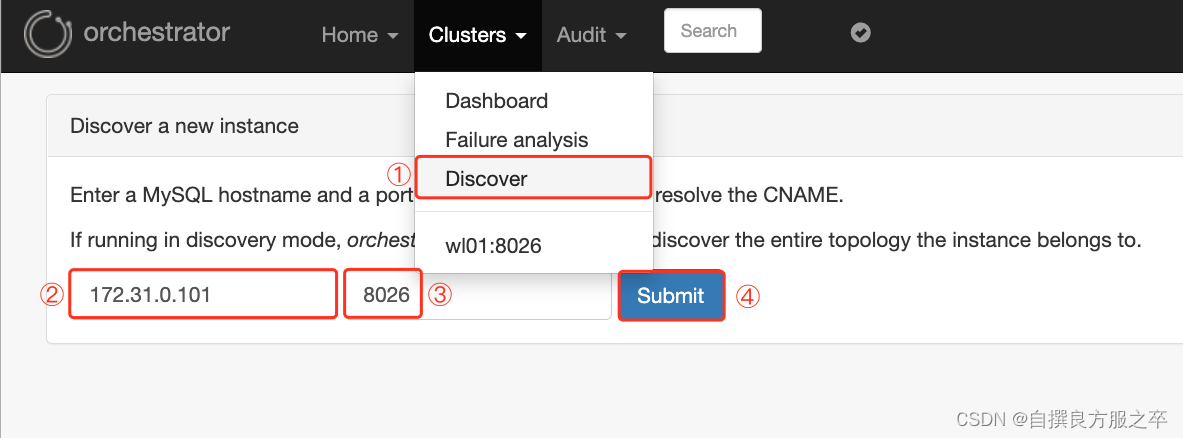
(1)点击Clushter中的Discover,输入所有的被管理mysql数据库ip与端口号
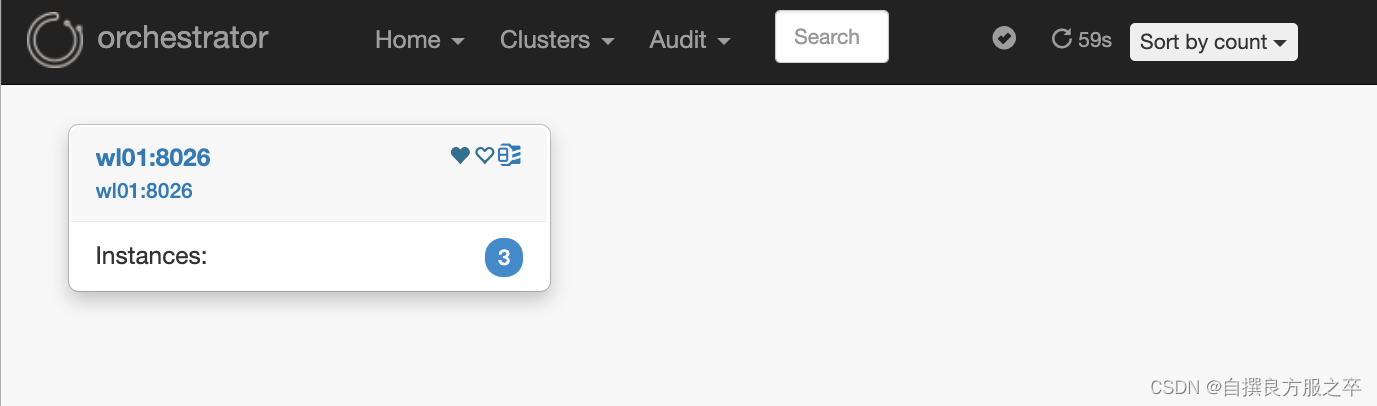
(2)点击Clushter中的Dashboard,查看被发现的集群
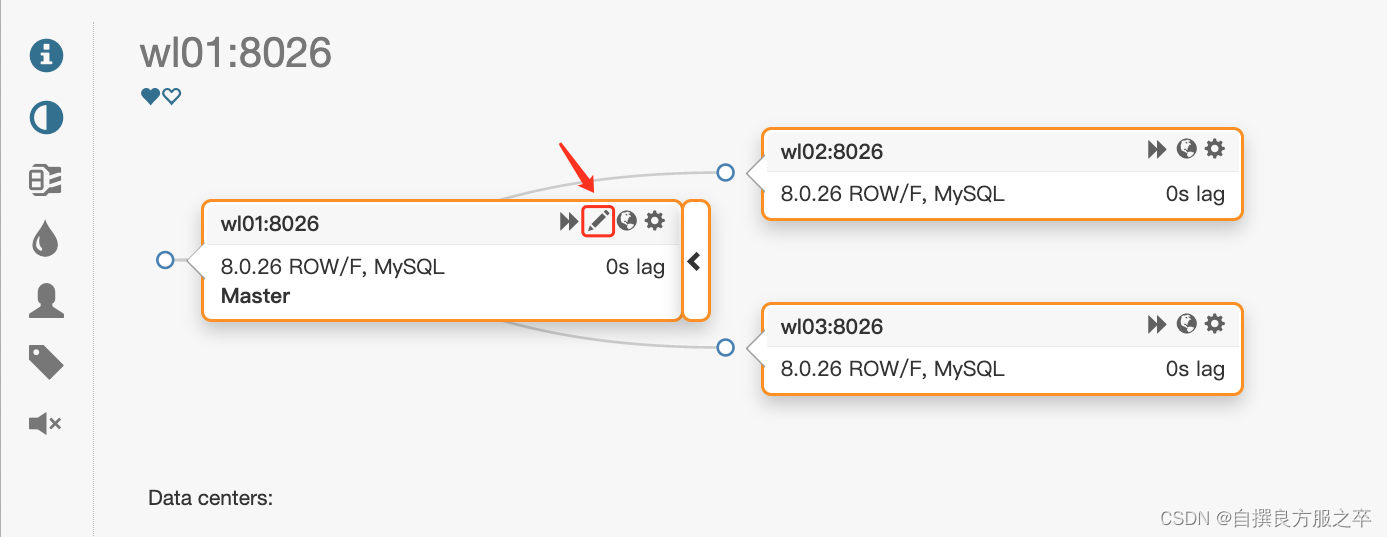
(3)点击集群名,查看集群拓扑图
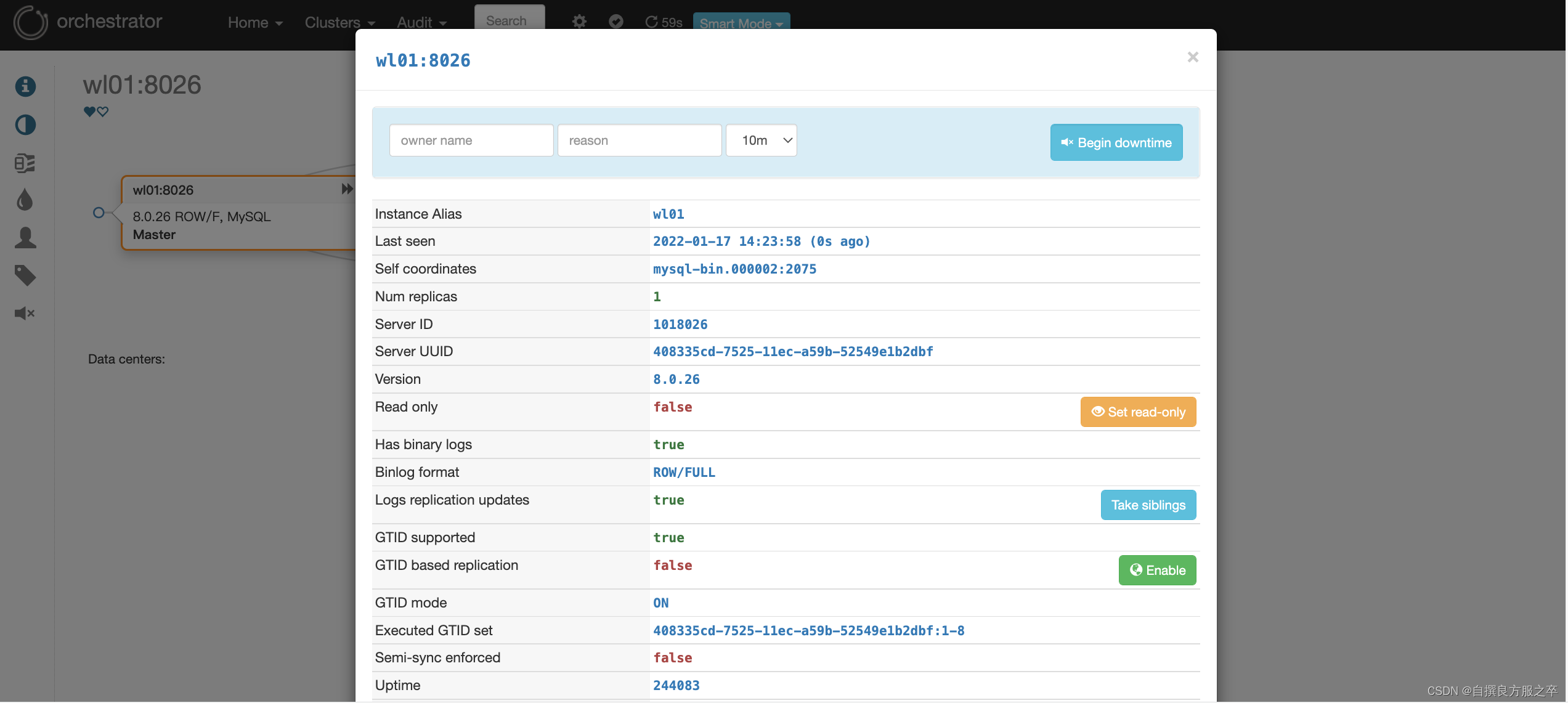
(4)点击(3)中红框图标可查看节点具体信息
7. 验证故障转移
#主库关机,观察现象
[root@wl01 orchestrator]# mysql -S /mysql-8026/8026/run/mysql.sock
mysql> shutdown;#查看当前leader节点,在leader节点查看故障漂移日志
[root@wl01 orchestrator]# /usr/local/orchestrator/resources/bin/orchestrator-client -c which-api
wl03:3000/api
[root@wl03 orchestrator]# tail -f orch_hook.log
/usr/local/orchestrator/orch_vip.sh -d 1 -n wl02 -i eth0 -I 172.31.0.188 -u root -o wl01  #vip由wl01漂移至wl02#vip成功漂到wl02节点
[root@wl01 orchestrator]# ip a | grep "172.31.0.188"
[root@wl02 orchestrator]# ip a | grep "172.31.0.188"
inet 172.31.0.188/32 scope global eth0
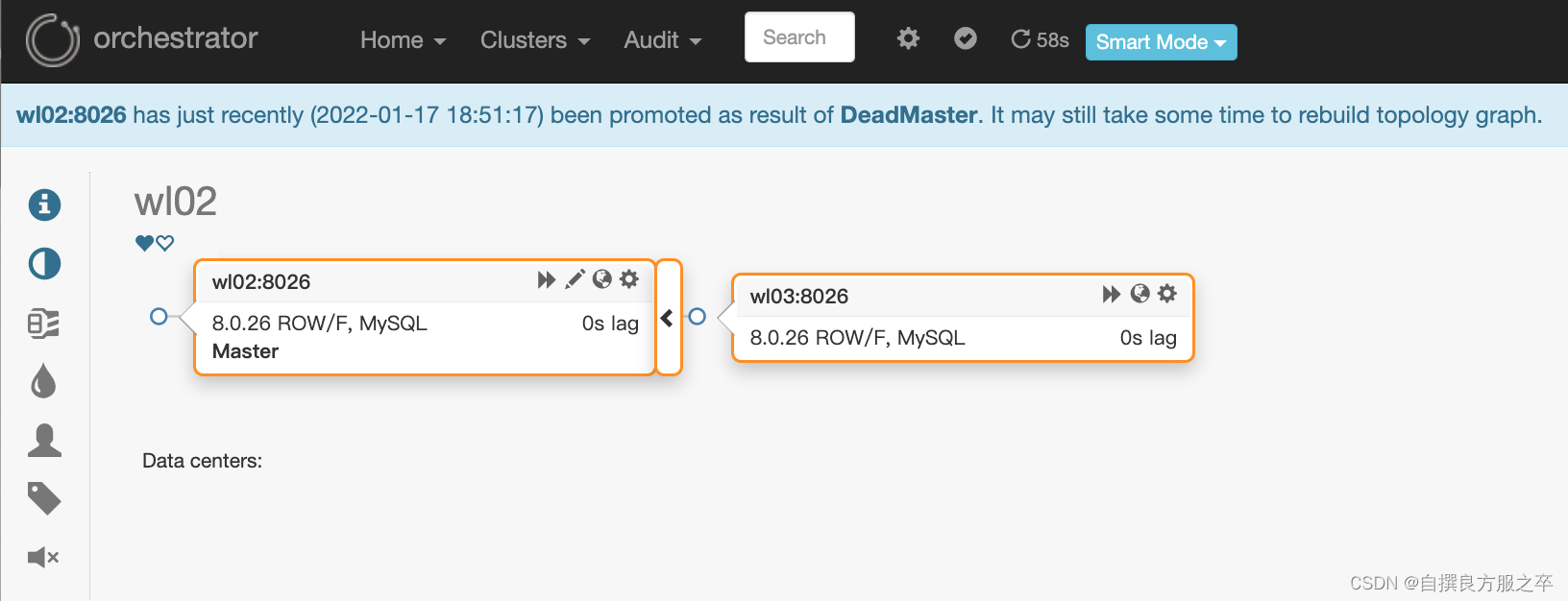
web界面查看拓扑关系,wl01节点已经脱离集群,wl02与wl03重新构建了主从关系
8. 验证raft的高可用性
#(1)修复mysql数据库集群的高可用
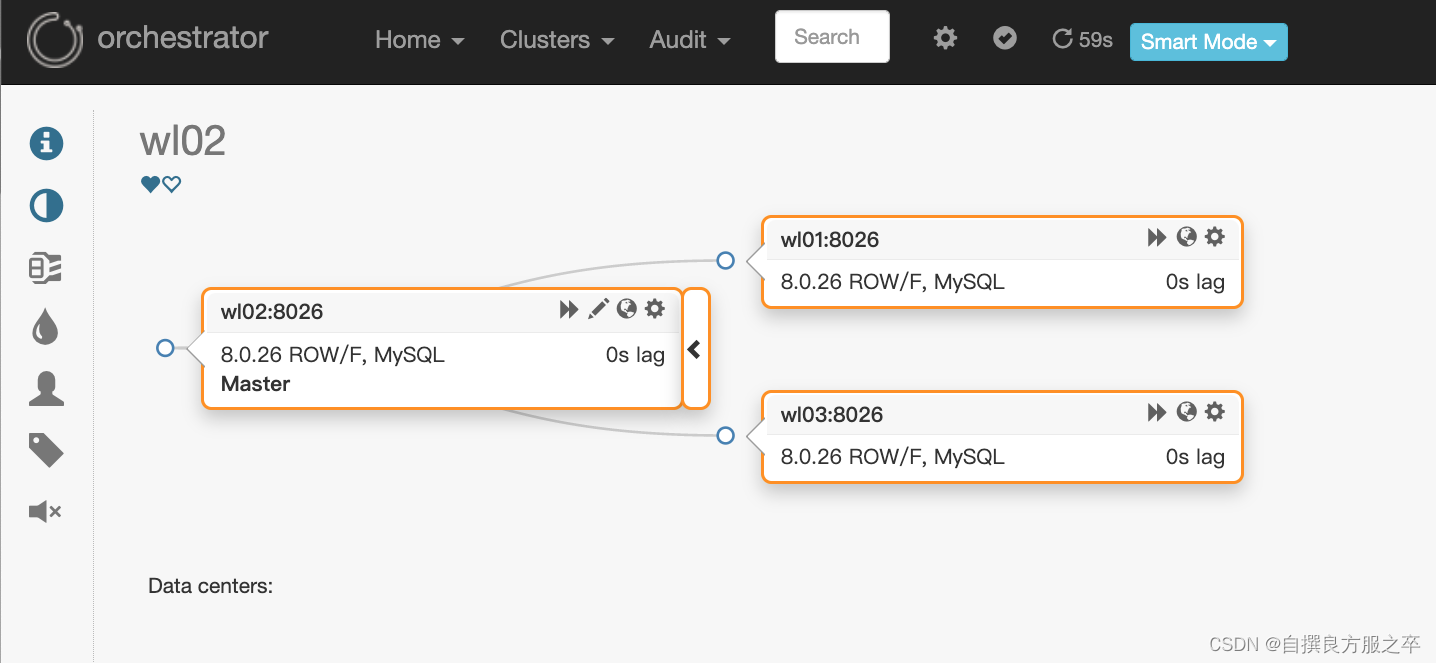
#(2)查看当前raft的leader节点
[root@wl02 orchestrator]# /usr/local/orchestrator/resources/bin/orchestrator-client -c which-api
wl01:3000/api
#(3)关闭wl01节点的orch后端数据库,orch服务也会跟着停掉
[root@wl01 orchestrator]# mysql -S /mysql-8026/3306/run/mysql.sock
mysql> shutdown;
Query OK, 0 rows affected (0.00 sec)
mysql> exit
Bye
[1]   Done                    mysqld_safe --defaults-file=/mysql-8026/3306/my.cnf
[5]-  Exit 1                  cd /usr/local/orchestrator && nohup ./orchestrator --config=/etc/orchestrator.conf.json http
[root@wl01 orchestrator]# ps -ef | grep orch
root     23134 14495  0 10:28 pts/2    00:00:00 grep --color=auto orch#(4)查看其它节点的orch日志,可以看到,wl02被选为新的leder
[root@wl03 orchestrator]# tail -f /usr/local/orchestrator/nohup.out
2022-01-18 10:27:38 DEBUG raft leader is 172.31.0.101:10008; state: Follower
2022/01/18 10:27:39 [WARN] raft: Rejecting vote request from 172.31.0.102:10008 since we have a leader: 172.31.0.101:10008
2022/01/18 10:27:39 [DEBUG] raft: Node 172.31.0.103:10008 updated peer set (2): [172.31.0.102:10008 172.31.0.101:10008 172.31.0.103:10008]
2022-01-18 10:27:39 DEBUG orchestrator/raft: applying command 6871: leader-uri
2022/01/18 10:27:39 [DEBUG] raft-net: 172.31.0.103:10008 accepted connection from: 172.31.0.102:38934
2022-01-18 10:27:43 DEBUG raft leader is 172.31.0.102:10008; state: Follower
2022-01-18 10:27:46 DEBUG orchestrator/raft: applying command 6872: request-health-report
2022-01-18 10:27:48 DEBUG raft leader is 172.31.0.102:10008; state: Follower
2022-01-18 10:27:53 INFO auditType:forget-clustr-aliases instance::0 cluster: message:Forgotten aliases: 0
2022-01-18 10:27:53 INFO auditType:review-unseen-instances instance::0 cluster: message:Operations: 0
2022-01-18 10:27:53 INFO auditType:forget-unseen instance::0 cluster: message:Forgotten instances: 0
2022-01-18 10:27:53 INFO auditType:resolve-unknown-masters instance::0 cluster: message:Num resolved hostnames: 0
2022-01-18 10:27:53 INFO auditType:inject-unseen-masters instance::0 cluster: message:Operations: 0
2022-01-18 10:27:53 INFO auditType:forget-unseen-differently-resolved instance::0 cluster: message:Forgotten instances: 0
2022-01-18 10:27:53 DEBUG raft leader is 172.31.0.102:10008; state: Follower#(5)关闭wl02的mysql数据库服务,再次验证故障漂移
[root@wl02 orchestrator]# mysql -S /mysql-8026/8026/run/mysql.sock
mysql> shutdown;
Query OK, 0 rows affected (0.00 sec)
mysql> exit
Bye
[4]   Done                    mysqld_safe --defaults-file=/mysql-8026/8026/my.cnf#(6)查看现象,vip漂移到wl03
[root@wl02 orchestrator]# ip a | grep "172.31.0.188"
[root@wl03 orchestrator]# ip a | grep "172.31.0.188"
inet 172.31.0.188/32 scope global eth0#(7)通过wl01的ip地址登录的web界面失去连接

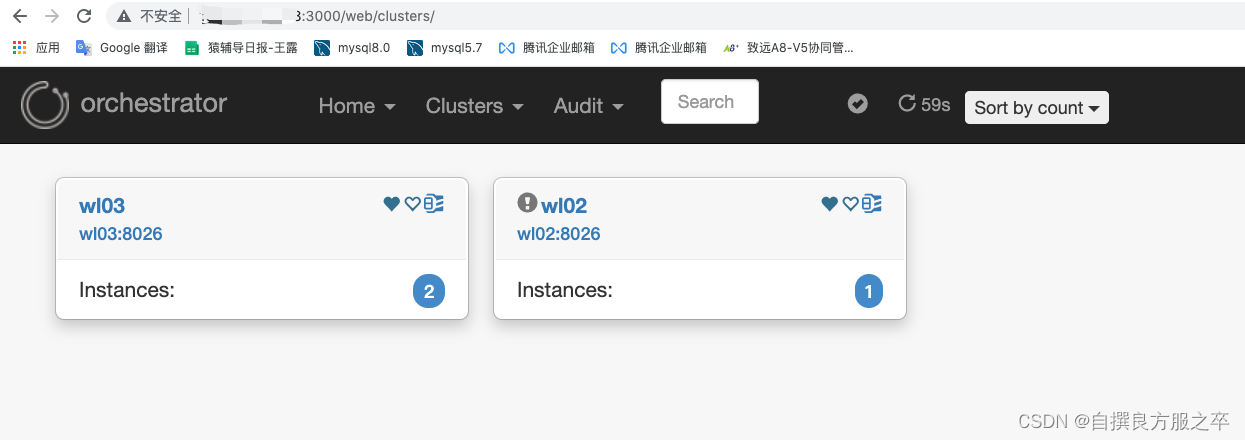
#(8)使用wl02的ip重新登录web界面
可以看到wl02节点已经脱离集群,wl03与wl01重新构建了主从关系
![[外链图片转存中...(img-trbwAWL0-1642477908249)]](https://img-blog.csdnimg.cn/61ee4eb8a5f34055bceb51155a7f3be6.png?x-oss-process=image/watermark,type_d3F5LXplbmhlaQ,shadow_50,text_Q1NETiBA6Ieq5pKw6Imv5pa55pyN5LmL5Y2S,size_20,color_FFFFFF,t_70,g_se,x_16)
本文来自互联网用户投稿,文章观点仅代表作者本人,不代表本站立场,不承担相关法律责任。如若转载,请注明出处。 如若内容造成侵权/违法违规/事实不符,请点击【内容举报】进行投诉反馈!