Nuscenes——实现世界坐标3D点投影到像素坐标系中
文章目录
- BBOX投影
- 投影原理
- 重要概念
- 代码重构
- 投影效果
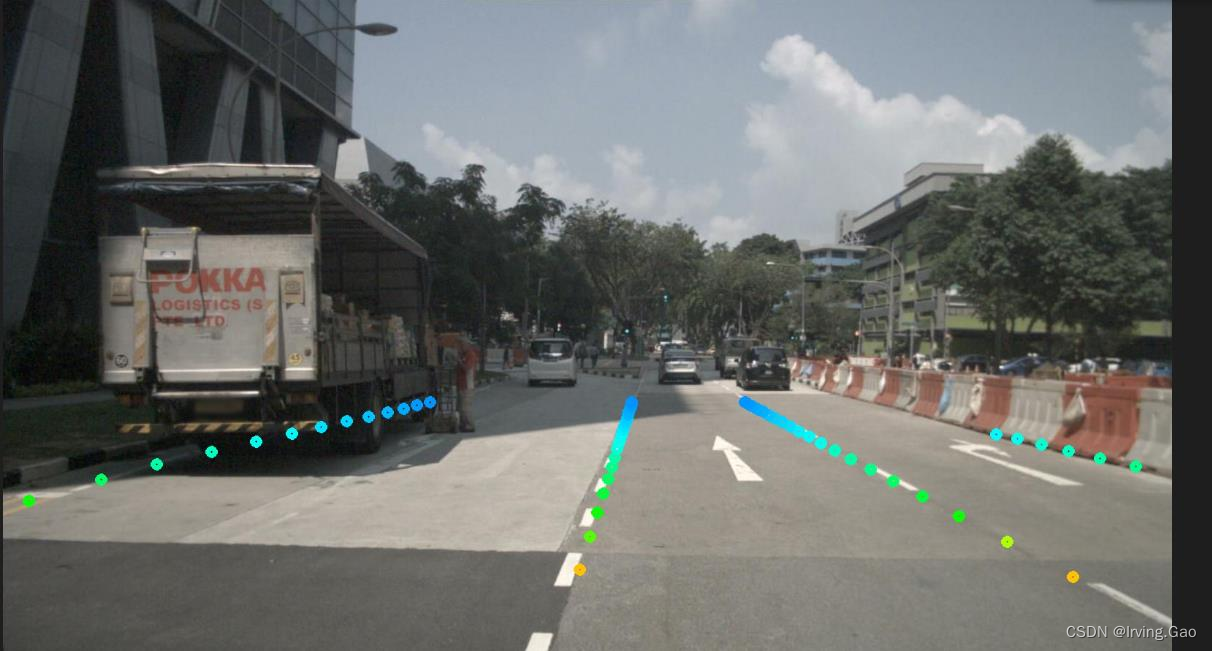
- 点投影
BBOX投影
首先在mmdetection3d/tools/data_converter/nuscenes_converter.py中,get_2d_boxes()可以直接从nuscenes原始sample数据中获取已标注的3D box信息,因此该函数就可以实现整体投影过程。
投影原理
投影过程分为以下几步:
-
世界坐标系 ——> Ego坐标系(自身)
- 这里需要世界坐标系原点变换到自身的 平移 T+旋转 R;
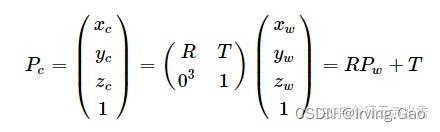
- 这里需要世界坐标系原点变换到自身的 平移 T+旋转 R;
-
Ego坐标系 ——> 相机坐标系
- 这里需要自身原点位置变换到相机位置的 平移 T+旋转 R(即相机外参) ;
- 这里需要自身原点位置变换到相机位置的 平移 T+旋转 R(即相机外参) ;
-
相机坐标系 ——> 像素坐标系
- 此处需要相机内参即可;
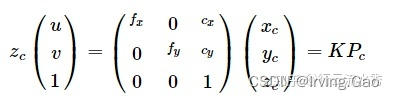
- 此处需要相机内参即可;
重要概念
- box坐标点的
origin:
在Nuscenes中,默认get_box()函数获取到的中心点为
代码重构
- 重构
get_2d_boxes()函数如下:(改动处均已标注出)
def get_2d_boxes(nusc,sample_data_token: str,visibilities: List[str],mono3d=True):"""Get the 2D annotation records for a given `sample_data_token`.Args:sample_data_token (str): Sample data token belonging to a camerakeyframe.visibilities (list[str]): Visibility filter.mono3d (bool): Whether to get boxes with mono3d annotation.Return:list[dict]: List of 2D annotation record that belongs to the input`sample_data_token`."""# Get the sample data and the sample corresponding to that sample data.sd_rec = nusc.get('sample_data', sample_data_token)assert sd_rec['sensor_modality'] == 'camera', 'Error: get_2d_boxes only works' \' for camera sample_data!'if not sd_rec['is_key_frame']:raise ValueError('The 2D re-projections are available only for keyframes.')s_rec = nusc.get('sample', sd_rec['sample_token'])# --------------------------------------------# 获取图像,用于可视化cam_rec = nusc.get('sample_data', s_rec['data']['CAM_FRONT'])imgname = os.path.join('/home/pc/Workspaces/Reaserch/mmdetection3d/data/nuscenes/trainval', \cam_rec['filename'])# --------------------------------------------# Get the calibrated sensor and ego pose# record to get the transformation matrices.cs_rec = nusc.get('calibrated_sensor', sd_rec['calibrated_sensor_token'])pose_rec = nusc.get('ego_pose', sd_rec['ego_pose_token'])camera_intrinsic = np.array(cs_rec['camera_intrinsic'])# Get all the annotation with the specified visibilties.ann_recs = [nusc.get('sample_annotation', token) for token in s_rec['anns']]ann_recs = [ann_rec for ann_rec in ann_recsif (ann_rec['visibility_token'] in visibilities)]repro_recs = []box_list = [] # visualizationfor ann_rec in ann_recs:# Augment sample_annotation with token information.ann_rec['sample_annotation_token'] = ann_rec['token']ann_rec['sample_data_token'] = sample_data_token# Get the box in global coordinates.box = nusc.get_box(ann_rec['token'])# Move them to the ego-pose frame.box.translate(-np.array(pose_rec['translation']))box.rotate(Quaternion(pose_rec['rotation']).inverse)# Move them to the calibrated sensor frame.box.translate(-np.array(cs_rec['translation']))box.rotate(Quaternion(cs_rec['rotation']).inverse)# Filter out the corners that are not in front of the calibrated# sensor.corners_3d = box.corners()in_front = np.argwhere(corners_3d[2, :] > 0).flatten()corners_3d = corners_3d[:, in_front]# Project 3d box to 2d.corner_coords = view_points(corners_3d, camera_intrinsic,True).T[:, :2].tolist()# Keep only corners that fall within the image.final_coords = post_process_coords(corner_coords)# Skip if the convex hull of the re-projected corners# does not intersect the image canvas.if final_coords is None:continueelse:min_x, min_y, max_x, max_y = final_coords# Generate dictionary record to be included in the .json file.repro_rec = generate_record(ann_rec, min_x, min_y, max_x, max_y,sample_data_token, sd_rec['filename'])# If mono3d=True, add 3D annotations in camera coordinatesif mono3d and (repro_rec is not None):loc = box.center.tolist()dim = box.wlhdim[[0, 1, 2]] = dim[[1, 2, 0]] # convert wlh to our lhwdim = dim.tolist()rot = box.orientation.yaw_pitch_roll[0]rot = [-rot] # convert the rot to our cam coordinateglobal_velo2d = nusc.box_velocity(box.token)[:2]global_velo3d = np.array([*global_velo2d, 0.0])e2g_r_mat = Quaternion(pose_rec['rotation']).rotation_matrixc2e_r_mat = Quaternion(cs_rec['rotation']).rotation_matrixcam_velo3d = global_velo3d @ np.linalg.inv(e2g_r_mat).T @ np.linalg.inv(c2e_r_mat).Tvelo = cam_velo3d[0::2].tolist()repro_rec['bbox_cam3d'] = loc + dim + rotrepro_rec['velo_cam3d'] = velocenter3d = np.array(loc).reshape([1, 3])center2d = points_cam2img(center3d, camera_intrinsic, with_depth=False)repro_rec['center2d'] = center2d.squeeze().tolist()# normalized center2D + depth# if samples with depth < 0 will be removed# --------------------------------------------# if repro_rec['center2d'][2] <= 0:# continue# --------------------------------------------ann_token = nusc.get('sample_annotation',box.token)['attribute_tokens']if len(ann_token) == 0:attr_name = 'None'else:attr_name = nusc.get('attribute', ann_token[0])['name']attr_id = nus_attributes.index(attr_name)repro_rec['attribute_name'] = attr_namerepro_rec['attribute_id'] = attr_id# --------------------------------------------box_list.append(torch.tensor(repro_rec['bbox_cam3d']))# --------------------------------------------repro_recs.append(repro_rec)# --------------------------------------------from mmdet3d.core.visualizer.image_vis import draw_camera_bbox3d_on_imgimport cv2img = cv2.imread(imgname)from mmdet3d.core.bbox.structures.cam_box3d import CameraInstance3DBoxesbbox_cam3d = torch.stack(box_list, dim=0) # repro_rec['bbox_cam3d']bbox_cam3d = CameraInstance3DBoxes(bbox_cam3d,origin=(0.5,0.5,0.5))draw_camera_bbox3d_on_img(bbox_cam3d,raw_img=img,cam2img=camera_intrinsic,img_metas=None,color=(0, 255, 0),thickness=1)# --------------------------------------------
投影效果
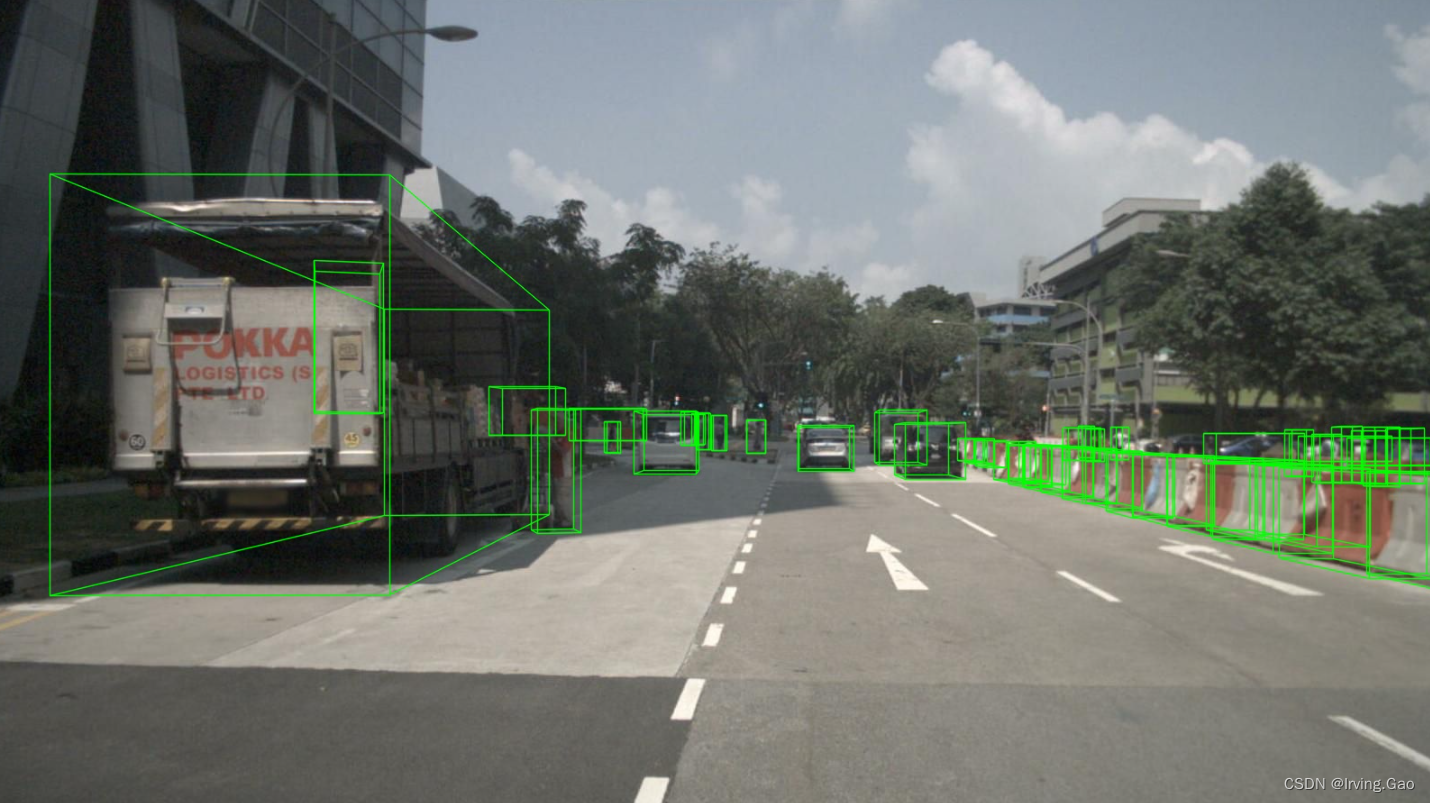
点投影
本文来自互联网用户投稿,文章观点仅代表作者本人,不代表本站立场,不承担相关法律责任。如若转载,请注明出处。 如若内容造成侵权/违法违规/事实不符,请点击【内容举报】进行投诉反馈!