安装grid报错?Failed to start the Clusterware. Last 20 lines of the alert log follow: CRS-2101 ......
(一)情况介绍
rhel 7 安装grid软件,执行root脚本的时候报错这个 emo
报错Failed to start the Clusterware. Last 20 lines of the alert log follow:
[client(5376)]CRS-2101:The OLR was formatted using version 3.
[client(5404)]CRS-1001:The OCR was formatted using version 3.

详情请看输出:
[root@oomc u01]# /u01/app/grid/11.2.0/root.sh
Performing root user operation for Oracle 11gThe following environment variables are set as:
ORACLE_OWNER= grid
ORACLE_HOME= /u01/app/grid/11.2.0Enter the full pathname of the local bin directory: [/usr/local/bin]:
The contents of "dbhome" have not changed. No need to overwrite.
The contents of "oraenv" have not changed. No need to overwrite.
The contents of "coraenv" have not changed. No need to overwrite.Entries will be added to the /etc/oratab file as needed by
Database Configuration Assistant when a database is created
Finished running generic part of root script.
Now product-specific root actions will be performed.
Using configuration parameter file: /u01/app/grid/11.2.0/crs/install/crsconfig_params
Creating trace directory
LOCAL ADD MODE
Creating OCR keys for user 'grid', privgrp 'oinstall'..
Operation successful.
LOCAL ONLY MODE
Successfully accumulated necessary OCR keys.
Creating OCR keys for user 'root', privgrp 'root'..
Operation successful.
CRS-4664: Node oomc successfully pinned.
Adding Clusterware entries to inittab
ohasd failed to start
Failed to start the Clusterware. Last 20 lines of the alert log follow:
2023-09-18 15:48:14.991:
[client(5376)]CRS-2101:The OLR was formatted using version 3.
2023-09-18 15:48:16.046:
[client(5404)]CRS-1001:The OCR was formatted using version 3.ohasd failed to start at /u01/app/grid/11.2.0/crs/install/roothas.pl line 377,
line 4.
/u01/app/grid/11.2.0/perl/bin/perl -I/u01/app/grid/11.2.0/perl/lib -I/u01/app/grid/11.2.0/crs/install /u01/app/grid/11.2.0/crs/install/roothas.pl execution failed
(二) 解决方法
(1)先回退root.sh脚本操作
--安装必要的依赖包
yum install perl-Env-- ORACLE_HOME=/u01/app/grid/11.2.0/
-- 注意用root用户操作,回退root.sh 脚本操作
/u01/app/grid/11.2.0/crs/install/roothas.pl -deconfig -force -verbose
(2)创建服务ohas.service
创建服务ohas.service的服务文件并赋予权限touch /usr/lib/systemd/system/ohas.service
chmod 777 /usr/lib/systemd/system/ohas.service
cat >> /usr/lib/systemd/system/ohas.service </dev/null 2>&1 Type=simple
Restart=always[Install]
WantedBy=multi-user.targetEOF
(3)启动服务并查看状态
加载、启动服务
systemctl daemon-reload
systemctl enable ohas.service
systemctl start ohas.service查看ohas服务状态
systemctl status ohas.service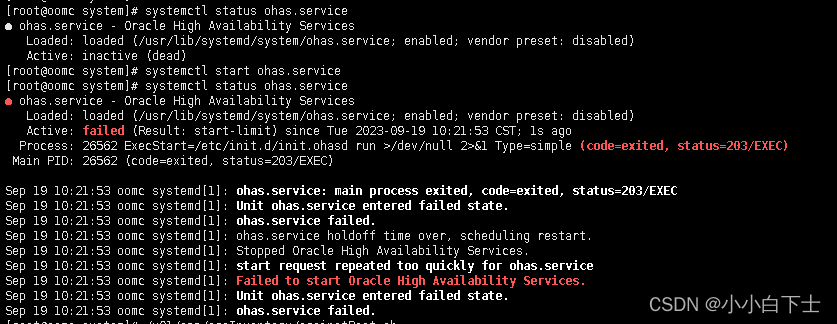
注意:状态是这样的,一看就有问题,不用担心
再次执行2个root脚本,root用户,发现还是启动失败,再次回退
回退后执行systemctl 命令启动ohas服务,这样这个服务就是running了
/u01/app/oraInventory/orainstRoot.sh
/u01/app/grid/11.2.0/root.sh
/u01/app/grid/11.2.0/crs/install/roothas.pl -deconfig -force -verbose
回退后再次查看状态并启动,在查看状态
systemctl start ohas.service
systemctl status ohas.service

(4)重新执行root
查看odhs状态是running的时候在执行root就会成功
/u01/app/oraInventory/orainstRoot.sh
/u01/app/grid/11.2.0/root.sh
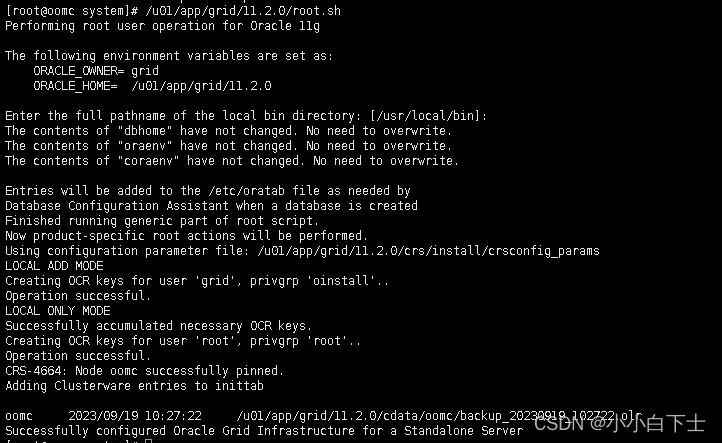
继续完成gi的安装
欧耶!解决
本文来自互联网用户投稿,文章观点仅代表作者本人,不代表本站立场,不承担相关法律责任。如若转载,请注明出处。 如若内容造成侵权/违法违规/事实不符,请点击【内容举报】进行投诉反馈!