目标检测各种数据集进行互转
一、VOC数据集和COCO数据集直接的相互转换
VOC数据集(xml格式)和COCO数据集(json格式)的相互转换
voc和coco数据集的目录结构:
以VOC2007数据集为例,下载下来有如下三文件夹:
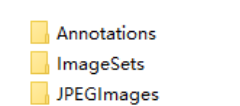
Annotations文件夹是存放图片对应的xml文件,比如“2007_000027.xml"存放的是图片2007_000027.jpg对应的信息,用记事本打开可以看到,这是xml格式的数据。
ImageSets文件夹里存放了官方为我们划分好的训练集和验证集的txt文件。我们主要使用“ImageSets/Main/"文件夹下的train.txt和val.txt文件,train.txt文件存放了官方划分的训练集的图片名称,val.txt文件存放了验证集图片的名称。
还有一个需要关注的文件夹就是JEPGImages,里面存放了对应图片名称的原始图片。
<annotation><folder>文件夹目录</folder><filename>图片名.jpg</filename><path>path_to\at002eg001.jpg</path><source><database>Unknown</database></source><size><width>550</width><height>518</height><depth>3</depth></size><segmented>0</segmented><object><name>Apple</name><pose>Unspecified</pose><truncated>0</truncated><difficult>0</difficult><bndbox><xmin>292</xmin><ymin>218</ymin><xmax>410</xmax><ymax>331</ymax></bndbox></object><object>...</object>
</annotation>
可以看到一个xml文件包含如下信息:
folder: 文件夹
filename:文件名
path:路径
source:来源
size:图片大小
segmented:图像分割会用到,本文仅以目标检测(bounding box为例进行介绍)
object:一个xml文件可以有多个object,每个object表示一个box,每个box有如下信息组成:
name:改box框出来的object属于哪一类,例如Apple
bndbox:给出左上角和右下角的坐标
truncated:是否被截
difficult:是否为检测困难物体
不同于VOC,一张图片对应一个xml文件,coco是直接将所有图片以及对应的box信息写在了一个json文件里。通常整个coco目录长这样:
coco
|______annotations # 存放标注信息
|        |__train.json
|        |__val.json
|        |__test.json
|______trainset # 存放训练集图像
|______valset   # 存放验证集图像
|______testset  # 存放测试集图像
一个标准的json文件包含如下信息:
{ "info" : info,"licenses" : [license],"images" : [image],"annotations" : [annataton],"categories" : [category]
}
通过上面的json整体结构可以看出,info这个key对应的值的类型是一个字典;licenses、images、annotations和categories这四个key对应的值的类型都是一个列表,列表当中存储的数据类型依旧是字典。
我们可以通过len(List)的方式得到images、annotations、categories这三个列表的长度,也就得到了以下内容。
(1)images字段列表元素的长度 = 划入训练集(或者测试集)的图片的数量;
(2)annotations字段列表元素的数量 = 训练集(或者测试集)中bounding box的数量;
(3)categories字段列表元素的数量 = 类别的数量
接下来我们看每个key对应的内容:
(1)info
info{
"year" : int,                # 年份
"version" : str,             # 版本
"description" : str,         # 详细描述信息
"contributor" : str,         # 作者
"url" : str,                 # 协议链接
"date_created" : datetime,   # 生成日期
}
(2)images
"images": [
{"id": 0,                                                # int 图像id,可从0开始"file_name": "0.jpg",                                   # str 文件名"width": 512,                                           # int 图像的宽"height": 512,                                          # int 图像的高"date_captured": "2020-04-14 01:45:07.508146",          # datatime 获取日期"license": 1,                                           # int 遵循哪个协议"coco_url": "",                                         # str coco图片链接url"flickr_url": ""                                        # str flick图片链接url
}]
(3)licenses
 "licenses": [
{"id": 1,                                            # int 协议id号      在images中遵循的license即1"name": null,                                       # str 协议名        "url": null                                         # str 协议链接
}]
(4)annotations
"annotations": [
{"id": 0,                                   # int 图片中每个被标记物体的id编号"image_id": 0,                             # int 该物体所在图片的编号"category_id": 2,                          # int 被标记物体的类别id编号"iscrowd": 0,                              # 0 or 1 目标是否被遮盖,默认为0"area": 4095.9999999999986,                # float 被检测物体的面积(64 * 64 = 4096)"bbox": [200.0, 416.0, 64.0, 64.0],        # [x, y, width, height] 目标检测框的坐标信息"segmentation": [[200.0, 416.0, 264.0, 416.0, 264.0, 480.0, 200.0, 480.0]]
}]
"bbox"里[x, y, width, height]x, y代表的是物体的左上角的x, y的坐标值。
"segmentation"里[x1, y1, x2, y2, x3, y3, x4, y4]是以左上角坐标为起始,顺时针依次选取的另外三个坐标点。及[左上x, 左上y, 右上x,右上y,右下x,右下y,左下x,左下y]。
(5)categories
"categories":[
{"id": 1,                                 # int 类别id编号"name": "rectangle",                     # str 类别名字"supercategory": "None"                  # str 类别所属的大类,如卡车和轿车都属于机动车这个class
},
{"id": 2,"name": "circle", "supercategory": "None"}
]
一、将voc数据集的xml转化为coco数据集的json格式
voc2coco
开始转换前,得先将要转化的所有.xml文件名保存在xml_list.txt列表中。如果是自己制作的voc数据集,在输入标签名的时候记得不要把类别名name打错了。
# create_xml_list.py
import os
xml_list = os.listdir('C:/Users/user/Desktop/train')
with open('C:/Users/user/Desktop/xml_list.txt','a') as f:for i in xml_list:if i[-3:]=='xml':f.write(str(i)+'\n')
执行python voc2coco.py xml_list.txt的文件路径 .xml文件的真实存放路径 转化后的.json存放路径即可将xml转化为一个.json文件。
# voc2coco.py# pip install lxmlimport sys
import os
import json
import xml.etree.ElementTree as ETSTART_BOUNDING_BOX_ID = 1
PRE_DEFINE_CATEGORIES = {}
# If necessary, pre-define category and its id
#  PRE_DEFINE_CATEGORIES = {"aeroplane": 1, "bicycle": 2, "bird": 3, "boat": 4,#  "bottle":5, "bus": 6, "car": 7, "cat": 8, "chair": 9,#  "cow": 10, "diningtable": 11, "dog": 12, "horse": 13,#  "motorbike": 14, "person": 15, "pottedplant": 16,#  "sheep": 17, "sofa": 18, "train": 19, "tvmonitor": 20}def get(root, name):vars = root.findall(name)return varsdef get_and_check(root, name, length):vars = root.findall(name)if len(vars) == 0:raise NotImplementedError('Can not find %s in %s.'%(name, root.tag))if length > 0 and len(vars) != length:raise NotImplementedError('The size of %s is supposed to be %d, but is %d.'%(name, length, len(vars)))if length == 1:vars = vars[0]return varsdef get_filename_as_int(filename):try:filename = os.path.splitext(filename)[0]return int(filename)except:raise NotImplementedError('Filename %s is supposed to be an integer.'%(filename))def convert(xml_list, xml_dir, json_file):list_fp = open(xml_list, 'r')json_dict = {"images":[], "type": "instances", "annotations": [],"categories": []}categories = PRE_DEFINE_CATEGORIESbnd_id = START_BOUNDING_BOX_IDfor line in list_fp:line = line.strip()print("Processing %s"%(line))xml_f = os.path.join(xml_dir, line)tree = ET.parse(xml_f)root = tree.getroot()path = get(root, 'path')if len(path) == 1:filename = os.path.basename(path[0].text)elif len(path) == 0:filename = get_and_check(root, 'filename', 1).textelse:raise NotImplementedError('%d paths found in %s'%(len(path), line))## The filename must be a numberimage_id = get_filename_as_int(filename)size = get_and_check(root, 'size', 1)width = int(get_and_check(size, 'width', 1).text)height = int(get_and_check(size, 'height', 1).text)image = {'file_name': filename, 'height': height, 'width': width,'id':image_id}json_dict['images'].append(image)## Cruuently we do not support segmentation#  segmented = get_and_check(root, 'segmented', 1).text#  assert segmented == '0'for obj in get(root, 'object'):category = get_and_check(obj, 'name', 1).textif category not in categories:new_id = len(categories)categories[category] = new_idcategory_id = categories[category]bndbox = get_and_check(obj, 'bndbox', 1)xmin = int(get_and_check(bndbox, 'xmin', 1).text) - 1ymin = int(get_and_check(bndbox, 'ymin', 1).text) - 1xmax = int(get_and_check(bndbox, 'xmax', 1).text)ymax = int(get_and_check(bndbox, 'ymax', 1).text)############################################################
#如果报错ValueError: invalid literal for int() with base 10: '99.2',原因是我们的坐标值是#浮点数字符串,而int只能转化整型字符串,这时坐标值得先用float将浮点数字符串转成浮点数,再用int将浮点#数转成整数。# xmin = int(float(get_and_check(bndbox, 'xmin', 1).text)) - 1
# ymin = int(float(get_and_check(bndbox, 'ymin', 1).text)) - 1
# xmax = int(float(get_and_check(bndbox, 'xmax', 1).text))
# ymax = int(float(get_and_check(bndbox, 'ymax', 1).text))############################################################assert(xmax > xmin)assert(ymax > ymin)o_width = abs(xmax - xmin)o_height = abs(ymax - ymin)ann = {'area': o_width*o_height, 'iscrowd': 0, 'image_id':image_id, 'bbox':[xmin, ymin, o_width, o_height],'category_id': category_id, 'id': bnd_id, 'ignore': 0,'segmentation': []}json_dict['annotations'].append(ann)bnd_id = bnd_id + 1for cate, cid in categories.items():cat = {'supercategory': 'none', 'id': cid, 'name': cate}json_dict['categories'].append(cat)json_fp = open(json_file, 'w')json_str = json.dumps(json_dict)json_fp.write(json_str)json_fp.close()list_fp.close()if __name__ == '__main__':if len(sys.argv) <= 1:print('3 auguments are need.')print('Usage: %s XML_LIST.txt XML_DIR OUTPU_JSON.json'%(sys.argv[0]))exit(1)convert(sys.argv[1], sys.argv[2], sys.argv[3])
注意这里的image_id用的是图片名称去掉.jpg,所以图片名必须是数字,如果不是,先将所有图片和label名称改成数字,再转coco。
import os
img_dir='F:/Billboard/dataset/images/'
lab_dir='F:/Billboard/dataset/labels/'
name_list = os.listdir(img_dir)
for i,name in enumerate(name_list):os.rename(img_dir+name,img_dir+str(i)+'.jpg')os.rename(lab_dir+name[:-4]+'.txt',lab_dir+str(i)+'.txt')
第二种方法,不需要繁琐的操作即可转换,只需要更改anno 以及xml_dir
import sys
import os
import json
import warnings
import numpy as np
import xml.etree.ElementTree as ET
import globSTART_BOUNDING_BOX_ID = 1
# 按照你给定的类别来生成你的 category_id
# COCO 默认 0 是背景类别
# CenterNet 里面类别是从0开始的,否则生成heatmap的时候报错
PRE_DEFINE_CATEGORIES = {'ignored regions': 1, 'pedestrian': 2,  'people': 3,'bicycle': 4, 'car': 5, 'van': 6, 'truck': 7,'tricycle': 8, 'awning-tricycle': 9, 'bus': 10,'motor': 11, 'others': 12}
START_IMAGE_ID = 0# If necessary, pre-define category and its id
#  PRE_DEFINE_CATEGORIES = {"aeroplane": 1, "bicycle": 2, "bird": 3, "boat": 4,
#  "bottle":5, "bus": 6, "car": 7, "cat": 8, "chair": 9,
#  "cow": 10, "diningtable": 11, "dog": 12, "horse": 13,
#  "motorbike": 14, "person": 15, "pottedplant": 16,
#  "sheep": 17, "sofa": 18, "train": 19, "tvmonitor": 20}def get(root, name):vars = root.findall(name)return varsdef get_and_check(root, name, length):vars = root.findall(name)if len(vars) == 0:raise ValueError("Can not find %s in %s." % (name, root.tag))if length > 0 and len(vars) != length:raise ValueError("The size of %s is supposed to be %d, but is %d."% (name, length, len(vars)))if length == 1:vars = vars[0]return varsdef get_filename_as_int(filename):try:filename = filename.replace("\\", "/")filename = os.path.splitext(os.path.basename(filename))[0]return int(filename)except:# raise ValueError("Filename %s is supposed to be an integer." % (filename))image_id = np.array([ord(char) % 10000 for char in filename], dtype=np.int32).sum()# print(image_id)return 0def get_categories(xml_files):"""Generate category name to id mapping from a list of xml files.Arguments:xml_files {list} -- A list of xml file paths.Returns:dict -- category name to id mapping."""classes_names = []for xml_file in xml_files:tree = ET.parse(xml_file)root = tree.getroot()for member in root.findall("object"):classes_names.append(member[0].text)classes_names = list(set(classes_names))classes_names.sort()return {name: i for i, name in enumerate(classes_names)}def convert(xml_files, json_file):json_dict = {"images": [], "type": "instances", "annotations": [], "categories": []}if PRE_DEFINE_CATEGORIES is not None:categories = PRE_DEFINE_CATEGORIESelse:categories = get_categories(xml_files)bnd_id = START_BOUNDING_BOX_IDimage_id = START_IMAGE_IDfor xml_file in xml_files:tree = ET.parse(xml_file)root = tree.getroot()path = get(root, "path")if len(path) == 1:filename = os.path.basename(path[0].text)elif len(path) == 0:filename = get_and_check(root, "filename", 1).textelse:raise ValueError("%d paths found in %s" % (len(path), xml_file))## The filename must be a number# image_id = get_filename_as_int(filename)size = get_and_check(root, "size", 1)width = int(get_and_check(size, "width", 1).text)height = int(get_and_check(size, "height", 1).text)if ".jpg" not in filename or ".png" not in filename:filename = filename + ".jpg"warnings.warn("filename's default suffix is jpg")images = {"file_name": filename,  # 图片名"height": height,"width": width,"id": image_id,  # 图片的ID编号(每张图片ID是唯一的)}json_dict["images"].append(images)## Currently we do not support segmentation.#  segmented = get_and_check(root, 'segmented', 1).text#  assert segmented == '0'for obj in get(root, "object"):category = get_and_check(obj, "name", 1).textif category not in categories:new_id = len(categories)categories[category] = new_idcategory_id = categories[category]bndbox = get_and_check(obj, "bndbox", 1)xmin = int(get_and_check(bndbox, "xmin", 1).text) - 1ymin = int(get_and_check(bndbox, "ymin", 1).text) - 1xmax = int(get_and_check(bndbox, "xmax", 1).text)ymax = int(get_and_check(bndbox, "ymax", 1).text)assert xmax > xminassert ymax > ymino_width = abs(xmax - xmin)o_height = abs(ymax - ymin)ann = {"area": o_width * o_height,"iscrowd": 0,"image_id": image_id,  # 对应的图片ID(与images中的ID对应)"bbox": [xmin, ymin, o_width, o_height],"category_id": category_id,"id": bnd_id, # 同一张图片可能对应多个 ann"ignore": 0,"segmentation": [],}json_dict["annotations"].append(ann)bnd_id = bnd_id + 1image_id += 1for cate, cid in categories.items():cat = {"supercategory": "none", "id": cid, "name": cate}json_dict["categories"].append(cat)os.makedirs(os.path.dirname(json_file), exist_ok=True)json.dump(json_dict, open(json_file, 'w'), indent=4)if __name__ == "__main__":# import argparse# parser = argparse.ArgumentParser(#     description="Convert Pascal VOC annotation to COCO format."# )# parser.add_argument("xml_dir", help="Directory path to xml files.", type=str)# parser.add_argument("json_file", help="Output COCO format json file.", type=str)# args = parser.parse_args()# args.xml_dir# args.json_filexml_dir = "./xml"json_file = "./train.json"  # output jsonxml_files = glob.glob(os.path.join(xml_dir, "*.xml"))# If you want to do train/test split, you can pass a subset of xml files to convert function.print("Number of xml files: {}".format(len(xml_files)))convert(xml_files, json_file)print("Success: {}".format(json_file))
此版本极其好用,可以切分训练集集验证集
注意修改
classes:自己的目标类别
xml_dir:图片与xml文件
img_dir: xml_dir的上级目录
#coding:utf-8# pip install lxmlimport os
import glob
import json
import shutil
import numpy as np
import xml.etree.ElementTree as ETpath2 = "./coco/" # 输出文件夹
# classes = ['plane', 'baseball-diamond', 'bridge', 'ground-track-field',
# 'small-vehicle', 'large-vehicle', 'ship',
# 'tennis-court', 'basketball-court',
# 'storage-tank', 'soccer-ball-field',
# 'roundabout', 'harbor',
# 'swimming-pool', 'helicopter','container-crane',]  # 类别classes=['plastic_bag','carton','plastic_bottle','hydrophyte','deciduous_aggregates','plastic_cup','cans']
xml_dir = "Annotations/" # xml文件
img_dir = "/media/wntlab/39e84b7d-5985-43ce-a0fa-a7f312f85897/HJK/dataset/data_voc_2021.11.1/" # 图片
train_ratio = 0.85 # 训练集的比例START_BOUNDING_BOX_ID = 1def get(root, name):return root.findall(name)def get_and_check(root, name, length):vars = root.findall(name)if len(vars) == 0:raise NotImplementedError('Can not find %s in %s.'%(name, root.tag))if length > 0 and len(vars) != length:raise NotImplementedError('The size of %s is supposed to be %d, but is %d.'%(name, length, len(vars)))if length == 1:vars = vars[0]return varsdef convert(xml_list, json_file):json_dict = {"images": [], "type": "instances", "annotations": [], "categories": []}categories = pre_define_categories.copy()bnd_id = START_BOUNDING_BOX_IDall_categories = {}for index, line in enumerate(xml_list):# print("Processing %s"%(line))xml_f = linetree = ET.parse(xml_f)root = tree.getroot()filename = os.path.basename(xml_f)[:-4] + ".JPG"image_id = 20190000001 + indexsize = get_and_check(root, 'size', 1)width = int(get_and_check(size, 'width', 1).text)height = int(get_and_check(size, 'height', 1).text)image = {'file_name': filename, 'height': height, 'width': width, 'id':image_id}json_dict['images'].append(image)## Cruuently we do not support segmentation#  segmented = get_and_check(root, 'segmented', 1).text#  assert segmented == '0'for obj in get(root, 'object'):category = get_and_check(obj, 'name', 1).textif category in all_categories:all_categories[category] += 1else:all_categories[category] = 1if category not in categories:if only_care_pre_define_categories:continuenew_id = len(categories) + 1print("[warning] category '{}' not in 'pre_define_categories'({}), create new id: {} automatically".format(category, pre_define_categories, new_id))categories[category] = new_idcategory_id = categories[category]bndbox = get_and_check(obj, 'bndbox', 1)xmin = int(float(get_and_check(bndbox, 'xmin', 1).text))ymin = int(float(get_and_check(bndbox, 'ymin', 1).text))xmax = int(float(get_and_check(bndbox, 'xmax', 1).text))ymax = int(float(get_and_check(bndbox, 'ymax', 1).text))assert(xmax > xmin), "xmax <= xmin, {}".format(line)assert(ymax > ymin), "ymax <= ymin, {}".format(line)o_width = abs(xmax - xmin)o_height = abs(ymax - ymin)ann = {'area': o_width*o_height, 'iscrowd': 0, 'image_id':image_id, 'bbox':[xmin, ymin, o_width, o_height],'category_id': category_id, 'id': bnd_id, 'ignore': 0,'segmentation': []}json_dict['annotations'].append(ann)bnd_id = bnd_id + 1for cate, cid in categories.items():cat = {'supercategory': 'none', 'id': cid, 'name': cate}json_dict['categories'].append(cat)json_fp = open(json_file, 'w')json_str = json.dumps(json_dict)json_fp.write(json_str)json_fp.close()print("------------create {} done--------------".format(json_file))print("find {} categories: {} -->>> your pre_define_categories {}: {}".format(len(all_categories), all_categories.keys(), len(pre_define_categories), pre_define_categories.keys()))print("category: id --> {}".format(categories))print(categories.keys())print(categories.values())if __name__ == '__main__':pre_define_categories = {}for i, cls in enumerate(classes):pre_define_categories[cls] = i + 1# pre_define_categories = {'a1': 1, 'a3': 2, 'a6': 3, 'a9': 4, "a10": 5}only_care_pre_define_categories = True# only_care_pre_define_categories = Falseif os.path.exists(path2 + "/annotations"):shutil.rmtree(path2 + "/annotations")os.makedirs(path2 + "/annotations")if os.path.exists(path2 + "/train2017"):shutil.rmtree(path2 + "/train2017")os.makedirs(path2 + "/train2017")if os.path.exists(path2 + "/val2017"):shutil.rmtree(path2 +"/val2017")os.makedirs(path2 + "/val2017")save_json_train = path2 + 'annotations/instances_train2017.json'save_json_val = path2 + 'annotations/instances_val2017.json'xml_list = glob.glob(xml_dir + "/*.xml")xml_list = np.sort(xml_list)np.random.seed(100)np.random.shuffle(xml_list)train_num = int(len(xml_list)*train_ratio)xml_list_train = xml_list[:train_num]xml_list_val = xml_list[train_num:]convert(xml_list_train, save_json_train)convert(xml_list_val, save_json_val)f1 = open(path2 + "train.txt", "w")for xml in xml_list_train:img = img_dir + xml.split("\\")[-1][:-4] + ".JPG"f1.write(os.path.basename(xml)[:-4] + "\n")shutil.copyfile(img, path2 + "/train2017/" + os.path.basename(img))f2 = open(path2 + "test.txt", "w")for xml in xml_list_val:img = img_dir + xml.split("\\")[-1][:-4] + ".JPG"f2.write(os.path.basename(xml)[:-4] + "\n") shutil.copyfile(img, path2 + "/val2017/" + os.path.basename(img))f1.close()f2.close()print("-------------------------------")print("train number:", len(xml_list_train))print("val number:", len(xml_list_val))
二、将COCO格式的json文件转化为VOC格式的xml文件
如果是要将COCO格式的json文件转化为VOC格式的xml文件,将anno和xml_dir改成json文件路径和转化后的xml文件保存路径,执行下面代码即可完成转化。
# coco2voc.py# pip install pycocotools
import os
import time
import json
import pandas as pd
from tqdm import tqdm
from pycocotools.coco import COCO#json文件路径和用于存放xml文件的路径
anno = 'C:/Users/user/Desktop/val/instances_val2017.json'
xml_dir = 'C:/Users/user/Desktop/val/xml/'coco = COCO(anno) # 读文件
cats = coco.loadCats(coco.getCatIds()) # 这里loadCats就是coco提供的接口,获取类别# Create anno dir
dttm = time.strftime("%Y%m%d%H%M%S", time.localtime())def trans_id(category_id):names = []namesid = []for i in range(0, len(cats)):names.append(cats[i]['name'])namesid.append(cats[i]['id'])index = namesid.index(category_id)return indexdef convert(anno,xml_dir): with open(anno, 'r') as load_f:f = json.load(load_f)imgs = f['images'] #json文件的img_id和图片对应关系 imgs列表表示多少张图cat = f['categories']df_cate = pd.DataFrame(f['categories']) # json中的类别df_cate_sort = df_cate.sort_values(["id"], ascending=True) # 按照类别id排序categories = list(df_cate_sort['name']) # 获取所有类别名称print('categories = ', categories)df_anno = pd.DataFrame(f['annotations']) # json中的annotationfor i in tqdm(range(len(imgs))): # 大循环是images所有图片,Tqdm是可扩展的Python进度条,可以在长循环中添加一个进度提示信息xml_content = []file_name = imgs[i]['file_name'] # 通过img_id找到图片的信息height = imgs[i]['height']img_id = imgs[i]['id']width = imgs[i]['width']version =['"1.0"','"utf-8"'] # xml文件添加属性xml_content.append(" + version[0] +" "+ "encoding="+ version[1] + "?>")xml_content.append("" )xml_content.append(" " + file_name + "")xml_content.append(" " )xml_content.append(" " + str(width) + "")xml_content.append(" " + str(height) + "")xml_content.append(" " + "3" + "")xml_content.append(" ")# 通过img_id找到annotationsannos = df_anno[df_anno["image_id"].isin([img_id])] # (2,8)表示一张图有两个框for index, row in annos.iterrows(): # 一张图的所有annotation信息bbox = row["bbox"]category_id = row["category_id"]cate_name = categories[trans_id(category_id)]# add new objectxml_content.append(" )xml_content.append(" " + cate_name + "")xml_content.append(" 0 ")xml_content.append(" 0 ")xml_content.append(" " )xml_content.append(" " + str(int(bbox[0])) + "")xml_content.append(" " + str(int(bbox[1])) + "")xml_content.append(" " + str(int(bbox[0] + bbox[2])) + "")xml_content.append(" " + str(int(bbox[1] + bbox[3])) + "")xml_content.append(" ")xml_content.append(" ")xml_content.append("")x = xml_contentxml_content = [x[i] for i in range(0, len(x)) if x[i] != "\n"]### list存入文件#xml_path = os.path.join(xml_dir, file_name.replace('.xml', '.jpg'))xml_path = os.path.join(xml_dir, file_name.split('j')[0]+'xml')print(xml_path)with open(xml_path, 'w+', encoding="utf8") as f:f.write('\n'.join(xml_content))xml_content[:] = []if __name__ == '__main__':convert(anno,xml_dir)三、VOC到YOLO
import xml.etree.ElementTree as ET
import os# box [xmin,ymin,xmax,ymax]
def convert(size, box):x_center = (box[2] + box[0]) / 2.0y_center = (box[3] + box[1]) / 2.0# 归一化x = x_center / size[0]y = y_center / size[1]# 求宽高并归一化w = (box[2] - box[0]) / size[0]h = (box[3] - box[1]) / size[1]return (x, y, w, h)def convert_annotation(xml_paths, yolo_paths, classes):xml_files = os.listdir(xml_paths)# 生成无序文件列表print(f'xml_files:{xml_files}')for file in xml_files:xml_file_path = os.path.join(xml_paths, file)yolo_txt_path = os.path.join(yolo_paths, file.split(".")[0]+ ".txt")tree = ET.parse(xml_file_path)root = tree.getroot()size = root.find("size")# 获取xml的width和height的值w = int(size.find("width").text)h = int(size.find("height").text)# object标签可能会存在多个,所以要迭代with open(yolo_txt_path, 'w') as f:for obj in root.iter("object"):difficult = obj.find("difficult").text# 种类类别cls = obj.find("name").textif cls not in classes or difficult == 1:continue# 转换成训练模式读取的标签cls_id = classes.index(cls)xml_box = obj.find("bndbox")box = (float(xml_box.find("xmin").text), float(xml_box.find("ymin").text),float(xml_box.find("xmax").text), float(xml_box.find("ymax").text))boxex = convert((w, h), box)# yolo标准格式类别 x_center,y_center,width,heightf.write(str(cls_id) + " " + " ".join([str(s) for s in boxex]) + '\n')if __name__ == "__main__":# 数据的类别classes_train = ['ignored regions', 'pedestrian', 'people','bicycle','car', 'van', 'truck','tricycle','awning-tricycle','bus','motor', 'others']# xml存储地址xml_dir = "./xml1/"# yolo存储地址yolo_txt_dir = "./Yolo_txt/"# voc转yoloconvert_annotation(xml_paths=xml_dir, yolo_paths=yolo_txt_dir,classes=classes_train)
在转换之前先要制定classes_train(训练集的类别),xml_dir(voc格式的路径)、yolo_txt_dir(yolo格式标注存储的路径)
四、yolo转voc
from xml.dom.minidom import Document
import os
import cv2# def makexml(txtPath, xmlPath, picPath):  # txt所在文件夹路径,xml文件保存路径,图片所在文件夹路径
def makexml(picPath, txtPath, xmlPath):  # txt所在文件夹路径,xml文件保存路径,图片所在文件夹路径"""此函数用于将yolo格式txt标注文件转换为voc格式xml标注文件"""dic = {'0': "0",  # 创建字典用来对类型进行转换'1': "1",  # 此处的字典要与自己的classes.txt文件中的类对应,且顺序要一致}files = os.listdir(txtPath)print(files)for i, name in enumerate(files):xmlBuilder = Document()annotation = xmlBuilder.createElement("annotation")  # 创建annotation标签xmlBuilder.appendChild(annotation)txtFile = open(txtPath + name)
#        print(txtFile)txtList = txtFile.readlines()
#        print(txtList)img = cv2.imread(picPath + name[0:-4] + ".jpg")print(name[0:-4])Pheight, Pwidth, Pdepth = img.shapefolder = xmlBuilder.createElement("folder")  # folder标签foldercontent = xmlBuilder.createTextNode("driving_annotation_dataset")folder.appendChild(foldercontent)annotation.appendChild(folder)  # folder标签结束filename = xmlBuilder.createElement("filename")  # filename标签filenamecontent = xmlBuilder.createTextNode(name[0:-4] + ".jpg")filename.appendChild(filenamecontent)annotation.appendChild(filename)  # filename标签结束size = xmlBuilder.createElement("size")  # size标签width = xmlBuilder.createElement("width")  # size子标签widthwidthcontent = xmlBuilder.createTextNode(str(Pwidth))width.appendChild(widthcontent)size.appendChild(width)  # size子标签width结束height = xmlBuilder.createElement("height")  # size子标签heightheightcontent = xmlBuilder.createTextNode(str(Pheight))height.appendChild(heightcontent)size.appendChild(height)  # size子标签height结束depth = xmlBuilder.createElement("depth")  # size子标签depthdepthcontent = xmlBuilder.createTextNode(str(Pdepth))depth.appendChild(depthcontent)size.appendChild(depth)  # size子标签depth结束annotation.appendChild(size)  # size标签结束for j in txtList:oneline = j.strip().split(" ")object = xmlBuilder.createElement("object")  # object 标签picname = xmlBuilder.createElement("name")  # name标签namecontent = xmlBuilder.createTextNode(dic[oneline[0]])#           print(namecontent)picname.appendChild(namecontent)object.appendChild(picname)  # name标签结束pose = xmlBuilder.createElement("pose")  # pose标签posecontent = xmlBuilder.createTextNode("Unspecified")pose.appendChild(posecontent)object.appendChild(pose)  # pose标签结束truncated = xmlBuilder.createElement("truncated")  # truncated标签truncatedContent = xmlBuilder.createTextNode("0")truncated.appendChild(truncatedContent)object.appendChild(truncated)  # truncated标签结束difficult = xmlBuilder.createElement("difficult")  # difficult标签difficultcontent = xmlBuilder.createTextNode("0")difficult.appendChild(difficultcontent)object.appendChild(difficult)  # difficult标签结束bndbox = xmlBuilder.createElement("bndbox")  # bndbox标签xmin = xmlBuilder.createElement("xmin")  # xmin标签mathData = int(((float(oneline[1])) * Pwidth + 1) - (float(oneline[3])) * 0.5 * Pwidth)xminContent = xmlBuilder.createTextNode(str(mathData))xmin.appendChild(xminContent)bndbox.appendChild(xmin)  # xmin标签结束ymin = xmlBuilder.createElement("ymin")  # ymin标签mathData = int(((float(oneline[2])) * Pheight + 1) - (float(oneline[4])) * 0.5 * Pheight)yminContent = xmlBuilder.createTextNode(str(mathData))ymin.appendChild(yminContent)bndbox.appendChild(ymin)  # ymin标签结束xmax = xmlBuilder.createElement("xmax")  # xmax标签mathData = int(((float(oneline[1])) * Pwidth + 1) + (float(oneline[3])) * 0.5 * Pwidth)xmaxContent = xmlBuilder.createTextNode(str(mathData))xmax.appendChild(xmaxContent)bndbox.appendChild(xmax)  # xmax标签结束ymax = xmlBuilder.createElement("ymax")  # ymax标签mathData = int(((float(oneline[2])) * Pheight + 1) + (float(oneline[4])) * 0.5 * Pheight)ymaxContent = xmlBuilder.createTextNode(str(mathData))ymax.appendChild(ymaxContent)bndbox.appendChild(ymax)  # ymax标签结束object.appendChild(bndbox)  # bndbox标签结束annotation.appendChild(object)  # object标签结束f = open(xmlPath + name[0:-4] + ".xml", 'w')xmlBuilder.writexml(f, indent='\t', newl='\n', addindent='\t', encoding='utf-8')f.close()if __name__ == "__main__":picPath = "model/YOLOX/datasets/VOC/VOCdevkit/VOC2007/JPEGImages/"  # 图片所在文件夹路径,后面的/一定要带上txtPath = "model/YOLOX/datasets/VOC/VOCdevkit/VOC2007/labels/lables/"  # txt所在文件夹路径,后面的/一定要带上xmlPath = "model/YOLOX/datasets/VOC/VOCdevkit/VOC2007/Annotations/"  # xml文件保存路径,后面的/一定要带上makexml(picPath, txtPath, xmlPath)
以上代码只需要依照自身情况对dic、picPath、txtPath、xmlPath进行更改即可转换。以上是yolo格式转voc格式
五、yolo转coco
"""
YOLO 格式的数据集转化为 COCO 格式的数据集
--root_path 输入根路径
"""import os
import cv2
import json
from tqdm import tqdm
import argparse
import globparser = argparse.ArgumentParser("ROOT SETTING")
parser.add_argument('--root_path', type=str, default='coco', help="root path of images and labels")
arg = parser.parse_args()# 默认划分比例为 8:1:1。 第一个划分点在8/10处,第二个在9/10。
VAL_SPLIT_POINT = 4 / 5
TEST_SPLIT_POINT = 9 / 10root_path = arg.root_path
print(root_path)# 原始标签路径
originLabelsDir = os.path.join(root_path, 'labels/*/*.txt')
# 原始标签对应的图片路径
originImagesDir = os.path.join(root_path, 'images/*/*.jpg')
# dataset用于保存所有数据的图片信息和标注信息
train_dataset = {'categories': [], 'annotations': [], 'images': []}
val_dataset = {'categories': [], 'annotations': [], 'images': []}
test_dataset = {'categories': [], 'annotations': [], 'images': []}# 打开类别标签
with open(os.path.join(root_path, 'classes.txt')) as f:classes = f.read().strip().split()# 建立类别标签和数字id的对应关系
for i, cls in enumerate(classes, 1):train_dataset['categories'].append({'id': i, 'name': cls, 'supercategory': 'fish'})val_dataset['categories'].append({'id': i, 'name': cls, 'supercategory': 'fish'})test_dataset['categories'].append({'id': i, 'name': cls, 'supercategory': 'fish'})# 读取images文件夹的图片名称
indexes = glob.glob(originImagesDir)
print(len(indexes))
# ---------------接着将,以上数据转换为COCO所需要的格式---------------
for k, index in enumerate(tqdm(indexes)):txtFile = index.replace('images', 'labels').replace('jpg', 'txt')# 用opencv读取图片,得到图像的宽和高im = cv2.imread(index)H, W, _ = im.shape# 切换dataset的引用对象,从而划分数据集if k + 1 > round(len(indexes) * VAL_SPLIT_POINT):if k + 1 > round(len(indexes) * TEST_SPLIT_POINT):dataset = test_datasetelse:dataset = val_datasetelse:dataset = train_dataset# 添加图像的信息到dataset中if (os.path.exists(txtFile)):with open(txtFile, 'r') as fr:dataset['images'].append({'file_name': index.replace("\\", "/"),'id': k,'width': W,'height': H})labelList = fr.readlines()for label in labelList:label = label.strip().split()x = float(label[1])y = float(label[2])w = float(label[3])h = float(label[4])# convert x,y,w,h to x1,y1,x2,y2# imagePath = os.path.join(originImagesDir,#                            txtFile.replace('txt', 'jpg'))image = cv2.imread(index)x1 = (x - w / 2) * Wy1 = (y - h / 2) * Hx2 = (x + w / 2) * Wy2 = (y + h / 2) * Hx1 = int(x1)y1 = int(y1)x2 = int(x2)y2 = int(y2)# 为了与coco标签方式对,标签序号从1开始计算cls_id = int(label[0]) + 1width = max(0, x2 - x1)height = max(0, y2 - y1)dataset['annotations'].append({'area': width * height,'bbox': [x1, y1, width, height],'category_id': int(cls_id),'id': i,'image_id': k,'iscrowd': 0,# mask, 矩形是从左上角点按顺时针的四个顶点'segmentation': [[x1, y1, x2, y1, x2, y2, x1, y2]]})# print(dataset)# breakelse:continue# 保存结果的文件夹
folder = os.path.join(root_path, 'annotations')
if not os.path.exists(folder):os.makedirs(folder)
for phase in ['train', 'val', 'test']:json_name = os.path.join(root_path, 'annotations/{}.json'.format(phase))with open(json_name, 'w', encoding="utf-8") as f:if phase == 'train':json.dump(train_dataset, f, ensure_ascii=False, indent=1)if phase == 'val':json.dump(val_dataset, f, ensure_ascii=False, indent=1)if phase == 'test':json.dump(test_dataset, f, ensure_ascii=False, indent=1)
六、人脸数据集转yolo
from xml.dom.minidom import Document
import os
import cv2def convert(size, box):x_center = (float(box[2]) + float(box[0])) / 2.0y_center = (float(box[3]) + float(box[1])) / 2.0# 归一化x = x_center / size[0]y = y_center / size[1]# 求宽高并归一化w = (float(box[2]) - float(box[0])) / size[0]h = (float(box[3]) - float(box[1])) / size[1]return (x, y, w, h)def makexml(picPath, facePath, txtPath):  dic = {'0': "0",  # 创建字典用来对类型进行转换}files = os.listdir(facePath)#    print("1", files)for i, name in enumerate(files):txtFile = open(facePath + name)txtList = txtFile.readlines()print("name", name)img = cv2.imread(picPath + name[0:-4] + ".png")Pheight, Pwidth, Pdepth = img.shapeyolo_txt_path = os.path.join(txtPath, name.split(".")[0]+ ".txt")with open(yolo_txt_path, 'w') as f:for j in txtList:box = j.strip().split(" ")if len(j) < 4:passelse:boxex = convert((Pwidth, Pheight), box)# yolo标准格式类别 x_center,y_center,width,heightf.write("0" + " " + " ".join([str(s) for s in boxex]) + '\n')if __name__ == "__main__":picPath = "model/datasets/DarkFace_Train_2021/image/"  facePath = "model/datasets/DarkFace_Train_2021/label/"  txtPath = "model/datasets/DarkFace_Train_2021/labels/"  makexml(picPath, facePath, txtPath)
七、LEVIE数据集转yolo
import os
import cv2def convert(size, box):x_center = (int(box[3]) + int(box[1])) / 2.0y_center = (int(box[4]) + int(box[2])) / 2.0# 归一化x = x_center / int(size[0])y = y_center / int(size[1])# 求宽高并归一化w = (int(box[3]) - int(box[1])) / size[0]h = (int(box[4]) - int(box[2])) / size[1]return (int(box[0]), x, y, w, h)def makexml(picPath, txtPath, yolo_paths):  # txt所在文件夹路径,yolo文件保存路径,图片所在文件夹路径"""此函数用于将yolo格式txt标注文件转换为voc格式xml标注文件"""files = os.listdir(txtPath)for i, name in enumerate(files):yolo_txt_path = os.path.join(yolo_paths, name.split(".")[0]+ ".txt")txtFile = open(txtPath + name)with open(yolo_txt_path, 'w') as f:txtList = txtFile.readlines()img = cv2.imread(picPath + name[0:-4] + ".jpg")Pheight, Pwidth, _ = img.shapefor j in txtList:oneline = j.strip().split(" ")obj = oneline[0]xmin = oneline[1]if int(xmin) < 0 :xmin = "1"            ymax = oneline[2]if int(ymax) < 0 :ymax = "1"xmax = oneline[3]ymin = oneline[4]box = convert((Pwidth, Pheight), oneline)f.write(str(box[0]) + " " + str(box[1]) + " " + str(box[2]) + " " + str(box[3]) + " " + str(box[4]) + '\n')if __name__ == "__main__":picPath = "./out/"  # 图片所在文件夹路径,后面的/一定要带上txtPath = "./labels/"  # txt所在文件夹路径,后面的/一定要带上yolo = "./xml/"  # xml文件保存路径,后面的/一定要带上makexml(picPath, txtPath, yolo)
八、NWPU VHR-10 dataset
import os
import cv2def convert(size, box):x_center = (int(box[3]) + int(box[1])) / 2.0y_center = (int(box[4]) + int(box[2])) / 2.0# 归一化x = x_center / int(size[0])y = y_center / int(size[1])# 求宽高并归一化w = (int(box[3]) - int(box[1])) / size[0]h = (int(box[4]) - int(box[2])) / size[1]return (int(box[0]), x, y, w, h)def makexml(picPath, txtPath, yolo_paths):  # txt所在文件夹路径,yolo文件保存路径,图片所在文件夹路径"""此函数用于将yolo格式txt标注文件转换为voc格式xml标注文件"""files = os.listdir(txtPath)for i, name in enumerate(files):print(name)yolo_txt_path = os.path.join(yolo_paths, name.split(".")[0]+ ".txt")txtFile = open(txtPath + name)with open(yolo_txt_path, 'w') as f:txtList = txtFile.readlines()img = cv2.imread(picPath + name[0:-4] + ".jpg")Pheight, Pwidth, _ = img.shapefor j in txtList:oneline = j.strip().split(",")a = int(oneline[4])b = int(oneline[0][1:])c = int(oneline[1][:-1])d = int(oneline[2][1:])e = int(oneline[3][:-1])oneline = (int(oneline[4]), int(oneline[0][1:]), int(oneline[1][:-1]), int(oneline[2][1:]), int(oneline[3][:-1]))box = convert((Pwidth, Pheight), oneline)f.write(str(box[0]) + " " + str(box[1]) + " " + str(box[2]) + " " + str(box[3]) + " " + str(box[4]) + '\n')if __name__ == "__main__":picPath = "./image/"  # 图片所在文件夹路径,后面的/一定要带上txtPath = "./txt/"  # txt所在文件夹路径,后面的/一定要带上yolo = "./xml/"  # xml文件保存路径,后面的/一定要带上makexml(picPath, txtPath, yolo)
九、UCAS_AOD
import os
import cv2
import mathdef convert(size, box):x_center = box[1] + box[3] / 2.0y_center = box[2] + box[4] / 2.0# 归一化x = x_center / int(size[0])y = y_center / int(size[1])# 求宽高并归一化w = box[3] / size[0]h = box[4] / size[1]return (int(box[0]), x, y, w, h)def fun(str_num):before_e = float(str_num.split('e')[0])sign = str_num.split('e')[1][:1]after_e = int(str_num.split('e')[1][1:])if sign == '+':float_num = before_e * math.pow(10, after_e)elif sign == '-':float_num = before_e * math.pow(10, -after_e)else:float_num = Noneprint('error: unknown sign')return float_numdef makexml(picPath, txtPath, yolo_paths):  # txt所在文件夹路径,yolo文件保存路径,图片所在文件夹路径"""此函数用于将yolo格式txt标注文件转换为voc格式xml标注文件"""files = os.listdir(txtPath)for i, name in enumerate(files):print(name)yolo_txt_path = os.path.join(yolo_paths, name.split(".")[0]+ ".txt")txtFile = open(txtPath + name)with open(yolo_txt_path, 'w') as f:txtList = txtFile.readlines()img = cv2.imread(picPath + name[0:-4] + ".png")Pheight, Pwidth, _ = img.shapefor j in txtList:oneline = j.strip().split("\t")try:int(oneline[9])except ValueError:a = fun(oneline[9])else:a = int(oneline[9])try:int(oneline[10])except ValueError:b = fun(oneline[10])else:b = int(oneline[10])  try:int(oneline[11])except ValueError:c = fun(oneline[11])else:c = int(oneline[11]) try:int(oneline[12])except ValueError:d = fun(oneline[12])else:d = int(oneline[12])                  oneline = (1, a, b, c, d)box = convert((Pwidth, Pheight), oneline)f.write(str(box[0]) + " " + str(box[1]) + " " + str(box[2]) + " " + str(box[3]) + " " + str(box[4]) + '\n')if __name__ == "__main__":picPath = "./CAR/"  # 图片所在文件夹路径,后面的/一定要带上txtPath = "./labels/"  # txt所在文件夹路径,后面的/一定要带上yolo = "./xml/"  # xml文件保存路径,后面的/一定要带上makexml(picPath, txtPath, yolo)
``在运行代码之前数据集根目录下放置classes.txt文件。只需要指定–root_path即可进行转换
以上部分感谢博主的分享:https://blog.csdn.net/qq_40502460/article/details/116564254
本文来自互联网用户投稿,文章观点仅代表作者本人,不代表本站立场,不承担相关法律责任。如若转载,请注明出处。 如若内容造成侵权/违法违规/事实不符,请点击【内容举报】进行投诉反馈!