coco数据集制作-多文件夹
背景:标准的coco格式数据集需要把所有图片放到一个文件夹里,而很多情况下,会有很多个文件夹,我们并不想把所有图片放到一起。
本文把多个文件夹下的yolov8(5)的txt标签转换至coco标签,转换标签代码如下:
import os
import json
import cv2# 图片和标签路径
img_root = './soccernet/tracking/images/test/'
label_root = './soccernet/tracking/labels/test/'
# 模板
coco = {"info": {"year": 2023,"version": "1.0","description": "Example COCO Dataset","contributor": "jefft","date_created": "2023-08-22"},"licenses": [{"id": 1,"name": "License Name","url": "https://license-url.com"}],"categories": [{"id": 0,"name": "person",},{"id": 1,"name": "soccer",}],"images": [ ],"annotations": []
}image_tp = {"id": 1,"width": 640,"height": 480,"file_name": "cat1.jpg","license": 1}anno_tp = {"id": 1,"image_id": 1,"category_id": 1,"bbox": [],"area": 0,"segmentation": [],"iscrowd": 0}idx = 0
img_id_= 0
for root, dirs, files in os.walk(label_root):for file in files:if file.endswith('txt'): # 遍历所有yolov8格式的txt标注文件txt_path = os.path.join(root,file)print("Current directory:", txt_path)img_path = txt_path.replace('labels','images')img_path = img_path.replace('.txt','.jpg') # 找到图片路径if 'old' not in img_path: # 不用管,自行修改anno = open(txt_path).read().splitlines()img = cv2.imread(img_path)h,w,_ = img.shapeimage_tp["id"] = idximage_tp["width"] = wimage_tp["height"] = himage_tp["file_name"] = img_path # 写入完整路径coco["images"].append(image_tp.copy()) # 添加图片信息for a in anno:l = a.split(' ')cat,cx,cy,lw,lh = int(l[0]),float(l[1])*w,float(l[2])*h,float(l[3])*w,float(l[4])*hanno_tp["id"] = img_id_anno_tp["image_id"] = img_pathimg_id_+=1anno_tp["bbox"] = [cx-lw/2,cy-lh/2,lw,lh] # 转换标注格式anno_tp["category_id"] = catanno_tp["area"] = lw*lhcoco["annotations"].append(anno_tp.copy())  # 添加标注信息idx+=1assert os.path.exists(img_path)# if idx>500:#     breakwith open('./test_soccer_coco.json', 'w') as l:l.write(json.dumps(coco))
验证是否转换正确代码如下:
from pycocotools.coco import COCO
import os
import cv2
import numpy as np# 替换为你的数据集标注文件的路径和图像文件夹路径
annotation_file = 'test_soccer_coco.json'
image_folder = ''# 初始化COCO对象
coco = COCO(annotation_file)idx = 0
# 遍历每个图像并绘制标注
for image_id in coco.getImgIds():image_info = coco.loadImgs(image_id)[0]image_path = os.path.join(image_folder, image_info['file_name'])image = cv2.imread(image_path)annotations = coco.loadAnns(coco.getAnnIds(imgIds=[image_info['file_name']]))  # 原来是imgIds=image_id,进行了修改for ann in annotations:bbox = ann['bbox']category_info = coco.loadCats(ann['category_id'])[0]category_name = category_info['name']# 在图像上绘制边界框x, y, w, h = map(int, bbox)if category_info['id'] == 0:cv2.rectangle(image, (x, y), (x + w, y + h), (0, 255, 0), 2)cv2.putText(image, category_name, (x, y - 10), cv2.FONT_HERSHEY_SIMPLEX, 0.5, (0, 255, 0), 2)else:cv2.rectangle(image, (x, y), (x + w, y + h), (0, 0, 255), 2)cv2.putText(image, category_name, (x, y - 10), cv2.FONT_HERSHEY_SIMPLEX, 0.5, (0, 0, 255), 2)# 保存绘制标注后的图像cv2.imwrite('tmp/{}.jpg'.format(idx), image)idx+=1
print("Annotation visualization and saving complete.")
另外,使用别人的代码训练的时候可能需要修改,就比如DAMO-YOLO图中的位置:
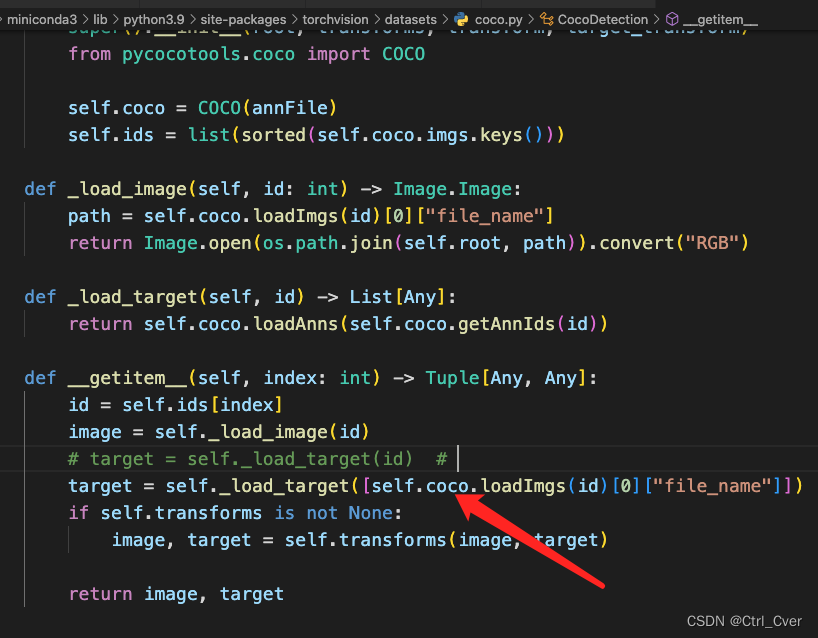
另外还需要修改以下文件,测试的时候map才不会等于-1.

def _prepare(self):'''Prepare ._gts and ._dts for evaluation based on params:return: None'''def _toMask(anns, coco):# modify ann['segmentation'] by referencefor ann in anns:rle = coco.annToRLE(ann)ann['segmentation'] = rlep = self.params'''tfj modi:'''mflag = False # true说明是自己制作的完整路径的数据集for tid,tit in self.cocoGt.imgs.items():if '/' in tit['file_name']:mflag = Truebreakfile_path = []if mflag:for im in range(len(self.cocoGt.imgs)):file_path.append(self.cocoGt.imgs[im]['file_name'])if p.useCats:gts=self.cocoGt.loadAnns(self.cocoGt.getAnnIds(imgIds=file_path, catIds=p.catIds))dts=self.cocoDt.loadAnns(self.cocoDt.getAnnIds(imgIds=p.imgIds, catIds=p.catIds))else:gts=self.cocoGt.loadAnns(self.cocoGt.getAnnIds(imgIds=file_path))dts=self.cocoDt.loadAnns(self.cocoDt.getAnnIds(imgIds=p.imgIds))else:if p.useCats:gts=self.cocoGt.loadAnns(self.cocoGt.getAnnIds(imgIds=p.imgIds, catIds=p.catIds))dts=self.cocoDt.loadAnns(self.cocoDt.getAnnIds(imgIds=p.imgIds, catIds=p.catIds))else:gts=self.cocoGt.loadAnns(self.cocoGt.getAnnIds(imgIds=p.imgIds))dts=self.cocoDt.loadAnns(self.cocoDt.getAnnIds(imgIds=p.imgIds))# convert ground truth to mask if iouType == 'segm'if p.iouType == 'segm':_toMask(gts, self.cocoGt)_toMask(dts, self.cocoDt)# set ignore flagfor gt in gts:gt['ignore'] = gt['ignore'] if 'ignore' in gt else 0gt['ignore'] = 'iscrowd' in gt and gt['iscrowd']if p.iouType == 'keypoints':gt['ignore'] = (gt['num_keypoints'] == 0) or gt['ignore']self._gts = defaultdict(list) # gt for evaluationself._dts = defaultdict(list) # dt for evaluationfor gt in gts:if mflag: # tfj moditmp_id = file_path.index(gt['image_id'])self._gts[tmp_id, gt['category_id']].append(gt)else:self._gts[gt['image_id'], gt['category_id']].append(gt)for dt in dts:self._dts[dt['image_id'], dt['category_id']].append(dt)self.evalImgs = defaultdict(list) # per-image per-category evaluation resultsself.eval = {} # accumulated evaluation results
有用的话点个赞哦😄
本文来自互联网用户投稿,文章观点仅代表作者本人,不代表本站立场,不承担相关法律责任。如若转载,请注明出处。 如若内容造成侵权/违法违规/事实不符,请点击【内容举报】进行投诉反馈!