OpenVINO 2022.3实战一:Window 10 环境下用 OpenVINO 2022.3部署yolov5 7.0
Window 10 环境下用 OpenVINO 2022.3部署yolov5_7.0
1 下载并解压 OpenVINO Runtime
OpenVINO™ Runtime 2022.3 以压缩包 (OpenVINO Archives) 的形式提供。
下载地址: storage.openvinotoolkit.org
下载后解压到 C:\Intel\openvino_2022.3.0
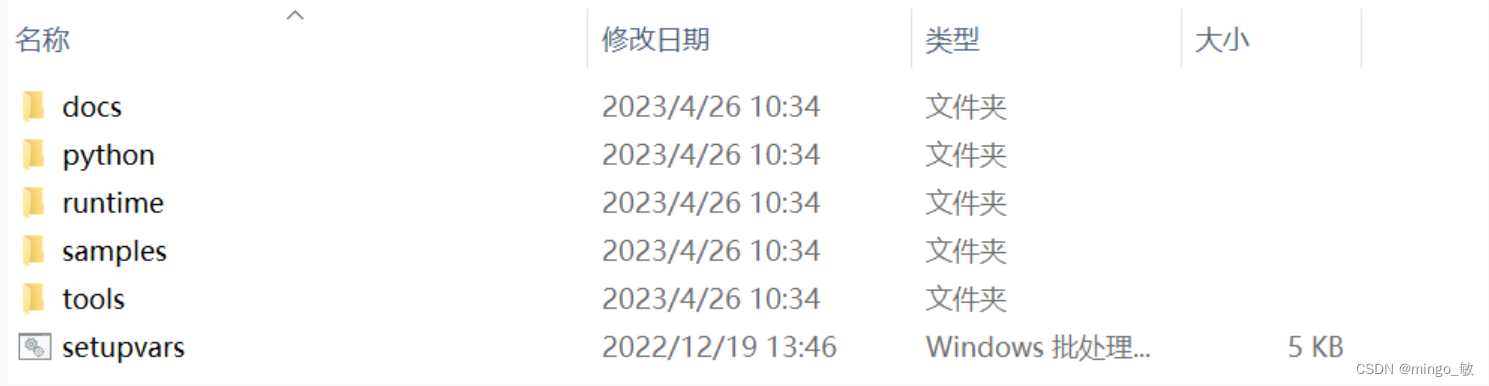
配置环境:
C:\Intel\openvino_2022.3.0\setupvars.bat
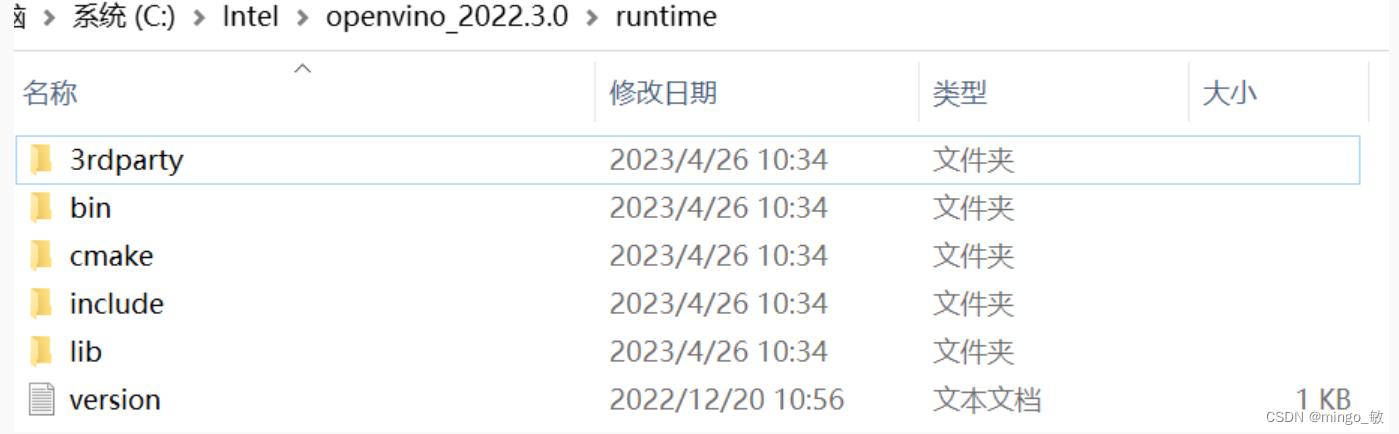
其中 OpenVINO C++ 推理程序所必需的文件在runtime目录下:
- 头文件:include 文件夹
- lib 文件:lib 文件夹
- 可执行文件 (*.exe) 所需的动态链接库文件:bin 文件夹
- OpenVINO runtime 第三方依赖库文件:3rdparty 文件夹
2 下载并编译 OpenCV
下载地址:_opencv
2-1 下载预编译OpenCV
直接下载 windows 编译版本,下载后解压到 E:\opencv455目录下即可
2-2 编译与OpenVINO对应的OpenCV
下载 Sources源码到本地, 解压到E:\opencv-4.5.5
mkdir "mybuild" && cd "mybuild"
cmake 编译项设置
test选项 不选

python 选项 不选
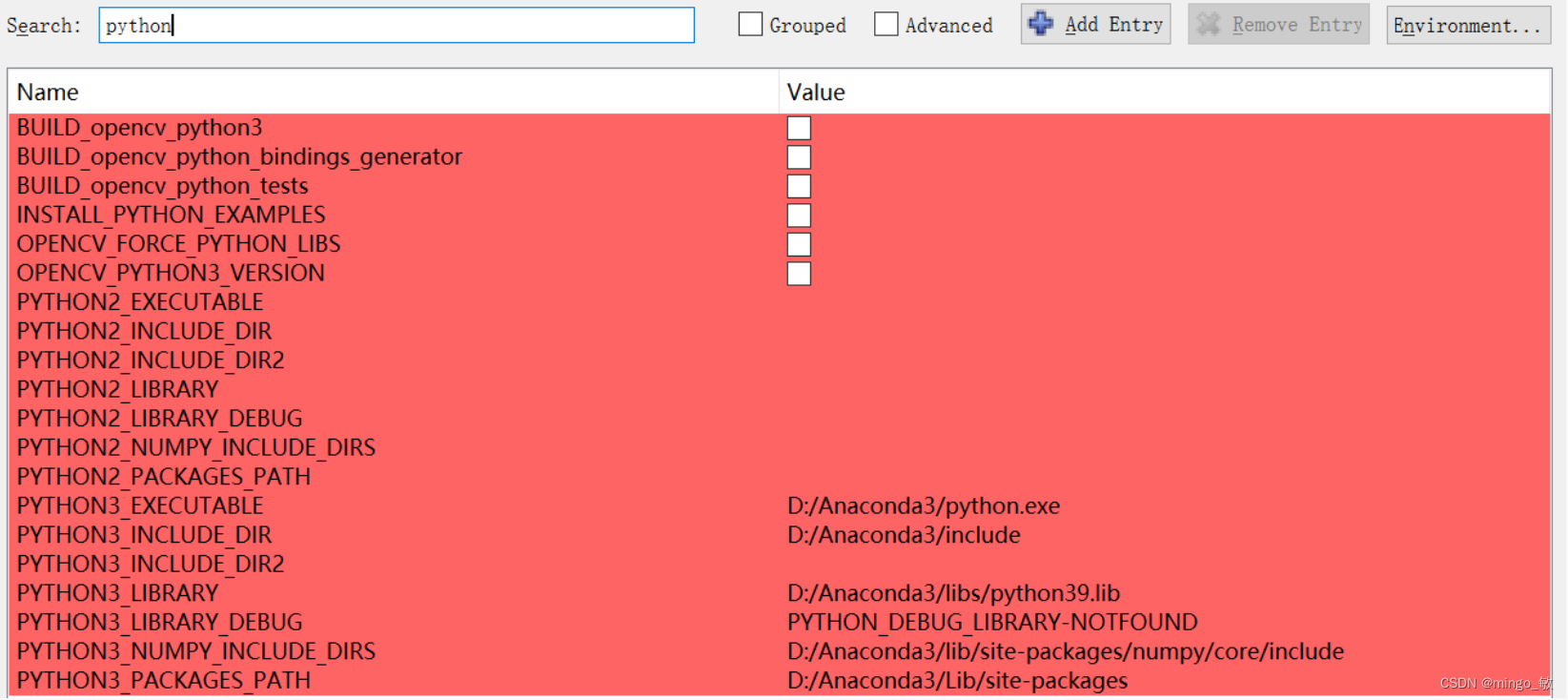
OPENCV_GENERATE_SETUPVARS 不选

WITH_OPENMP 选中

WITH_IPP 选中

BUILD_opencv_world 选中

OPENCV_EXTRA_MODULES_PATH 设置 E:/opencv_contrib-4.5.5/modules

cmake编译可以参考
Windows10+Cmake+VS2019编译opencv(超级详细)_vs编译opencv_乐安世家的博客-CSDN博客
win10+vs2017+opencv4.5.0+opencv_contrib-4.5.0+cuda源码编译详细教程_vs2017 源码编译opencv_Bubble_water的博客-CSDN博客
opencv4.2.0 源码编译,win7+VS2015,DNN模块支持cuda加速_蜡笔小心点的博客-CSDN博客
3 在 Visual Studio 中配置项目属性
Release:
属性 --> VC++ 目录 --> 包含目录
C:\Intel\openvino_2022.3.0\runtime\include
E:\opencv455\build\include
属性 --> VC++ 目录 --> 库目录
C:\Intel\openvino_2022.3.0\runtime\lib\intel64\Release
E:\opencv455\build\x64\vc15\lib
属性 --> 链接器 --> 输入 --> 附加依赖项
openvino.lib
opencv_world455.lib
动态链接库 配置
将 C:\Intel\openvino_2022.3.0\runtime\bin\intel64\Release目录下的
openvino.dll
openvino_intel_cpu_plugin.dll
openvino_ir_frontend.dll
plugins.xml
将 C:\Intel\openvino_2022.3.0\runtime\3rdparty\tbb\bin目录下的
tbb.dll
将 E:\opencv455\mybuild\x64\vc15\bin 目录下的
opencv_world455.dll
移动到 可执行文件目录 或者将三个路径加入系统目录。
Debug:
属性 --> VC++ 目录 --> 包含目录
C:\Intel\openvino_2022.3.0\runtime\include
E:\opencv455\build\include
属性 --> VC++ 目录 --> 库目录
C:\Intel\openvino_2022.3.0\runtime\lib\intel64\Debug
E:\opencv455\build\x64\vc15\lib
属性 --> 链接器 --> 输入 --> 附加依赖项
openvinod.lib
opencv_world455d.lib
动态链接库 配置
将 C:\Intel\openvino_2022.3.0\runtime\bin\intel64\Debug目录下的
openvinod.dll
openvino_intel_cpu_plugind.dll
openvino_ir_frontendd.dll
plugins.xml
将 C:\Intel\openvino_2022.3.0\runtime\3rdparty\tbb\bin目录下的
tbb.dll
将 E:\opencv455\mybuild\x64\vc15\bin 目录下的
opencv_world455d.dll
移动到 可执行文件目录 或者将三个路径加入系统目录。
4 导出onnx模型
下载yolov5代码 ultralytics/yolov5
python export.py --weights yolov5s.pt --include torchscript onnx openvino
导出模型为 yolov5s_openvino_model

5 代码
yolov5_openvino.cpp
// yolov5_openvino.cpp : 此文件包含 "main" 函数。程序执行将在此处开始并结束。
//// Copyright (C) 2018-2022 Intel Corporation
// SPDX-License-Identifier: Apache-2.0
//#pragma warning(disable:4996)#include
#include
#include using namespace std;const float SCORE_THRESHOLD = 0.2;
const float NMS_THRESHOLD = 0.4;
const float CONFIDENCE_THRESHOLD = 0.4;struct Detection
{int class_id;float confidence;cv::Rect box;
};struct ResizeImage
{cv::Mat img;int dw;int dh;
};ResizeImage resize_and_pad(cv::Mat& img, cv::Size new_shape) {float width = img.cols;float height = img.rows;float r = float(new_shape.width / max(width, height));int new_unpadW = int(round(width * r));int new_unpadH = int(round(height * r));ResizeImage resizedImg;cv::resize(img, resizedImg.img, cv::Size(new_unpadW, new_unpadH), 0, 0, cv::INTER_AREA);resizedImg.dw = new_shape.width - new_unpadW;resizedImg.dh = new_shape.height - new_unpadH;cv::Scalar color = cv::Scalar(100, 100, 100);cv::copyMakeBorder(resizedImg.img, resizedImg.img, 0, resizedImg.dh, 0, resizedImg.dw, cv::BORDER_CONSTANT, color);return resizedImg;
}int main() {// Step 1. Initialize OpenVINO Runtime coreov::Core core;// Step 2. Read a modelstd::shared_ptr model = core.read_model("E:\\python_code\\yolov5\\weights\\openvino\\yolov5s_openvino_model\\yolov5s.xml");// Step 3. Read input imagecv::Mat img = cv::imread("E:\\cpp_code\\images\\zidane.jpg");// resize imageResizeImage res = resize_and_pad(img, cv::Size(640, 640));// Step 4. Inizialize Preprocessing for the modelov::preprocess::PrePostProcessor ppp = ov::preprocess::PrePostProcessor(model);// Specify input image formatppp.input().tensor().set_element_type(ov::element::u8).set_layout("NHWC").set_color_format(ov::preprocess::ColorFormat::BGR);// Specify preprocess pipeline to input image without resizingppp.input().preprocess().convert_element_type(ov::element::f32).convert_color(ov::preprocess::ColorFormat::RGB).scale({ 255., 255., 255. });//  Specify model's input layoutppp.input().model().set_layout("NCHW");// Specify output results formatppp.output().tensor().set_element_type(ov::element::f32);// Embed above steps in the graphmodel = ppp.build();ov::CompiledModel compiled_model = core.compile_model(model, "CPU");// Step 5. Create tensor from imagefloat *input_data = (float *)res.img.data;ov::Tensor input_tensor = ov::Tensor(compiled_model.input().get_element_type(), compiled_model.input().get_shape(), input_data);// Step 6. Create an infer request for model inference ov::InferRequest infer_request = compiled_model.create_infer_request();infer_request.set_input_tensor(input_tensor);infer_request.infer();//Step 7. Retrieve inference results const ov::Tensor &output_tensor = infer_request.get_output_tensor();ov::Shape output_shape = output_tensor.get_shape();float *detections = output_tensor.data();// Step 8. Postprocessing including NMS  std::vector boxes;vector class_ids;vector confidences;for (int i = 0; i < output_shape[1]; i++) {float *detection = &detections[i * output_shape[2]];float confidence = detection[4];if (confidence >= CONFIDENCE_THRESHOLD) {float *classes_scores = &detection[5];cv::Mat scores(1, output_shape[2] - 5, CV_32FC1, classes_scores);cv::Point class_id;double max_class_score;cv::minMaxLoc(scores, 0, &max_class_score, 0, &class_id);if (max_class_score > SCORE_THRESHOLD) {confidences.push_back(confidence);class_ids.push_back(class_id.x);float x = detection[0];float y = detection[1];float w = detection[2];float h = detection[3];float xmin = x - (w / 2);float ymin = y - (h / 2);boxes.push_back(cv::Rect(xmin, ymin, w, h));}}}std::vector nms_result;cv::dnn::NMSBoxes(boxes, confidences, SCORE_THRESHOLD, NMS_THRESHOLD, nms_result);std::vector output;for (int i = 0; i < nms_result.size(); i++){Detection result;int idx = nms_result[i];result.class_id = class_ids[idx];result.confidence = confidences[idx];result.box = boxes[idx];output.push_back(result);}// Step 9. Print results and save Figure with detectionsfor (int i = 0; i < output.size(); i++){auto detection = output[i];auto box = detection.box;auto classId = detection.class_id;auto confidence = detection.confidence;float rx = (float)img.cols / (float)(res.img.cols - res.dw);float ry = (float)img.rows / (float)(res.img.rows - res.dh);box.x = rx * box.x;box.y = ry * box.y;box.width = rx * box.width;box.height = ry * box.height;cout << "Bbox" << i + 1 << ": Class: " << classId << " "<< "Confidence: " << confidence << " Scaled coords: [ "<< "x: " << (float)box.x << ", "<< "y: " << (float)box.y << ", "<< "w: " << (float)box.width << ", "<< "h: " << (float)box.height << " ]" << endl;float xmax = box.x + box.width;float ymax = box.y + box.height;cv::rectangle(img, cv::Point(box.x, box.y), cv::Point(xmax, ymax), cv::Scalar(0, 255, 0), 3);cv::rectangle(img, cv::Point(box.x, box.y - 20), cv::Point(xmax, box.y), cv::Scalar(0, 255, 0), cv::FILLED);cv::putText(img, std::to_string(classId), cv::Point(box.x, box.y - 5), cv::FONT_HERSHEY_SIMPLEX, 0.5, cv::Scalar(0, 0, 0));}cv::imwrite("detection.png", img);return 0;
}
常见问题
1 error C4996: ‘ov::Node::evaluate_upper’: This method is deprecated and will be removed soon. Please use evaluate_upper with ov::Tensor instead
解决方法: 代码中加入 #pragma warning(disable:4996) 即可
2 DNN: CUDA backend requires CUDA Toolkit. Please resolve dependency or disable OPENCV_DNN_CUDA=OFF"
解决方法:https://github.com/opencv/opencv/issues/18528
参考资料:
1 Installing Intel® Distribution of OpenVINO™ Toolkit — OpenVINO™ documentation
2 How to use OpenCV with OpenVINO - OpenCV
3 BuildOpenCV4OpenVINO · opencv/opencv Wiki · GitHub
4 TFLite, ONNX, CoreML, TensorRT Export - Ultralytics YOLOv8 Docs
5 基于OpenVINO™ 2022.1实现YOLOv5推理程序 | 开发者实战
6 使用OpenVINO™ 预处理API进一步提升YOLOv5推理性能 | 开发者实战
本文来自互联网用户投稿,文章观点仅代表作者本人,不代表本站立场,不承担相关法律责任。如若转载,请注明出处。 如若内容造成侵权/违法违规/事实不符,请点击【内容举报】进行投诉反馈!