Vue项目如何引入echarts
一、安装 echarts
npm install echarts -S
二、main.js 中全局引入 echarts
// 引入 echarts
import * as echarts from 'echarts'
Vue.prototype.$echarts = echarts
三、使用
<template><div class="column-container"><div ref="monthWorkOrder" class="echarts-box" style="width: 600px; height: 300px; border: 1px solid red"></div></div>
</template><script>
export default {name: 'Column',data() {return {}},mounted() {this.initMonthWorkOrder()},methods: {// 月工单处理数initMonthWorkOrder() {let myChart = this.$echarts.init(this.$refs.monthWorkOrder)let options = {tooltip: {backgroundColor: 'rgba(204, 221, 255, 0.6)',trigger: 'axis',borderColor: '#CCDDFF',textStyle: { color: '#2562DC' }},color: ['#635df7', '#f15d5d'],grid: {left: '3%',right: '4%',bottom: '3%',containLabel: true},xAxis: [{type: 'category',data: ['1月', '2月', '3月', '4月', '5月', '6月', '7月', '8月', '9月', '10月', '11月', '12月'],axisTick: {alignWithLabel: true}}],yAxis: [{type: 'value',splitLine: {show: true,lineStyle: {type: 'dashed',color: '#D3D8DD'}}}],series: [{name: '维修',type: 'bar',barWidth: 10,data: [141, 39, 10, 16, 79, 116, 67, 104, 12, 36, 20, 128]},{name: '保养',type: 'bar',barWidth: 10,data: [36, 124, 112, 87, 16, 28, 80, 24, 112, 146, 127, 105]}]}myChart.setOption(options)}}
}
</script><style lang="scss" scoped>
.column-container {height: 100%;
}
</style>
效果图如下:
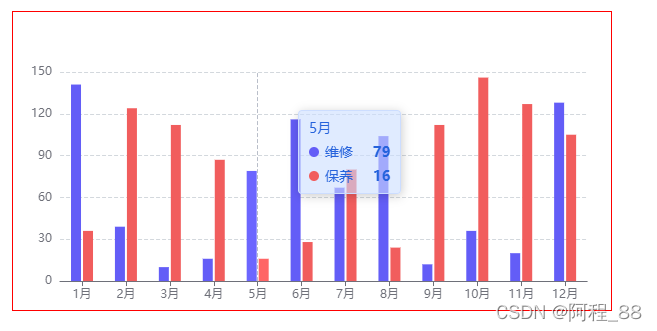
注意:echarts盒子一定要给宽高
本文来自互联网用户投稿,文章观点仅代表作者本人,不代表本站立场,不承担相关法律责任。如若转载,请注明出处。 如若内容造成侵权/违法违规/事实不符,请点击【内容举报】进行投诉反馈!