Android 极光推送快速接入
一、关于极光推送
官网:极光推送
JPush 是一个大规模 App 推送平台,开发者集成 SDK 后,可以通过调用 API 推送消息。同时,JPush 提供可视化的 web 端控制台发送通知,统计分析推送效果。 JPush 全面支持 Android, iOS, Winphone 三大手机平台,同时支持多种消息形式:通知,自定义消息,富媒体和本地通知。
二、创建应用
注册账号,在 控制台 按要求和步骤创建应用
三、jcenter 自动集成
使用 jcenter 自动集成,不需要在项目中添加 jar 和 so,jcenter 会自动完成依赖;
在 AndroidManifest.xml 中不需要添加任何 JPush SDK 相关的配置,jcenter 会自动导入。
1、确认工程根目录 build.gradle 中配置了 jcenter 支持。一般新建的project 默认支持。
public class MyJPushReceiver extends BroadcastReceiver {private static final String TAG = "MyJPushReceiver";public static String regId;@Overridepublic void onReceive(Context context, Intent intent) {Log.i(TAG, "[MyJPushReceiver] 广播被注册了");try {Bundle bundle = intent.getExtras();if (JPushInterface.ACTION_REGISTRATION_ID.equals(intent.getAction())) {regId = bundle.getString(JPushInterface.EXTRA_REGISTRATION_ID);Log.d(TAG, "[MyJPushReceiver] 接收Registration Id : " + regId);//send the Registration Id to your server...} else if (JPushInterface.ACTION_MESSAGE_RECEIVED.equals(intent.getAction())) {Log.d(TAG, "[MyJPushReceiver] 接收到推送下来的自定义消息(内容为): " + bundle.getString(JPushInterface.EXTRA_MESSAGE));// 自定义消息不是通知,默认不会被SDK展示到通知栏上,极光推送仅负责透传给SDK。其内容和展示形式完全由开发者自己定义。// 自定义消息主要用于应用的内部业务逻辑和特殊展示需求// 收到消息 显示通知processCustomMessage(context, bundle);} else if (JPushInterface.ACTION_NOTIFICATION_RECEIVED.equals(intent.getAction())) {Log.d(TAG, "[MyJPushReceiver] 接收到推送下来的通知");String extra_json = bundle.getString(JPushInterface.EXTRA_EXTRA);if (!TextUtils.isEmpty(extra_json))Log.d(TAG, "[MyJPushReceiver] 接收到推送下来的通知附加字段" + extra_json);// 可以利用附加字段来区别Notication,指定不同的动作,extra_json是个json字符串// 通知(Notification),指在手机的通知栏(状态栏)上会显示的一条通知信息} else if (JPushInterface.ACTION_NOTIFICATION_OPENED.equals(intent.getAction())) {Log.d(TAG, "[MyJPushReceiver] 用户点击打开了通知");// 在这里根据 JPushInterface.EXTRA_EXTRA(附加字段) 的内容处理代码,// 比如打开新的Activity, 打开一个网页等..//打开自定义的ActivityIntent i = new Intent(context, MainActivity.class);i.putExtras(bundle);//i.setFlags(Intent.FLAG_ACTIVITY_NEW_TASK);i.setFlags(Intent.FLAG_ACTIVITY_NEW_TASK | Intent.FLAG_ACTIVITY_CLEAR_TOP );context.startActivity(i);} else if (JPushInterface.ACTION_RICHPUSH_CALLBACK.equals(intent.getAction())) {Log.d(TAG, "[MyJPushReceiver] 用户收到到RICH PUSH CALLBACK: " + bundle.getString(JPushInterface.EXTRA_EXTRA));//在这里根据 JPushInterface.EXTRA_EXTRA 的内容处理代码,比如打开新的Activity, 打开一个网页等..} else if (JPushInterface.ACTION_CONNECTION_CHANGE.equals(intent.getAction())) {boolean connected = intent.getBooleanExtra(JPushInterface.EXTRA_CONNECTION_CHANGE, false);Log.w(TAG, "[MyJPushReceiver]" + intent.getAction() + " connected state change to " + connected);} else {Log.d(TAG, "[MyJPushReceiver] Unhandled intent - " + intent.getAction());}} catch (Exception e) {e.printStackTrace();}}/*** 处理自定义通告* @param context* @param bundle*/private void processCustomMessage(Context context, Bundle bundle) {String channelID = "1";String channelName = "channel_name";// 跳转的ActivityIntent intent = new Intent(context, MainActivity.class);intent.putExtras(bundle);intent.setFlags(Intent.FLAG_ACTIVITY_NEW_TASK | Intent.FLAG_ACTIVITY_CLEAR_TOP);PendingIntent pendingIntent = PendingIntent.getActivity(context, 0, intent, 0);// 获得系统推送的自定义消息String message = bundle.getString(JPushInterface.EXTRA_MESSAGE);NotificationManager notificationManager = (NotificationManager) context.getSystemService(NOTIFICATION_SERVICE);//适配安卓8.0的消息渠道if (Build.VERSION.SDK_INT >= Build.VERSION_CODES.O) {NotificationChannel channel = new NotificationChannel(channelID, channelName, NotificationManager.IMPORTANCE_HIGH);notificationManager.createNotificationChannel(channel);}NotificationCompat.Builder notification = new NotificationCompat.Builder(context, channelID);notification.setAutoCancel(true)//点击后消失.setContentText(message).setContentTitle("我是Title").setSmallIcon(R.mipmap.ic_launcher)     //设置通知栏消息标题的头像.setDefaults(NotificationCompat.DEFAULT_ALL)//设置通知铃声,震动,闪光灯.setContentIntent(pendingIntent);notificationManager.notify((int)(System.currentTimeMillis()/1000), notification.build());}
}
4、在AndroidManifest.xml中配置该极光推送的广播
6、初始化极光推送Sdk
public class MyApplication extends Application {@Overridepublic void onCreate() {super.onCreate();JPushInterface.setDebugMode(true);JPushInterface.init(this);}
}
四、消息推送
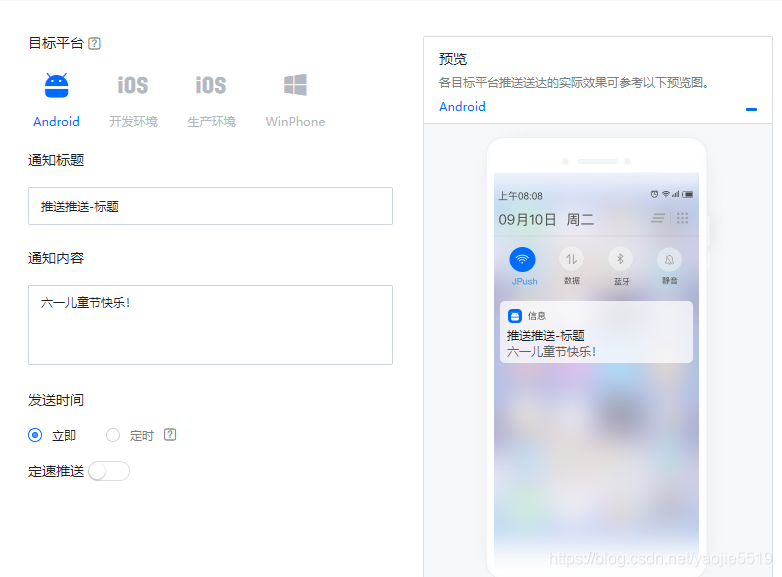
在控制台设置好推送内容,点击发送预览->确定即可推送
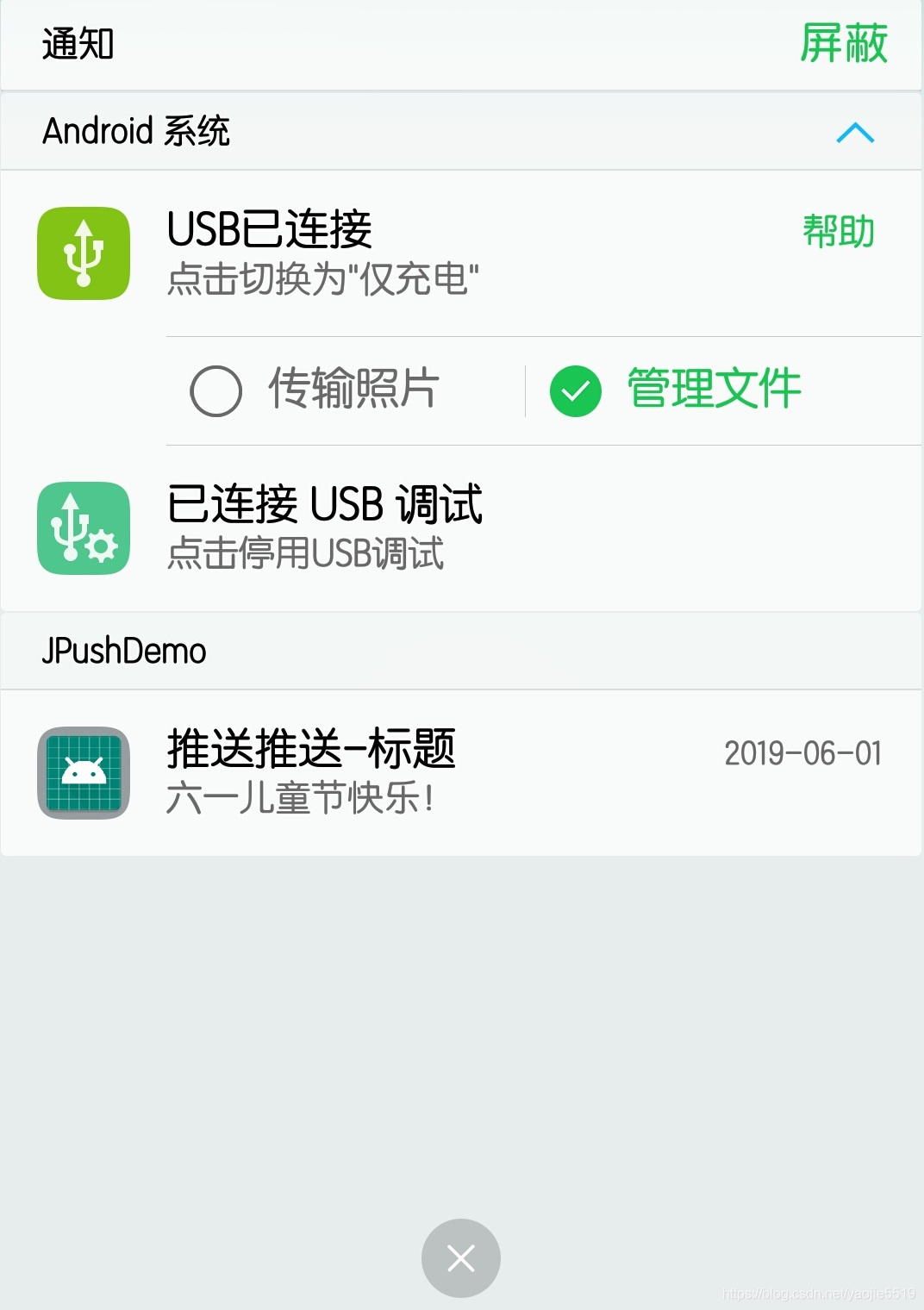
推送完,手机即可收到:
极光推送更多应用见官网及文档:http://docs.jiguang.cn/jpush/client/Android/android_sdk/
本文来自互联网用户投稿,文章观点仅代表作者本人,不代表本站立场,不承担相关法律责任。如若转载,请注明出处。 如若内容造成侵权/违法违规/事实不符,请点击【内容举报】进行投诉反馈!