codis安装入门
前期准备:
3台云服务器(服务器ip和域名配置详情可见最下方的host配置)
172.16.0.6 instance-oi4hyxs3 (2C4G)(安装zk,codis-server-master,codis-dashboard,codis-proxy,codis-fe)
172.16.0.4 instance-drr9py6i (1C2G)(安装zk,codis-server-master,codis-proxy)
172.16.0.5 instance-lbmhmbfu (1C1G)(安装zk,codis-server-slave作为2C4G的从库)
1.安装go环境和zk环境
2.yum install -y gcc git autoconf
3.下载编译codis
mkdir -p $GOPATH/src/github.com/CodisLabs
cd $_ && git clone https://github.com/CodisLabs/codis.git -b release3.2
cd $GOPATH/src/github.com/CodisLabs/codis
make
4.安装codis-server(redis-server)
./codis-server /usr/local/gopath/src/github.com/CodisLabs/codis/config/redis.conf5.安装codis-dash
启动nohup ./codis-dashboard --config=/usr/local/gopath/src/github.com/CodisLabs/codis/config/dashboard.toml --ncpu=1 --log=/home/local/codis/codis-dashboard/log/dashboard.log --log-level=INFO > dash.txt &停止
./codis-admin --dashboard=localhost:18080   --shutdown当dash异常退出时,重启启动会报错,需要删除zk上的注册信息
./codis-admin --remove-lock --product=codis-vk --zookeeper=zk1.idc.baiduyun.com:2181,zk2.idc.baiduyun.com:2181,zk3.idc.baiduyun.com:2181
6.安装codis-proxy
启动
nohup ./codis-proxy --ncpu=1  --config=/usr/local/gopath/src/github.com/CodisLabs/codis/config/proxy.toml --log=/home/local/codis/codis-proxy/log/proxy.log --log-level=INFO > proxy.txt &停止
./codis-admin --proxy=127.0.0.1:11080 --shutdown
7.安装codis-fe
生成fe的配置文件
./codis-admin --dashboard-list --zookeeper=zk1.idc.baiduyun.com:2181,zk2.idc.baiduyun.com:2181,zk3.idc.baiduyun.com:2181 | tee codis.json启动
nohup ./codis-fe --log=/home/local/codis/codis-fe/log/fe.log --log-level=INFO --dashboard-list=/usr/local/gopath/src/github.com/CodisLabs/codis/config/codis.json --listen=0.0.0.0:18090 --ncpu=1 > fe.txt &
8.访问fe界面初始化集群
8.1 访问fe界面:
http://localhost:18090
8.2 添加codis-proxy代理到codis-dash中

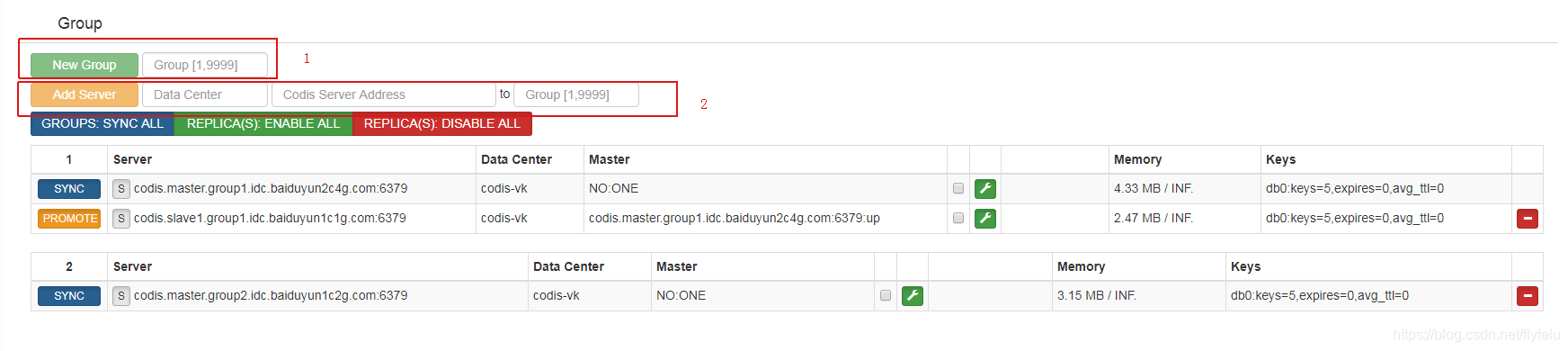
8.3添加codis-server到group中
8.4 分配salt(0~1023)到每个组
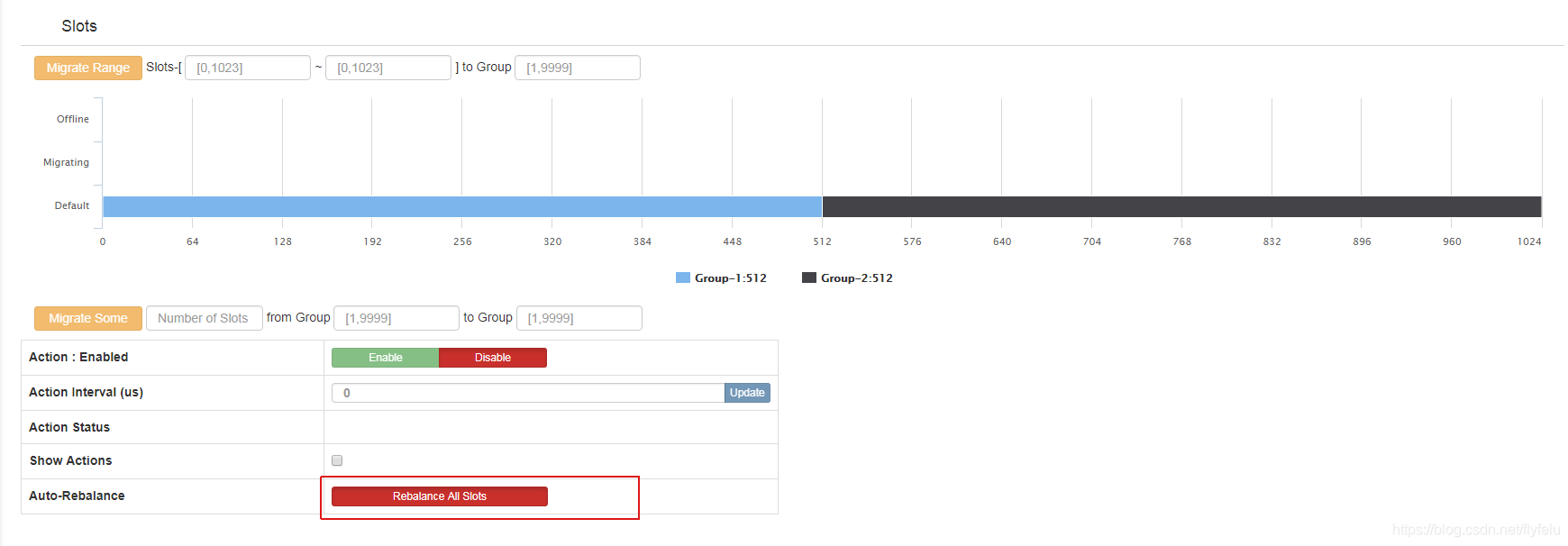
8.5 分配需要一段时间,分配完成后,图中会显示每个组所占salt范围
------------------------------------------------------------------------题外话------------------------------------------------------------------------------
各个配置文件:
redis-server-master:(redis.conf)
daemonize yes
pidfile /usr/local/redis/redis.pid
port 6379
tcp-backlog 511timeout 0tcp-keepalive 0loglevel noticelogfile /home/local/redis/log/redis-server.logdatabases 16save 900 1
save 300 10
save 60 10000stop-writes-on-bgsave-error yesrdbcompression yesrdbchecksum yesdbfilename dump.rdbdir /home/local/redis/dataslave-serve-stale-data yes
slave-read-only yesrepl-disable-tcp-nodelay noslave-priority 100############################## AOF ###############################
appendonly no
appendfilename "appendonly.aof"
appendfsync everysec
no-appendfsync-on-rewrite noauto-aof-rewrite-percentage 100
auto-aof-rewrite-min-size 64mblua-time-limit 5000slowlog-log-slower-than 10000slowlog-max-len 128notify-keyspace-events ""hash-max-ziplist-entries 512
hash-max-ziplist-value 64list-max-ziplist-entries 512
list-max-ziplist-value 64set-max-intset-entries 512zset-max-ziplist-entries 128
zset-max-ziplist-value 64activerehashing yesclient-output-buffer-limit normal 0 0 0
client-output-buffer-limit slave 256mb 64mb 60
client-output-buffer-limit pubsub 32mb 8mb 60hz 10aof-rewrite-incremental-fsync yesprotected-mode no
redis-slave:(redis-slave.conf)
daemonize yes
pidfile /usr/local/redis/redis.pid
port 6379
tcp-backlog 511timeout 0tcp-keepalive 0loglevel noticelogfile /home/local/redis/log/redis-server.logdatabases 16save 900 1
save 300 10
save 60 10000stop-writes-on-bgsave-error yesrdbcompression yesrdbchecksum yesdbfilename dump.rdbdir /home/local/redis/dataslaveof codis.master.group1.idc.baiduyun2c4g.com 6379slave-serve-stale-data yes
slave-read-only yesrepl-disable-tcp-nodelay noslave-priority 100############################## AOF ###############################
appendonly no
appendfilename "appendonly.aof"
appendfsync everysec
no-appendfsync-on-rewrite noauto-aof-rewrite-percentage 100
auto-aof-rewrite-min-size 64mblua-time-limit 5000slowlog-log-slower-than 10000slowlog-max-len 128notify-keyspace-events ""hash-max-ziplist-entries 512
hash-max-ziplist-value 64list-max-ziplist-entries 512
list-max-ziplist-value 64set-max-intset-entries 512zset-max-ziplist-entries 128
zset-max-ziplist-value 64activerehashing yesclient-output-buffer-limit normal 0 0 0
client-output-buffer-limit slave 256mb 64mb 60
client-output-buffer-limit pubsub 32mb 8mb 60hz 10aof-rewrite-incremental-fsync yesprotected-mode no
codis-dash:(dashboard.toml)
coordinator_name = "zookeeper"
coordinator_addr = "zk1.idc.baiduyun.com:2181,zk2.idc.baiduyun.com:2181,zk3.idc.baiduyun.com:2181"product_name = "codis-vk"
product_auth = ""admin_addr = "0.0.0.0:18080"# Set arguments for data migration (only accept 'sync' & 'semi-async').
migration_method = "semi-async"
migration_parallel_slots = 100
migration_async_maxbulks = 200
migration_async_maxbytes = "32mb"
migration_async_numkeys = 500
migration_timeout = "30s"
codis-proxy: (proxy.toml)
product_name = "codis-vk"
product_auth = ""
session_auth = ""admin_addr = "0.0.0.0:11080"# Set bind address for proxy, proto_type can be "tcp", "tcp4", "tcp6", "unix" or "unixpacket".
proto_type = "tcp4"
proxy_addr = "0.0.0.0:19000"jodis_name = ""
jodis_addr = ""
jodis_auth = ""
jodis_timeout = "20s"
jodis_compatible = falseproxy_datacenter = ""
proxy_max_clients = 1000
proxy_max_offheap_size = "1024mb"
proxy_heap_placeholder = "256mb"backend_ping_period = "5s"
backend_recv_bufsize = "128kb"
backend_recv_timeout = "30s"
backend_send_bufsize = "128kb"
backend_send_timeout = "30s"
backend_max_pipeline = 20480
backend_primary_only = false
backend_primary_parallel = 1
backend_replica_parallel = 1
backend_keepalive_period = "75s"
backend_number_databases = 16session_recv_bufsize = "128kb"
session_recv_timeout = "30m"
session_send_bufsize = "64kb"
session_send_timeout = "30s"
session_max_pipeline = 10000
session_keepalive_period = "75s"
session_break_on_failure = false# Set metrics server (such as http://localhost:28000), proxy will report json formatted metrics to specified server in a predefined period.
metrics_report_server = ""
metrics_report_period = "1s"# Set influxdb server (such as http://localhost:8086), proxy will report metrics to influxdb.
metrics_report_influxdb_server = ""
metrics_report_influxdb_period = "1s"
metrics_report_influxdb_username = ""
metrics_report_influxdb_password = ""
metrics_report_influxdb_database = ""# Set statsd server (such as localhost:8125), proxy will report metrics to statsd.
metrics_report_statsd_server = ""
metrics_report_statsd_period = "1s"
metrics_report_statsd_prefix = ""
codis-fe: (codis.json)
[{"name": "codis-vk","dashboard": "codis.dash1.idc.baiduyun2c4g.com:18080"}
]
各个host:
172.16.0.6 zk1.idc.baiduyun.com
172.16.0.4 zk2.idc.baiduyun.com
172.16.0.5 zk3.idc.baiduyun.com# codis-server
172.16.0.6 codis.master.group1.idc.baiduyun2c4g.com
172.16.0.5 codis.slave1.group1.idc.baiduyun1c1g.com
172.16.0.4 codis.master.group2.idc.baiduyun1c2g.com# codis-dash
172.16.0.6 codis.dash1.idc.baiduyun2c4g.com# codis-proxy
172.16.0.6 codis.proxy1.idc.baiduyun.com
172.16.0.4 codis.proxy2.idc.baiduyun.com#主机hostname配置
172.16.0.6 instance-oi4hyxs3
172.16.0.4 instance-drr9py6i
172.16.0.5 instance-lbmhmbfu
-----------------------------------------------------------------------参考-----------------------------------------------------------------------------------
https://github.com/CodisLabs/codis/blob/release3.2/doc/tutorial_zh.md
https://baijiahao.baidu.com/s?id=1614005693207544015&wfr=spider&for=pc
https://www.cnblogs.com/xmzncc/p/6218694.html
---------------------------------------------------------------------架构图---------------------------------------------------------------------------------

本文来自互联网用户投稿,文章观点仅代表作者本人,不代表本站立场,不承担相关法律责任。如若转载,请注明出处。 如若内容造成侵权/违法违规/事实不符,请点击【内容举报】进行投诉反馈!