Android开发实现短信验证码功能(总结)
今天做了一下手机登录常用的短信验证码功能,记录一下。(用Mob,主要是免费的,可以拿这个做研究。)
其中,最主要的是注册之后获取到的AppKey和AppSecret。
Mob官网:http://www.mob.com/
效果图如下:
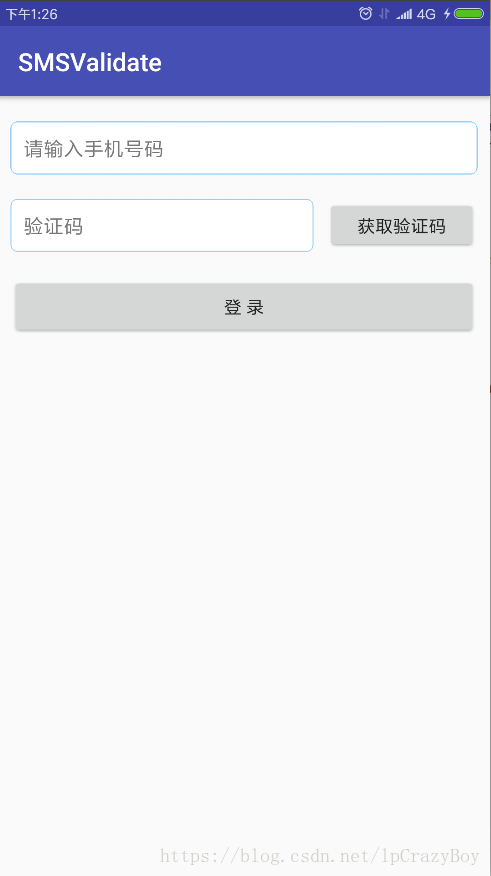
步骤如下:
1、下载官方sdk,并且导入到项目里。(即把以下4个文件复制到libs目录下)

2、在build.gradle中添加如下部分:
repositories{flatDir{dirs 'libs'
    }
}dependencies {implementation fileTree(dir: 'libs', include: ['*.jar'])implementation 'com.android.support:appcompat-v7:27.1.1'
    implementation 'com.android.support.constraint:constraint-layout:1.1.2'
    testImplementation 'junit:junit:4.12'
    androidTestImplementation 'com.android.support.test:runner:1.0.2'
    androidTestImplementation 'com.android.support.test.espresso:espresso-core:3.0.2'
以下部分为添加内容
    implementation files('libs/MobCommons-2016.1201.1839.jar')implementation files('libs/MobTools-2016.1201.1839.jar')implementation name:'SMSSDK-2.1.3',ext:'aar'
    implementation name:'SMSSDKGUI-2.1.3',ext:'aar'
}
3、在清单文件AndroidManifest.xml中添加权限等,代码如下:
xml version="1.0" encoding="utf-8"?>
xmlns:android="http://schemas.android.com/apk/res/android"
    package="com.deepreality.smsvalidate">

    android:name="android.permission.READ_CONTACTS" />
    android:name="android.permission.READ_PHONE_STATE" />
    android:name="android.permission.WRITE_EXTERNAL_STORAGE" />
    android:name="android.permission.ACCESS_NETWORK_STATE" />
    android:name="android.permission.ACCESS_WIFI_STATE" />
    android:name="android.permission.INTERNET" />
    android:name="android.permission.RECEIVE_SMS" />
    android:name="android.permission.READ_SMS" />
    android:name="android.permission.GET_TASKS" />
    android:name="android.permission.ACCESS_FINE_LOCATION" />

            android:name="MobApplication"
        android:allowBackup="true"
        android:icon="@mipmap/ic_launcher"
        android:label="@string/app_name"
        android:roundIcon="@mipmap/ic_launcher_round"
        android:supportsRtl="true"
        android:theme="@style/AppTheme">


        android:name="Mob-AppKey" android:value="d580ad56b4b5"/>
        android:name="Mob-AppSecret" android:value="7fcae59a62342e7e2759e9e397c82bdd"/>

        android:name=".LoginActivity">

                android:name="android.intent.action.MAIN" />

                android:name="android.intent.category.LAUNCHER" />


        android:name=".MainActivity"
            android:launchMode="singleTask">


                    android:name="com.mob.tools.MobUIShell"
            android:theme="@android:style/Theme.Translucent.NoTitleBar"
            android:configChanges="keyboardHidden|orientation|screenSize"
            android:windowSoftInputMode="stateHidden|adjustResize">
4、LoginActivity.java中功能代码的实现:
package com.deepreality.smsvalidate;

import android.content.Intent;
import android.os.CountDownTimer;
import android.support.v7.app.AppCompatActivity;
import android.os.Bundle;
import android.view.View;
import android.widget.Button;
import android.widget.EditText;
import android.widget.Toast;

import java.util.regex.Matcher;
import java.util.regex.Pattern;

import cn.smssdk.EventHandler;
import cn.smssdk.SMSSDK;

public class LoginActivity extends AppCompatActivity implements View.OnClickListener {private Button validateNum_btn;
    private Button landing_btn;
    private EditText userName;
    private EditText validateNum;
    public EventHandler eh; //事件接收器
    private TimeCount mTimeCount;//计时器

    @Override
    protected void onCreate(Bundle savedInstanceState) {super.onCreate(savedInstanceState);
        setContentView(R.layout.activity_login);

        initEvent();
        init();
    }private void initEvent(){userName = (EditText) findViewById(R.id.userName);
        validateNum = (EditText) findViewById(R.id.validateNum);
        validateNum_btn = (Button) findViewById(R.id.validateNum_btn);
        landing_btn = (Button) findViewById(R.id.landing_btn);
        validateNum_btn.setOnClickListener(this);
        landing_btn.setOnClickListener(this);
        mTimeCount = new TimeCount(60000, 1000);
    }/**
     * 初始化事件接收器
     */
    private void init(){eh = new EventHandler(){@Override
            public void afterEvent(int event, int result, Object data) {if (result == SMSSDK.RESULT_COMPLETE) { //回调完成

                    if (event == SMSSDK.EVENT_SUBMIT_VERIFICATION_CODE) { //提交验证码成功

                        startActivity(new Intent(LoginActivity.this, MainActivity.class)); //页面跳转

                    } else if (event == SMSSDK.EVENT_GET_VERIFICATION_CODE){ //获取验证码成功

                    } else if (event ==SMSSDK.EVENT_GET_SUPPORTED_COUNTRIES){ //返回支持发送验证码的国家列表

                    }} else{((Throwable)data).printStackTrace();
                }}};
        SMSSDK.registerEventHandler(eh); //注册短信回调
    }@Override
    public void onClick(View view) {switch (view.getId()){case R.id.validateNum_btn:
//                SMSSDK.getSupportedCountries();//获取短信目前支持的国家列表
                if(!userName.getText().toString().trim().equals("")){if (checkTel(userName.getText().toString().trim())) {SMSSDK.getVerificationCode("+86",userName.getText().toString());//获取验证码
                        mTimeCount.start();
                    }else{Toast.makeText(LoginActivity.this, "请输入正确的手机号码", Toast.LENGTH_SHORT).show();
                    }}else{Toast.makeText(LoginActivity.this, "请输入手机号码", Toast.LENGTH_SHORT).show();
                }break;
            case R.id.landing_btn:if (!userName.getText().toString().trim().equals("")) {if (checkTel(userName.getText().toString().trim())) {if (!validateNum.getText().toString().trim().equals("")) {SMSSDK.submitVerificationCode("+86",userName.getText().toString().trim(),validateNum.getText().toString().trim());//提交验证
                        }else{Toast.makeText(LoginActivity.this, "请输入验证码", Toast.LENGTH_SHORT).show();
                        }}else{Toast.makeText(LoginActivity.this, "请输入正确的手机号码", Toast.LENGTH_SHORT).show();
                    }}else{Toast.makeText(LoginActivity.this, "请输入手机号码", Toast.LENGTH_SHORT).show();
                }break;
        }}/**
     * 正则匹配手机号码
     * @param tel
     * @return
     */
    public boolean checkTel(String tel){Pattern p = Pattern.compile("^[1][3,4,5,7,8][0-9]{9}$");
        Matcher matcher = p.matcher(tel);
        return matcher.matches();
    }@Override
    protected void onDestroy() {super.onDestroy();
        SMSSDK.unregisterEventHandler(eh);
    }/**
     * 计时器
     */
    class TimeCount extends CountDownTimer {public TimeCount(long millisInFuture, long countDownInterval) {super(millisInFuture, countDownInterval);
        }@Override
        public void onTick(long l) {validateNum_btn.setClickable(false);
            validateNum_btn.setText(l/1000 + "秒后重新获取");
        }@Override
        public void onFinish() {validateNum_btn.setClickable(true);
            validateNum_btn.setText("获取验证码");
        }}
}
布局文件之类的,自行定义即可。
Demo地址:https://download.csdn.net/download/lpcrazyboy/10536978
(1个积分,拿去用。)
本文来自互联网用户投稿,文章观点仅代表作者本人,不代表本站立场,不承担相关法律责任。如若转载,请注明出处。 如若内容造成侵权/违法违规/事实不符,请点击【内容举报】进行投诉反馈!